
python基础(8)-装饰器函数&进阶
从小例子进入装饰器
统计一个函数执行耗时
原始版本
 import time

 # time模块有提供时间相关函数
 def do_something():
     print("do_something")
     time.sleep(0.5)  # 让程序停止0.5秒模拟其它操作耗时

 start = time.time()
 do_something()
 print(time.time() - start)
 #result:
 # do_something
 # 0.5000283718109131
问题:上述代码可以完成这个功能,但之后会发现,如果我们要统计其它函数,就必须在每个函数前后加入相应代码
装饰器版本1(无参数)
 import time

 def execute_time(func):
     def inner():
         start = time.time()
         func()
         print(time.time() - start)

     return inner

 # time模块有提供时间相关函数
 def do_something():
     print("do_something")
     time.sleep(0.5)  # 让程序停止0.5秒模拟其它操作耗时

 do_something = execute_time(do_something)
 do_something()
 #result:
 # do_something
 # 0.5000283718109131
从上述代码可以看到,使用了另一个函数execute_time()给我们要统计耗时的函数进行了包装,这时,这个execute_time()函数就叫做装饰器函数,而我们要统计的那个函数也就是do_something()函数就是被装饰的函数.问题:函数执行的时候实际上是调用的execute_time()函数中的inner()函数,这种方法虽然解决了原始版本的问题,但是当我们要统计的函数拥有返回值的时候,这时候我们获取不到返回值.
装饰器版本2(有固定参数)
import time

def execute_time(func):
    def inner(do):
        start = time.time()
        result = func(do)
        print(time.time() - start)
        return result
    return inner

# time模块有提供时间相关函数
def do_something(do):
    print("do_something", do)
    time.sleep(0.5)  # 让程序停止0.5秒模拟其它操作耗时
    return 'do_something over'

do_something = execute_time(do_something)
print(do_something('say hello'))
# result:
# do_something say hello
# 0.5000283718109131
# do_something over
为了解决装饰器版本1的问题,我在inner()函数里面加了个返回值.问题:当被装饰函数的参数个数与inner()参数个数不同时,这个装饰器就不适用了
装饰器版本3(动态参数)
 import time

 def execute_time(func):
     def inner(*args, **kwargs):
         start = time.time()
         result = func(*args, **kwargs)
         print(time.time() - start)
         return result

     return inner

 # time模块有提供时间相关函数
 def do_something(do1,do2):
     print("do_something", do1,do2)
     time.sleep(0.5)  # 让程序停止0.5秒模拟其它操作耗时
     return 'do_something over'

 do_something = execute_time(do_something)
 print(do_something('say hello1','say hello2'))
 # result:
 # do_something say hello1 say hello2
 # 0.5000283718109131
 # do_something over
在第七天内容中有个知识点是动态参数,刚好可以解决这个问题
终极版本(语法糖@)
 import time

 def execute_time(func):
     def inner(*args, **kwargs):
         start = time.time()
         result = func(*args, **kwargs)
         print(time.time() - start)
         return result

     return inner

 @execute_time
 def do_something(do1,do2):
     print("do_something", do1,do2)
     time.sleep(0.5)  # 让程序停止0.5秒模拟其它操作耗时
     return 'do_something over'

 # do_something = execute_time(do_something)
 print(do_something('say hello1','say hello2'))
 # result:
 # do_something say hello1 say hello2
 # 0.5000283718109131
 # do_something over
对于装饰器,python内部给我们提供了语法糖支持.在需要被装饰的函数名上部使用[@装饰器函数名称]即可,简化上述代码18行
装饰器进阶
获取被包装函数原生属性
例1:常规函数取函数名
 def func():
     print('执行中')
     print(func.__name__)

 func()
 # result:
 #   执行中
 #   func
常规函数可以通过函数的__name__属性可拿到当前函数名称
例2:被装饰函数取函数名
 def wrapper(func):
     def inner():
         print('执行前')
         result = func()
         print('执行后')
         return result
     return inner;
 @wrapper
 def func():
     print('执行中')
     print(func.__name__)

 func()
 # result:
 #   执行前
 #   执行中
 #   inner
 #   执行后
问题:通过执行结果会发现,结果中想获取的函数名是func,而实际结果是inner.原因是@wrapper进行包装相当于执行一个操作:func=wrapper(func)=inner
解决
使用functools模块
 from functools import wraps

 def wrapper(func):
     @wraps(func)
     def inner():
         print('执行前')
         result = func()
         print('执行后')
         return result

     return inner;

 @wrapper
 def func():
     print('执行中')
     print(func.__name__)

 func()
 # result:
 #   执行前
 #   执行中
 #   func
 #   执行后
导入functools模块后通过第4行操作,会发现执行的函数即使被包装但还是能获取到它本身的属性
带参数的装饰器
例1
 def wrapper(func):
     def inner():
         print('执行前')
         result = func()
         print('执行后')
         return result

     return inner;

 @wrapper
 def func_1():
     print('执行中')

 @wrapper
 def func_2():
     print('执行中')

 @wrapper
 def func_3():
     print('执行中')
 ...
 @wrapper
 def func_n():
     print('执行中')
问题:通过上述代码会发现,有很多函数都用了同一个装饰器,如果有一天要取消这些函数上的装饰,就必须对每一个函数进行修改
解决
定义一个全局变量flag,并给原本装饰器外部再加一层函数用来接收参数,inner()函数内部通过外部参数flag判断被装饰函数的执行与否,修改flag即可控制装饰器的执行结果,如下:
 from functools import wraps
 flag = True

 def wrapper_out(flag):
     def wrapper(func):
         @wraps(func)
         def inner():
             if (flag):
                 print('{}执行前'.format(func.__name__))
                 result = func()
                 print('{}执行后'.format(func.__name__))
             else:
                 result = func()
             return result

         return inner

     return wrapper

 @wrapper_out(flag)
 def func_1():
     print('{}执行中'.format(func_1.__name__))

 @wrapper_out(flag)
 def func_2():
     print('{}执行中'.format(func_2.__name__))

 @wrapper_out(flag)
 def func_3():
     print('{}执行中'.format(func_3.__name__))

 ...

 @wrapper_out(flag)
 def func_n():
     print('{}执行中'.format(func_n.__name__))

 func_1()
 func_2()
 func_3()
 func_n()

 #result:
     # func_1执行前
     # func_1执行中
     # func_1执行后
     # func_2执行前
     # func_2执行中
     # func_2执行后
     # func_3执行前
     # func_3执行中
     # func_3执行后
     # func_n执行前
     # func_n执行中
     # func_n执行后
from functools import wraps flag = False def wrapper_out(flag): def wrapper(func): @wraps(func) def inner(): if (flag): print('{}执行前'.format(func.__name__)) result = func() print('{}执行后'.format(func.__name__)) else: result = func() return result return inner return wrapper @wrapper_out(flag) def func_1(): print('{}执行中'.format(func_1.__name__)) @wrapper_out(flag) def func_2(): print('{}执行中'.format(func_2.__name__)) @wrapper_out(flag) def func_3(): print('{}执行中'.format(func_3.__name__)) ... @wrapper_out(flag) def func_n(): print('{}执行中'.format(func_n.__name__)) func_1() func_2() func_3() func_n() #result: # func_1执行中 # func_2执行中 # func_3执行中 # func_n执行中
多个装饰器装饰同一个函数
代码
 def wrapper1(func):
     def inner():
         print('wrapper1 ,before func')
         func()
         print('wrapper1 ,after func')

     return inner

 def wrapper2(func):
     def inner():
         print('wrapper2 ,before func')
         func()
         print('wrapper2 ,after func')

     return inner

 @wrapper1
 @wrapper2
 def f():
     print('in f')

 f()
 # result:
 # wrapper1 ,before func
 # wrapper2 ,before func
 # in f
 # wrapper2 ,after func
 # wrapper1 ,after func
图解
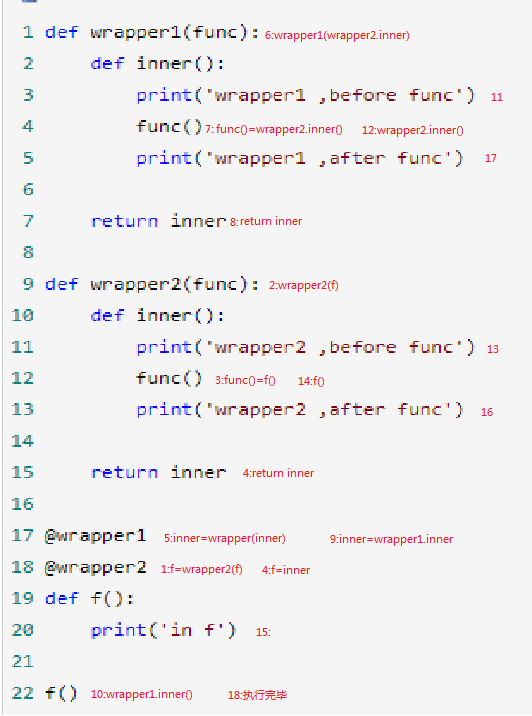
从上图可以看到,从1-9步是装饰器的装载过程,10-18步是执行过程.结论:多个装饰器装饰同一个函数时,装载顺序是从下到上,但执行顺序却是从上到下,可以理解为创建了一个装饰器栈(先进后出)
python基础(8)-装饰器函数&进阶的更多相关文章
- 十. Python基础(10)--装饰器
十. Python基础(10)--装饰器 1 ● 装饰器 A decorator is a function that take a function as an argument and retur ...
- python基础之 装饰器,内置函数
1.闭包回顾 在学习装饰器之前,可以先复习一下什么是闭包? 在嵌套函数内部的函数可以使用外部变量(非全局变量)叫做闭包! def wrapper(): money =10 def inner(num) ...
- Day11 Python基础之装饰器(高级函数)(九)
在python中,装饰器.生成器和迭代器是特别重要的高级函数 https://www.cnblogs.com/yuanchenqi/articles/5830025.html 装饰器 1.如果说装 ...
- python基础--定义装饰器(内置装饰器)
装饰器的定义: 装饰器本质上就是一个python函数,它可以让其它函数在不需要做任何代码改动的前提下增加额外的功能,装饰器的返回值也是一个函数对象.它经常用于有切面需求的场景中,比如-- >插入 ...
- [python基础]关于装饰器
在面试的时候,被问到装饰器,在用的最多的时候就@classmethod ,@staticmethod,开口胡乱回答想这和C#的static public 关键字是不是一样的,等面试回来一看,哇,原来是 ...
- 1.16 Python基础知识 - 装饰器初识
Python中的装饰器就是函数,作用就是包装其他函数,为他们起到修饰作用.在不修改源代码的情况下,为这些函数额外添加一些功能,像日志记录,性能测试等.一个函数可以使用多个装饰器,产生的结果与装饰器的位 ...
- python基础之装饰器(实例)
1.必备 #### 第一波 #### def foo(): print 'foo' foo #表示是函数 foo() #表示执行foo函数 #### 第二波 #### def foo(): print ...
- 【Python基础】装饰器的解释和用法
装饰器的用法比较简单,但是理解装饰器的原理还是比较复杂的,考虑到接下来的爬虫框架中很多用到装饰器的地方,我们先来讲解一下. 函数 我们定义了一个函数,没有什么具体操作,只是返回一个固定值 请注意一下缩 ...
- python之路——装饰器函数
阅读目录 楔子 装饰器的形成过程 开放封闭原则 谈装饰器主要功能和装饰器固定结构 带参数的装饰器 多个装饰器装饰一个函数 返回顶部 楔子 作为一个会写函数的python开发,我们从今天开始要去公司上班 ...
随机推荐
- python faker 生成随机类型字符串
以前生成测试字符时,用random模块拼来拼去来生成随机串,如姓名,手机,身份证等,还是费一些功夫,不过有了faker模块,一切变得简单起来 基本使用: from faker import Faker ...
- JAVA—API和SPI概念
JAVA—API和SPI概念 目录 概念 JDBC实例 自己实现一个SPI 总结 概念英文: What is the difference between Service Provider Inter ...
- 微信OAuth2.0网页授权设置一个域名需多个域名使用的问题
最近遇到一个问题,一个微信公众号,需要在多个域名上使用OAuth2.0网页授权,但微信OAuth2.0网页授权回调域名只能设置一个. 解决办法: 通过多一次的跳转,解决了微信限制回调域名只能设置一个的 ...
- Python3 File
open() 方法 Python open() 方法用于打开一个文件,并返回文件对象,在对文件进行处理过程都需要使用到这个函数,如果该文件无法被打开,会抛出 OSError. 注意:使用 open() ...
- Thrift关键字
在编译thrift文件的时候发现报了如下的错误 Cannot use reserved language keyword: "class" 后来查了一下,发现class是thrif ...
- pointcut 切面表达式 切入点表达式
下面给出一些常见切入点表达式的例子. 任意公共方法的执行: execution(public * *(..)) 任何一个以“set”开始的方法的执行: execution(* set*(..)) Ac ...
- python学习笔记(五)
面向对象方法 元组的二义性:不明确参数代表的含义 circle=(2,4,6) def distance_from_origin(x,y): return "返回x,y坐标" de ...
- nginx && apache 图片代理
location ~ /mmopen/ { proxy_set_header Host thirdwx.qlogo.cn; rewrite /(.+)$ /$ break; proxy_pass ht ...
- 如何在spring-boot web项目中启用swagger
swagger的三个项目及其作用 我们打开swagger的官网,会发现有三个swagger相关的项目,它们分别是 swagger-editor 作用是通过写代码,生成文档描述(一个json文件或其他格 ...
- js---根据指定的顺序进行排序
有一个数据列表,我需要根据根据ID依次来取里面的第9,3,8,4项,具体的实现方法. var arr = [ {id:1,title:'我是第一个'}, {id:2,title:'我是第二个'}, { ...