
mybatis源码解析之环境准备
概述
对于mybatis而言,大家一定都不陌生,我相信很多同学都跟我一样,用起来非常的熟练,但是其内部的实现原理呢,不太清楚,经常面试的时候,面试官问及这方面的知识,都只能尴尬的回答不知道,或者不清楚,接下来的一段时间,我会慢慢的记录一些我读源码的一些过程,和大家一起学习。
sql准备
要操作数据库,当然还得是先建表,sql如下:
CREATE TABLE `news` (

  `id` bigint(100) NOT NULL AUTO_INCREMENT,

  `title` varchar(1000) DEFAULT NULL,

  `url` varchar(1000) DEFAULT NULL,

  `hash` varchar(1000) DEFAULT NULL,

  `publish_time` varchar(50) DEFAULT NULL,

  `news_type` varchar(50) DEFAULT NULL,

  `from_name` varchar(50) DEFAULT NULL,

  PRIMARY KEY (`id`)

) ENGINE=InnoDB AUTO_INCREMENT=538 DEFAULT CHARSET=utf8
当然,这表建的不一定规范,这些不重要。
其他代码准备
我们新建一个mybatis-source-read的工程,其目录结构如下图:
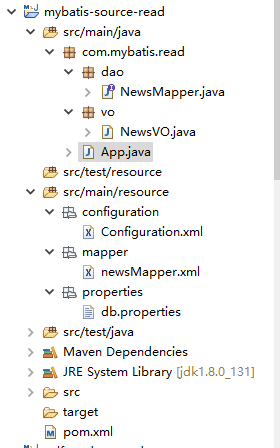
一次来介绍下:
porm.xml
添加mybatis,mysql驱动依赖
		<dependency>

			<groupId>org.mybatis</groupId>

			<artifactId>mybatis</artifactId>

			<version>3.4.4</version>

		</dependency>

		<!-- MySQL 连接驱动依赖 -->

		<dependency>

			<groupId>mysql</groupId>

			<artifactId>mysql-connector-java</artifactId>

			<version>5.1.39</version>

		</dependency>
实体类NewsVO
package com.mybatis.read.vo;

public class NewsVO {

	private int id;

	private String title;

	private String url;

	private String hash;

	private String publishTime;

	private String newsType;

	private String fromName;

	@Override

	public String toString() {

		return "NewsVO [id=" + id + ", title=" + title + ", url=" + url + ", hash=" + hash + ", publishTime="

				+ publishTime + ", newsType=" + newsType + ", fromName=" + fromName + "]";

	}

	public int getId() {

		return id;

	}

	public void setId(int id) {

		this.id = id;

	}

	public String getTitle() {

		return title;

	}

	public void setTitle(String title) {

		this.title = title;

	}

	public String getUrl() {

		return url;

	}

	public void setUrl(String url) {

		this.url = url;

	}

	public String getHash() {

		return hash;

	}

	public void setHash(String hash) {

		this.hash = hash;

	}

	public String getPublishTime() {

		return publishTime;

	}

	public void setPublishTime(String publishTime) {

		this.publishTime = publishTime;

	}

	public String getNewsType() {

		return newsType;

	}

	public void setNewsType(String newsType) {

		this.newsType = newsType;

	}

	public String getFromName() {

		return fromName;

	}

	public void setFromName(String fromName) {

		this.fromName = fromName;

	}

}
数据库访问层dao:
package com.mybatis.read.dao;

import com.mybatis.read.vo.NewsVO;

public interface NewsMapper {

	public NewsVO getNews(int id);

}
这边只写了一个查询,后续再做补充
mybatis配置文件Configuration.xml
<?xml version="1.0" encoding="UTF-8" ?>

<!DOCTYPE configuration PUBLIC "-//mybatis.org//DTD Config 3.0//EN"

"http://mybatis.org/dtd/mybatis-3-config.dtd">

<configuration>

	<properties resource="properties/db.properties" />

	<settings>

		<setting name="cacheEnabled" value="true" />

		<setting name="lazyLoadingEnabled" value="true" />

		<setting name="useGeneratedKeys" value="true" />

	</settings>

	<typeAliases>

		<typeAlias alias="NewsVO" type="com.mybatis.read.vo.NewsVO" />

	</typeAliases>

	<environments default="development">

		<environment id="development">

			<transactionManager type="JDBC" />

			<dataSource type="POOLED">

				<property name="driver" value="${driveClass}" />

				<property name="url" value="${url}" />

				<property name="username" value="${userName}" />

				<property name="password" value="${password}" />

			</dataSource>

		</environment>

	</environments>

	<mappers>

		<mapper resource="mapper/newsMapper.xml" />

	</mappers>

</configuration>
操作数据库的sql,newsMapper.xml
<?xml version="1.0" encoding="UTF-8"?>

<!DOCTYPE mapper PUBLIC "-//mybatis.org//DTD Mapper 3.0//EN"

"http://mybatis.org/dtd/mybatis-3-mapper.dtd">

<mapper namespace="com.mybatis.read.dao.NewsMapper">

	<resultMap type="com.mybatis.read.vo.NewsVO" id="baseResultMap">

		<id column="id" jdbcType="BIGINT" property="id" />

		<result column="title" jdbcType="VARCHAR" property="title" />

		<result column="url" jdbcType="VARCHAR" property="url" />

		<result column="hash" jdbcType="VARCHAR" property="hash" />

		<result column="publish_time" jdbcType="VARCHAR" property="publishTime" />

		<result column="news_type" jdbcType="VARCHAR" property="newsType" />

		<result column="from_name" jdbcType="VARCHAR" property="fromName" />

	</resultMap>

	<select id="getNews" resultMap="baseResultMap">

		select * from news where id=#{id}

	</select>

</mapper>
启动函数main:
package com.mybatis.read;

import java.io.IOException;

import java.io.InputStream;

import org.apache.ibatis.io.Resources;

import org.apache.ibatis.session.SqlSession;

import org.apache.ibatis.session.SqlSessionFactory;

import org.apache.ibatis.session.SqlSessionFactoryBuilder;

import com.mybatis.read.dao.NewsMapper;

import com.mybatis.read.vo.NewsVO;

public class App {

	public static void main(String[] args) {

		try {

			InputStream inputStream = Resources.getResourceAsStream("configuration/Configuration.xml");

			SqlSessionFactory sqlSessionFactory = new SqlSessionFactoryBuilder().build(inputStream);

			SqlSession session = sqlSessionFactory.openSession();

			//写法一

			//NewsVO newsVo = session.selectOne("com.mybatis.read.dao.NewsMapper.getNews", 40);

			//写法二

			NewsMapper newsMapper = session.getMapper(NewsMapper.class);

			NewsVO newsVo = newsMapper.getNews(40);

			System.out.println(newsVo.toString());

		} catch (IOException e) {

			e.printStackTrace();

		}

	}

}
运行下,结果如下:
Sat Dec 08 21:45:00 CST 2018 WARN: Establishing SSL connection without server's identity verification is not recommended. According to MySQL 5.5.45+, 5.6.26+ and 5.7.6+ requirements SSL connection must be established by default if explicit option isn't set. For compliance with existing applications not using SSL the verifyServerCertificate property is set to 'false'. You need either to explicitly disable SSL by setting useSSL=false, or set useSSL=true and provide truststore for server certificate verification.

NewsVO [id=40, title=利刃出鞘 英超史上最伟大的30位前锋盘点(上篇), url=https://www.fourfourtwo.com/features/ranked-30-best-strikers-premier-league-history, hash=-2589400655418950890, publishTime=2018-12-06 16:44:33, newsType=zuqiu, fromName=fourfourtwo]
那么基本的环境准备就完成了,接下来,要做的就是一步一步的跟进去,探究下它的相关执行流程和原理。
mybatis源码解析之环境准备的更多相关文章
- mybatis源码-解析配置文件(三)之配置文件Configuration解析
目录 1. 简介 1.1 系列内容 1.2 适合对象 1.3 本文内容 2. 配置文件 2.1 mysql.properties 2.2 mybatis-config.xml 3. Configura ...
- Mybatis源码解析,一步一步从浅入深(二):按步骤解析源码
在文章:Mybatis源码解析,一步一步从浅入深(一):创建准备工程,中我们为了解析mybatis源码创建了一个mybatis的简单工程(源码已上传github,链接在文章末尾),并实现了一个查询功能 ...
- Mybatis源码解析,一步一步从浅入深(四):将configuration.xml的解析到Configuration对象实例
在Mybatis源码解析,一步一步从浅入深(二):按步骤解析源码中我们看到了XMLConfigBuilder(xml配置解析器)的实例化.而且这个实例化过程在文章:Mybatis源码解析,一步一步从浅 ...
- Mybatis源码解析(二) —— 加载 Configuration
Mybatis源码解析(二) -- 加载 Configuration 正如上文所看到的 Configuration 对象保存了所有Mybatis的配置信息,也就是说mybatis-config. ...
- 【MyBatis源码解析】MyBatis一二级缓存
MyBatis缓存 我们知道,频繁的数据库操作是非常耗费性能的(主要是因为对于DB而言,数据是持久化在磁盘中的,因此查询操作需要通过IO,IO操作速度相比内存操作速度慢了好几个量级),尤其是对于一些相 ...
- Mybatis源码解析-DynamicSqlSource和RawSqlSource的区别
XMLLanguageDriver是ibatis的默认解析sql节点帮助类,其中的方法其会调用生成DynamicSqlSource和RawSqlSource这两个帮助类,本文将对此作下简单的简析 应用 ...
- mybatis源码-解析配置文件(四-1)之配置文件Mapper解析(cache)
目录 1. 简介 2. 解析 3 StrictMap 3.1 区别HashMap:键必须为String 3.2 区别HashMap:多了成员变量 name 3.3 区别HashMap:key 的处理多 ...
- mybatis源码-解析配置文件(四)之配置文件Mapper解析
在 mybatis源码-解析配置文件(三)之配置文件Configuration解析 中, 讲解了 Configuration 是如何解析的. 其中, mappers作为configuration节点的 ...
- Mybatis源码解析,一步一步从浅入深(一):创建准备工程
Spring SpringMVC Mybatis(简称ssm)是一个很流行的java web框架,而Mybatis作为ORM 持久层框架,因其灵活简单,深受青睐.而且现在的招聘职位中都要求应试者熟悉M ...
随机推荐
- html5 javascript 事件练习2
<!DOCTYPE html><html lang="en"><head> <meta charset="UTF-8&qu ...
- lua 特殊时间格式转换
[1]时间格式转换需求 工作中,因业务需要将时间格式进行转换.需求内容如下: 原格式:17:04:49.475 UTC Mon Mar 04 2019 转换格式:2019-03-04 17:04:4 ...
- 改变FileUpload文件上传控件的显示方式,选择文件后自动上传
一.Aspx页面: <%@ Page Language="C#" AutoEventWireup="true" CodeBehind="File ...
- MySQL更新命令_UPDATE
创建测试表 mysql> CREATE TABLE `product` ( -> `proID` ) NOT NULL AUTO_INCREMENT COMMENT '商品表主键', -& ...
- MVC输出缓存(OutputCache参数详解)
版权声明:本文为博主原创文章,未经博主允许转载随意. https://blog.csdn.net/kebi007/article/details/59199115 1.学习之前你应该知道这些 几乎每个 ...
- Log4j配置记录
log4j的配置文件就是用来设置记录器的级别.存放器和布局的,它可接key=value格式的设置或xml格式的设置信息.通过配置,可以创建出Log4J的运行环境. 1.配置文件 log4j配置文件的基 ...
- Guitar Pro 添加装饰音
在使用Guitar Pro进行乐谱弹唱或者自己作曲时,我们经常会碰到在乐谱上出现一些装饰音,那么大家肯定会有问题了,装饰音是什么?如何使用Guitar Pro来添加装饰音呢? 装饰音是用来装饰旋律的临 ...
- NPOI解决由于excel删除数据导致空行读取问题
1.解决问题思路一:申明判断是否空行变量用于判断是否空行,声明变量数组用于临时非空行数据,最后存于datatable中. /// <summary>读取excel, /// 默认第一行为表 ...
- sqldeveloper 重置java.exe路径方法
sqldeveloper重新配置java.exe 1.进入D:\app\product\11.2.0\dbhome_1\sqldeveloper\sqldeveloper\bin路径下,找到sqlde ...
- POJ-3294 Life Forms n个字符串中出现超过n/2次的最长子串(按字典序依次输出)
按照以前两个字符串找两者的最长公共子串的思路类似,可以把所有串拼接到一起,这里为了避免讨论LCP跨越多个串需需要特别处理的问题用不同的字符把所有串隔开(因为char只有128位,和可能不够用,更推荐设 ...