
String.split()与StringUtils.split()
我们平时进行简单的字符串分割的时候,尽量不要用String自身的split方法,它是匹配正则表达式的,如果遇到$这种特殊字符,需要转义一下。用StringUtils.split()方法会更方便

使用apache StringUtils.split替代String.split
如果你对下面几个结果有疑惑的话,建议使用apache commons包的StringUtils.split来替代。
String[] strs = "".split(",");
结果是strs.length=1,strs[0]=""
String[] strs = ",".split(",");
结果是strs.length=0
String[] strs = ",1,".split(",");
结果是strs.length=2,strs[0]="",strs[1]="1"
String[] strs = StringUtils.split(",1,,2,", ",");
结果是strs.length=2,strs[0]="1",strs[1]="2"
 System.out.println(":ab:cd:ef::".split(":").length);//末尾分隔符全部忽略

  System.out.println(":ab:cd:ef::".split(":",-1).length);//不忽略任何一个分隔符

  System.out.println(StringUtils.split(":ab:cd:ef::",":").length);//最前面的和末尾的分隔符全部都忽略,apache commons

  System.out.println(StringUtils.splitPreserveAllTokens(":ab:cd:ef::",":").length);//不忽略任何一个分隔符 apache commons

输出:

4

6

3

6
String s =",1,,2,3,4,,";

String[] split1 = s.split(",");

String[] split2 = StringUtils.splitString(s, ",");
调试结果:
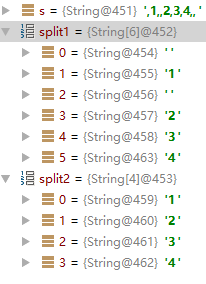
总结:
String.split()会包含空字符串,而且是包含 头部的和中间的, 不包含有效数字后面所有的空字符串.
StringUtils.split()会过滤所有的空字符串. 当然空格不会被过滤.
package stringsplit;

public class stringSplit {

     public static void main(String[] args) {

          String line = "hello,,world,,,";

          String res1[] = line.split(",");

          String res2[] = line.split(",", -1);

          int i=1;

          for(String r: res1)

              System.out.println(i+++r);

          System.out.println("========================");

          i=1;

          for(String r: res2)

              System.out.println(i+++r);

     }

}
输出结果是:
1hello

2

3world

========================

1hello

2

3world

4

5

6
String.split()与StringUtils.split()的更多相关文章
- String.split()与StringUtils.split()的区别
import com.sun.deploy.util.StringUtils; String s =",1,,2,3,4,,"; String[] split1 = s.split ...
- StringUtils.split()和string.split()的区别
场景 出于业务考虑,将多个字符串拼接起来时,使用的分隔符是;,;.如果要将这样一个拼接来的字符串分割成原本的多个字符串时,就需要使用到jdk自带的split()方法.不过因为公司的编程规范,改为使用了 ...
- 使用 StringUtils.split 的坑
点赞再看,动力无限. 微信搜「程序猿阿朗 」. 本文 Github.com/niumoo/JavaNotes 和 未读代码博客 已经收录,有很多知识点和系列文章. 在日常的 Java 开发中,由于 J ...
- C# Split的用法,Split分割字符串
C# Split的用法,Split分割字符串 分割单个字串:string str="来自张三的亲切问候!;string[] strarry=str.Split(new string[] { ...
- Python: str.split()和re.split()的区别
str.split() 单一分隔符,使用str.split()即可 str.split不支持正则及多个切割符号,不感知空格的数量 re.split() 多个分隔符,复杂的分隔情况,使用re.split ...
- .split(",", -1);和.split(",")的区别
.split(",", -1);和.split(",")的区别在于://eg:String a="河南省,,金水区".//a.split(& ...
- python split(),os.path.split()和os.path.splitext()函数用法
https://blog.csdn.net/T1243_3/article/details/80170006 # -*- coding:utf-8 -*- """ @ ...
- split(),strip,split("/")[-1] 和 split("/",-1)的区别
Python中split()函数,通常用于将字符串切片并转换为列表. 一.函数说明: split():语法: str.split(str="",num=string.count(s ...
- str.split()与re.split()的区别
str.split(): >>>'hello, world'.split() >>>['hello,','world'] >>>'hello, w ...
随机推荐
- php框架中,try,catch不能用的问题(转载)
本文转自:http://blog.csdn.net/sangjinchao/article/details/71436557 最近再用laravel框架发现,try catch用了没有效果,依然不能阻 ...
- CPanel/服务器文件及目录
cPanel服务器默认的各主要目录及配置文件的路径.cPanel服务器很多配置文件的路径和通常情况下安装LAMP的不同,另外还有很多是属于cPanel面板自己的配置文件. 目录 1 Apache 2 ...
- Oracle课程档案,第十四天
备份数据文件:SQL> select file_id, file_name from dba_data_files; backup:备用(备份) datafile:数据文件 backup tab ...
- dubbo控制器xml文件报错
在配置dubbo服务的过程中,经常会遇到虽然程序能够跑起来,但是配置文件一堆红叉,虽然不影响功能,但是确实很让人恶心. 报错信息如下: Multiple annotations found at th ...
- CodeFirst简单演示的步骤
CodeFirst简单演示的步骤 创建实体类[Student] public class Student { public long Id { get; set; } public string Na ...
- Linux命令更新系统时间,更新所有文件的时间(转)
https://blog.csdn.net/ccj2020/article/details/76026606
- poj2480(利用欧拉函数的积性求解)
题目链接: http://poj.org/problem?id=2480 题意:∑gcd(i, N) 1<=i <=N,就这个公式,给你一个n,让你求sum=gcd(1,n)+gcd(2, ...
- 在docker中使用mysql数据库,在局域网访问
1.获取mysql镜像 docker pull mysql:5.6 注意:此处之所以获取mysql5.6是因为mysql5.7在centos7中启动可能会报错 2.查看镜像列表 docker imag ...
- numactl 修改 非统一内存访问架构 NUMA(Non Uniform Memory Access Architecture)模式
当今数据计算领域的主要应用程序和模型可大致分为三大类: (1)联机事务处理(OLTP). (2)决策支持系统(DSS) (3)企业信息通讯(BusinessCommunications) 上述三类系统 ...
- selenium定位下拉框
下拉选择框(Select) <div> <p>下拉选择框框 Select</p> <select id="proAddItem_kind" ...