
idea搭建Eureka注册中心
服务的注册与发现
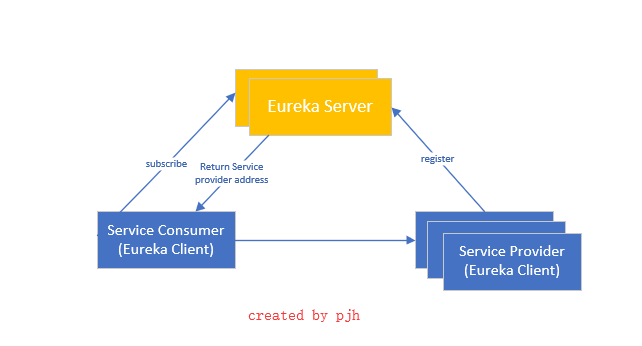
关系调用说明:
- 服务生产者启动时,向服务注册中心注册自己提供的服务
- 服务消费者启动时,在服务注册中心订阅自己所需要的服务
- 注册中心返回服务提供者的地址信息个消费者
- 消费者从提供者中调用服务
Eureka简介
Eureka是Spring Cloud Netflix微服务套件中的一部分,可以与Springboot构建的微服务很容易的整合起来。
Eureka包含了服务器端和客户端组件。服务器端,也被称作是服务注册中心,用于提供服务的注册与发现。Eureka支持高可用的配置,当集群中有分片出现故障时,Eureka就会转入自动保护模式,它允许分片故障期间继续提供服务的发现和注册,当故障分片恢复正常时,集群中其他分片会把他们的状态再次同步回来。
客户端组件包含服务消费者与服务生产者。在应用程序运行时,Eureka客户端向注册中心注册自身提供的服务并周期性的发送心跳来更新它的服务租约。同时也可以从服务端查询当前注册的服务信息并把他们缓存到本地并周期性的刷新服务状态。
1.创建Eureka Server
File--》new-->project-->spring initializr
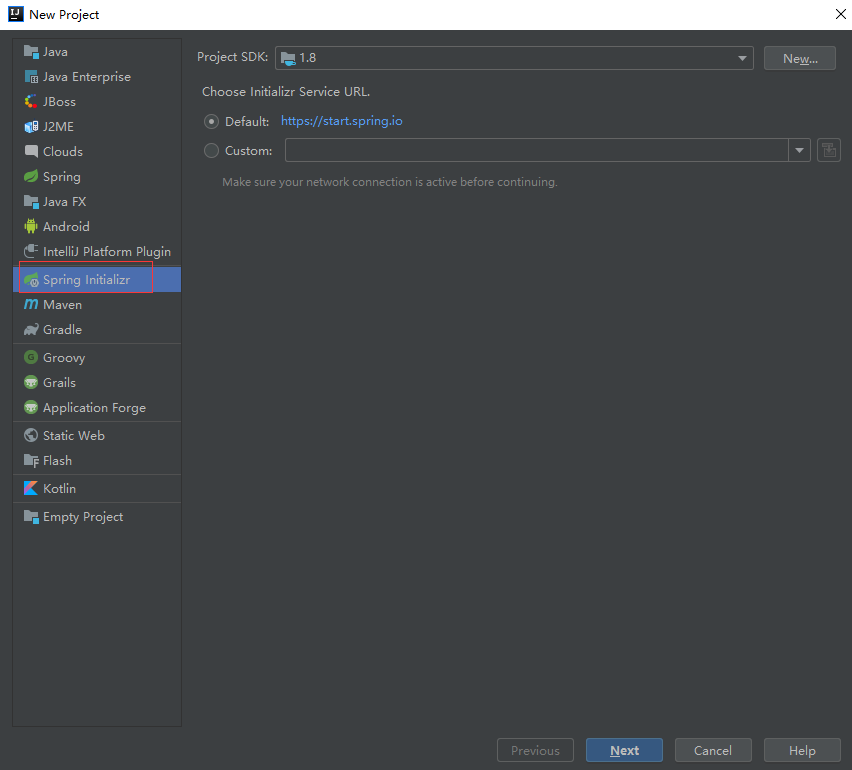
next
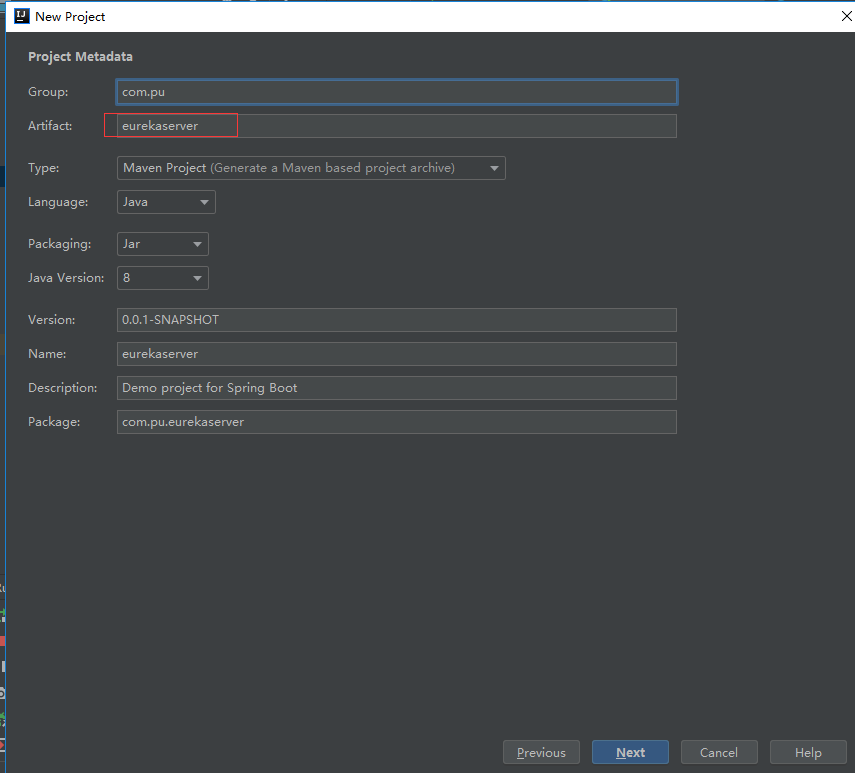
next

next

finish
目录结构如下

在Application类上添加注解@EnableEurekaServer声明注册中心
package com.pu.eurekaserver;

import org.springframework.boot.SpringApplication;

import org.springframework.boot.autoconfigure.SpringBootApplication;

import org.springframework.cloud.netflix.eureka.server.EnableEurekaServer;

@EnableEurekaServer

@SpringBootApplication

public class EurekaserverApplication {

    public static void main(String[] args) {

        SpringApplication.run(EurekaserverApplication.class, args);

    }

}
在resource/application.yml(默认是.properties)配置文件添加图中内容
server:
  port: 8761
eureka:
  instance:
    hostname: localhost
  server:
    #是否开启自我保护机制, 测试时关闭自我保护机制,保证不可用服务及时踢出
    enable-self-preservation: false
    # 剔除失效服务间隔,默认60000 ms
    eviction-interval-timer-in-ms: 3000
  client:
    #声明自己是服务端,表示是否将自己注册到Eureka Server,默认为true。由于当前这个应用就是Eureka Server,故而设为false
    register-with-eureka: false
    #表示是否从Eureka Server获取注册信息,默认为true。因为这是一个单点的Eureka Server,不需要同步其他的Eureka Server节点的数据,故而设为false
    fetch-registry: false
    #设置与Eureka Server交互的地址,查询服务和注册服务都需要依赖这个地址。默认是http://localhost:8761/eureka ;多个地址可使用 , 分隔
    service-url:
      defaultZone: http://${eureka.instance.hostname}:${server.port}/eureka/
pom.xml文件内容(自动生成)
<?xml version="1.0" encoding="UTF-8"?>

<project xmlns="http://maven.apache.org/POM/4.0.0" xmlns:xsi="http://www.w3.org/2001/XMLSchema-instance"

         xsi:schemaLocation="http://maven.apache.org/POM/4.0.0 http://maven.apache.org/xsd/maven-4.0.0.xsd">

    <modelVersion>4.0.0</modelVersion>

    <parent>

        <groupId>org.springframework.boot</groupId>

        <artifactId>spring-boot-starter-parent</artifactId>

        <version>2.1.4.RELEASE</version>

        <relativePath/> <!-- lookup parent from repository -->

    </parent>

    <groupId>com.pu</groupId>

    <artifactId>eurekaserver</artifactId>

    <version>0.0.1-SNAPSHOT</version>

    <name>eurekaserver</name>

    <description>Demo project for Spring Boot</description>

    <properties>

        <java.version>1.8</java.version>

        <spring-cloud.version>Greenwich.SR1</spring-cloud.version>

    </properties>

    <dependencies>

        <dependency>

            <groupId>org.springframework.cloud</groupId>

            <artifactId>spring-cloud-starter-netflix-eureka-server</artifactId>

        </dependency>

        <dependency>

            <groupId>org.springframework.boot</groupId>

            <artifactId>spring-boot-starter-test</artifactId>

            <scope>test</scope>

        </dependency>

    </dependencies>

    <dependencyManagement>

        <dependencies>

            <dependency>

                <groupId>org.springframework.cloud</groupId>

                <artifactId>spring-cloud-dependencies</artifactId>

                <version>${spring-cloud.version}</version>

                <type>pom</type>

                <scope>import</scope>

            </dependency>

        </dependencies>

    </dependencyManagement>

    <build>

        <plugins>

            <plugin>

                <groupId>org.springframework.boot</groupId>

                <artifactId>spring-boot-maven-plugin</artifactId>

            </plugin>

        </plugins>

    </build>

</project>
启动工程

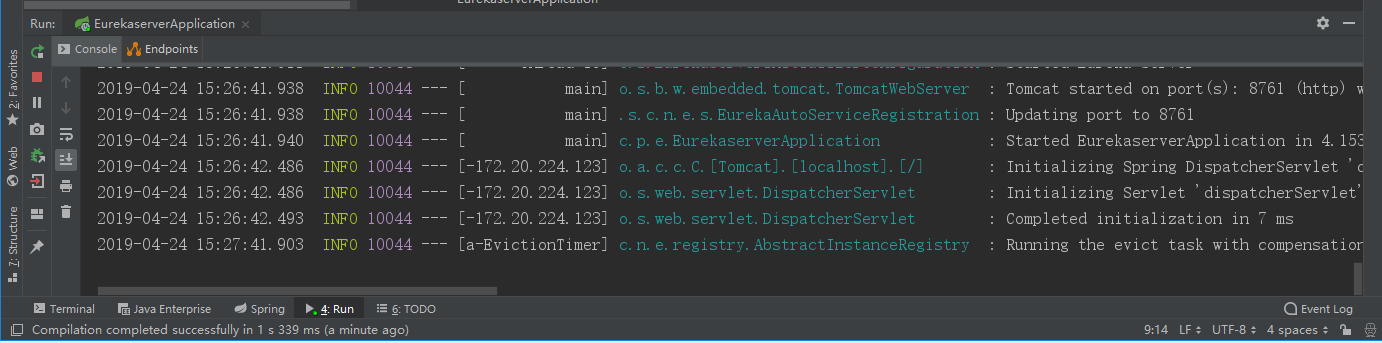
在浏览器中输入
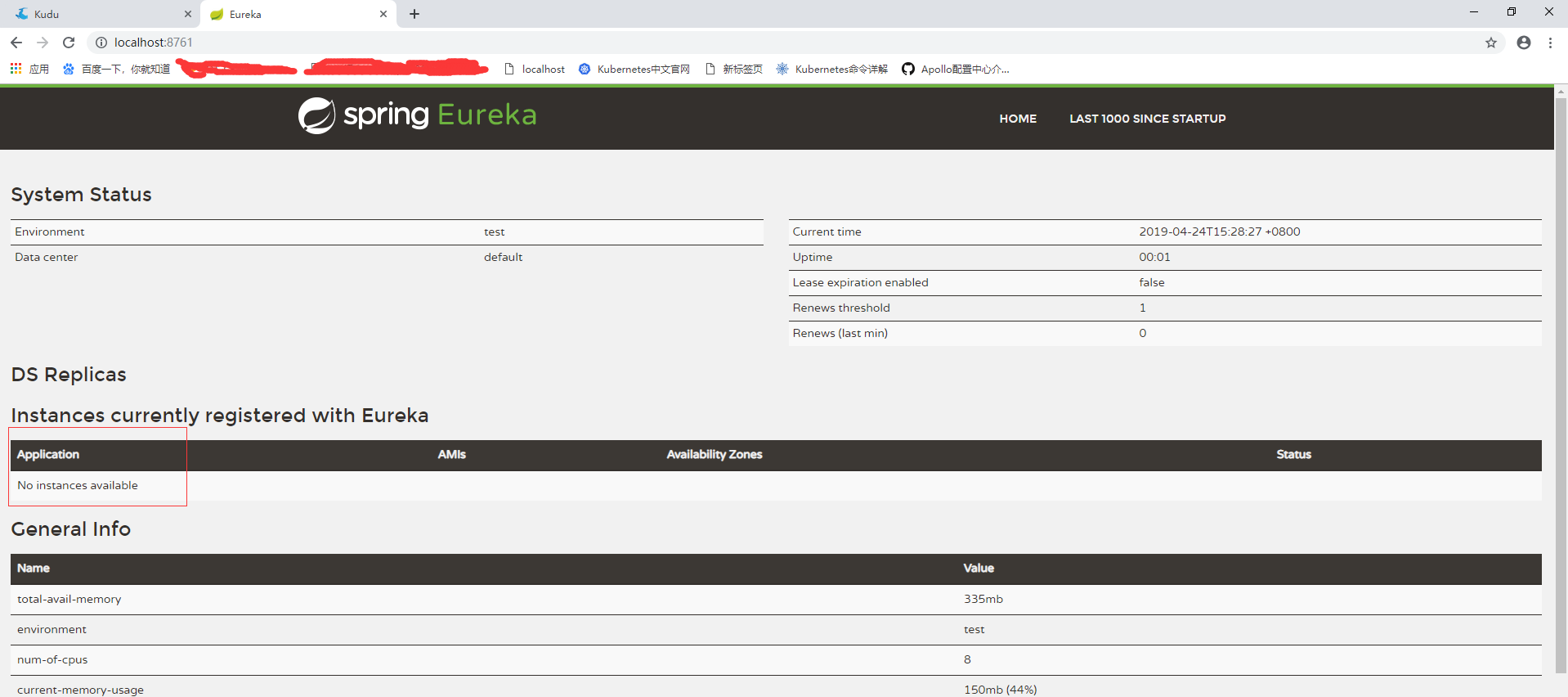
这里显示No instances available是因为还没有服务注册上去
2.创建一个服务提供者 (eureka client)
File-->new-->project-->spring initializr

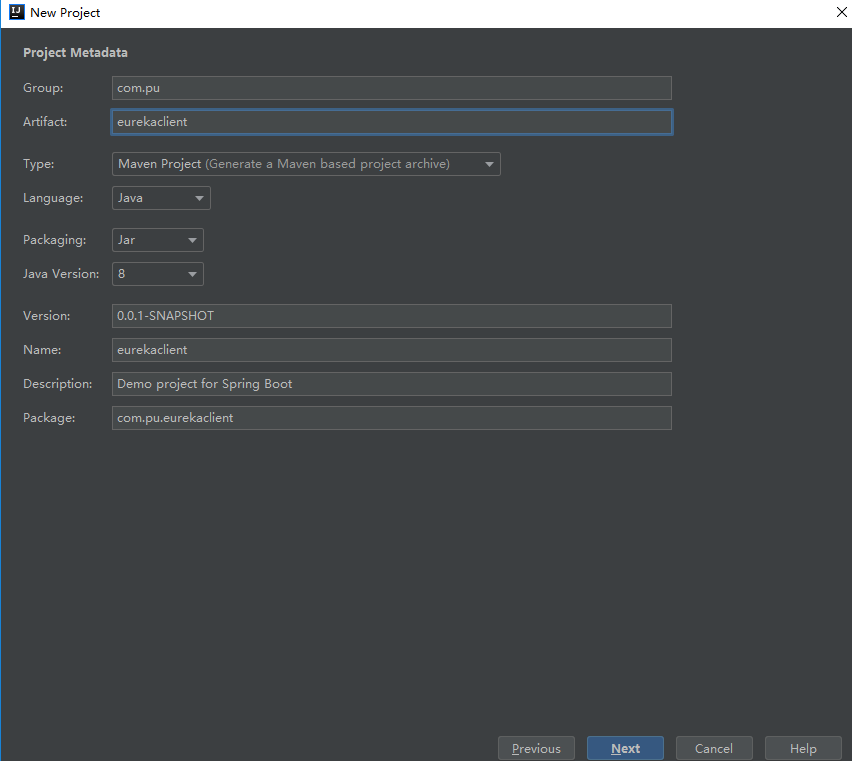
此处与上面不同
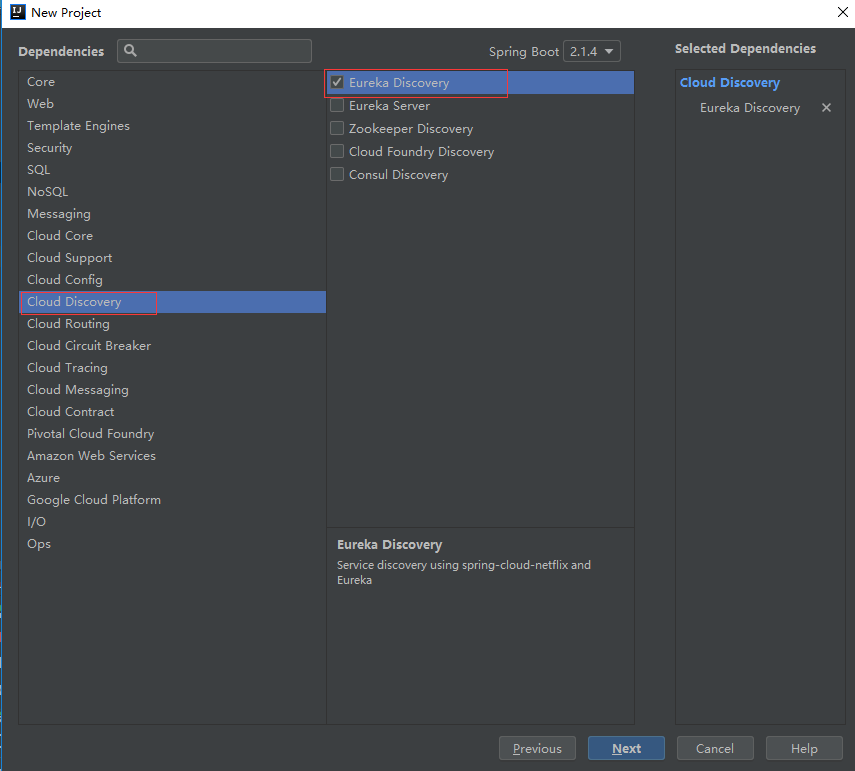

finish
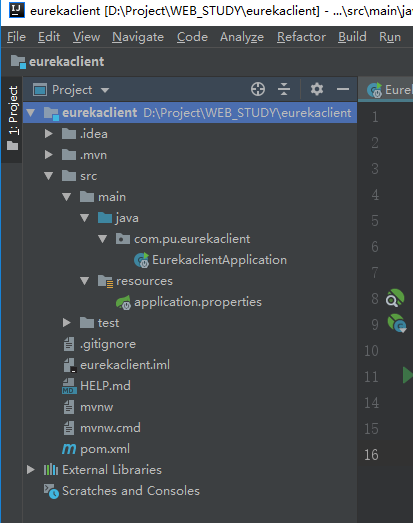
目录结构
pom.xml文件(自动生成)
<?xml version="1.0" encoding="UTF-8"?>

<project xmlns="http://maven.apache.org/POM/4.0.0" xmlns:xsi="http://www.w3.org/2001/XMLSchema-instance"

         xsi:schemaLocation="http://maven.apache.org/POM/4.0.0 http://maven.apache.org/xsd/maven-4.0.0.xsd">

    <modelVersion>4.0.0</modelVersion>

    <parent>

        <groupId>org.springframework.boot</groupId>

        <artifactId>spring-boot-starter-parent</artifactId>

        <version>2.1.4.RELEASE</version>

        <relativePath/> <!-- lookup parent from repository -->

    </parent>

    <groupId>com.pu</groupId>

    <artifactId>eurekaclient</artifactId>

    <version>0.0.1-SNAPSHOT</version>

    <name>eurekaclient</name>

    <description>Demo project for Spring Boot</description>

    <properties>

        <java.version>1.8</java.version>

        <spring-cloud.version>Greenwich.SR1</spring-cloud.version>

    </properties>

    <dependencies>

        <dependency>

            <groupId>org.springframework.cloud</groupId>

            <artifactId>spring-cloud-starter-netflix-eureka-client</artifactId>

        </dependency>

        <dependency>

            <groupId>org.springframework.boot</groupId>

            <artifactId>spring-boot-starter-test</artifactId>

            <scope>test</scope>

        </dependency>

        <dependency>

            <groupId>org.springframework.boot</groupId>

            <artifactId>spring-boot-starter-web</artifactId>

        </dependency>

    </dependencies>

    <dependencyManagement>

        <dependencies>

            <dependency>

                <groupId>org.springframework.cloud</groupId>

                <artifactId>spring-cloud-dependencies</artifactId>

                <version>${spring-cloud.version}</version>

                <type>pom</type>

                <scope>import</scope>

            </dependency>

        </dependencies>

    </dependencyManagement>

    <build>

        <plugins>

            <plugin>

                <groupId>org.springframework.boot</groupId>

                <artifactId>spring-boot-maven-plugin</artifactId>

            </plugin>

        </plugins>

    </build>

</project>
在EurekaclientApplication添加注解@EnableEurekaClient
package com.pu.eurekaclient;

import org.springframework.boot.SpringApplication;

import org.springframework.boot.autoconfigure.SpringBootApplication;

import org.springframework.cloud.netflix.eureka.EnableEurekaClient;

@EnableEurekaClient

@SpringBootApplication

public class EurekaclientApplication {

    public static void main(String[] args) {

        SpringApplication.run(EurekaclientApplication.class, args);

    }

}
配置resource/application.yml
spring:
  application:
    name: service-hi
server:
  port: 8762
eureka:
  client:
    serviceUrl:
      #指向注册中心
      #defaultZone: http://192.168.111.133:8888/eureka/
    defaultZone: http://localhost:8761/eureka/
  instance:
    # 每间隔1s,向服务端发送一次心跳,证明自己依然”存活“
    lease-renewal-interval-in-seconds: 1
    # 告诉服务端,如果我2s之内没有给你发心跳,就代表我“死”了,将我踢出掉。
    lease-expiration-duration-in-seconds: 2
创建controller类
package com.pu.eurekaclient;

import org.springframework.web.bind.annotation.RequestMapping;

import org.springframework.web.bind.annotation.RestController;

@RestController

public class hiController {

    @RequestMapping(value="/hi")

    public String say(){

        String str="my spring boot web project hihihi";

        System.out.println(str);

        return str;

    }

}
启动项目

查看刚刚的服务端,发现服务service-hi已经注册成功
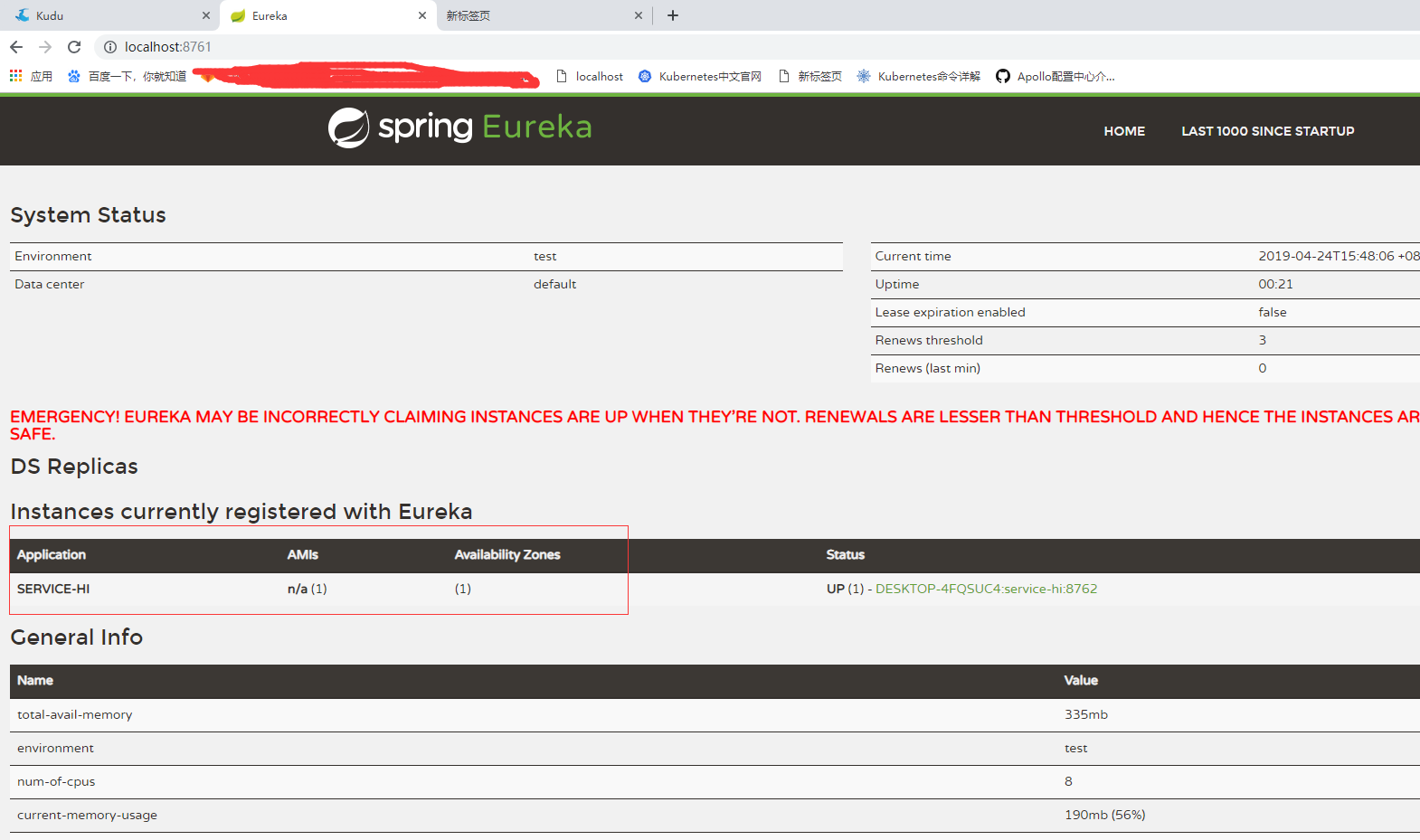
服务已经注册成功
但报红色字体
EMERGENCY! EUREKA MAY BE INCORRECTLY CLAIMING INSTANCES ARE UP WHEN THEY'RE NOT. RENEWALS ARE LESSER THAN THRESHOLD AND HENCE THE INSTANCES ARE NOT BEING EXPIRED JUST TO BE SAFE.
这是因为eureka server开启了SELF PRESERVATION模式,导致registry的信息不会因为过期而被剔除掉,直到退出SALF PRESERVATION模式。
针对SALF PRESEVATION的问题,在测试环境可以将自我保护模式关闭:
即在eurekasrver工程resource/application.yml添加
server:
    #是否开启自我保护机制, 测试时关闭自我保护机制,保证不可用服务及时踢出
    enable-self-preservation: false

重启server,client,后,正常
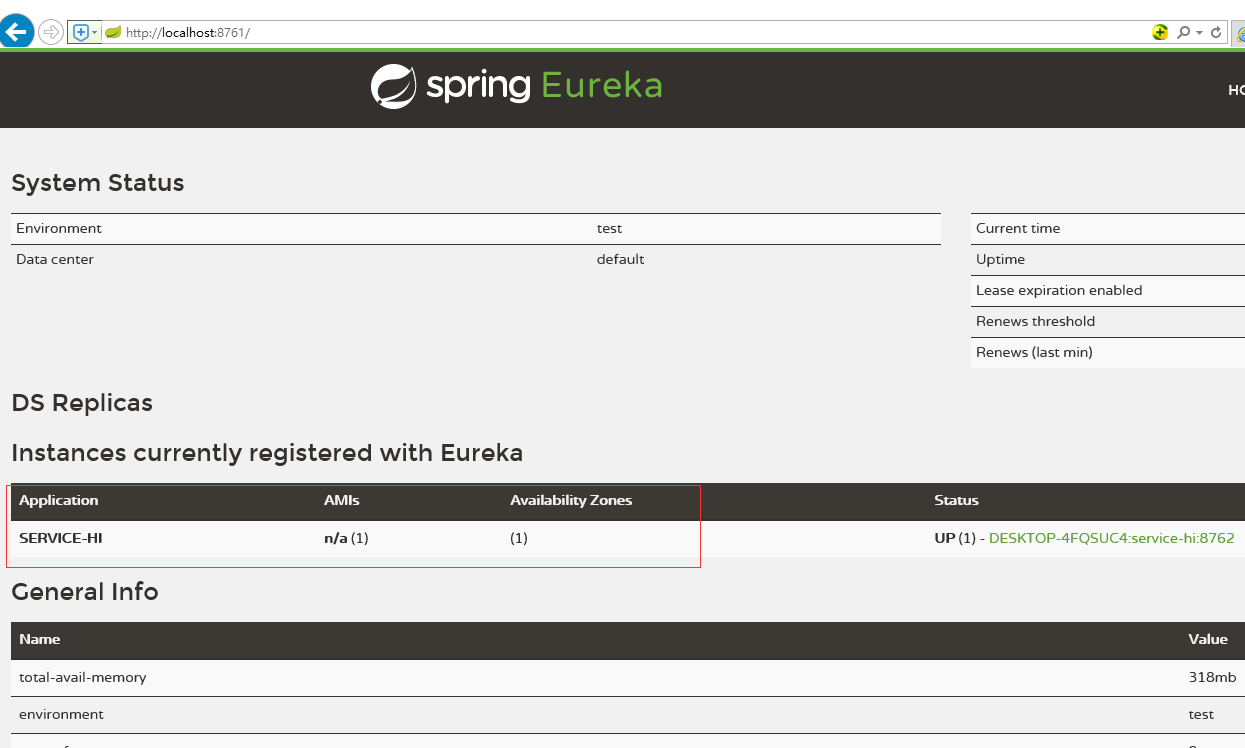
访问client服务,在浏览器中输入
http://localhost:8762/hi

3.添加Eureka密码验证
pom中引入此依赖
        <dependency>

            <groupId>org.springframework.cloud</groupId>

            <artifactId>spring-cloud-starter-security</artifactId>

        </dependency>
yml中添加
server:

  port: 8761

spring

  security:

  user:

    name: aa

    password: 111111

eureka:

  instance:

    hostname: localhost

  server:

    #是否开启自我保护机制, 测试时关闭自我保护机制,保证不可用服务及时踢出

    enable-self-preservation: false

    # 剔除失效服务间隔,默认60000 ms

    eviction-interval-timer-in-ms: 3000

  client:

    #声明自己是服务端,表示是否将自己注册到Eureka Server,默认为true。由于当前这个应用就是Eureka Server,故而设为false

    register-with-eureka: false

    #表示是否从Eureka Server获取注册信息,默认为true。因为这是一个单点的Eureka Server,不需要同步其他的Eureka Server节点的数据,故而设为false

    fetch-registry: false

    #设置与Eureka Server交互的地址,查询服务和注册服务都需要依赖这个地址。默认是http://localhost:8761/eureka ;多个地址可使用 , 分隔

    service-url:

      defaultZone: http://aa:111111@${eureka.instance.hostname}:${server.port}/eureka/
关闭CSRF,否则导致无法注册任何服务
package com.pu.eurekaserver.config;

import org.springframework.security.config.annotation.web.builders.HttpSecurity;

import org.springframework.security.config.annotation.web.configuration.EnableWebSecurity;

import org.springframework.security.config.annotation.web.configuration.WebSecurityConfigurerAdapter;

/**

 * 配置security的csrf检验为false

 * 作用:security模块用于配置登陆Eureka界面登陆时需要输入用户名密码

 * 此模块同时会开启csrf功能导致所有服务注册不进Eureka,需在此处显示关闭

 *

 * @Author

 * @date 20190826 15:25:49

 * @modify 20190826 15:25:49 v0.1 创建

 * @since v0.1

 */

@EnableWebSecurity

public class WebSecurityConfig extends WebSecurityConfigurerAdapter {

    @Override

    protected void configure(HttpSecurity http) throws Exception {

        http.csrf().disable();

        super.configure(http);

    }

}
重启服务再次进入http://localhost:8761后要求输入密码
idea搭建Eureka注册中心的更多相关文章
- 14 微服务电商【黑马乐优商城】:day02-springcloud(搭建Eureka注册中心)
本项目的笔记和资料的Download,请点击这一句话自行获取. day01-springboot(理论篇) :day01-springboot(实践篇) day02-springcloud(理论篇一) ...
- 搭建Eureka注册中心
创建一个Spring Boot工程,命名为eureka-server,并在pom.xml中引入必要的依赖,代码如下. <parent> <groupId>org.springf ...
- spring cloud 专题一 (spring cloud 入门搭建 之 Eureka注册中心搭建)
一.前言 本文为spring cloud 微服务框架专题的第一篇,主要讲解如何快速搭建spring cloud微服务及Eureka 注册中心 以及常用开发方式等. 本文理论不多,主要是傻瓜式的环境搭建 ...
- Spring Cloud第三篇 | 搭建高可用Eureka注册中心
本文是Spring Cloud专栏的第三篇文章,了解前两篇文章内容有助于更好的理解后面文章: Spring Cloud第一篇 | Spring Cloud前言及其常用组件介绍概览 Spring ...
- (转)微服务_创建一个简单的Eureka注册中心
原文地址:https://www.cnblogs.com/lplshermie/p/9105329.html 微服务和分布式已经成了一种极其普遍的技术,为了跟上时代的步伐,最近开始着手学习Spring ...
- 创建一个简单的Eureka注册中心
微服务和分布式已经成了一种极其普遍的技术,为了跟上时代的步伐,最近开始着手学习SpringCloud,就从Eureka开始.他们俩就不做介绍了,网上的说明一堆,随便打开一个搜索引擎输入关键字都足够了解 ...
- springCloud系列教程01:Eureka 注册中心集群搭建
springCloud系列教程包含如下内容: springCloud系列教程01:Eureka 注册中心集群搭建 springCloud系列教程02:ConfigServer 配置中心server搭建 ...
- 架构师入门:搭建双注册中心的高可用Eureka架构(基于项目实战)
本文的案例是基于 架构师入门:搭建基本的Eureka架构(从项目里抽取) 改写的. 在上文里,我们演示Eureka客户端调用服务的整个流程,在这部分里我们将在架构上有所改进.大家可以想象下,在上文里案 ...
- Spring-cloud (一):Eureka注册中心搭建
前提 系统安装jdk1.8及以上,配置好maven的ide(这里用idea进行演示,maven版本3.5,配置阿里云源) 项目搭建 新建一个maven项目,创建最简单的那种就好,项目名这里为Eurek ...
随机推荐
- MYSQL-8.0.11-WINX64(免安装版)配置
1. 解压zip包到安装目录 首先,将mysql-8.0.11-winx64.zip 解压缩到 安装D:/mysql-8.0.11-winx64 目录下, 2.配置文件 在安装根目录下添加 my.in ...
- JS实现大整数乘法(性能优化、正负整数)
本方法的思路为: 一:检查了输入的合法性(非空,无非法字符) 二:检查输入是否可以进行简单计算(一个数为 0,1,+1,-1) 三:去掉输入最前面可能有的正负符号,并判断输出的正负 四:将输入的值分成 ...
- 18-09-20 关于Xlrd和Xlwt的初步学习
#一关于利用xlrd 打开Excel 读取数据的简单介绍import xlrd """ #1 xlrd 基础的用法:读取,获取sheet,获取内容,行数,列数def re ...
- nodejs - 1)上传图片 ,并显示 , 2)模块 formidable
1.代码: 1-1: 入口文件: index.js var server = require('./server'); var router = require("./router" ...
- 基于TCP的安卓服务器开发
一.说明 前文介绍了基于安卓客户端的开发,在此基础上,进行少许改动即可开发出一款基于TCP的安卓服务器,理论知识请参见笔者上一篇博文,下面直接实践操作. 二.权限申明 <!--允许应用程序改变网 ...
- servlet编程操作
所谓servlet指:服务器处理来自Web浏览器或其他客户端的HTTP请求的服务器程序.客户端向服务器发送Http请求,经Tomcat封装处理转给Servlet容器,Servlet容器在把请求或回应交 ...
- Angular4.0引入第三方框架,eg: bootstrap、jquery
最近学习angular4.0,在练习是需要使用jquery和bootstrap.但是查阅了,大多数都是angular2的方法,或者是angular4.0的方法但是不准确.花了一些时间终于捣腾出来了,把 ...
- css3中trastion,transform,animation基本的了解
毕业答辩一耽误就是一个月的时间,感觉自己浪费好多时间,而且学习劲头都没有以前的好,学习是个漫长艰苦的事情,也出现了好多问题,希望自己有则改之,无则加冕,曾国藩曾说过:悔者,所以守其缺而禾取求全也.虽然 ...
- 洛谷P1019:单词接龙(DFS)
题目描述 单词接龙是一个与我们经常玩的成语接龙相类似的游戏,现在我们已知一组单词,且给定一个开头的字母,要求出以这个字母开头的最长的"龙"(每个单词都最多在"龙" ...
- SQL 优化经历
一次非常有趣的 SQL 优化经历 阅读本文大概需要 6 分钟. 前言 在网上刷到一篇数据库优化的文章,自己也来研究一波. 场景 数据库版本:5.7.25 ,运行在虚拟机中. 课程表 #课程表 cr ...