
如何用poi生成导出excel
import org.apache.poi.ss.usermodel.CellStyle;

import org.apache.poi.ss.usermodel.Sheet;

import java.util.List;

import java.util.Map;

/**

 * <p>excel 简单表格 赋值接口<p>

 * @version 1.0

 * @author li_hao

 * @date 2017年1月18日

 */

public interface ColVal {

    void setColVal(List<Map<String, Object>> list, String[] keys, Sheet sheet, CellStyle colValCellStyle);

}
import org.apache.poi.ss.usermodel.Cell;

import org.apache.poi.ss.usermodel.CellStyle;

import org.apache.poi.ss.usermodel.Row;

import org.apache.poi.ss.usermodel.Sheet;

import java.util.List;

import java.util.Map;

import java.util.Objects;

/**

 * <p>excel 简单表格 赋值 实现<p>

 * @version 1.0

 * @author li_hao

 * @date 2017年1月18日

 */

public class CommonColVal implements ColVal {

    /**

     * @param list            数据map

     * @param keys            列值  key

     * @param sheet           {@link Sheet}

     * @param colValCellStyle {@link CellStyle}

     */

    @Override

    public void setColVal(List<Map<String, Object>> list, String[] keys, Sheet sheet, CellStyle colValCellStyle) {

        int rowNum = 1; // 行号

        int i = 0;

        for (; i < list.size(); i++, rowNum++) {

            // 创建行

            Row row = sheet.createRow(rowNum);

            // 获取当前行 数据map

            Map<String, Object> rowValMap = list.get(i);

            // 遍历 key值 给每个列赋值

            for (int j = 0; j < keys.length; j++) {

                Object cellVal = rowValMap.get(keys[j]);

                Cell cell = row.createCell(j);

                cell.setCellValue(Objects.toString(cellVal, ""));

                cell.setCellStyle(colValCellStyle);

            }

        }

    }

}
import org.apache.poi.ss.usermodel.*;

import org.apache.poi.ss.util.CellRangeAddress;

import javax.servlet.ServletOutputStream;

import javax.servlet.http.HttpServletResponse;

import java.io.*;

import java.util.List;

import java.util.Map;

/**

 * <p>导出Excel文档工具类<p>

 * @version 1.0

 * @author li_hao

 * @date 2017年1月18日

 */

public class PoiUtils {

    private static CellStyle buildColValCellStyle(Workbook wb) {

        CellStyle filedValCellStyle = wb.createCellStyle();

        Font f2 = wb.createFont();

        // 创建第二种字体样式(用于值)

        f2.setFontHeightInPoints((short) 10);

        f2.setColor(IndexedColors.BLACK.getIndex());

        // 设置第二种单元格的样式(用于值)

        filedValCellStyle.setFont(f2);

        filedValCellStyle.setBorderLeft(CellStyle.BORDER_THIN);

        filedValCellStyle.setBorderRight(CellStyle.BORDER_THIN);

        filedValCellStyle.setBorderTop(CellStyle.BORDER_THIN);

        filedValCellStyle.setBorderBottom(CellStyle.BORDER_THIN);

        filedValCellStyle.setAlignment(CellStyle.ALIGN_CENTER);

        filedValCellStyle.setVerticalAlignment(CellStyle.VERTICAL_CENTER);

        return filedValCellStyle;

    }

    private static CellStyle buildColNameCellStyle(Workbook wb) {

        // 创建两种单元格格式

        CellStyle filedNameCellStyle = wb.createCellStyle();

        // 创建两种字体

        Font f = wb.createFont();

        // 创建第一种字体样式(用于列名)

        f.setFontHeightInPoints((short) 10);

        f.setColor(IndexedColors.BLACK.getIndex());

        f.setBoldweight(Font.BOLDWEIGHT_BOLD);

        // 设置第一种单元格的样式(用于列名)

        filedNameCellStyle.setFont(f);

        filedNameCellStyle.setBorderLeft(CellStyle.BORDER_THIN);

        filedNameCellStyle.setBorderRight(CellStyle.BORDER_THIN);

        filedNameCellStyle.setBorderTop(CellStyle.BORDER_THIN);

        filedNameCellStyle.setBorderBottom(CellStyle.BORDER_THIN);

        filedNameCellStyle.setAlignment(CellStyle.ALIGN_CENTER);

        return filedNameCellStyle;

    }

    /**

     * 创建excel文档,

     *

     * @param list        数据

     * @param keys        list中map的key数组集合

     * @param columnNames excel的列名

     */

    public static Workbook createSheet(Workbook wb, String sheetName, String titleName, List<Map<String, Object>> list, String[] keys, String columnNames[], ColVal colVal) {

        // 创建第一个sheet(页),并命名

        Sheet sheet = wb.createSheet(sheetName);

        setColLength(keys, sheet);

        CellStyle colNameCellStyle = buildColNameCellStyle(wb);

        CellStyle colValCellStyle = buildColValCellStyle(wb);

        setTitle(titleName, sheet, colNameCellStyle, new CellRangeAddress(0, 0, 0, keys.length - 1));

        setColName(columnNames, sheet, colNameCellStyle, 1);

        colVal.setColVal(list, keys, sheet, colValCellStyle);

        return wb;

    }

    /**

     * 创建excel文档,

     *

     * @param list        数据

     * @param keys        list中map的key数组集合

     * @param columnNames excel的列名

     */

    public static Workbook createSheetNoTitle(Workbook wb, String sheetName, List<Map<String, Object>> list, String[] keys, String columnNames[], ColVal colVal) {

        Sheet sheet = wb.createSheet(sheetName);

        setColLength(keys, sheet);

        CellStyle colNameCellStyle = buildColNameCellStyle(wb);

        CellStyle colValCellStyle = buildColValCellStyle(wb);

        setColName(columnNames, sheet, colNameCellStyle, 0);

        colVal.setColVal(list, keys, sheet, colValCellStyle);

        return wb;

    }

    private static void setTitle(String titleName, Sheet sheet1, CellStyle colNameCellStyle, CellRangeAddress cellRangeAddress) {

        //表头

        Row titleRow = sheet1.createRow(0);

        Cell titleRowCell = titleRow.createCell(0);

        titleRowCell.setCellValue(titleName);

        titleRowCell.setCellStyle(colNameCellStyle);

        sheet1.addMergedRegion(cellRangeAddress);

    }

    private static void setColLength(String[] keys, Sheet sheet1) {

        // 手动设置列宽。第一个参数表示要为第几列设;,第二个参数表示列的宽度,n为列高的像素数。

        for (int i = 0; i < keys.length; i++) {

            sheet1.setColumnWidth((short) i, (short) (35.7 * 150));

        }

    }

    private static void setColName(String[] columnNames, Sheet sheet1, CellStyle cs, int rowNum) {

        // 列名行

        Row row = sheet1.createRow(rowNum);

        //设置列名

        for (int i = 0; i < columnNames.length; i++) {

            Cell cell = row.createCell(i);

            cell.setCellValue(columnNames[i]);

            cell.setCellStyle(cs);

        }

    }

    public static void setResponse(HttpServletResponse response, String fileName, ByteArrayOutputStream os) throws IOException {

        byte[] content = os.toByteArray();

        InputStream is = new ByteArrayInputStream(content);

        // 设置response参数,可以打开下载页面

        response.reset();

        response.setContentType("application/vnd.ms-excel;charset=utf-8");

        response.setHeader("Content-Disposition", "attachment;filename=" + new String((fileName + ".xls").getBytes(), "iso-8859-1"));

        ServletOutputStream out = response.getOutputStream();

        BufferedInputStream bis = null;

        BufferedOutputStream bos = null;

        try {

            bis = new BufferedInputStream(is);

            bos = new BufferedOutputStream(out);

            byte[] buff = new byte[2048];

            int bytesRead;

            // Simple read/write loop.

            while (-1 != (bytesRead = bis.read(buff, 0, buff.length))) {

                bos.write(buff, 0, bytesRead);

            }

        } catch (final IOException e) {

            throw e;

        } finally {

            if (bis != null)

                bis.close();

            if (bos != null)

                bos.close();

        }

    }

}
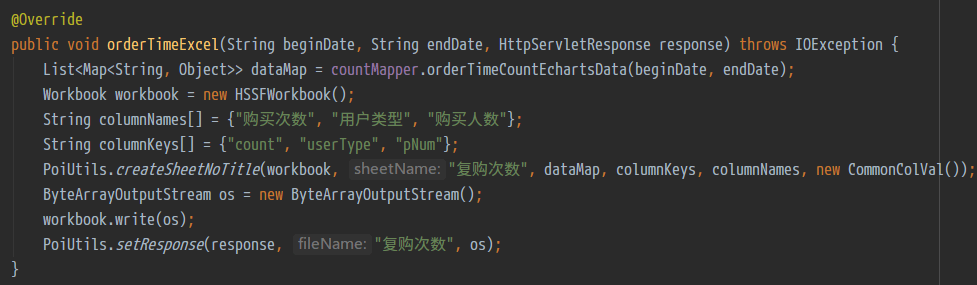
代码示例:
如何用poi生成导出excel的更多相关文章
- java使用poi生成导出Excel(新)
导出样式: java代码: import java.io.FileOutputStream; import java.io.IOException; import java.io.OutputStre ...
- Java利用POI导入导出Excel中的数据
首先谈一下今天发生的一件开心的事,本着一颗android的心我被分配到了PB组,身在曹营心在汉啊!好吧,今天要记录和分享的是Java利用POI导入导出Excel中的数据.下面POI包的下载地 ...
- POI通用导出Excel数据(包括样式设计)
前言 前一段时间我写过通用的导入Excel,前几天也写了导出pdf格式的,还有我之前搞得导出Word,我在之前的博客也都介绍了导出和导入是一个道理,无非是一个获取一个是赋值.昨天有一位同仁看了我的Ex ...
- POI导入导出Excel(HSSF格式,User Model方式)
1.POI说明 Apache POI是Apache软件基金会的开源代码库, POI提供对Microsoft Office格式档案读和写的功能. POI支持的格式: HSSF - 提供读写Microso ...
- Java POI导入导出Excel
1.异常java.lang.NoClassDefFoundError: org/apache/poi/UnsupportedFileFormatException 解决方法: 使用的poi的相关jar ...
- java中使用poi导入导出excel文件_并自定义日期格式
Apache POI项目的使命是创造和保持java API操纵各种文件格式基于Office Open XML标准(OOXML)和微软的OLE复合文档格式(OLE2)2.总之,你可以读写Excel文件使 ...
- SpringMvc 使用poi导入导出Excel
Util类 package com.common.util; public class ExportUtil { private XSSFWorkbook wb = null; private XSS ...
- springMVC中使用POI方式导出excel至客户端、服务器实例
Apache POI是Apache软件基金会的开放源码函式库,POI提供API给Java程序对Microsoft Office格式档案读和写的功能. 这里的方法支持导出excel至项目所在服务器,或导 ...
- springMVC框架+POI组件导出Excel
目的:访问url(http://localhost:8080/POIOutputExcel/outputexcel.do)实现excel导出,效果图如下: 文件目录(配置文件就不多说了,跟前面的随笔一 ...
随机推荐
- dp——完全背包(方案数)
Problem J. icebound 的商店Time limit: 1000msMemory limit: 65536KBDescriptionicebound 在得到神殿的宝藏之后,开了一家神秘的 ...
- 2分钟理解文件IO -我对文件IO的理解与实验对比
本文介绍了不同的IO方式以及他们之间的效率比较 1.一次读取写入单个字节(读取400M的文件浪费了很久,等了很久没读取完成,证明其效率很差) public class CopyFileDemo { p ...
- git 错误汇总
★一.git提交时报错:Updates were rejected because the tip of your current branch is behind 出现这样的问题是由于:自己当前版本 ...
- enumerate()使用
enumerate()使用 如果对一个列表,既要遍历索引又要遍历元素时,首先可以这样写: list1 = ["这", "是", "一个", ...
- 一个nginx服务器配置多站点
有时候你想在一台服务器上为不同的域名运行不同的站点.比如www.siteA.com作为博客,www.siteB.com作为论坛.你可以把两个域名的IP都解析到你的服务器上,但是没法在Nginx的根目录 ...
- phpmyadmin nginx设置
1,解压缩phpmyadmin4.2.8压缩包到/usr/local/phpMyAdmin 2,复制config.sample.inc.php为config.inc.php 3,修改nginx.con ...
- win7中安装mysql
这篇文章主要介绍了如何在win7中安装mysql,所以加上了MySQL的下载过程,希望对需要的人有所帮助大家都知道MySQL是一款中.小型关系型数据库管理系统,很具有实用性,对于我们学习很多技术都有帮 ...
- [综] meanshift算法
Meanshift,聚类算法 http://www.cnblogs.com/liqizhou/archive/2012/05/12/2497220.html 记得刚读研究生的时候,学习的第一个算法就是 ...
- DSP2812 启动详解
百度文库转载 1. 从0X3F FFC0处复位→执行0X3F FC00地址处的初始化引导函数(Initboot) →根据GPIO选择引导模式→确定用户程序入口地址→从入口处开始执行用户程序. 输入外部 ...
- inception 自动化sql审核
##概念: Inception是一款自动化运维的利器,有别与现在各个公司使用的方式,使用Inception,将会给DBA带来最大的便利性,将DBA从繁冗的工作中解放出来,做一些更多的自动化工作,或者从 ...