
Communication Model
【Communication Model】
EOSIO actions operate primarily in a message-based communication architecture. A client invokes actions by sending (pushing) messages to nodeos. This can be done using the cleos command. It can also be done using one of the EOSIO send methods (e.g., eosio::action::send).
nodeos dispatches action requests to the WASM code that implements a contract. That code runs in its entirety, then processing continues to the next action.
EOSIO supports two basic communication models, inline and deferred.
1、An operation to perform within the current transaction is an example of an inline action,
2、while a triggered future transaction is an example of a deferred action.
Communication among contracts should be considered as occurring asynchronously.
1、Inline Communication
Inline actions operate with the same scopes and authorities of the original transaction, and are guaranteed to execute with the current transaction.
These can effectively be thought of as nested transactions within the calling transaction. If any part of the transaction fails, the inline actions will unwind with the rest of the transaction. Calling the inline action generates no notification outside the scope of the transaction, regardless of success or failure.
2、Deferred Communication
Deferred actions get scheduled to run, at best, at a later time, at the producer's discretion. There is no guarantee that a deferred action will be executed.
The transaction that creates the deferred transaction, it can only determine whether the create request was submitted successfully or whether it failed (if it fails, it will fail immediately).
【Transactions VS. Actions】
An action represents a single operation, whereas a transaction is a collection of one or more actions. 交易是 actions 的集合。
A contract and an account communicate in the form of actions.
Transaction with one action:
{

  "expiration": "2018-04-01T15:20:44",

  "region": ,

  "ref_block_num": ,

  "ref_block_prefix": ,

  "net_usage_words": ,

  "kcpu_usage": ,

  "delay_sec": ,

  "context_free_actions": [],

  "actions": [{

      "account": "eosio.token",

      "name": "issue",

      "authorization": [{

          "actor": "eosio",

          "permission": "active"

        }

      ],

      "data": "00000000007015d640420f000000000004454f5300000000046d656d6f"

    }

  ],

  "signatures": [

    ""

  ],

  "context_free_data": []

}
Transaction with multiple actions, these actions must all succeed or the transaction will fail:
{

  "expiration": "...",

  "region": ,

  "ref_block_num": ...,

  "ref_block_prefix": ...,

  "net_usage_words": ..,

  "kcpu_usage": ..,

  "delay_sec": ,

  "context_free_actions": [],

  "actions": [{

      "account": "...",

      "name": "...",

      "authorization": [{

          "actor": "...",

          "permission": "..."

        }

      ],

      "data": "..."

    }, {

      "account": "...",

      "name": "...",

      "authorization": [{

          "actor": "...",

          "permission": "..."

        }

      ],

      "data": "..."

    }

  ],

  "signatures": [

    ""

  ],

  "context_free_data": []

}
Action Name Restrictions
Action types are actually base32 encoded 64-bit integers. This means they are limited to the characters a-z, 1-5, and '.' for the first 12 characters. If there is a 13th character then it is restricted to the first 16 characters ('.' and a-p).
Transaction Limitations
Every transaction must execute in 30ms or less. If a transaction contains several actions, and the sum of these actions is greater than 30ms.
【Action Handlers and Action "Apply" Context】
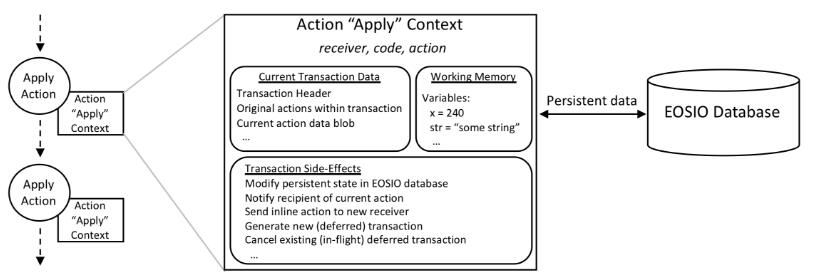
Actions operate within transactions; if a transaction fails, the results of all actions in the transaction must be rolled back.
An action can have many side effects. Among these are:
- Change state persisted in the EOSIO persistent storage
- Notify the recipient of the current transaction
- Send inline action requests to a new receiver
- Generate new (deferred) transactions
- Cancel existing (in-flight) deferred transactions (i.e., cancel already-submitted deferred transaction requests)
参考:
1、https://developers.eos.io/eosio-cpp/docs/communication-model
Communication Model的更多相关文章
- Peer-to-Peer (P2P) communication across middleboxes
Internet Draft B. FordDocument: draft-ford-midcom- ...
- Microsoft.AspNet.SignalR 2.2
Nuget :http://www.nuget.org/packages/Microsoft.AspNet.SignalR/ What is SignalR? ASP.NET SignalR is a ...
- Java性能提示(全)
http://www.onjava.com/pub/a/onjava/2001/05/30/optimization.htmlComparing the performance of LinkedLi ...
- Introduction to SignalR -摘自网络
What is SignalR? ASP.NET SignalR is a library for ASP.NET developers that simplifies the process of ...
- RFC Transactional RFC (tRFC) queue RFC(qRFC) 概念
Transactional RFC When using transactional RFC (tRFC), the called function module is executed exactl ...
- ARVE: Augmented Reality Applications in Vehicle to Edge Networks
ARVE:车辆到边缘网中的增强现实应用 本文为SIGCOMM 2018 Workshop (Mobile Edge Communications, MECOMM)论文. 笔者翻译了该论文.由于时间仓促 ...
- [dev][ipsec] netlink是什么
介绍: https://www.linuxjournal.com/article/7356 大纲: man手册 http://man7.org/linux/man-pages/man7/netlink ...
- HP-Socket v3.2.2
==========================================================================================v3.2.2 upg ...
- OPENVPN2.3配置文档官方说明
openvpn Section: Maintenance Commands (8)Index NAME openvpn - secure IP tunnel daemon. SYNOPSIS open ...
随机推荐
- SQLI DUMB SERIES-9&&10
第五关.第八关以及第九关.第十关都是使用盲注,除了第五关说的双注入外,也可使用时间注入法 (1)无论输入啥,都回显相同 (2) ?id=1' and sleep(3) --+ 发现有明显延迟,说明可以 ...
- Flume架构以及应用介绍
在具体介绍本文内容之前,先给大家看一下Hadoop业务的整体开发流程: 从Hadoop的业务开发流程图中可以看出,在大数据的业务处理过程中,对于数据的采集是十分重要的一步,也是不可避免的一步,从而引 ...
- 1,python 的基本数据类型
Python3 中有6个标准的数据类型:Number(数字);字符串(String);列表(list);元组(Tuple);字典:(Dict);集合(Sets) Number: 数字 int整形 fl ...
- PythonStudy——函数默认值
# 如果函数的默认参数的默认值为变量,在所属函数定义阶段一执行就被确定为当时变量存放的值 a = 100 def fn(num=a): a = 200 fn() 输出: 100 也就是说在函数调用的时 ...
- PythonStudy——逻辑运算符 Logical Operators
在Python中,None.任何数值类型中的0.空字符串“”.空元组().空列表[].空字典{}都被当作False,还有自定义类型,如果实现了 __ nonzero __ () 或 __ len __ ...
- laravel 路由分組
laravel 路由分組 Route::group(['prefix' => 'admin'], function () { $namespacePrefix="\\App\\Http ...
- Linux which命令详解
Linux which命令 Linux which命令用于查找文件. which指令会在环境变量$PATH设置的目录里查找符合条件的文件 用法: which [options] [--] COMMAN ...
- C++Primer第五版——习题答案详解(八)
习题答案目录:https://www.cnblogs.com/Mered1th/p/10485695.html 第9章 顺序容器 练习9.1 a.list,需要按字典序插入,可能插入位置在中间 b.d ...
- 转的,具体 https://www.cnblogs.com/icyJ/p/FreeShare.html
网络资源下载网址 屏幕录像.图像处理,汉化和破解版本很新.国内破解汉化:大眼仔旭 http://www.dayanzai.me/ 开发工具,系统,数据库 http://msdn.itellyou.cn ...
- 应用程序与驱动程序通信 DeviceIoControl
之前写过一篇关于通过DeviceIoControl函数来使应用程序与驱动程序通信的博客,这次再通过这个完整的代码来简要疏通总结一下. 这种通信方式,就是驱动程序和应用程序自定义一种IO控制码,然后调用 ...