
Struts 2.5.20 在Eclipse IDE中的配置和开发实例
零、参考博客
1、Struts框架入门教程
2、Struts 2.5.10.1配置
4、Struts2.5+eclipse+tomcat8.5配置
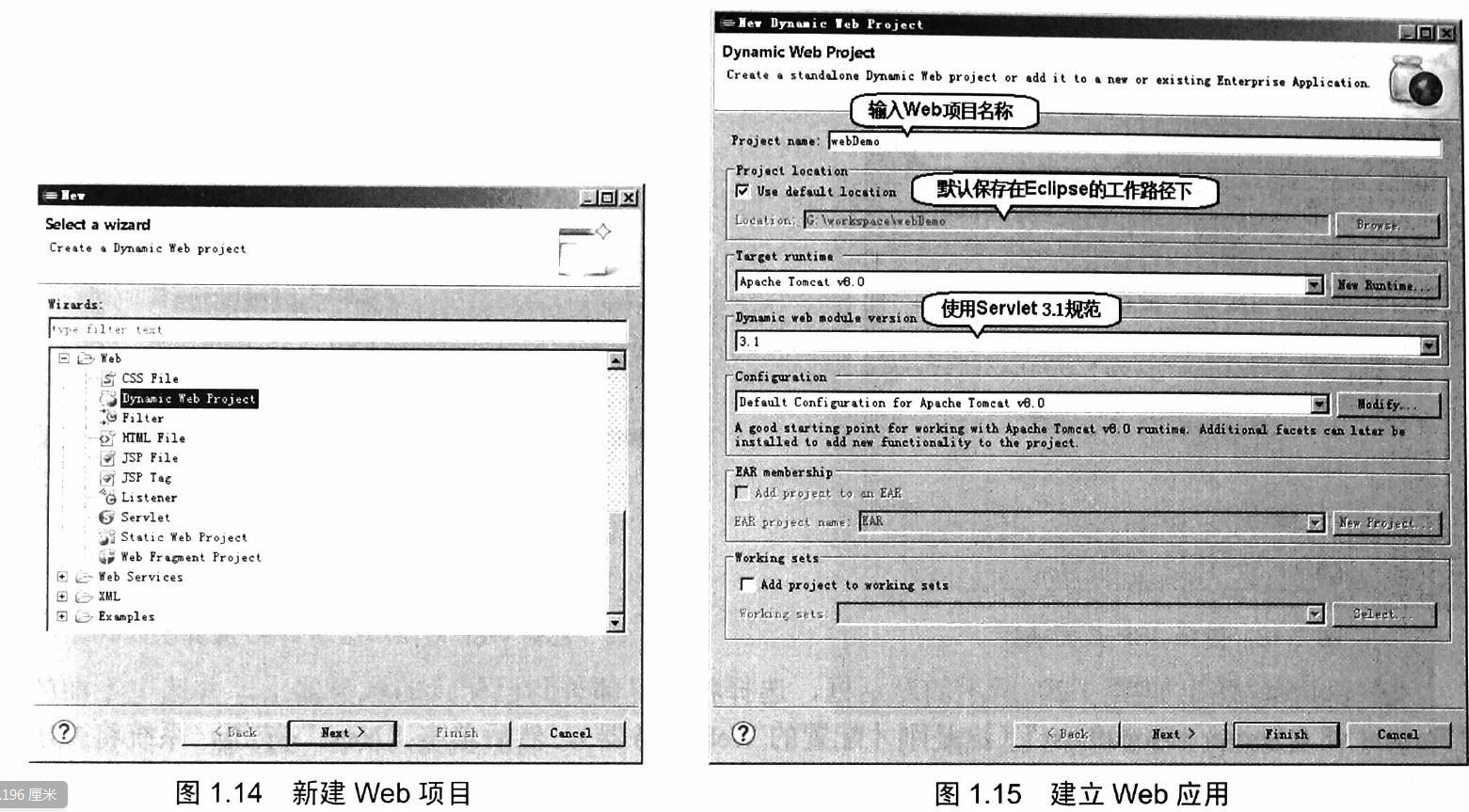
一、创建web工程
老套路,如下所示:



二、下载Struts 2.5.20 jar
1、https://struts.apache.org/download.cgi#struts2520
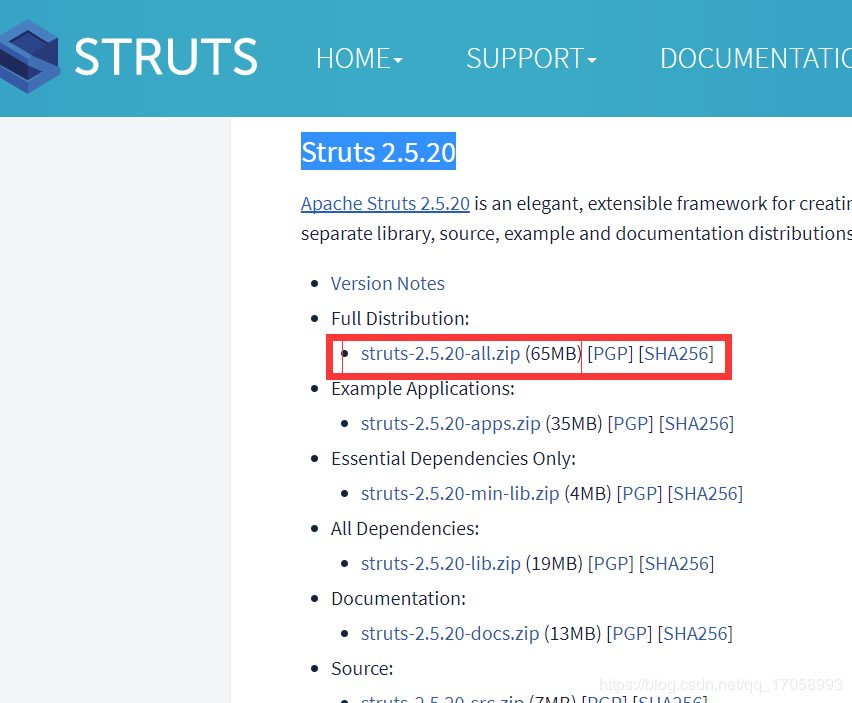
2、从struts-2.5.20-all\struts-2.5.20\lib 中找到下面几个jar,添加到web工程的lib中,(不要将.jar包全部都添加进去,都添进去反而报错)
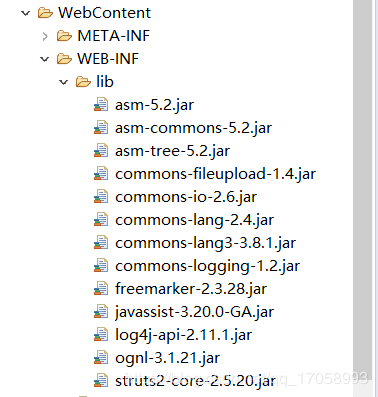
附注:与Struts2.3比起来少了一个xwork-core-2.3.34.jar,多了一个log4j-api-2.7.jar。这是因为xwork-core-2.3.34.jar已经整合到Struts2-core中了,如果没有导入log4j-api-2.7jar的话,在web.xml和struts.xml都配置正确的情况下,会报出以下的错误:

三、新建 action类:HelloWorldAction.java
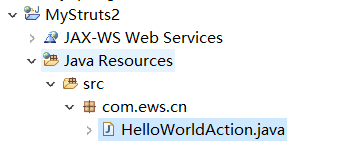
package com.ews.cn;

public class HelloWorldAction {

    private String name;

    public String execute() throws Exception {

        System.out.println("getName:" + getName());

        if (getName().equals("") || getName() == null) {

            return "error";

        } else {

            return "success";

        }

    }

    public String getName() {

        return name;

    }

    public void setName(String name) {

        this.name = name;

    }

}
四、新建 struts.xml
方法是:选中项目——右键——新建——其他,在搜索框内输入xml,然后选择: (注意一定要将该xml文件命名为:struts.xml,不能出错。)
但是在新生成的xml文档中只有版本信息,因此还需要将以下内容复制到xml文档中。
<!DOCTYPE struts PUBLIC

        "-//Apache Software Foundation//DTD Struts Configuration 2.5//EN"

        "http://struts.apache.org/dtds/struts-2.5.dtd">
这样eclipse才会出现提示。以上需要复制的内容可以从Struts目录下打开apps文件夹,其中有两个war包,随便其中一个war包解压出来,依次打开WEB-INF——src找到里面的Struts.xml就可以找到上面的这段话。
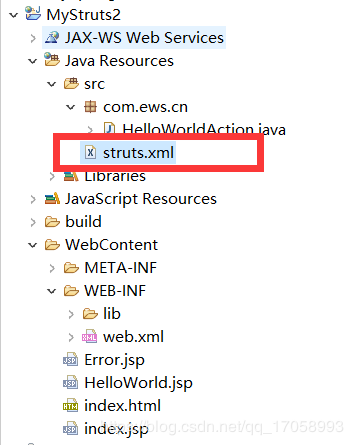
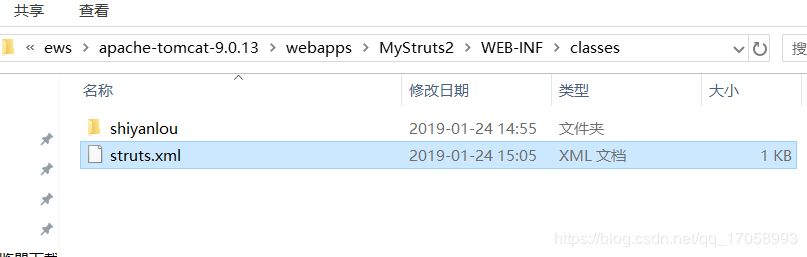
1、查看 struts-2.5.20\apps\WEB-INF\classes 里找到 struts.xml,为了让其在tomact的 classes中生成,必须放倒工程的src下面,不然找不到action。
2、对struts.xml进行修改:
<?xml version="1.0" encoding="UTF-8"?>

<!DOCTYPE struts PUBLIC

"-//Apache Software Foundation//DTD Struts Configuration 2.5//EN"

"http://struts.apache.org/dtds/struts-2.5.dtd">

<struts>

<constant name="struts.enable.DynamicMethodInvocation"

value="true" />

<package name="com.ews.cn" extends="struts-default">

<!-- <global-allowed-methods>add, update</global-allowed-methods> -->

<action name="hello" class="com.ews.cn.HelloWorldAction" method="execute">

<result name="success">/HelloWorld.jsp</result>

<result name="error">/Error.jsp</result>

</action>

</package>

</struts>
五、修改 web.xml,配置 struts 过滤器
<?xml version="1.0" encoding="UTF-8"?>

<web-app xmlns:xsi="http://www.w3.org/2001/XMLSchema-instance"

xmlns="http://java.sun.com/xml/ns/javaee"

xmlns:web="http://java.sun.com/xml/ns/javaee/web-app_2_5.xsd"

xsi:schemaLocation="http://java.sun.com/xml/ns/javaee http://java.sun.com/xml/ns/javaee/web-app_3_0.xsd"

id="WebApp_ID" version="3.0">

<display-name>HelloWorldStruts2</display-name>

<welcome-file-list>

<welcome-file>index.html</welcome-file>

<welcome-file>index.jsp</welcome-file>

</welcome-file-list>

<filter>

<filter-name>struts2</filter-name>

<filter-class>

org.apache.struts2.dispatcher.filter.StrutsPrepareAndExecuteFilter

</filter-class>

</filter>

<filter-mapping>

<filter-name>struts2</filter-name>

<url-pattern>/*</url-pattern>

</filter-mapping>

</web-app>
注意:
struts2.5 中的是 org.apache.struts2.dispatcher.filter.StrutsPrepareAndExecuteFilter , 而不是 org.apache.struts2.dispatcher.ng.filter.StrutsPrepareAndExecuteFilter
六、分别创建三个页面
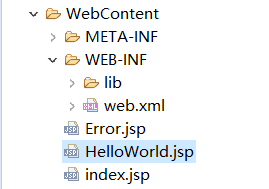
1、index.jsp
<%@ page language="java" contentType="text/html; charset=UTF-8"

pageEncoding="UTF-8"%>

<%@ taglib uri="/struts-tags" prefix="s"%>

<!DOCTYPE html PUBLIC "-//W3C//DTD HTML 4.01 Transitional//EN" "http://www.w3.org/TR/html4/loose.dtd">

<html>

<head>

<meta http-equiv="Content-Type" content="text/html; charset=UTF-8">

<title>Insert title here</title>

</head>

<body>

<h1>Hello World Struts2</h1>

<form action="hello">

<label for="name">Please enter your name</label><br/>

<input type="text" name="name"/>

<input type="submit" value="Enter"/>

</form>

</body>

</html>
2、HelloWorld.jsp
<s:property value="name"/> 需要引入标签 <%@ taglib uri="/struts-tags" prefix="s"%>

<%@ page language="java" contentType="text/html; charset=UTF-8"

pageEncoding="UTF-8"%>

<%@ taglib uri="/struts-tags" prefix="s"%>

<!DOCTYPE html PUBLIC "-//W3C//DTD HTML 4.01 Transitional//EN" "http://www.w3.org/TR/html4/loose.dtd">

<html>

<head>

<meta http-equiv="Content-Type" content="text/html; charset=UTF-8">

<title>Insert title here</title>

</head>

<body>

Hello World, Welcome! <s:property value="name"/>

</body>

</html>
3、Error.jsp
<%@ page language="java" contentType="text/html; charset=UTF-8"

pageEncoding="UTF-8"%>

<%@ taglib uri="/struts-tags" prefix="s"%>

<!DOCTYPE html PUBLIC "-//W3C//DTD HTML 4.01 Transitional//EN" "http://www.w3.org/TR/html4/loose.dtd">

<html>

<head>

<meta http-equiv="Content-Type" content="text/html; charset=UTF-8">

<title>Insert title here</title>

</head>

<body>

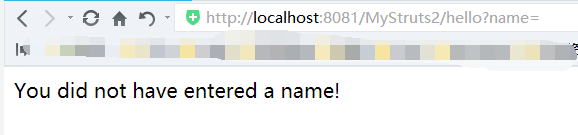
You did not have entered a name!

</body>

</html>
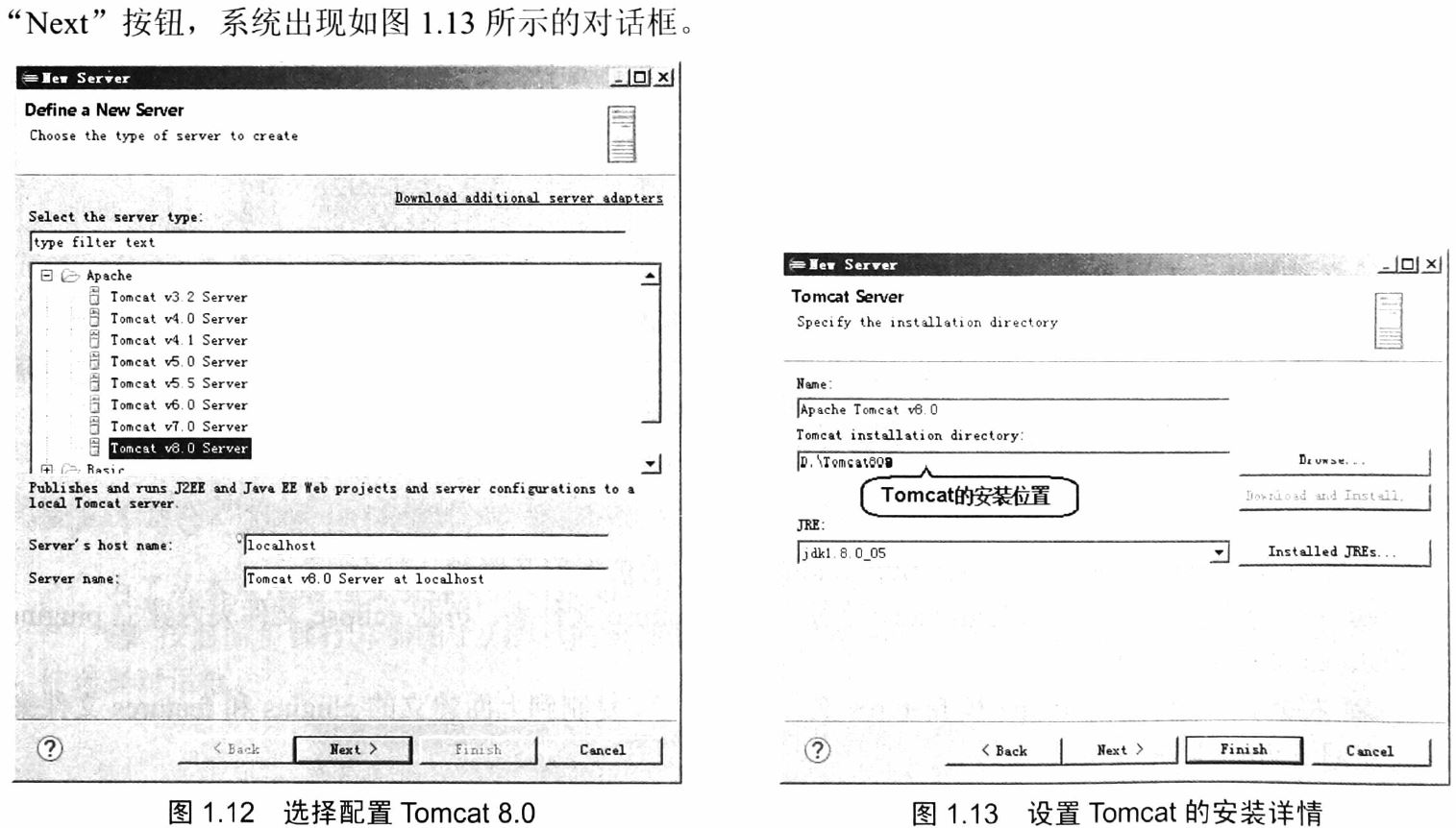
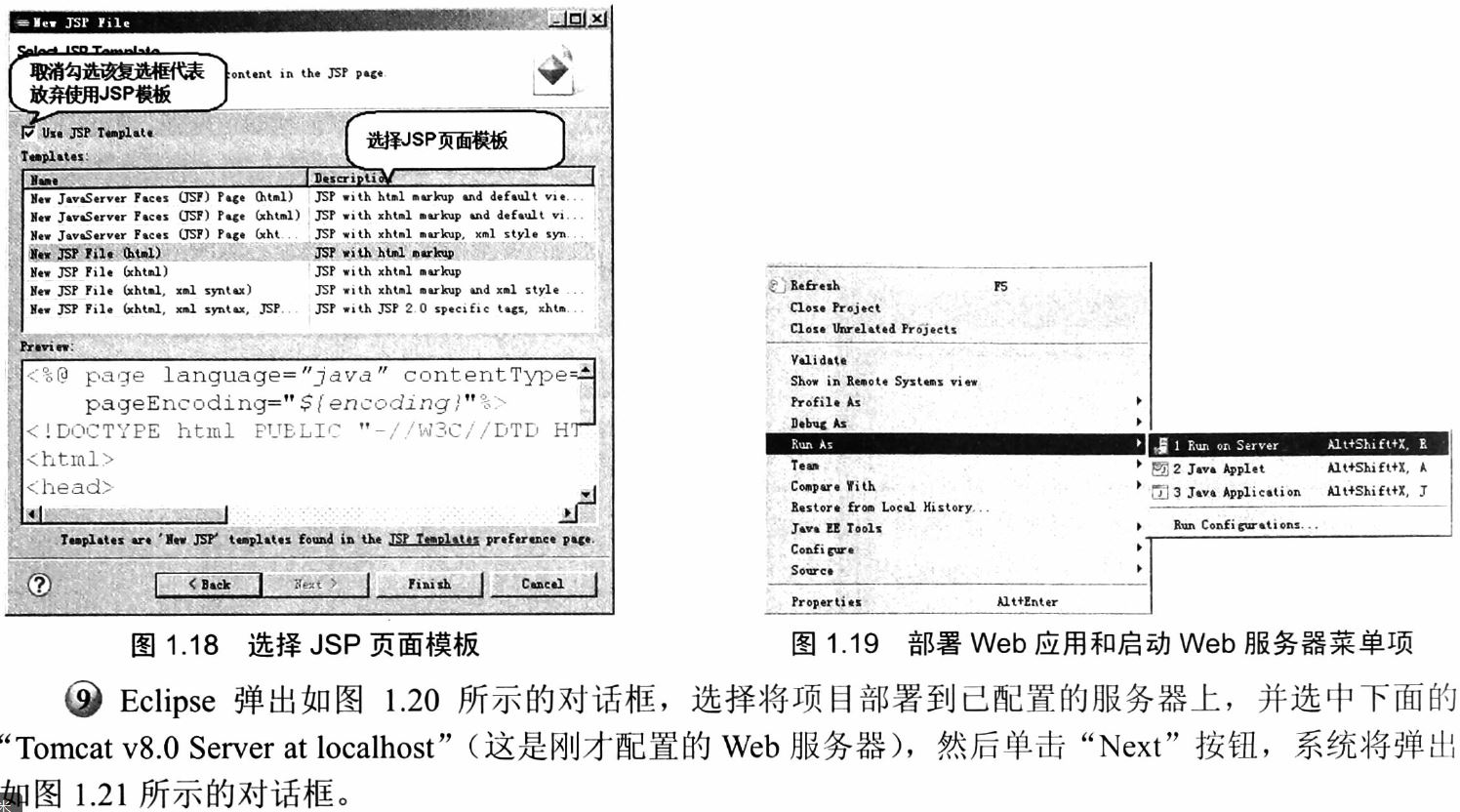
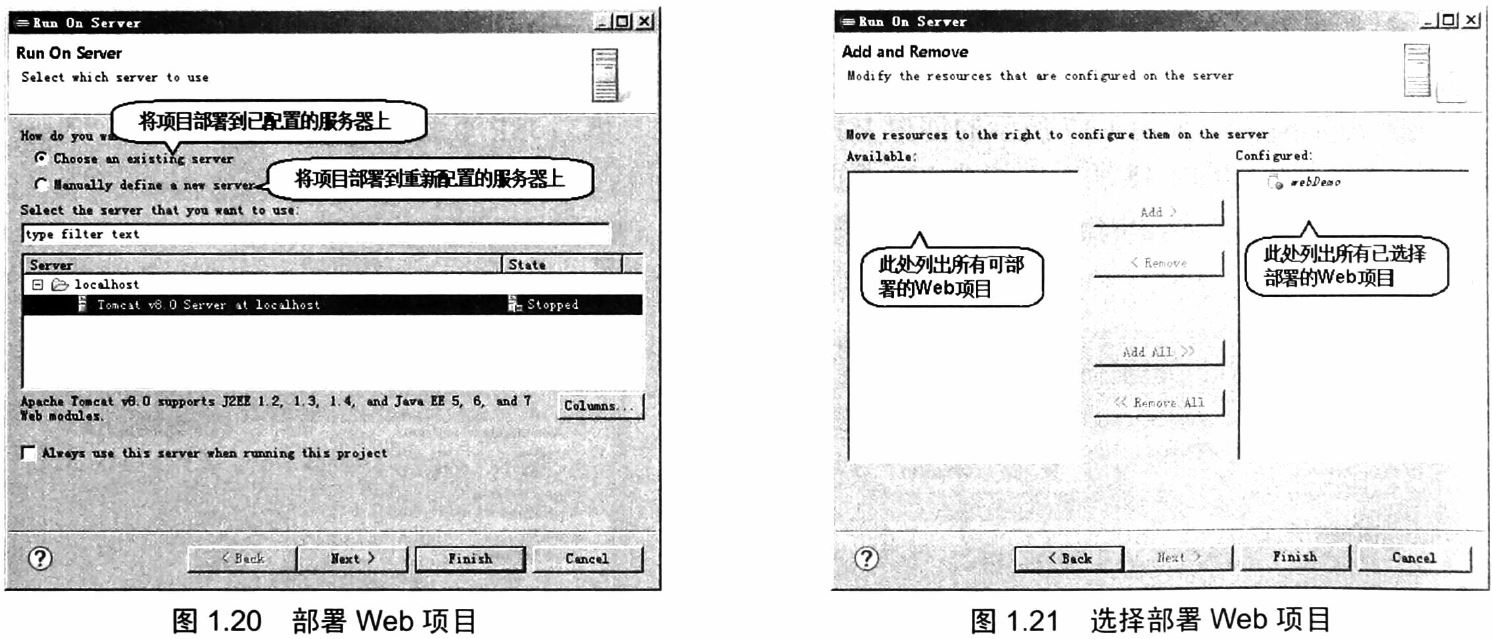
七、将Web应用部署到Apache Tomcat服务器上




八、测试
访问:http://localhost:8081/MyStruts2/index.jsp
1、正常输入name


2、name为空

Struts 2.5.20 在Eclipse IDE中的配置和开发实例的更多相关文章
- 方案:在Eclipse IDE 中搭建Python开发环境
Eclipse是一款功能强大的IDE,Python是一种功能强大的计算机语言,但是Python的IDE环境确实很缺乏,如果在强大的Eclipse中添加Python开发环境,那样就很完美了. 在这里,我 ...
- 【eclipse插件开发实战】 Eclipse插件开发5——时间插件Timer开发实例详解
Eclipse插件开发5--时间插件Timer开发实例详解 这里做的TimeHelper插件设定为在菜单栏.工具栏提供快捷方式,需要在相应地方设置扩展点,最后弹出窗体显示时间. 在上一篇文章里创建好了 ...
- eclipse ide for java ee developers 开发环境搭建(j2ee)
转载自:http://www.iteye.com/topic/982182 真的是一片很不错的文章啊! 使用eclipse真的有年头了,相信java程序员没有不知道它的,最近在给团队中新来的应届生做指 ...
- [转贴]Eclipse IDE for c++配置
从工作到现在已经有快一年多没用过C/C++了,现在想重新捡起来,但是以前一直是在windows下面进行开发,使用最多的是Eclipse和Myeclipse,因为这些都是开源的软件,并不收费,所以现在也 ...
- eclipse ide for java ee developers 开发环境搭建(J2EE) 【转载】
使用eclipse真的有年头了,相信java程序员没有不知道它的,最近在给团队中新来的应届生做指导,专门讲解了一下Eclipse开发环境的搭建过程, 一是帮助他们尽快的熟悉IDE的使用,二也是保证团队 ...
- 于Eclipse传导C/C++配置方法开发(20140721新)
Eclipse 它是一个开源.基于Java可扩展的开发平台. 在其自己的.它只是一个框架和一组服务.对于通过插件组件构建开发环境. --从百度百科的短语. 简单的说Eclipse 是免费的开源的Jav ...
- Eclipse安装Hadoop插件配置Hadoop开发环境
一.编译Hadoop插件 首先需要编译Hadoop 插件:hadoop-eclipse-plugin-2.6.0.jar,然后才可以安装使用. 第三方的编译教程:https://github.com/ ...
- Eclipse IDE for C/C++ Developers和MinGW安装配置C/C++开发学习环境详解
Eclipse IDE for C/C++ Developers和MinGW安装配置C/C++开发学习环境详解 操作系统:Windows 7 JDK版本:1.6.0_33 Eclipse版本:Juno ...
- 如何创建支持Eclipse IDE的Maven项目
使用Maven创建的项目是不支持任何IDE的,不能导入IDE中,因为项目格式都不符合特定IDE的格式要求,那么如何创建符合IDE要求的项目呢? 1.使用mvn eclipse:eclipse 命令把项 ...
随机推荐
- CSS--使用伪选择器制作箭头图标
// 使用Transform的属性,组合translate(位移)和rotate(旋转),将生成的小矩形组合成各种箭头样式: HTML <section class="main&quo ...
- Python全栈学习_day005知识点
今日内容大纲: . 字典的增删改查以及其他操作 . 字典的嵌套 . 字典的增删改查以及其他操作 , 'sex': '男'}, 'name_list': ['无双', 'alex', 'BlameK'] ...
- polyfill-eventsource added missing EventSource to window ie浏览器 解决方案
今天遇到一个 ie浏览器显示空白,报错内容是: polyfill-eventsource added missing EventSource to window的问题, import 'babel-p ...
- 创建一个背景为蓝色的pygame窗口
import sys import pygame def creat_screen(): #初始化pygame pygame.init() #设置窗口大小并保存在screen对象中 screen = ...
- php curl中x-www-form-urlencoded与multipart/form-data 方式 Post 提交数据详解
multipart/form-data 方式 post的curl库,模拟post提交的时候,默认的方式 multipart/form-data ,这个算是post提交的几个基础的实现方式. $post ...
- 用animate改变了某个样式之后再用css控制会无效
我前几天写了个移动端运动,(这个运动的代码我贴在这了:http://www.cnblogs.com/weiman/p/6600380.html)然后发现了这个问题,具体如下: 未运动前是这样的,菜单栏 ...
- 教你如何使用云服务器去搭建SS
注册云服务器 (首先推荐Vultr,注册链接:https://www.vultr.com/?ref=6962741,其他云服务商如阿里云HK,Linode等亦可使用,按需选择) 这里拿Vultr举例: ...
- loadrunner 脚本优化-关联设置
脚本优化-关联设置 by:授客 QQ:1033553122 关联的原理 关联也属于一钟特殊的参数化.一般参数化的参数来源于一个文件.一个定义的table.通过sql写的一个结果集等,但关联所获得的参数 ...
- 利用RSACryptoServiceProvider进行RSA加密解密
前言: 本文只介绍How to use,对于加密算法的研究不予讨论. 关于私钥的存储,微软给的建议是使用windows自带的秘钥容器,相见文档. 为了直观看到私钥和公钥,本文直接将其存入XML文件中. ...
- EntityFramework Code-First 简易教程(十一)-------从已存在的数据库中映射出表
怎样从一个已存在的数据库中映射表到 entity 实体? Entity Framework 提供了一个简便方法,可以为已存在的数据库里的所有表和视图创建实体类(entity class),并且可以用 ...