
SSM_CRUD新手练习(8)搭建BootStrap分页页面
经过Spring单元测试模拟请求,我们能够成功的取出数据,接下来,我们就开始写用来显示查询数据的分页页面吧。

我们使用Bootstrap来帮助我们快速开发漂亮的页面,具体怎么用可以查看Bootstrap中文官方文档 https://v3.bootcss.com/getting-started/
1.把下载的Bootstrap压缩包解压到static文件夹。
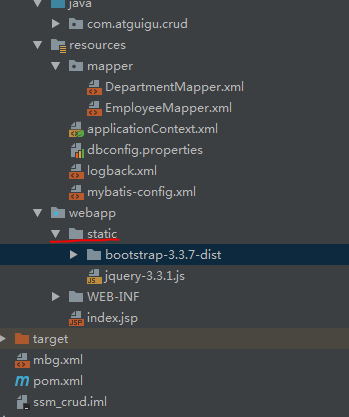
2.在views文件夹下创建list.jsp分页页面。
Bootstrap官方文档给出了一个简单引用的基本模板,我们可以看一下。

不难看出我们需要引入三个插件,而Bootstrap依赖jQuery插件,所以我们需要自己去下载jQuery插件,这里我直接在官网下载的最新的http://jquery.com/download/。
然后在<head>标签内引用插件。
list.jsp
<%@ page contentType="text/html;charset=UTF-8" language="java" %>
<%@page import="java.util.*" %>
<html> <head>
<!-- 不以/开头的相对路径,寻找资源,以当前资源的路径为标准,经常容易出问题-->
<!-- 以/开始的相对路径,寻找资源,以服务器的路径为基准(http://localhost:3306),需要加上项目名才能找到 -->
<meta http-equiv="content-Type" content="text/html; charset=UTF-8"><!-- 设定页面使用的字符集。 -->
<link href="${pageContext.request.contextPath}/static/bootstrap-3.3.7-dist/css/bootstrap.min.css" rel="stylesheet">
<script src="${pageContext.request.contextPath}/static/bootstrap-3.3.7-dist/jquery-3.3.1.js"> </script>
<script src="${pageContext.request.contextPath}/static/bootstrap-3.3.7-dist/js/bootstrap.min.js"></script>
<title>SSM简单的增删改查</title>
</head>
<body>
<div class="container">
<!--标题 -->
<div class="row">
<div class="col-md-12">
<h2>SSM_CRUD</h2>
</div>
</div>
<!-- 按钮-->
<div class="row">
<div class="col-md-4 col-md-offset-8">
<button class="btn-primary btn-sm">新增</button>
<button class="btn-danger btn-sm">删除</button>
</div>
</div>
<!--显示表格数据 -->
<div class="row">
<div class="col-md-12">
<table class=" table table-hover">
<tr>
<th>#</th>
<th>empId</th>
<th>gender</th>
<th>email</th>
<th>操作</th>
</tr>
<tr>
<th>1</th>
<th>1012</th>
<th>男</th>
<th>2121.com</th>
<th>
<button class="btn-primary btn-sm"><span class="glyphicon glyphicon-pencil" aria-hidden="true"></span>编辑</button>
<button class="btn-danger btn-sm "><span class="glyphicon glyphicon-trash" aria-hidden="true"></span>删除</button>
</th>
</tr>
</table> </div>
</div> <!-- 显示分页信息-->
<div class="row">
<!-- 分页信息-->
<div class="col-md-6"></div>
<!-- 分页条-->
<div class="col-md-6">
<nav aria-label="Page navigation">
<ul class="pagination">
<li><a href="#">首页</a></li>
<li>
<a href="#" aria-label="Previous">
<span aria-hidden="true">«</span>
</a>
</li>
<li><a href="#">1</a></li>
<li><a href="#">2</a></li>
<li><a href="#">3</a></li>
<li><a href="#">4</a></li>
<li><a href="#">5</a></li>
<li>
<a href="#" aria-label="Next">
<span aria-hidden="true">»</span>
</a>
</li>
<li><a href="#">末页</a></li>
</ul>
</nav>
</div> </div> </div>
</body>
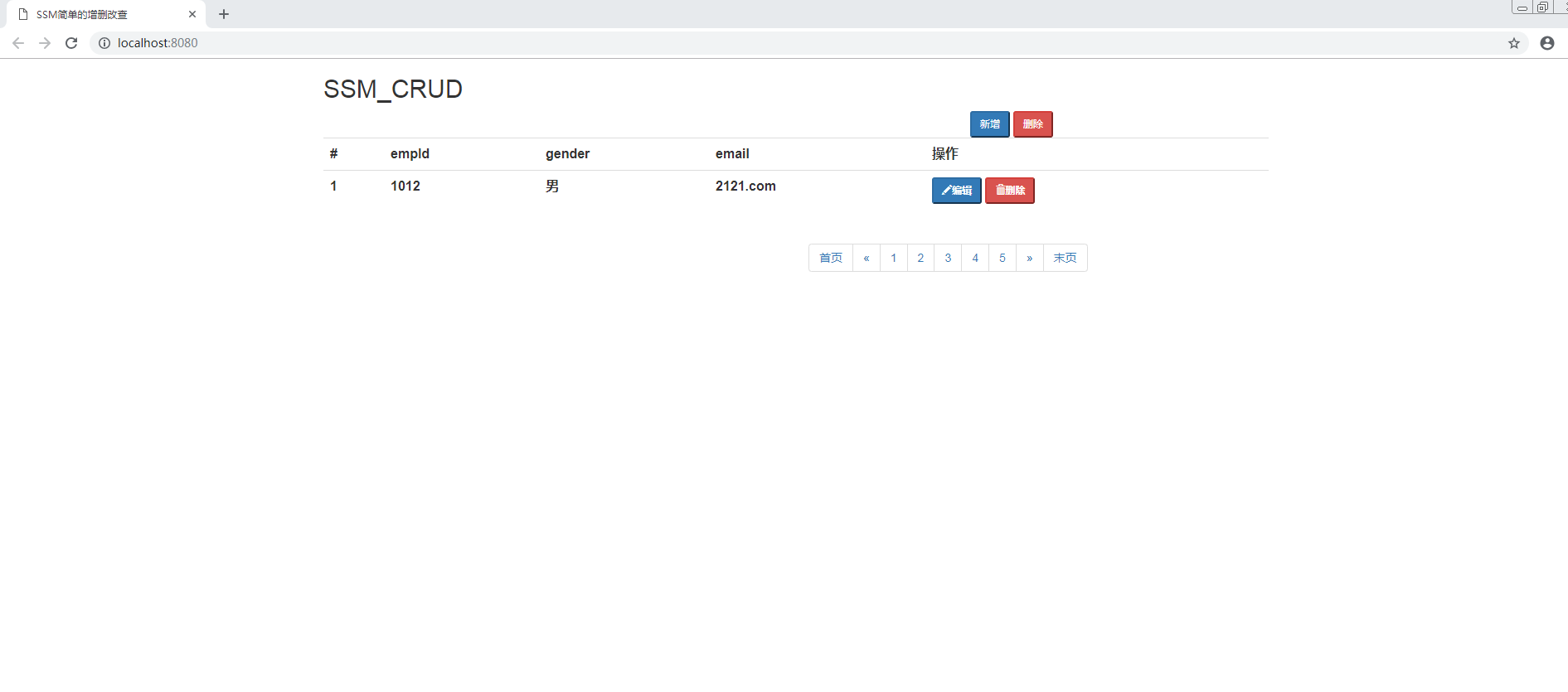
3.结果
SSM_CRUD新手练习(8)搭建BootStrap分页页面的更多相关文章
- SSM_CRUD新手练习(6)分页后台控制器编写
经过测试基础环境已经搭建好了,现在我们开始编写CRUD. 我们来看一下查询的逻辑该怎么写: 1.访问index.jsp页面 2.index.jsp页面发送查询员工的请求 3.EmployeeContr ...
- bootstrap 分页
1.背景: 前端页面使用bootstrap分页,同时与搜索条件联动: 2. jsp页面由服务端返回后, 异步请求动态创建表格, 分页的数据由服务端第一次返回后初始化, 以后每次异步请求再更新. jsp ...
- Bootstrap 分页插件 ajax获取数据显示
Bootstrap 分页插件 ajax获取数据显示 标签(空格分隔): bootstrap 文章的内容是使用bootstrap-paginator进行分页,使用ajax获取后台数据.渲染. 1. 版本 ...
- 面向新手的Webserver搭建(一)——IIS的搭建
非常多童鞋说自己是做移动开发的,想挂个简单的Web API,但是server又不会搭,这样一来測试就成了问题.看看网上的教程.发现略难懂,并且大多是一个转一个,没价值,所以干脆写几篇文章讲讲简单的We ...
- bootstrap分页插件的使用
项目中需要实现文章列表的分页显示,由于使用了bootstrap框架,所以我们选择bootstrap的分页实现方法.网上有一些这方面的介绍文章,并且也有相关的示例程序.这里结合我们的项目,介绍一下使用b ...
- yii使用bootstrap分页样式
Bootstrap是Twitter推出的一个开源的用于前端开发的工具包.它由Twitter的设计师Mark Otto和Jacob Thornton合作开发,是一个CSS/HTML框架.Bootstra ...
- bootstrap分页
使用bootstrap分页插件,如下代码是html代码 <title>分页</title> <link href="page/bootstrap-3.3.5-d ...
- bootstrap 分页样式代码
bootstrap 分页样式代码,废话不多说,直接上源码 <!DOCTYPE html> <html> <head> <title>Bootstrap ...
- bootstrap 基本页面元素,代码,列表
bootstrap 基本页面元素,代码,列表 <!DOCTYPE html> <html> <head> <title></title> & ...
随机推荐
- git 在本地拉取远程分支的代码(并不做提交操作)
1. git fetch 获取远程的所有分支 2. 在执行 git checkout -b local-branch-name origin/remote-branch 就可以将远程分支remote ...
- 删除已经提交到远程仓库的gitignore文件
亲们支持我的新博客哦==>地址(以后更新会尽量在新博客更新,欢迎大家访问加入我的后宫w) ) gitignore里新添加了需要过滤的文件,但是之前已经提交到了远程分支 解决方法: # 1.为避免 ...
- Maven CXF wsdl2Java String生成JAXBElement<Xxx> 解决方法
添加要bindingFile的jaxb配置文件,如下: <jaxb:bindings version="2.1" xmlns:jaxb="http://java.s ...
- 06python上
product_list=[ ('Mac',9000), ('kindle',800), ('tesla',900000), ('python book',105), ('bike',2000), ] ...
- python变量、注释、程序交互、格式化输入、基本运算符
变量 ...
- ajax用FormData方式提交
<!DOCTYPE html> <html lang="en"> <head> <meta charset="UTF-8&quo ...
- c#随机生成英文名
private static string GenerateSurname() { string name = string.Empty; string[] currentConson ...
- Linux网络编程学习计划
由于网络编程是很重要的一块,自己这一块也比较欠缺,只知道一些皮毛,从今天开始系统学习<Linux网络编程>一书,全书分为十四个章节: 第一章 概论 P1-16 第二章 UNIX ...
- 基于PaddlePaddle的语义匹配模型DAM,让聊天机器人实现完美回复 |
来源商业新知网,原标题:让聊天机器人完美回复 | 基于PaddlePaddle的语义匹配模型DAM 语义匹配 语义匹配是NLP的一项重要应用.无论是问答系统.对话系统还是智能客服,都可以认为是问题和回 ...
- 干货|技术小白如何在45分钟内发行通证(TOKEN)并上线交易(附流程代码
https://blog.csdn.net/HiBlock/article/details/80071478