
nginx linux 下开机自动启动
这里使用的是编写shell脚本的方式来处理
vi /etc/init.d/nginx (输入下面的代码)
#!/bin/bash
# nginx Startup script for the Nginx HTTP Server
# it is v.0.0.2 version.
# chkconfig: - 85 15
# description: Nginx is a high-performance web and proxy server.
# It has a lot of features, but it's not for everyone.
# processname: nginx
# pidfile: /var/run/nginx.pid
# config: /usr/local/nginx/conf/nginx.conf
nginxd=/usr/local/nginx/sbin/nginx
nginx_config=/usr/local/nginx/conf/nginx.conf
nginx_pid=/var/run/nginx.pid
RETVAL=0
prog="nginx"
# Source function library.
. /etc/rc.d/init.d/functions
# Source networking configuration.
. /etc/sysconfig/network
# Check that networking is up.
[ ${NETWORKING} = "no" ] && exit 0
[ -x $nginxd ] || exit 0
# Start nginx daemons functions.
start() {
if [ -e $nginx_pid ];then
echo "nginx already running...."
exit 1
fi
echo -n $"Starting $prog: "
daemon $nginxd -c ${nginx_config}
RETVAL=$?
echo
[ $RETVAL = 0 ] && touch /var/lock/subsys/nginx
return $RETVAL
}
# Stop nginx daemons functions.
stop() {
echo -n $"Stopping $prog: "
killproc $nginxd
RETVAL=$?
echo
[ $RETVAL = 0 ] && rm -f /var/lock/subsys/nginx /var/run/nginx.pid
}
# reload nginx service functions.
reload() {
echo -n $"Reloading $prog: "
#kill -HUP `cat ${nginx_pid}`
killproc $nginxd -HUP
RETVAL=$?
echo
}
# See how we were called.
case "$1" in
start)
start
;;
stop)
stop
;;
reload)
reload
;;
restart)
stop
start
;;
status)
status $prog
RETVAL=$?
;;
*)
echo $"Usage: $prog {start|stop|restart|reload|status|help}"
exit 1
esac
exit $RETVAL
:wq 保存并退出
设置文件的访问权限
chmod a+x /etc/init.d/nginx (a+x ==> all user can execute 所有用户可执行)
这样在控制台就很容易的操作nginx了:查看Nginx当前状态、启动Nginx、停止Nginx、重启Nginx…
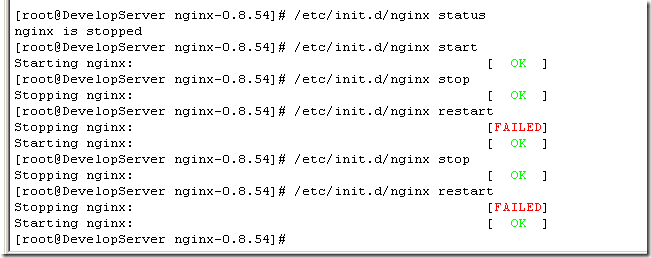
同样的修改了nginx的配置文件nginx.conf,也可以使用上面的命令重新加载新的配置文件并运行,可以将此命令加入到rc.local文件中,这样开机的时候nginx就默认启动了
vi /etc/rc.local
加入一行 /etc/init.d/nginx start 保存并退出,下次重启会生效。
nginx linux 下开机自动启动的更多相关文章
- nginx设置成开机自动启动服务
1.nginx的安装目录 /usr/local/nginx 启动nginx cd /usr/local/nginx/sbin./nginx 更改配置重启nginxcd /usr/local/nginx ...
- linux下添加自动启动项,linux 开机自动启动脚本方法
#service servicename status是当前状态#chkconfig --list servicename是查看启动状态,也就是是否开机自动启动 首先写好脚本,如 mysql,把它放到 ...
- Window下将nginx配置为开机自动启动
前两天看到公司window服务器上面有个nginx在跑,重启服务器后没有自动启动,需要手动运行nginx,甚是麻烦呀 上网找了一下关于将nginx配置为系统服务并且开机自动启动的解决方案,这里mark ...
- linux 系统下开机自动启动oracle 监听和实例 (亲测有效)
[oracle@oracle11g ~]$ dbstartORACLE_HOME_LISTNER is not SET, unable to auto-start Oracle Net Listene ...
- 【Linux】开机自动启动脚本
Linux下(以RedHat为范本)添加开机开机自动启动脚本有两种方式; 本例系统:Linux(CentOS 7.2) 方法一 使用 /etc/rc.d/rc.local,自动启动脚本 #!/bin/ ...
- 将node.js程序作为服务,并在windows下开机自动启动(使用forever)
手上项目中有一块服务是用node.js实现的,运行环境是windows server 2008 R2,刚开始着手实现这块功能的时候时间很紧迫,随便写了个console程序就部署上去了--启动方式就是在 ...
- linux服务开机自动启动
zookeeper设置开机自动启动 第一种:直接修改/etc/rc.d/rc.local文件 在/etc/rc.d/rc.local文件中需要输入两行,其中export JAVA_HOME=/usr/ ...
- linux下开机启动443程序无法访问解决方法
前言:最近,有一个项目需要用到开机自动启动程序,所以就研究了一下,环境为redhat8,程序是node,使用forever来进行node程序的持久化,程序使用的是443端口,开启的是https 1.把 ...
- linux svn开机自动启动服务
SVN设置开机自动启动 usr/lib/systemd/system/添加svn.service文件 home/sdbdatasvn/svnrepos(换成绝对路径) 如果出现权限问题,请chmod ...
随机推荐
- mysql锁表机制及相关优化
(该文章为方便自己查阅,也希望对大家有所帮助,转载于互联网) 1. 锁机制 当前MySQL支持 ISAM, MyISAM, MEMORY (HEAP) 类型表的表级锁,BDB 表支持页级锁,InnoD ...
- hadoop权威指南 读书笔记
1 数据库和MapReduce对比 2 hadoop 包含的内容
- Lucene建索引代码
Lucene 是apache软件基金会一个开放源代码的全文检索引擎工具包,是一个全文检索引擎的架构,提供了完整的查询引擎和索引引擎,部分文本分析引擎. Lucene的目的是为软件开发人员提供一个简单易 ...
- 【转】ChainMapper 实例理解一
通过ChainMapper可以将多个map类合并成一个map任务. 下面个这个例子没什么实际意思,但是很好的演示了ChainMapper的作用. 源文件100 tom 90101 mary 85102 ...
- CentOS7上安装和使用Docker
导读 Docker 是一个开源工具,它可以让创建和管理 Linux 容器变得简单,容器就像是轻量级的虚拟机,并且可以以毫秒级的速度来启动或停止.在本篇文章中我们将教你如何在 CentOS 7.x 中安 ...
- yii2 文件上传
直接贴代码了 --------------------------------------------------------------------------------------------- ...
- MVC&WebForm对照学习:文件上传(以图片为例)
原文 http://www.tuicool.com/articles/myM7fe 主题 HTMLMVC模式Asp.net 博客园::首页:: :: :: ::管理 5 Posts :: 0 ...
- JS的跨域问题
1.什么是跨域? 跨域问题是由于javascript语言安全限制中的同源策略造成的. 2.什么是同源策略: 同源策略是指一段脚本只能读取来自同一来源的窗口和文档的属性,这里的同一来源指的是主机名.协议 ...
- MySQL二进制日志的备份和恢复
二进制日志:记录数据库修改的相关操作,作用是即时点回复,主从复制 可以按时间滚动,也可以按大小滚动 server-id:服务器身份标识 一.二进制文件的删除方法,千万不要手动删除 PURGE BINA ...
- HDU 1159 Common Subsequence
HDU 1159 题目大意:给定两个字符串,求他们的最长公共子序列的长度 解题思路:设字符串 a = "a0,a1,a2,a3...am-1"(长度为m), b = "b ...