
Python背景色与语法高亮主题配置
使用python idle的人恐怕都无法忍受默认的白色背景,及其语法高亮主题。
大家更倾向于使用黑色背景。
用户目录 的.idlerc 目录:
下面的各个系统下对应的该文件的位置:

在Linux系列系统下路径为(~表示用户目录):

~/.idlerc/

在Windows XP下路径为:

C:/Documents and Settings/<用户名>/.idlerc/

在Windows 7下路径为:

C:/Users/<用户名>/.idlerc/

在window下,可以直接在运行框中输入下面的路径定位到位置:

%USERPROFILE%/.idlerc/

有时候会发现目录中没有config-highlight.cfg文件,那么自己就创建一个:在Linux下:

# for Linuxvi ~/.idlerc/config-highlight.cfg

在window下:

notepad %USERPROFILE%/.idlerc/config-highlight.cfg
下面介绍Obsidian, Desert, 和Tango三种主题配置
在 用户目录 的.idlerc 目录下新建名为 config-highlight.cfg 文件,并加入如下内容
[tango]

definition-foreground = #fce94f

error-foreground = #fa8072

string-background = #2e3436

keyword-foreground = #8cc4ff

normal-foreground = #ffffff

comment-background = #2e3436

hit-foreground = #ffffff

break-foreground = #

builtin-background = #2e3436

stdout-foreground = #eeeeec

cursor-foreground = #fce94f

hit-background = #2e3436

comment-foreground = #73d216

hilite-background = #edd400

definition-background = #2e3436

stderr-background = #2e3436

break-background = #2e3436

console-foreground = #87ceeb

normal-background = #2e3436

builtin-foreground = #ad7fa8

stdout-background = #2e3436

console-background = #2e3436

stderr-foreground = #ff3e40

keyword-background = #2e3436

string-foreground = #e9b96e

hilite-foreground = #2e3436

error-background = #2e3436

[desert]

definition-foreground = #98fb98

error-foreground = #ff0000

string-background = #

keyword-foreground = #cc6600

normal-foreground = #f0e68c

comment-background = #

hit-foreground = #ffffff

break-foreground = black

builtin-background = #

stdout-foreground = #eeeeee

cursor-foreground = #ffcc00

hit-background = #

comment-foreground = #87ceeb

hilite-background = gray

definition-background = #

stderr-background = #

break-background = #ffff55

console-foreground = #87ceeb

normal-background = #

builtin-foreground = #519e51

stdout-background = #

console-background = #

stderr-foreground = #ff3e40

keyword-background = #

string-foreground = #ffa0a0

hilite-foreground = #

error-background = #

[Obsidian]

definition-foreground = #678CB1

error-foreground = #FF0000

string-background = #

keyword-foreground = #93C763

normal-foreground = #E0E2E4

comment-background = #

hit-foreground = #E0E2E4

builtin-background = #

stdout-foreground = #678CB1

cursor-foreground = #E0E2E4

break-background = #

comment-foreground = #66747B

hilite-background = #2F393C

hilite-foreground = #E0E2E4

definition-background = #

stderr-background = #

hit-background = #

console-foreground = #E0E2E4

normal-background = #

builtin-foreground = #E0E2E4

stdout-background = #

console-background = #

stderr-foreground = #FB0000

keyword-background = #

string-foreground = #EC7600

break-foreground = #E0E2E4

error-background = #
重启IDLE,依次选 Options -> Configure IDLE -> Highlighting 如下图
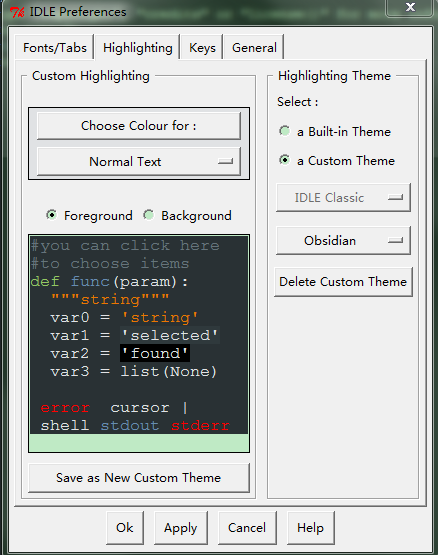
有童鞋要问字体怎么配置?这个容易,在Highlighting选项卡旁边有个Fonts/Tabs选项卡,可以用来配置字体和缩进宽度的:

Python背景色与语法高亮主题配置的更多相关文章
- Python GUI 背景色与语法高亮主题配置
[补充] Python GUI 中 :ALT+P 可以重复上一条命令. ---------------------------------------------------------------- ...
- 修改Python IDLE代码配色及语法高亮主题
初学Python,想必大家拿来练习最多的IDE就是Python自带的IDLE了,但是默认的代码配色及语法高亮主题确实很不适应,所以我们需要做个小小的美化,比如像下面这样我做的美化配置: HOW TO ...
- LaTeX中Python代码的语法高亮
LaTeX中Python代码的语法高亮 本文中,"{}"中的字母为LaTeX或Python的包名,只有"Pygments"是Python的包,其他都是LaTeX ...
- phpDesigner 7.2.5 注册码 更改 语法高亮 主题
注册码: 用户名:www.xiazaiba.com 序列号:43AB0D432A29EE238CCE0F884D84D8A18498498E98298A98568AD05A0B40 验证码:7S2FF ...
- 【转】让Souce Insight支持多种语言的语法高亮:Python,Ruby,ARM汇编,windows脚本文件(bat/batch),PPC,SQL,TCL,Delphi等
原文网址:http://www.crifan.com/source_insight_support_highlight_for_python_ruby_arm_batch_ppc_sql_tcl_de ...
- vim python配置 安装pep8自动检查插件,语法高亮
pep8 http://www.vim.org/scripts/script.php?script_id=2914 语法高亮 http://www.vim.org/scripts/script.php ...
- Python IDLE 代码高亮主题
Python IDLE 代码高亮主题 使用方法: 打开C盘我的 C:\Documents and Settings\你的用户名.idlerc文件夹 里面会有一个 config-highlight.cf ...
- mac 终端 使用 solarized 主题设置语法高亮
mac 终端 使用 solarized 主题设置语法高亮 先来看看 solarized 在 mac 终端上的效果图片 一:先下载 solarized 官网下载:https://github.com/a ...
- Mac下Vim配置语法高亮
设置终端的字体颜色 如图,打开终端然后,选择偏好设置,再选择描述文件,再窗口左侧可以选择系统配置好的,或者你也可以自定义,最后别忘了把你的配置设置成默认就行 Vim语法高亮设置 只需要找到vimrc配 ...
随机推荐
- 一些比较好的shellscript脚本
1. 变量与替换 #!/bin/bash # 变量替换 # 另外, 变量替换还有许多别的语法 # 例如, b=${a/23/bb} 将 23 替换成 bb 等等, 用到时再找 a=375 hello= ...
- C++中的虚函数与纯虚函数
这个吧,我也不怎么知道,所以,大家来看这两篇文章哦: http://blog.csdn.net/hackbuteer1/article/details/7558868 http://blog.csdn ...
- Java用webSocket实现tomcat的日志实时输出到web页面
原文:http://blog.csdn.net/smile326/article/details/52218264 1.场景需求 后台攻城狮和前端攻城狮一起开发时,经常受到前端攻城狮的骚扰,动不动就来 ...
- JSP中RequestDispatcher的用法
RequestDispatcher是一个Web资源的包装器,可以用来把当前request传递到该资源,或者把新的资源包括到当前响应中.RequestDispatcher接口中定义了两个方法:inclu ...
- hdu5787(数位dp)
基础的数位dp,才发现今天才终于彻底搞懂了数位dp... // // main.cpp // hdu5787.1 // // Created by New_Life on 16/8/10. // Co ...
- nginx的启动与关闭
[root@nginx ~]# #默认启动方式 [root@nginx ~]# which nginx /sbin/nginx [root@nginx ~]# nginx [root@nginx ~] ...
- VC++编译MPIR 2.7.0
目录 第1章编译 2 1.1 简介 2 1.2 下载 3 1.3 解决方案 4 1.4 创建项目 5 1.5 复制文件树 6 1.6 不使用预编译头文件 8 ...
- android上传文件到wamp服务器
1.php server(wamp)部分 建立unload.php页面代码如下 <?php move_uploaded_file($_FILES["file1"][" ...
- noip赛前小结3
嗯,这是第三份小结. 连续三天的小结. 这几天状态逐渐回来了. 前天3道题rk8左右. 昨天上午3道题rk7,但是有一道题考后1minAC了. 昨天晚上2道题AK了. 今天也3道题rk1了. 这个趋势 ...
- echarts饼图--数据交互
<!DOCTYPE html> <html> <head lang="en"> <meta charset="UTF-8&quo ...