
UIKit 框架之UICollectionViewController
1.自定义单元格
#import <UIKit/UIKit.h>

@interface myCollectionViewCell : UICollectionViewCell
@property(nonatomic,strong) UIImageView *myImageView;
@property(nonatomic,strong) UILabel *nameLabel;
@end
#import "myCollectionViewCell.h"

@implementation myCollectionViewCell
-(void)layoutSubviews
{
    self.myImageView.frame=CGRectMake(, , self.contentView.frame.size.width,);
    [self.contentView addSubview:self.myImageView];

    self.nameLabel.frame = CGRectMake(, , self.contentView.frame.size.width, );
    [self.contentView addSubview:self.nameLabel];
    [self.nameLabel setBackgroundColor:[UIColor cyanColor]];

}
@end
2.设置UICollectionViewFlowLayout
- (BOOL)application:(UIApplication *)application didFinishLaunchingWithOptions:(NSDictionary *)launchOptions {
    UICollectionViewFlowLayout *collectionViewFlowLayout=[[UICollectionViewFlowLayout alloc]init];
    //每行内部cell item的间距
    collectionViewFlowLayout.minimumInteritemSpacing=10.0;
//     每行的间距
    collectionViewFlowLayout.minimumLineSpacing=20.0;
    collectionViewFlowLayout.scrollDirection = UICollectionViewScrollDirectionVertical;
    collectionViewFlowLayout.sectionInset = UIEdgeInsetsMake(, 0.0);
    //它定义了每一个item的大小。通过设定itemSize可以全局地改变所有cell的尺寸,如果想要对某个cell制定尺寸,可以使用-collectionView:layout:sizeForItemAtIndexPath:方法
    collectionViewFlowLayout.itemSize=CGSizeMake(, );
    collectionViewFlowLayout.estimatedItemSize=CGSizeMake(, );
    //由属性scrollDirection确定scroll view的方向,将影响Flow Layout的基本方向和由header及footer确定的section之间的宽度
    collectionViewFlowLayout.scrollDirection=UICollectionViewScrollDirectionVertical;
    //Header和Footer尺寸 同样地分为全局和部分。需要注意根据滚动方向不同,header和footer的高和宽中只有一个会起作用。垂直滚动时section间宽度为该尺寸的高,而水平滚动时为宽度起作用
    collectionViewFlowLayout.headerReferenceSize=CGSizeMake(, );
    collectionViewFlowLayout.footerReferenceSize=CGSizeMake(, );
    CollectionViewController *cvc=[[CollectionViewController alloc]initWithCollectionViewLayout:collectionViewFlowLayout];
    UINavigationController *nvc=[[UINavigationController alloc]initWithRootViewController:cvc];
    self.window.backgroundColor=[UIColor whiteColor];
    self.window.rootViewController=nvc;
    [self.window makeKeyAndVisible];

    return YES;
}
3.实现代理方法
//
//  CollectionViewController.m
//  collectionVC
//
//  Created by City--Online on 15/6/2.
//  Copyright (c) 2015年 CYW. All rights reserved.
//

#import "CollectionViewController.h"
#import "myCollectionViewCell.h"
@interface CollectionViewController ()

@end

@implementation CollectionViewController

static NSString * const reuseIdentifier = @"Cell";

- (void)viewDidLoad {
    [super viewDidLoad];

    [self.collectionView registerClass:[myCollectionViewCell class] forCellWithReuseIdentifier:reuseIdentifier];
    [self.collectionView registerClass:[UICollectionReusableView class] forSupplementaryViewOfKind:UICollectionElementKindSectionHeader withReuseIdentifier:@"Header"];
    [self.collectionView registerClass:[UICollectionReusableView class] forSupplementaryViewOfKind:UICollectionElementKindSectionFooter withReuseIdentifier:@"Footer"];

   }

- (void)didReceiveMemoryWarning {
    [super didReceiveMemoryWarning];

}

- (NSInteger)numberOfSectionsInCollectionView:(UICollectionView *)collectionView {
    ;

}

- (NSInteger)collectionView:(UICollectionView *)collectionView numberOfItemsInSection:(NSInteger)section {
    ) {
        ;
    }
    else
    {
        ;
    }

}

- (UICollectionViewCell *)collectionView:(UICollectionView *)collectionView cellForItemAtIndexPath:(NSIndexPath *)indexPath {

    myCollectionViewCell *cell =[collectionView dequeueReusableCellWithReuseIdentifier:reuseIdentifier  forIndexPath:indexPath];
    cell.backgroundColor = [UIColor colorWithRed:arc4random()%/  /  / ];
    cell.myImageView=[[UIImageView alloc]initWithImage:[UIImage imageNamed:@"1.png"]];
    cell.nameLabel=[[UILabel alloc]init];
    cell.nameLabel.text=[NSString stringWithFormat:@"%ld %ld",indexPath.section,indexPath.row];
    return cell;
}

#pragma mark <UICollectionViewDelegate>

// Uncomment this method to specify if the specified item should be highlighted during tracking
- (BOOL)collectionView:(UICollectionView *)collectionView shouldHighlightItemAtIndexPath:(NSIndexPath *)indexPath {
    return YES;
}

// Uncomment this method to specify if the specified item should be selected
- (BOOL)collectionView:(UICollectionView *)collectionView shouldSelectItemAtIndexPath:(NSIndexPath *)indexPath {
    return YES;
}

// Uncomment these methods to specify if an action menu should be displayed for the specified item, and react to actions performed on the item
- (BOOL)collectionView:(UICollectionView *)collectionView shouldShowMenuForItemAtIndexPath:(NSIndexPath *)indexPath {
    return NO;
}

- (BOOL)collectionView:(UICollectionView *)collectionView canPerformAction:(SEL)action forItemAtIndexPath:(NSIndexPath *)indexPath withSender:(id)sender {
    return NO;
}

- (void)collectionView:(UICollectionView *)collectionView performAction:(SEL)action forItemAtIndexPath:(NSIndexPath *)indexPath withSender:(id)sender {

}
- (UICollectionReusableView *)collectionView:(UICollectionView *)collectionView viewForSupplementaryElementOfKind:(NSString *)kind atIndexPath:(NSIndexPath *)indexPath
{
    if ([kind isEqualToString: UICollectionElementKindSectionFooter]) {
        UICollectionReusableView *footer=[collectionView dequeueReusableSupplementaryViewOfKind:kind withReuseIdentifier:@"Footer" forIndexPath:indexPath];
        footer.backgroundColor=[UIColor yellowColor];
        UILabel *label=[[UILabel alloc]initWithFrame:CGRectMake(, , , )];
        label.text=@"label";
        label.textAlignment=NSTextAlignmentCenter;
        [footer addSubview:label];
        return footer;
    }
    else
    {
        UICollectionReusableView *Header=[collectionView dequeueReusableSupplementaryViewOfKind:kind withReuseIdentifier:@"Header" forIndexPath:indexPath];
        Header.backgroundColor=[UIColor blueColor];
        return Header;

    }
}

@end
4.运行结果图
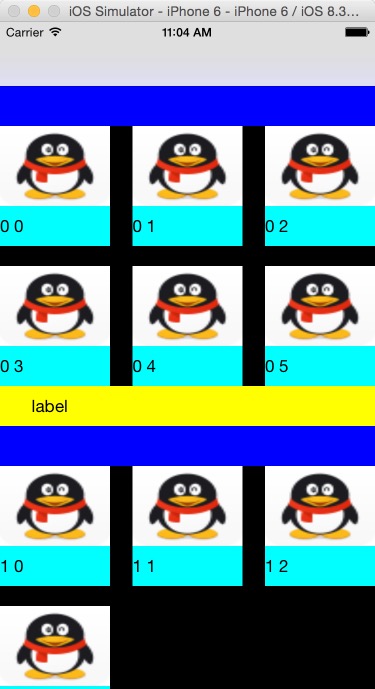
UIKit 框架之UICollectionViewController的更多相关文章
- UIKit框架使用总结--看看你掌握了多少
一.经常使用的,基本就是每次项目迭代都需要使用的 UIView.UILabel.UIImage.UIColor.UIFont.UIImageView.UITextField.UIButton. UIS ...
- Swift - 重写UIKit框架类的init初始化方法(以UITabBarController为例)
原来写了篇文章讲UITabBarController的用法,当时是从UIViewController跳转到UITabBarController页面,代码如下: 1 self.presentViewCo ...
- UIKit框架
在今后的应用程序构建中,会陆续使用各式各样的控件,因此UIKit框架的引入是必不可少的! 一.简介 UIKitk框架提供一系列的Class(类)来建立和管理iPhone OS应用程序的用户界面接口.应 ...
- iOS学习32之UIKit框架-可视化编程-XIB
1. Interface Builder 可视化编程 1> 概述 GUI : 图形用户界面(Graphical User Interface, 简称GUI, 又称图形化界面) 是指采用图形方式显 ...
- 基础框架Fundation和UIkit框架的定义和使用
Foundation 框架为所有应用程序提供基本的系统服务 您的应用程序以及 UIKit 和其他框架,都建立在 Foundation 框架的基础结构之上.Foundation 框架提供许多基本的对象类 ...
- iOS开发概述UIkit动力学,讲述UIKit的Dynamic特性,UIkit动力学是UIkit框架中模拟真实世界的一些特性。
转发:http://my.oschina.net/u/1378445/blog/335014 iOS UIKit动力学 Dynamics UIAttachmentBehavior 实现iMessage ...
- iOS开发UIKit框架-可视化编程-XIB
1. Interface Builder 可视化编程 1> 概述 GUI : 图形用户界面(Graphical User Interface, 简称GUI, 又称图形化界面) 是指采用图形方式显 ...
- 79、iOS 的Cocoa框架、Foundation框架以及UIKit框架
Cocoa框架是iOS应用程序的基础 1. Cocoa是什么? Cocoa是 OS X和ios 操作系统的程序的运行环境. 是什么因素使一个程序成为Cocoa程序呢?不是编程语言,因为在Cocoa开发 ...
- UIKit 框架之UIView二
下面这些都是UIView一些基本的东西,具体的可以参考UIKit 框架之UIView一博客 一.自定义一个View // // MyView.m // UIView // // Created by ...
随机推荐
- Android 中断线程的处理
我现在对一个用户注册的功能1.用ProgressDialog将当前页面设成不可操作(保留返回键 退出ProgressDialog)2.用一个线程clientThread执行数据的提交和返回 问题:考虑 ...
- 利用Python抓取CSDN博客
这两天发现了一篇好文章,陈皓写的makefile的教程,具体地址在这里<跟我一起写makefile> 这篇文章一共分成了14个部分,我看东西又习惯在kindle上面看,感觉一篇一篇地复制成 ...
- js生成有缩进的表格
项目中用到用了两天时间想到的,记录下来,如有更好的方法,留言给我,谢谢! js做如下表格: json [{"id":302,"serviceId":15,&qu ...
- php敏感词过滤
在项目开发中发现有个同事在做敏感词过滤的时候用循环在判断,其实是不用这样做的,用php的数组函数和字符串函数即可实现 function filterNGWords($string) { $badwor ...
- leetcode刷题笔记
(1)Best Time to Buy and Sell Stock Total Accepted: 10430 Total Submissions: 33800My Submissions Say ...
- php中的占位符
1.?这种形式传值,注意是数组! 2.:name的形式.
- DevExpress控件开发常用要点(项目总结版)
使用DevExpress控件来做项目开发已经有很长一段时间了,在摸索开发到客户苛刻要求的过程中,其中碰到过很多问题需要解决的,随着一个个问题的解决,也留下很多对DevExpress控件的使用经验及教训 ...
- 重命名Oracle数据库的表空间(Renaming a Tablespace)
重命名一个表空间时,Oracle会在数据字典.控制文件和数据文件的头部更新这个表空间名. 注意,重命名一个表空间不会重命名相关联的数据文件. 重命名代码示例如下: SQL> alter tabl ...
- poj 1338 Ugly Numbers
原题链接:http://poj.org/problem?id=1338 优先队列的应用,如下: #include<cstdio> #include<cstdlib> #incl ...
- 2天驾驭DIV+CSS (基础篇)(转)
这是去年看到的一片文章,感觉在我的学习中,有不少的影响.于是把它分享给想很快了解css的兄弟们. 基础篇[知识一] “DIV+CSS” 的叫法是不准确的[知识二] “DIV+CSS” 将你引入两大误区 ...