
MySQL-python模块
1. Python 操作 Mysql 模块的安装
linux:
pip install MySQL-python 或 yum -y install MySQL-python
windows: exe安装包
http://pan.baidu.com/s/1c2ugfvE
2. SQL基本使用
2.1 数据库操作
show databases;
use [databasename];
create database [databasename] charset utf8;
2.2 数据表操作
create database py CHARSET('utf8')

use py

create table students (

id int  not null auto_increment primary key,

name char(32) not null,

sex char(12) not null,

age tinyint unsigned not null,

tel char(13) null default "-",

nal char(64)

);
2.3 数据操作
insert into students(name,sex,age,tel,nal) values('alex','man',18,'','CN')

delete from students where id =2;

update students set name = 'sb' where id =1;

select * from students
2.4 其他
主键
外键
左右连接3. Python MySQL API
3.1 插入数据
#!/use/bin/env python

# -*- coding:utf-8 -*-

import MySQLdb

conn = MySQLdb.connect('py', user='root', passwd='py123', db='py')

cur = conn.cursor()

info = [    ('go1','man',30,'13900000000', 'US'),    ('go2','man',28,'13900000001', 'HK'),]

info1 = ('mihui','man',30,'', 'US')

info2 = ['YeGangchan','man',28,'', 'HK']

#reCount = cur.execute('insert into students(name,sex,age,tel,nal) values(%s,%s,%s,%s,%s)', info1)

reCount = cur.execute('insert into students(name,sex,age,tel,nal) values(%s,%s,%s,%s,%s)', info2)

reCount2 = cur.execute('insert into students(name,sex,age,tel,nal) values(%s,%s,%s,%s,%s)', ('rain','female',18,'','NK'))
# 插入多条

reCount3 = cur.executemany('insert into students(name,sex,age,tel,nal) values(%s,%s,%s,%s,%s)', info)
conn.commit()

cur.close()

conn.close()

print(reCount)
注意:cur.lastrowid
3.2 删除数据
#!/use/bin/env python

# -*- coding:utf-8 -*-

import MySQLdb

conn = MySQLdb.connect(host='py', user='root', passwd='py123', db='py')

cur = conn.cursor()

reCount = cur.execute('delete from students where name=%s',('syl'))

conn.commit()

cur.close()

conn.close()

print(reCount)
3.3 修改数据
#!/use/bin/env python

# -*- coding:utf-8 -*-

import MySQLdb

conn = MySQLdb.connect(host='py', user='root', passwd='py123', db='py')

cur = conn.cursor()

reCount = cur.execute('update students set name=%s where name=%s',('Laonanhai', 'Oldboy'))

conn.commit()

cur.close()

conn.close()

print(reCount)
3.4 查询数据
#!/use/bin/env python

# -*- coding:utf-8 -*-

import MySQLdb

conn = MySQLdb.connect('py', user='root', passwd='py123', db='py')

cur = conn.cursor()

reCount = cur.execute('select * from students')

## fetchone()

print(cur.fetchone())

print(cur.fetchone())

print(cur.fetchone())

cur.scroll(-1, mode='relative')     #游标相对上移一个

print(cur.fetchone())

print(cur.fetchone())

print('##------')

cur.scroll(0, mode='absolute')      #游标移动到绝对位置0

# print(cur.fetchone())

# print(cur.fetchone())

print('##------ fetchmany()')

# print(cur.fetchmany())

print(cur.fetchmany(4))

cur.close()

conn.close()

print(reCount)
#!/use/bin/env python

# -*- coding:utf-8 -*-

import MySQLdb

conn = MySQLdb.connect(host='py', user='root', passwd='py123', db='py')

cur = conn.cursor()

#cur = conn.cursor(cursorclass=MySQLdb.cursors.DictCursor)

reCount = cur.execute('select * from students')

nRes = cur.fetchall()

cur.close()

conn.close()

print(reCount)

print(nRes)

for i in nRes:

    print(i[0],i[1])
3.5 事务回滚
students表创建语句:
CREATE TABLE `students` (
`id` int(11) NOT NULL AUTO_INCREMENT,
`name` char(32) NOT NULL,
`sex` char(12) DEFAULT NULL,
`age` tinyint(3) unsigned NOT NULL,
`tel` char(13) DEFAULT '_',
`nal` char(64) DEFAULT NULL,
PRIMARY KEY (`id`)
) ENGINE=InnoDB AUTO_INCREMENT=7 DEFAULT CHARSET=utf8
如:select * from students现在的结果如下(id自增)
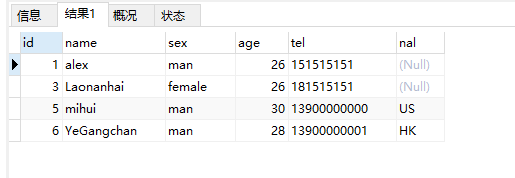
现在的最后一条数据的id为6
插入两条数据在commit()前行rollback()
#!/use/bin/env python

# -*- coding:utf-8 -*-

import MySQLdb

conn = MySQLdb.connect(host='py', user='root', passwd='py123', db='py')

cur = conn.cursor()

reCount = cur.execute('insert into students(name,sex,age,tel,nal) values(%s,%s,%s,%s,%s)', ('rain2','man',26,'','NK'))

reCount2 = cur.execute('insert into students(name,sex,age,tel,nal) values(%s,%s,%s,%s,%s)', ('rain3','female',22,'','NK'))

conn.rollback()

conn.commit()

cur.close()

conn.close()

print(reCount)

print(reCount2)
现在再来
select * from students现在的结果如下
最后一条数据的仍id为6
做一次真正数据插入:
#!/use/bin/env python

# -*- coding:utf-8 -*-

import MySQLdb

conn = MySQLdb.connect(host='py', user='root', passwd='py123', db='py')

cur = conn.cursor()

reCount = cur.execute('insert into students(name,sex,age,tel,nal) values(%s,%s,%s,%s,%s)', ('rain2','man',26,'','NK'))

reCount2 = cur.execute('insert into students(name,sex,age,tel,nal) values(%s,%s,%s,%s,%s)', ('rain3','female',22,'','NK'))

#conn.rollback()

conn.commit()

cur.close()

conn.close()

print(reCount)

print(reCount2)
select * from students现在的结果如下
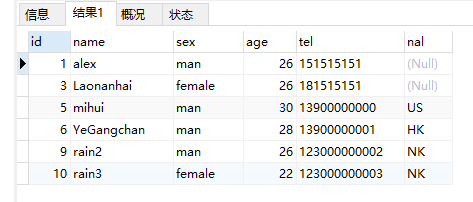
结果id跳过了7,8
id AUTO_INCREMENT信息保存在内存中,rollback时不回滚AUTO_INCREMENT信息
MySQL-python模块的更多相关文章
- Python操作mysql之模块pymysql
pymsql是Python中操作MySQL的模块,其使用方法和MySQLdb几乎相同.但目前pymysql支持python3.x而后者不支持3.x版本. 本文环境 python3.6.1 Mysql ...
- python开发学习-day09(队列、多路IO阻塞、堡垒机模块、mysql操作模块)
s12-20160312-day09 *:first-child { margin-top: 0 !important; } body>*:last-child { margin-bottom: ...
- Python安装MySQL数据库模块
背景 折腾: [记录]使用Python操作MySQL数据库 的过程中,需要去安装MySQLdb. 下载MySQLdb 去官网: http://pypi.python.org/pypi/MySQL-py ...
- Python基础篇【第5篇】: Python模块基础(一)
模块 简介 在计算机程序的开发过程中,随着程序代码越写越多,在一个文件里代码就会越来越长,越来越不容易维护. 为了编写可维护的代码,我们把很多函数分组,分别放到不同的文件里,这样,每个文件包含的代码就 ...
- python模块使用案例
python模块使用案例 一.使用MySQLdb模块代码示例: # 导入 MySQLdb模块 import MySQLdb # 和服务器建立链接,host是服务器ip,我的MySQL数据库搭建在本机, ...
- python 模块 SQLalchemy
SQLalchemy 概述: # &&&&&&&&&&&&&&&&&am ...
- python 模块和包
一,模块 1,什么是模块? 常见的场景: 一个模块就是一个包含了python定义和声明的文件,文件名就是模块名字加上.py 的后缀. 但其实 import 加载的模块分为四个通用类别: 1,使用pyt ...
- Python模块和包使用
1.什么是模块 模块就是一个.py的文件 2.为什么要使用模块? 最开始的程序(没有任何组织)----> 函数------>类----->模块------>包 为了让程序的组 ...
- python模块大全
python模块大全2018年01月25日 13:38:55 mcj1314bb 阅读数:3049 pymatgen multidict yarl regex gvar tifffile jupyte ...
- [转]Python 模块收集
Python 模块收集 转自:http://kuanghy.github.io/2017/04/04/python-modules Python | Apr 4, 2017 | python 工具 a ...
随机推荐
- hadoop创建两大错误:Bad connection to FS. command aborted. exception和Shutting down NameNod...
我的hadoop启动后,各个节点都正常,但是无法查看hdfs目录,错误提示 Bad connection to FS. command aborted. 查了下网上的解决办法,主要是删除tmp下的所 ...
- Git的常用命令的使用方法和解释
我们常用的git命令: add Add file contents to the index(将文件添加到暂存区) 用法: 保存某个文件到暂缓区:git add 文件名 保存当前路径的 ...
- resolve some fragment exception
1.android fragment not attached to activity http://blog.csdn.net/walker02/article/details/7995407 if ...
- Hadoop MRUnit使用(一)
之前在写MR job的时候,由于要在云梯,或者一淘的开发集群上运行:所以处理方法是,在本地打成jar包,然后scp到客户端网关机上,然后在提交job运行.这样的问题时,有时候如果遇到一些逻辑上的问题, ...
- 学习php前需要了解的知识
1.静态网站与动态网站 A)静态网站: 不支持数据交互的网站(后缀: .html .htm) B)动态网站: 支持数据交互的网站,动态网站可以放静态网页的 i.实现动态网站的技术 1.Asp ...
- 【LeetCode OJ】Pascal's Triangle
Prolbem Link: http://oj.leetcode.com/problems/pascals-triangle/ Just a nest-for-loop... class Soluti ...
- Bash简介
Bash(GNU bourne-Again Shell)是一个为GNU计划编写的Unix shell,它是很多Linux平台默认的使用的shell. shell是一个命令解析器,是介于操作系统内核与用 ...
- XML JSON解析--基本功能
一,json的解析 json文件: {"code": "cn","cities": [{"name": " ...
- 著名的安装制作软件InnoSetup的源码及示例源码-The installation of a well-known software s source code and sample InnoSetup source
@echo off rem Inno Setup rem Copyright (C) 1997-2007 Jordan Russell rem Portions by Martijn Laan rem ...
- Android FM模块学习之二 FM搜索频道
最近在学习FM模块,FM是一个值得学习的模块,可以从上层看到底层.上层就是FM的按扭操作和界面显示,从而调用到FM底层驱动来实现广播收听的功能. 看看FM启动流程:如下图: 先进入FMRadio.ja ...