
Swift TabeleViewCell dequeueReusableCellWithIdentifier 使用的新的细节,原来现在可以这样
今天在看官方的TableView Guide,突然想起来最近写的一个代码中实现tableViewCell复用的时候有点问题:
var cell = UITableViewCell(style: UITableViewCellStyle.Subtitle, reuseIdentifier: identifer)

cell.textLabel.text = myPeripherals[indexPath.row].name
这里可以看出来,每次调用tableView:cellForRowAtIndexPath: 时都会新建一个cell对象,这样肯定是不好的。
在OC中的正统的实现方式应该是:
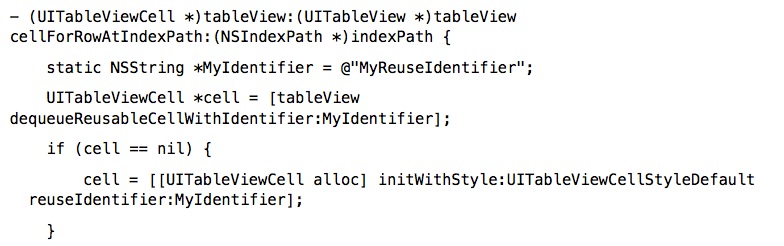
先是用dequeueReusableCellWithIdentifier去将队列中已有的cell,则将其取出,重新利用。
如果cell为nil,则重新实例化一个TableViewCell对象,再使用~~~~
所以这样我就像将我有问题的Swift代码改回来,如下:
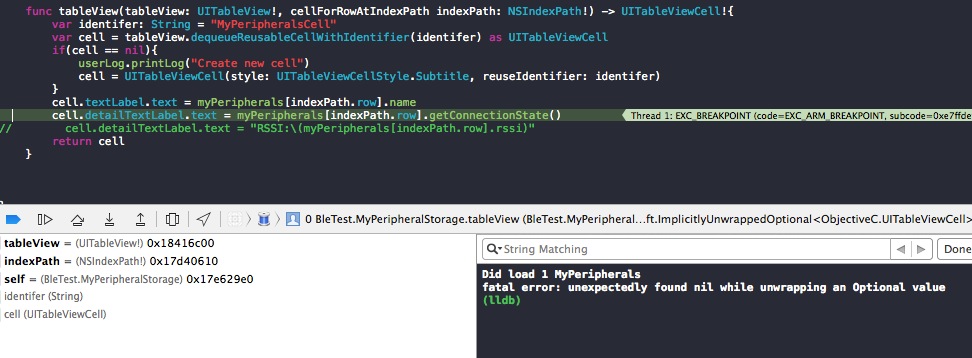
但是这样会崩溃,不管是写成optional value的形式:
var cell? = tableView.dequeueReusableCellWithIdentifier(identifer) as? UITableViewCell
都会报同样的错误,搞了半天才发现,原来这个错误不是cell == nil导致的,因为“Create new cell”没有被输出过。
出错的原因就在cell.detailTextLabel上出现,说明cell没有被设置成Subtitle的风格。
再去看苹果官方的TableViewSuite Sample Code,中对tableViewCell的调用发现
- (UITableViewCell *)tableView:(UITableView *)tableView cellForRowAtIndexPath:(NSIndexPath *)indexPath {

    static NSString *MyIdentifier = @"MyIdentifier";

    /*

     Retrieve a cell with the given identifier from the table view.

     The cell is defined in the main storyboard: its identifier is MyIdentifier, and  its selection style is set to None.

     */

    UITableViewCell *cell = [tableView dequeueReusableCellWithIdentifier:MyIdentifier];

    // Set up the cell.

    NSString *timeZoneName = [self.timeZoneNames objectAtIndex:indexPath.row];

    cell.textLabel.text = timeZoneName;

    return cell;

}
这里也是直接调用dequeueReusableCellWithIdentifier:MyIdentifier函数,没有在实例化一个tableViewCell对象。
这里也对这个进行了一定的说明:
/* Retrieve a cell with the given identifier from the table view. The cell is defined in the main storyboard: its identifier is MyIdentifier, and its selection style is set to None. */
再加上苹果官方TableView Guide文档中写到:
If the dequeueReusableCellWithIdentifier: method asks for a cell that’s defined in a storyboard, the method always returns a valid cell. If there is not a recycled cell waiting to be reused, the method creates a new one using the information in the storyboard itself. This eliminates the need to check the return value for nil and create a cell manually.
就是用dequeueReusableCellWithIdentifier:MyIdentifier函数会一直得到一个有效的在storyboard中定义的cell,而且用storyboard中所定义的信息去设置这个cell,这样就省去了每次去检测cell是否是nil,再去手动的创建。
从这里可以看到,我的代码中出现的错误就是在storyboard中没有将cell设置为subtitle的样式,否则应该不会出错。
所以下面这种方式是最简单的:
var identifer: String = "myCell"

var cell = tableView.dequeueReusableCellWithIdentifier(identifer) as UITableViewCell

cell.textLabel.text = a[indexPath.row].name

cell.detailTextLabel.text = "detail"
但是要注意,这样方式需要在storyboard中设置好cell的一些必要的属性。
如果是这样,那自定义cell又该如何实现呢?
加个你custom的cell类的名字是MyTableViewCell,则实现方法如下
- (UITableViewCell *)tableView:(UITableView *)tableView

cellForRowAtIndexPath:(NSIndexPath *)indexPath

{

    MyTableViewCell *cell = [tableView

dequeueReusableCellWithIdentifier:@"MyIdentifier"];

    cell.firstLabel.text = [NSString stringWithFormat:@"%d", indexPath.row];

    cell.secondLabel.text = [NSString stringWithFormat:@"%d", NUMBER_OF_ROWS -

indexPath.row];

    return cell;

}
这个是官方提供的OC代码,将其转换成Swift代码就可以了。如下
    func tableView(tableView: UITableView!, cellForRowAtIndexPath indexPath: NSIndexPath!) -> UITableViewCell!{

        var cell: MyTableViewCell = tableView.dequeueReusableCellWithIdentifier("cell") as MyTableViewCell

        cell.first.text = ""

        cell.second.text = ""

        return cell

    }
Swift TabeleViewCell dequeueReusableCellWithIdentifier 使用的新的细节,原来现在可以这样的更多相关文章
- Swift 3.1 的一些新特性
Swift 3.1 的一些新特性 推荐序 本文来自泊学的投稿,介绍了 Swift 3.1 的新特性,感谢泊学授权发表.以下为文章正文. 正文 Apple 终于发布了Xcode 8.3以及Swift ...
- Swift 3到5.1新特性整理
本文转载自:https://hicc.me/whats-new-in-swift-3-to-5-1/,本站转载出于传递更多信息之目的,版权归原作者或者来源机构所有. Hipo 2.0 重写从 Swif ...
- iOS8.3发布了Swift 1.2带来哪些新变化
苹果前几日在面向开发者推送iOS 8.3 Beta的同时,还发布了版本号为6D520o的Xcode 6.3 Beta,其中便包含了iOS 8.3 Beta和OS X v10.10 SDK,并进一步提升 ...
- Swift 2.0 到底「新」在哪?
[编者按]2015年6月,一年一度的苹果 WWDC 大会如期而至,在大会上苹果发布了 Swift 2.0,引入了很多新的特性,以帮助开发者更快.更简单地构建应用.本篇文章作者是 Maxime defa ...
- Swift 3必看:新的访问控制fileprivate和open
在swift 3中新增加了两中访问控制权限 fileprivate和 open.下面将对这两种新增访问控制做详细介绍. fileprivate 在原有的swift中的 private其实并不是真正的私 ...
- iOS - Swift Swift 语言新特性
1.Swift 2.0 带来哪些新变化 常规变化: 1.OS X 10.11.iOS 9 和 watchOS 2 SDK 采纳了一些 Objective-C 的特性用来提高 Swift 的编程体验, ...
- iOS开发——新特性篇&swift新特性(__nullable和__nonnull)
swift新特性(__nullable和__nonnull) 最近在看老师写代码的时候经常遇到两个陌生的关键字,但是当我在我的电脑上敲得时候就是敲不出,后来才知道这是为了swift与OC混编的时候产生 ...
- iOS开发——新特性OC篇&Swift 2.0新特性
Swift 2.0新特性 转眼间,Swift已经一岁多了,这门新鲜.语法时尚.类型安全.执行速度更快的语言已经渐渐的深入广大开发者的心.我同样也是非常喜爱这门新的编程语言. 今年6月,一年一度 ...
- 现代的新语言--Swift初探
新的语言 WWDC简短的介绍,新的语言Swift就问世了,尽管新语言的名字导致贴吧下歌手粉丝和开发人员们争抢地盘- -,只是雨燕就是这么来了. WWDC keynote里给Swift打上了非常多标签: ...
随机推荐
- iOS地址编码解析
- (void)viewDidLoad { [super viewDidLoad]; // 创建地址解析器 self.geocoder = [[CLGeocoder alloc] init]; } - ...
- 理解DOM中的事件流
浏览器发展到第四代时(IE4和Netscape Communicator 4),浏览器团队遇到一个很有意思的问题:页面的哪一部分会拥有特定的事件?想象下在一张纸上有一组同心圆,如果你把手指放在圆心上, ...
- windows phone主题切换(换肤)
之前项目做了个主题切换的功能,最后客户没来得及出第二套界面给放弃了,默哀中... 为了不让它就这样流产了,就放博客共享吧. 首先说明下原理:这个切换是通过重写资源字典里指定的样式,在运行的过程中加载指 ...
- Cadence仿真利器,Cadence SI / PI Analysis – Sigrity安装及破解指南
Sigrity提供了丰富的千兆比特信号与电源网络分析技术,包括面向系统.印刷电路板(PCB)和IC封装设计的独特的考虑电源影响的信号完整性分析功能. Sigrity分析技术与Cadence Alleg ...
- 搭建高性能计算环境(八)、应用软件的安装之gromacs
1,下载安装新版本的gcc(高版本的gcc只是推荐使用的,系统自带的gcc4.4照样能正常编译.运行) wget http://ftp.tsukuba.wide.ad.jp/software/gcc/ ...
- Windows和Linux下Mysql 重置root 密码
Windows系统下一:进入Windows窗口cmd命令行下,停止mysql服务: net stop mysql二:进入mysql的安装目录下,进去bin目录mysqld-nt.exe --skip- ...
- foreach 和 list.foreach 初步测试
单纯从速度上讲 小数据量下foreach 较快,list.Foreach 由于 public void ForEach(Action<T> action) { ; i <this._ ...
- scala实现Netty通信
在学习spark源码的时候看到spark在1.6之后底层的通信框架变成了akka和netty两种方式,默认的是用netty根据源码的思路用scala写了一个Demo级别的netty通信 package ...
- ajax翻页效果模仿yii框架
ajax翻页效果,模仿yii框架. 复制代码代码如下: <!DOCTYPE html> <html> <head> <title>ajax分页_w ...
- 对话框AlertDialog的基本类型与创建
测试代码: 布局: activity_main.xml: <LinearLayout xmlns:android="http://schemas.android.com/apk/res ...