
Unity3d UGUI 通用Confirm确认对话框实现(Inventory Pro学习总结)
背景
曾几何时,在Winform中,使用MessageBox对话框是如此happy,后来还有人封装了可以选择各种图标和带隐藏详情的MessageBox,现在Unity3d UGui就没有了这样的好事情了,所有的UI都需要自己来搞定了,幸好还有各种插件,Inventory Pro中的对话框方案不失一种通用,可复用的方案。
YY(自己的想法)
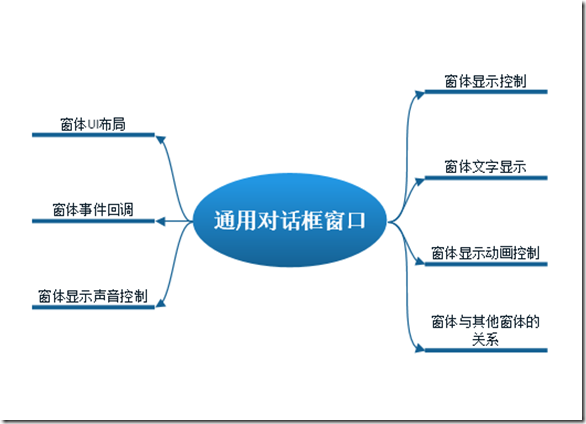
所谓通用对话框,如果是自己实现的话有以下几点需要解决,窗体显示控制,窗体UI布局,窗体文字显示,窗体事件回调,窗体显示动画控制,窗体显示声音控制,窗体与其他窗体的关系,功能虽然小涉及的方面和知识却不少,自己做真的很不容易,所以别再自己造轮子了。
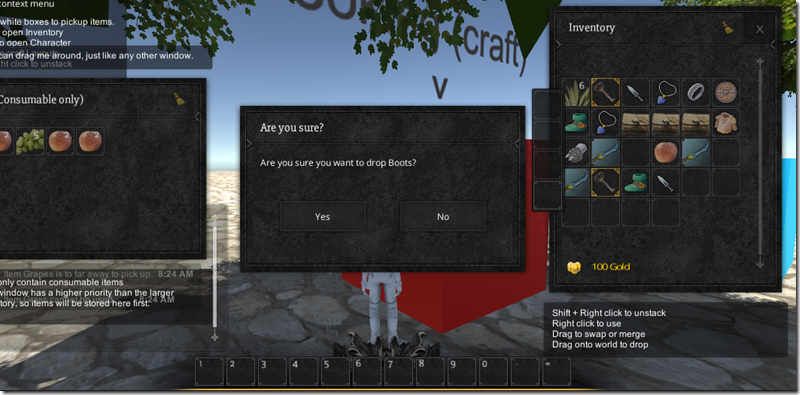
插件实现的效果
简单的确认对话框提示
当扔物品的时候会提示是否确认对话框。
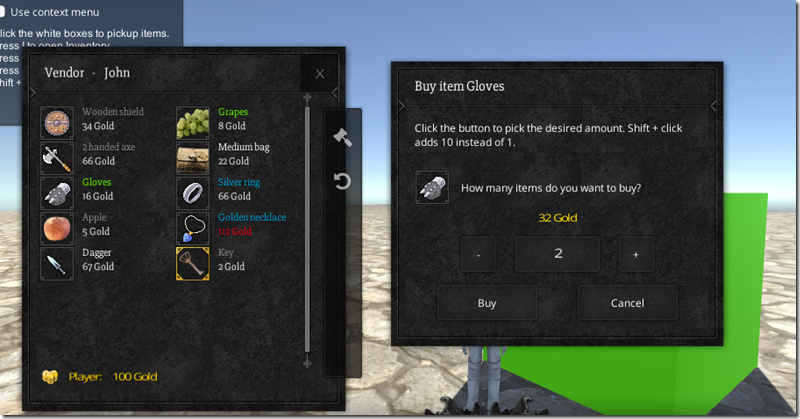
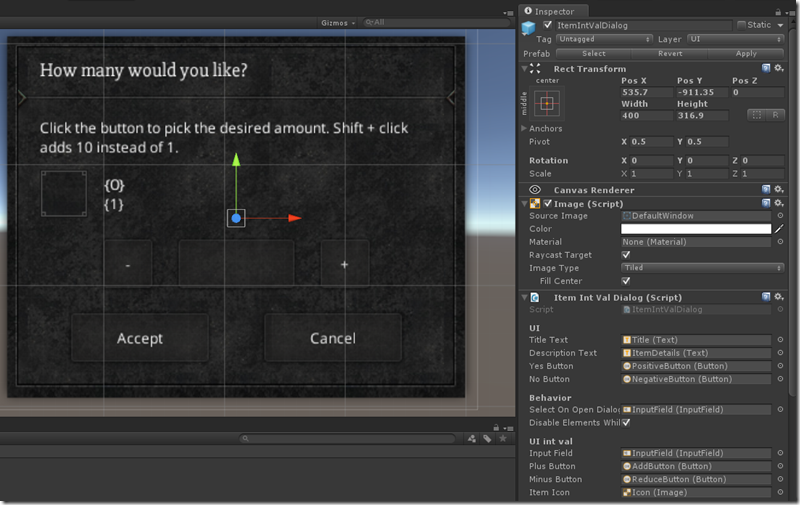
稍微复杂一些的购买物品对话框
当购买物品时会显示出一个购买的物品,物品数量金额的对话框
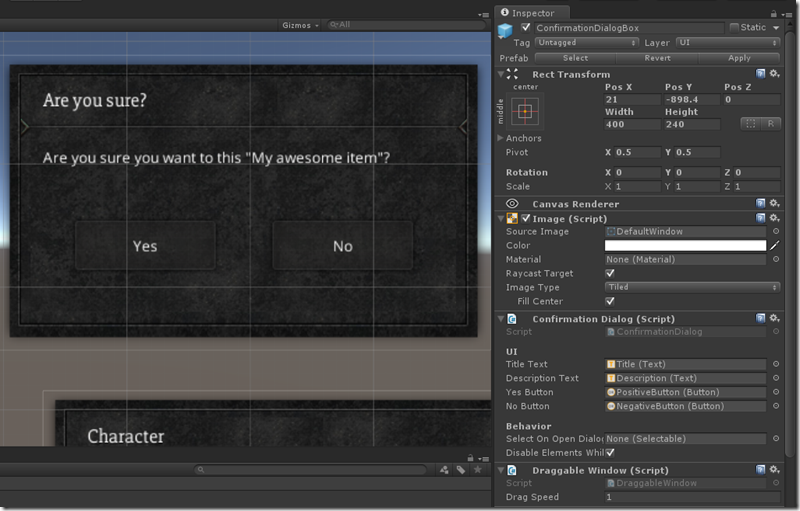
简单确认对话框的使用
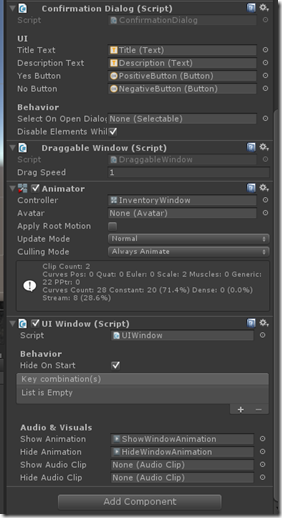
1、使用UGUI来设计一个自己使用的对话框,基本几个元素Title,description ,two buttons;
2、给对话框绑定Draggable Window(Script)使其具有拖拽功能
3、添加Animator,定义对话框显示的时候具有动画效果
4、添加UI Windows(script)使其具有打开关闭,声音,动画的效果
5、Confirmation Dialog(script)使其具有事件回调,model对话框的属性,文字绑定等对话框固有的属性
至此简单的对话框就做好了,这里我们充分见识了绑定技术、组件技术、UI解耦和框架的强大威力
复杂对话框的使用
这里只要知道Item Int Val Dialog(scirpt)其实是ConfirmDialog类的一个子类,剩下的东西就很自然了,这里不详细展开了。
分析
功能需求确定了,如何实现这些功能可能就需要用到一些模式,以及一些经验了,先看一下类图
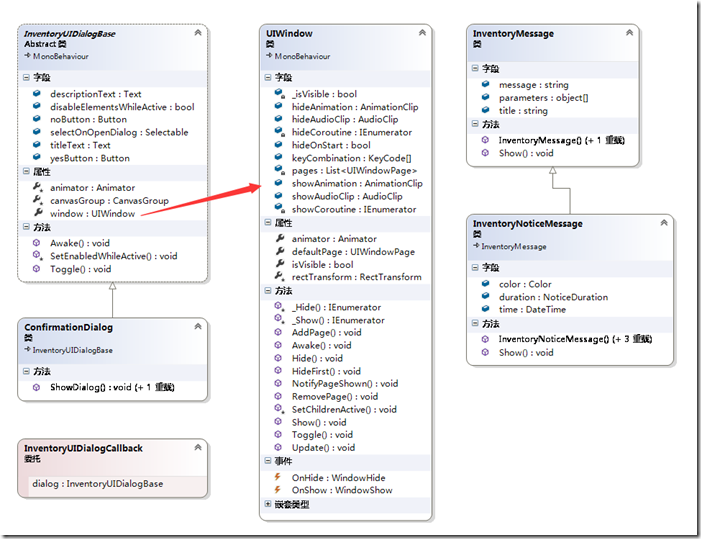
根据前一节的脑图,类图我们逐个分析,InventoryUIDialogBase 是一个抽象类,也是与UI进行绑定的主体,其没有一个无用的属性,这里重点关注几个字段和属性,UIWindow类是通用的窗口显示和动画控制组件,InventoryMessage是字符串Message的封装类。
1)窗体UI布局
UI布局是通过Unity3d UGUI拖拽的方式设计上去的,这个很简单,首先做到了UI分离
2)窗体文字显示
窗体文字的显示首先是通过后台与UI做的绑定,这里使用Unity3d的组件设计时绑定技术(这里做过WPF的同学有是否有印象MVVM中的绑定),这里关键是文字信息,实际发现其实Dialog类并不关心显示的什么string,而是Inventory Pro提供的(类图中的Message类)一层封装后得到的结果,这里为什么要单独拿出来实际是为了做国际化以及一些文字性的扩展,比如颜色,字体显示的方案。
InventoryLangDataBase类对于所有的消息体文字进行了集中处理,而且本身也是Asset,这里有两种好处一种就是可以集中管理,一种就是为国际化文字。
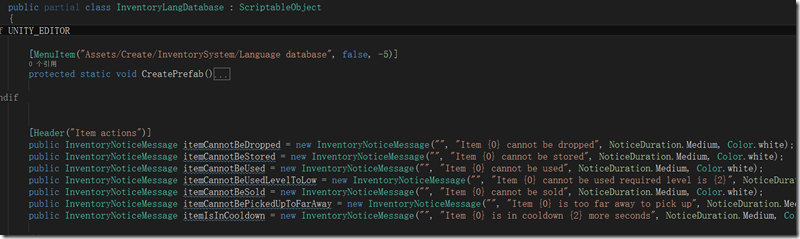
因为Unity3d UGUI可以做文字颜色和字体的格式化操作,这里完全可以扩展添加有颜色和字体大小的文字重载
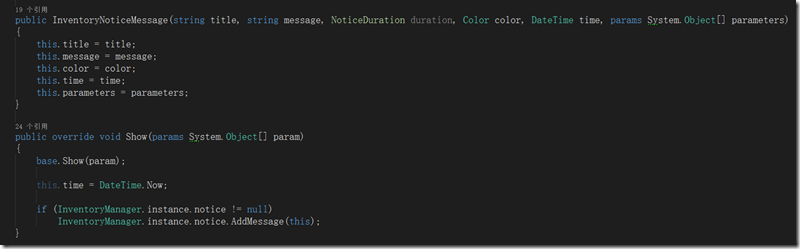
3)窗体显示控制,窗体显示动画控制,窗体显示声音控制
窗体显示的控制,完全利用Unity3d平台的组件化功能,通过UIWindow专门拿出来控制,这里看到UIWinow类是必须加载Animator动画类的
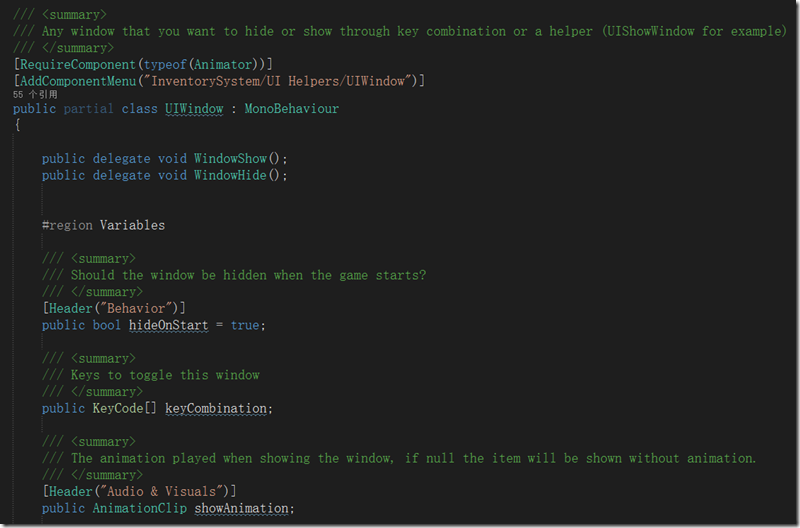
窗体的动画控制,由主体DialogBase进行设计时的动画效果绑定,由UIWindow类在控制显示和关闭时进行动画的Play,这里还用到了协程
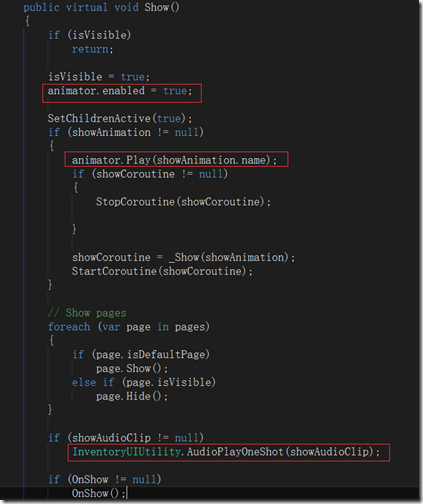
窗体显示声音控制,由全局类静态方法 InventoryUIUtility.AudioPlayOneShot 来播放即可
3)窗体与其他窗体的关系
这个功能类似于网页中的遮罩或者winform里的模态(ModelDialog)对话框,这里没有现成的东西可以使用只能自己写了,这里如何关闭UGUI的事件处理主要是通过CanvasGroup这个插件来控制
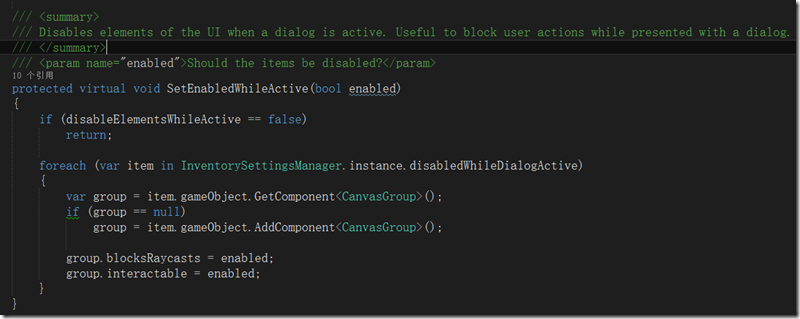
4) 窗体事件回调
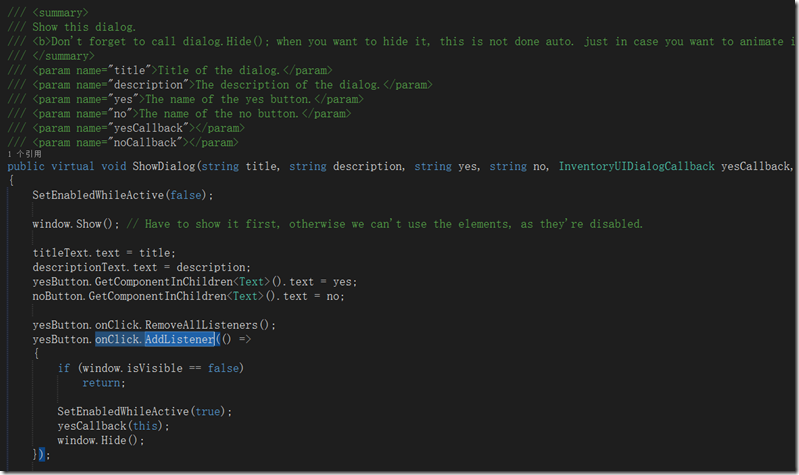
窗体中的事件回调交给了Dialog子类来处理,具体是在重载的ShowDialog方法中添加了委托的事件回调函数,然后通过代码绑定的方式(这里是onClick.AddListener,而不是UI手动可视化绑定)进行了按钮事件的绑定,这里有很大的灵活性。我比较喜欢这种通过代码定义显示委托的方式,来完成事件的回调(c++系可能叫做函数指针),同比匿名委托,泛型委托(Action或者Func),Lambda表达式,代码可读性更强
其它
这里留了一个小疑问,对话框的触发显示是如何实现的,我们的(MessageBox.Show)在哪里呢?
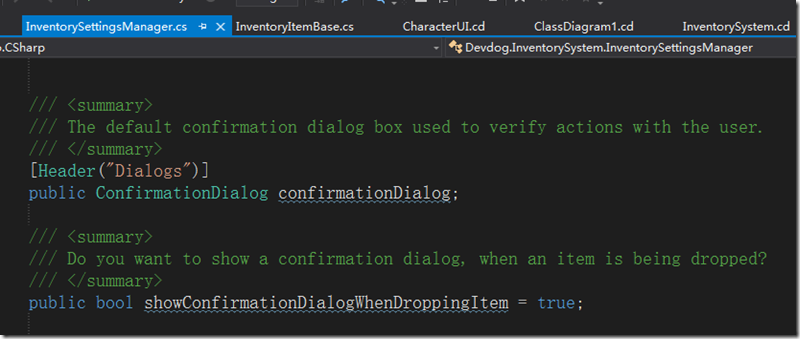
看过前面的文章的同学应该知道,Inevntory Pro有一个全局setting类,需要进行一些配置,其中就需要窗体元素与SettingManger脚本进行绑定,而SettingManger是一个单列全局类
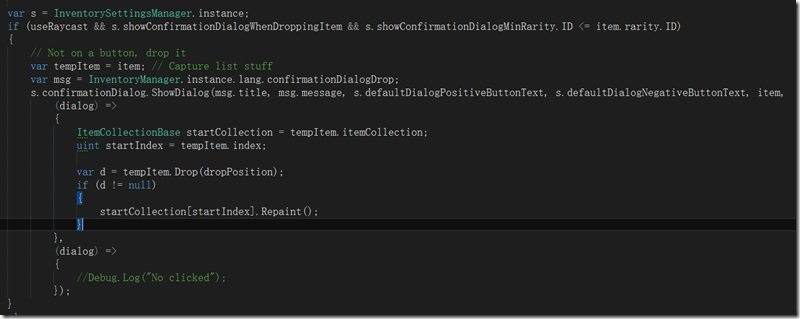
最后是如何显示对话框的代码了,看到ShowDialog方法了吗,两个按钮的事件回调函数 Lambda表达式特别显眼
写在最后
分析总结完毕后有一些想法
1、好的框架使开发变得的easy,扩展很方便,通过以上的分析和例子看的出来很容易就能扩展出来一些简单的类似Confirm对话框,而且是对修改封闭,对新增开放的;
2、一个司空见惯的小功能,如果做好了完全可以覆盖到Unity3d的许多知识,剩下的只是不断进行这样的重复,重建你的神经网络即可,总有一天Unity3d的技术就这样印在你的大脑之中;
3、如果你真的看懂了本文,分析一下其实所有的UI系统都是相通的只是API和使用的技术不同而已,只是有些API封装的死,有些封装的松散一些。换句话说如果你自己在某种UI体系中完成一种自己的实现,换到另一个UI体系一样可以实现的;
4、微软体系如Winform过渡的封装是否是好事情?有些时候是好事情,有些时候就未必。根据手上的资源合理的选择技术才是根本;
5、关于使用轮子和造轮子的纠结,这也是一组矛盾,不造轮子就不能深刻的体会技术,造轮子需要大量的时间可造出来未必有已经造好的轮子设计的好,你会选择哪一种呢?
本文首发于蛮牛,次发于博客园,特此说明
核心代码
UIWindow
using System;

using UnityEngine;

using System.Collections;

using UnityEngine.EventSystems;

using System.Collections.Generic;

namespace Devdog.InventorySystem

{

    /// <summary>

    /// Any window that you want to hide or show through key combination or a helper (UIShowWindow for example)

    /// </summary>

    [RequireComponent(typeof(Animator))]

    [AddComponentMenu("InventorySystem/UI Helpers/UIWindow")]

    public partial class UIWindow : MonoBehaviour

    {

        public delegate void WindowShow();

        public delegate void WindowHide();

        #region Variables

        /// <summary>

        /// Should the window be hidden when the game starts?

        /// </summary>

        [Header("Behavior")]

        public bool hideOnStart = true;

        /// <summary>

        /// Keys to toggle this window

        /// </summary>

        public KeyCode[] keyCombination;

        /// <summary>

        /// The animation played when showing the window, if null the item will be shown without animation.

        /// </summary>

        [Header("Audio & Visuals")]

        public AnimationClip showAnimation;

        /// <summary>

        /// The animation played when hiding the window, if null the item will be hidden without animation.

        /// </summary>

        public AnimationClip hideAnimation;

        public AudioClip showAudioClip;

        public AudioClip hideAudioClip;

        /// <summary>

        /// The animator in case the user wants to play an animation.

        /// </summary>

        public Animator animator { get; set; }

        protected RectTransform rectTransform { get; set; }

        [NonSerialized]

        private bool _isVisible = false;

        /// <summary>

        /// Is the window visible or not? Used for toggling.

        /// </summary>

        public bool isVisible

        {

            get

            {

                return _isVisible;

            }

            protected set

            {

                _isVisible = value;

            }

        }

        private IEnumerator showCoroutine;

        private IEnumerator hideCoroutine;

        /// <summary>

        /// All the pages of this window

        /// </summary>

        [HideInInspector]

        private List<UIWindowPage> pages = new List<UIWindowPage>();

        public UIWindowPage defaultPage

        {

            get;

            private set;

        }

        #endregion

        #region Events

        /// <summary>

        /// Event is fired when the window is hidden.

        /// </summary>

        public event WindowHide OnHide;

        /// <summary>

        /// Event is fired when the window becomes visible.

        /// </summary>

        public event WindowShow OnShow;

        #endregion

        public void AddPage(UIWindowPage page)

        {

            pages.Add(page);

            if (page.isDefaultPage)

                defaultPage = page;

        }

        public void RemovePage(UIWindowPage page)

        {

            pages.Remove(page);

        }

        public virtual void Awake()

        {

            animator = GetComponent<Animator>();

            if (animator == null)

                animator = gameObject.AddComponent<Animator>();

            rectTransform = GetComponent<RectTransform>();

            if (hideOnStart)

                HideFirst();

            else

            {

                isVisible = true;

            }

        }

        public virtual void Update()

        {

            if (keyCombination.Length == )

                return;

            bool allDown = true;

            foreach (var key in keyCombination)

            {

                if (Input.GetKeyDown(key) == false)

                {

                    allDown = false;

                }

            }

            if (allDown)

                Toggle();

        }

        #region Usefull UI reflection functions

        /// <summary>

        /// One of our children pages has been shown

        /// </summary>

        public void NotifyPageShown(UIWindowPage page)

        {

            foreach (var item in pages)

            {

                if (item.isVisible && item != page)

                    item.Hide();

            }

        }

        protected virtual void SetChildrenActive(bool active)

        {

            foreach (Transform t in transform)

            {

                t.gameObject.SetActive(active);

            }

            var img = gameObject.GetComponent<UnityEngine.UI.Image>();

            if(img != null)

                img.enabled = active;

        }

        public virtual void Toggle()

        {

            if (isVisible)

                Hide();

            else

                Show();

        }

        public virtual void Show()

        {

            if (isVisible)

                return;

            isVisible = true;

            animator.enabled = true;

            SetChildrenActive(true);

            if (showAnimation != null)

            {

                animator.Play(showAnimation.name);

                if (showCoroutine != null)

                {

                    StopCoroutine(showCoroutine);

                }

                showCoroutine = _Show(showAnimation);

                StartCoroutine(showCoroutine);

            }

            // Show pages

            foreach (var page in pages)

            {

                if (page.isDefaultPage)

                    page.Show();

                else if (page.isVisible)

                    page.Hide();

            }

            if (showAudioClip != null)

                InventoryUIUtility.AudioPlayOneShot(showAudioClip);

            if (OnShow != null)

                OnShow();

        }

        public virtual void HideFirst()

        {

            isVisible = false;

            animator.enabled = false;

            SetChildrenActive(false);

            rectTransform.anchoredPosition = Vector2.zero;

        }

        public virtual void Hide()

        {

            if (isVisible == false)

                return;

            isVisible = false;

            if (OnHide != null)

                OnHide();

            if (hideAudioClip != null)

                InventoryUIUtility.AudioPlayOneShot(hideAudioClip);

            if (hideAnimation != null)

            {

                animator.enabled = true;

                animator.Play(hideAnimation.name);

                if (hideCoroutine != null)

                {

                    StopCoroutine(hideCoroutine);

                }

                hideCoroutine = _Hide(hideAnimation);

                StartCoroutine(hideCoroutine);

            }

            else

            {

                animator.enabled = false;

                SetChildrenActive(false);

            }

        }

        /// <summary>

        /// Hides object after animation is completed.

        /// </summary>

        /// <param name="animation"></param>

        /// <returns></returns>

        protected virtual IEnumerator _Hide(AnimationClip animation)

        {

            yield return new WaitForSeconds(animation.length + 0.1f);

            // Maybe it got visible in the time we played the animation?

            if (isVisible == false)

            {

                SetChildrenActive(false);

                animator.enabled = false;

            }

        }

        /// <summary>

        /// Hides object after animation is completed.

        /// </summary>

        /// <param name="animation"></param>

        /// <returns></returns>

        protected virtual IEnumerator _Show(AnimationClip animation)

        {

            yield return new WaitForSeconds(animation.length + 0.1f);

            if (isVisible)

                animator.enabled = false;

        }

        #endregion

    }

}
InventoryUIDialogBase
using UnityEngine;

using System.Collections;

using Devdog.InventorySystem.Dialogs;

using UnityEngine.UI;

namespace Devdog.InventorySystem.Dialogs

{

    public delegate void InventoryUIDialogCallback(InventoryUIDialogBase dialog);

    /// <summary>

    /// The abstract base class used to create all dialogs. If you want to create your own dialog, extend from this class.

    /// </summary>

    [RequireComponent(typeof(Animator))]

    [RequireComponent(typeof(UIWindow))]

    public abstract partial class InventoryUIDialogBase : MonoBehaviour

    {

        [Header("UI")]

        public Text titleText;

        public Text descriptionText;

        public UnityEngine.UI.Button yesButton;

        public UnityEngine.UI.Button noButton;

        /// <summary>

        /// The item that should be selected by default when the dialog opens.

        /// </summary>

        [Header("Behavior")]

        public Selectable selectOnOpenDialog;

        /// <summary>

        /// Disables the items defined in InventorySettingsManager.disabledWhileDialogActive if set to true.

        /// </summary>

        public bool disableElementsWhileActive = true;

        protected CanvasGroup canvasGroup { get; set; }

        protected Animator animator { get; set; }

        public UIWindow window { get; protected set; }

        public virtual void Awake()

        {

            canvasGroup = GetComponent<CanvasGroup>();

            if (canvasGroup == null)

                canvasGroup = gameObject.AddComponent<CanvasGroup>();

            animator = GetComponent<Animator>();

            window = GetComponent<UIWindow>();

            window.OnShow += () =>

            {

                SetEnabledWhileActive(false); // Disable other UI elements

                if (selectOnOpenDialog != null)

                    selectOnOpenDialog.Select();

            };

            window.OnHide += () =>

            {

                SetEnabledWhileActive(true); // Enable other UI elements

            };

        }

        public void Toggle()

        {

            window.Toggle();

            if(window.isVisible)

                SetEnabledWhileActive(false); // Disable other UI elements

            else

                SetEnabledWhileActive(true); // Enable other UI elements

        }

        /// <summary>

        /// Disables elements of the UI when a dialog is active. Useful to block user actions while presented with a dialog.

        /// </summary>

        /// <param name="enabled">Should the items be disabled?</param>

        protected virtual void SetEnabledWhileActive(bool enabled)

        {

            if (disableElementsWhileActive == false)

                return;

            foreach (var item in InventorySettingsManager.instance.disabledWhileDialogActive)

            {

                var group = item.gameObject.GetComponent<CanvasGroup>();

                if (group == null)

                    group = item.gameObject.AddComponent<CanvasGroup>();

                group.blocksRaycasts = enabled;

                group.interactable = enabled;

            }

        }

    }

}
ConfirmationDialog
using UnityEngine;

using System.Collections;

using UnityEngine.UI;

namespace Devdog.InventorySystem.Dialogs

{

    public partial class ConfirmationDialog : InventoryUIDialogBase

    {

        /// <summary>

        /// Show this dialog.

        /// <b>Don't forget to call dialog.Hide(); when you want to hide it, this is not done auto. just in case you want to animate it instead of hide it.</b>

        /// </summary>

        /// <param name="title">Title of the dialog.</param>

        /// <param name="description">The description of the dialog.</param>

        /// <param name="yes">The name of the yes button.</param>

        /// <param name="no">The name of the no button.</param>

        /// <param name="yesCallback"></param>

        /// <param name="noCallback"></param>

        public virtual void ShowDialog(string title, string description, string yes, string no, InventoryUIDialogCallback yesCallback, InventoryUIDialogCallback noCallback)

        {

            SetEnabledWhileActive(false);

            window.Show(); // Have to show it first, otherwise we can't use the elements, as they're disabled.

            titleText.text = title;

            descriptionText.text = description;

            yesButton.GetComponentInChildren<Text>().text = yes;

            noButton.GetComponentInChildren<Text>().text = no;

            yesButton.onClick.RemoveAllListeners();

            yesButton.onClick.AddListener(() =>

            {

                if (window.isVisible == false)

                    return;

                SetEnabledWhileActive(true);

                yesCallback(this);

                window.Hide();

            });

            noButton.onClick.RemoveAllListeners();

            noButton.onClick.AddListener(() =>

            {

                if (window.isVisible == false)

                    return;

                SetEnabledWhileActive(true);

                noCallback(this);

                window.Hide();

            });

        }

        /// <summary>

        /// Show the dialog.

        /// <b>Don't forget to call dialog.Hide(); when you want to hide it, this is not done auto. just in case you want to animate it instead of hide it.</b>

        /// </summary>

        /// <param name="title">The title of the dialog. Note that {0} is the item ID and {1} is the item name.</param>

        /// <param name="description">The description of the dialog. Note that {0} is the item ID and {1} is the item name.</param>

        /// <param name="yes">The name of the yes button.</param>

        /// <param name="no">The name of the no button.</param>

        /// <param name="item">

        /// You can add an item, if you're confirming something for that item. This allows you to use {0} for the title and {1} for the description inside the title and description variables of the dialog.

        /// An example:

        ///

        /// ShowDialog("Are you sure you want to drop {0}?", "{0} sure seems valuable..", ...etc..);

        /// This will show the item name at location {0} and the description at location {1}.

        /// </param>

        /// <param name="yesCallback"></param>

        /// <param name="noCallback"></param>

        public virtual void ShowDialog(string title, string description, string yes, string no, InventoryItemBase item, InventoryUIDialogCallback yesCallback, InventoryUIDialogCallback noCallback)

        {

            ShowDialog(string.Format(string.Format(title, item.name, item.description)), string.Format(description, item.name, item.description), yes, no, yesCallback, noCallback);

        }

    }

}
Unity3d UGUI 通用Confirm确认对话框实现(Inventory Pro学习总结)的更多相关文章
- Unity3D 通用提示窗口实现分析(Inventory Pro学习总结)
背景 游戏中的UI系统或者叫做GUI窗口系统主要有:主要装备窗口(背包,角色窗口也是一种特殊窗口).确实提示窗口(如购买确认).信息提示窗口(一遍没有按钮,ContexntMenu)和特殊窗口(聊天记 ...
- jquery仿alert提示框、confirm确认对话框、prompt带输入的提示框插件[附实例演示]
jquery仿alert提示框.confirm确认对话框.prompt带输入的提示框插件实例演示 第一步:引入所需要的jquery插件文件: http://www.angelweb.cn/Inc/eg ...
- 关于abp中使用的sweetalert对话框组件的confirm确认对话框中的一个坑
今天修改了一个功能,限制删除用户,在删除的时候不满足条件的时候提示用户原因,使用的sweet alert组件. abp框架前端集成了sweet alert 对http请求的error做了全局处理,我在 ...
- confirm确认对话框
还记得之前的javascript入门里的讲的confirm 消息对话框吗?不记得也没关系,我们先来回顾一下,然后在详细讲它. 复习: confirm 消息对话框通常用于允许用户做选择的动作,如:“你对 ...
- asp.net在后台弹出confirm确认对话框并获取用户选择的值做出相应的操作
在asp项目中,这种情况是经常出现的,前段时间通过查找资料以及自己尝试,找到一种解决方案,但是不知是否有更好的方案,以后发现再进行记录. 一.思路 在本次项目中,在一个函数中需要让用户判断,并根据用户 ...
- BootstrapDialog.confirm确认对话框
1. 依赖文件: bootstrap.js bootstrap-dialog.js bootstrap.css bootstrap-dialog.css 2.代码 BootstrapDialog.co ...
- 确认(confirm 消息对话框)
confirm 消息对话框通常用于允许用户做选择的动作(包括一个确定按钮和一个取消按钮). 语法: confirm(str) str:在消息对话框中要显示的文本 返回值: 当用户点击"确定& ...
- javascript window.confirm确认 取消对话框实现代码小结
本文章讲述的三种都是基于了javascript confirm提示确认框的做法了,只是在不同的地方写哦,有需要的同学可参考一下 confirm() 方法 confirm() 方法用于显示一个带有指 ...
- 确认(confirm 消息对话框)语法:confirm(str); 消息对话框通常用于允许用户做选择的动作,如:“你对吗?”等。弹出对话框(包括一个确定按钮和一个取消按钮)
确认(confirm 消息对话框) confirm 消息对话框通常用于允许用户做选择的动作,如:"你对吗?"等.弹出对话框(包括一个确定按钮和一个取消按钮). 语法: confir ...
随机推荐
- mysql 密码篇
通过MySQL命令行,可以修改MySQL数据库的密码,下面就为您详细介绍该MySQL命令行,如果您感兴趣的话,不妨一看. 格式:mysqladmin -u用户名 -p旧密码 password 新密码 ...
- 【转】UGUI实现unity摇杆
http://blog.csdn.net/onafioo/article/details/46403801 http://www.winig.cc/archives/348 好久没有写文章了,最近在做 ...
- EBS 资源路径
/data03/DEV4/comn/java/cmcc/upload cd $OA_HTML /data03/DEV4/comn/html 日志 $IAS_ORACLE_HOME/Apache/Js ...
- Linux core 文件介绍
Linux core 文件介绍 http://www.cnblogs.com/dongzhiquan/archive/2012/01/20/2328355.html 1. core文件的简单介绍在一个 ...
- Java实验报告二:Java面向对象程序设计
Java实验报告二:Java面向对象程序设计 ...
- protobuf序列化、反序列化
引用dllprotobuf-net.rar /// <summary> /// buf序列化 /// </summary> public static String Seria ...
- jquery rotate
网上发现一个很有意思的jQuery旋转插件,支持Internet Explorer 6.0+ .Firefox 2.0 .Safari 3 .Opera 9 .Google Chrome,高级浏览器下 ...
- Naming Service 与 Zookeeper
命名服务是指通过指定的名字来获取资源或者服务的地址,提供者的信息.利用Zookeeper很容易创建一个全局的路径,而这个路径就可以作为 一个名字,它可以指向集群中的集群,提供的服务的地址,远程对象 ...
- 【Android测试】【随笔】与 “58同城” 测试开发交流
◆版权声明:本文出自胖喵~的博客,转载必须注明出处. 转载请注明出处:http://www.cnblogs.com/by-dream/p/5384698.html 初衷 一直都有一个这样的想法: 虽然 ...
- Java调用ASP.NET的webservice故障排除
公司要接入其它公司的一个业务功能,对方是提供的 .net产生的webservice,在用cxf的wsdl2java命令生成客户端的测试代码时,出现了如下故障WSDLToJava Error: Thro ...