
[安卓] 4、CheckBox、RadioButton和Toast简单用法
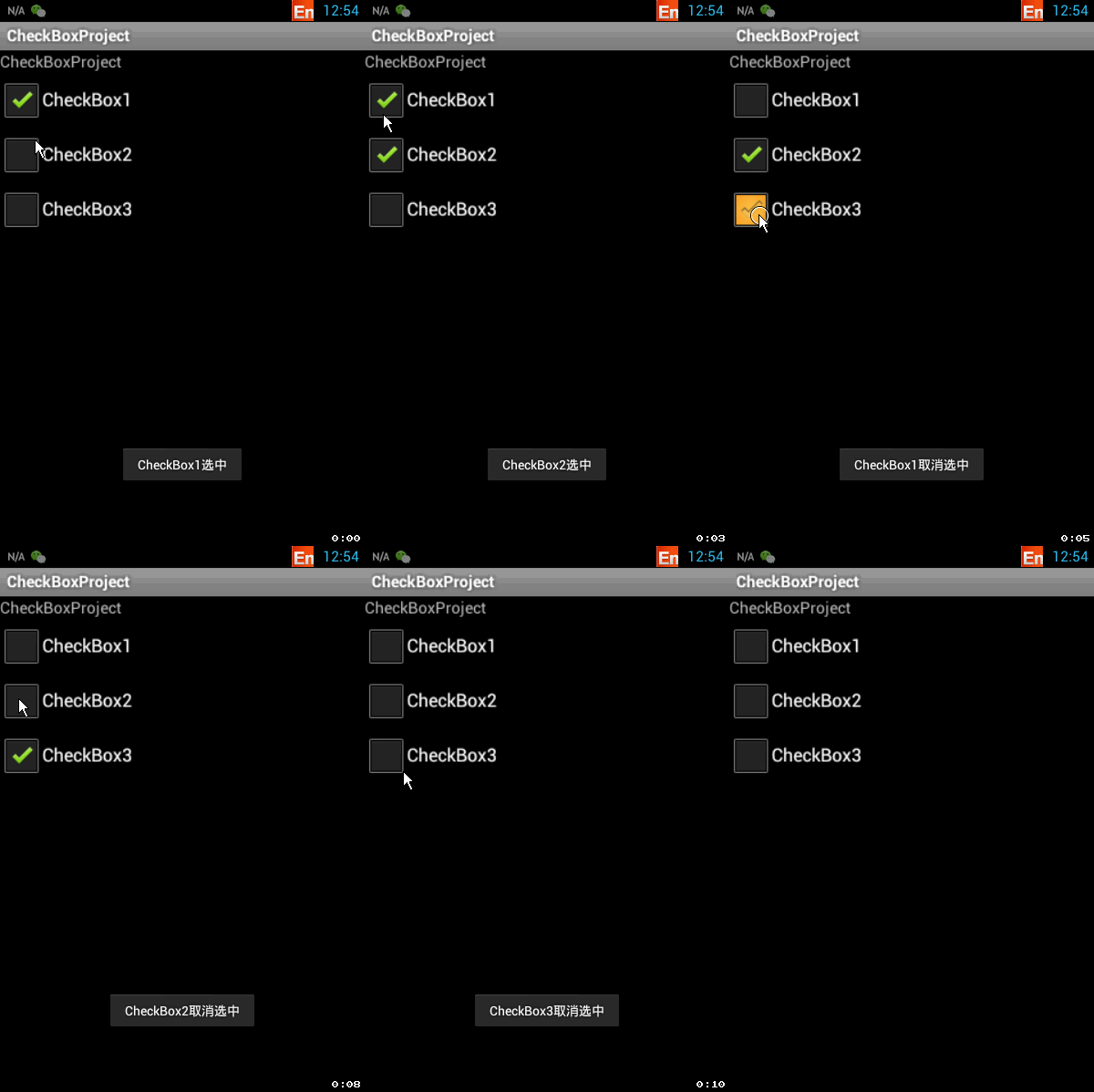
和按钮类似,这里采用cb1.setOnCheckedChangeListener(this);方法分别对3个CheckBox进行CheckChange事件绑定,然后在onCheckedChanged抽象函数中对点击CheckBox的状态进行获取并用Toast显示。
 //使用状态改变检查监听器

 public class MainActivity extends Activity implements OnCheckedChangeListener {

     private CheckBox cb1, cb2, cb3;//创建3个CheckBox对象

     @Override

     public void onCreate(Bundle savedInstanceState) {

         super.onCreate(savedInstanceState);

         setContentView(R.layout.main);

         //实例化3个CheckBox

         cb1 = (CheckBox) findViewById(R.id.cb1);

         cb2 = (CheckBox) findViewById(R.id.cb2);

         cb3 = (CheckBox) findViewById(R.id.cb3);

         cb1.setOnCheckedChangeListener(this);

         cb2.setOnCheckedChangeListener(this);

         cb3.setOnCheckedChangeListener(this);

     }

     //重写监听器的抽象函数

     @Override

     public void onCheckedChanged(CompoundButton buttonView, boolean isChecked) {

         //buttonView 选中状态发生改变的那个按钮

         //isChecked 表示按钮新的状态(true/false)

         if (cb1 == buttonView || cb2 == buttonView || cb3 == buttonView) {

             if (isChecked) {

                 //显示一个提示信息

                 toastDisplay(buttonView.getText() + "选中");

             } else {

                 toastDisplay(buttonView.getText() + "取消选中");

             }

         }

     }

     public void toastDisplay(String str) {

         Toast.makeText(this, str, Toast.LENGTH_SHORT).show();

     }

 }
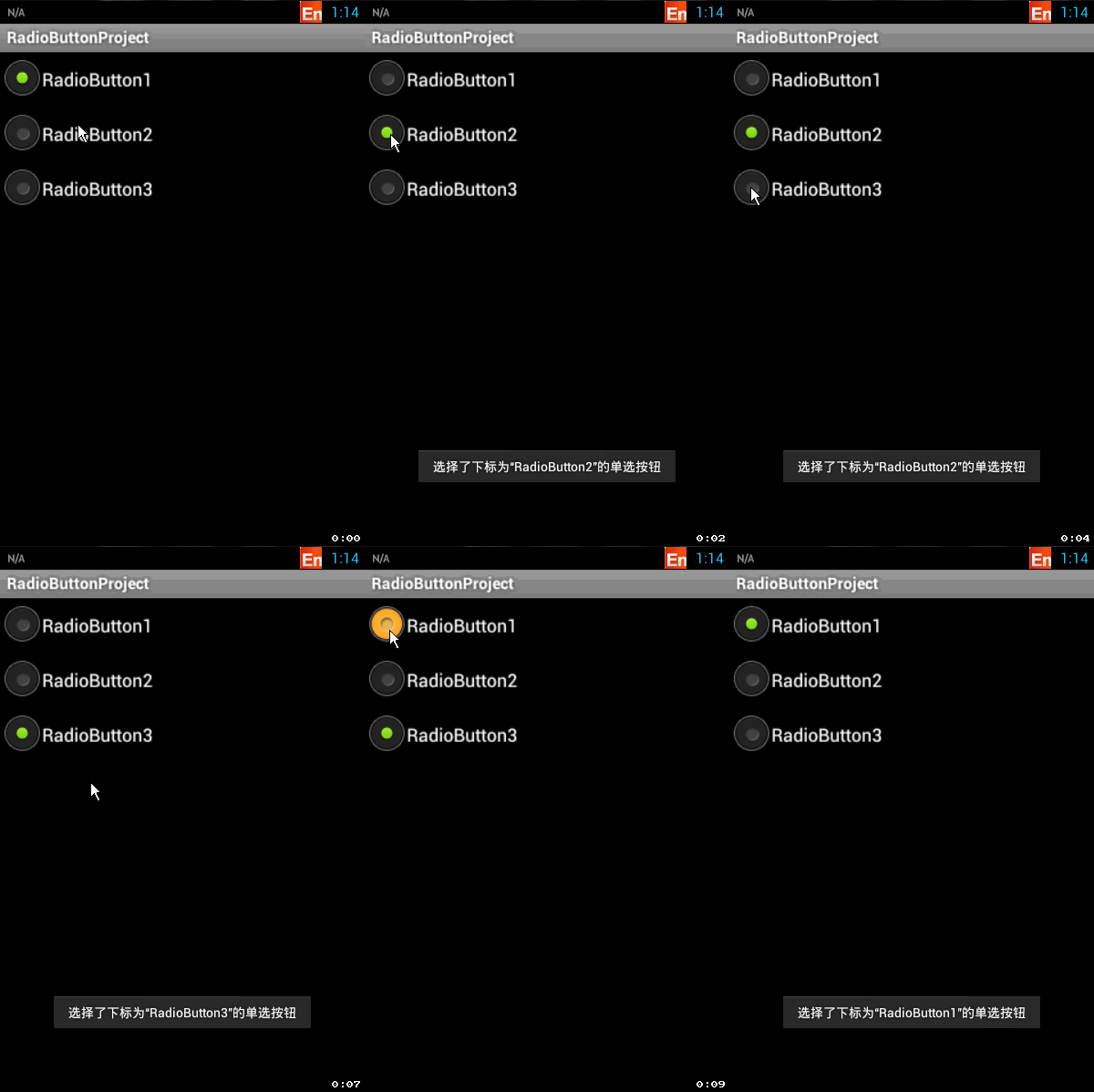
了解上述用法之后,我们来看一下radioButton的用法:注意这里不同的地方是第13、14行,没有像CheckBox一样每一个控件绑定CheckChange监听器,而是将RadioGroup进行绑定。
 //使用状态改变监听器

 public class MainActivity extends Activity implements OnCheckedChangeListener {

     private RadioButton rb1, rb2, rb3;

     private RadioGroup rg;

     @Override

     public void onCreate(Bundle savedInstanceState) {

         super.onCreate(savedInstanceState);

         setContentView(R.layout.main);

         rb1 = (RadioButton) findViewById(R.id.rb1);

         rb2 = (RadioButton) findViewById(R.id.rb2);

         rb3 = (RadioButton) findViewById(R.id.rb3);

         rg = (RadioGroup) findViewById(R.id.radGrp);

         rg.setOnCheckedChangeListener(this);//将单选组绑定监听器

     }

     //重写监听器函数

     /**

      * @param group:指单选组

      * @param group:指单选组中发生状态改变的RadioButton的内存ID!

      */

     @Override

     public void onCheckedChanged(RadioGroup group, int checkedId) {

         if (group == rg) {//因为当前程序中只有一个RadioGroup,此步可以不进行判定

             String rbName = null;

             if (checkedId == rb1.getId()) {

                 rbName = rb1.getText().toString();

             } else if (checkedId == rb2.getId()) {

                 rbName = rb2.getText().toString();

             } else if (checkedId == rb3.getId()) {

                 rbName = rb3.getText().toString();

             }

             Toast.makeText(this, "选择了下标为“" + rbName + "”的单选按钮",

                     Toast.LENGTH_LONG).show();

         }

     }

 }
那这个RadioGroup是怎么和RadioButton结合在一起呈现多选一的效果的呢?我们来看看xml就知道了:
 <?xml version="1.0" encoding="utf-8"?>

 <LinearLayout xmlns:android="http://schemas.android.com/apk/res/android"

     android:orientation="vertical"

     android:layout_width="fill_parent"

     android:layout_height="fill_parent"

     >

     <RadioGroup

         android:id="@+id/radGrp"

         android:layout_width="wrap_content"

         android:layout_height="wrap_content">

         <RadioButton

             android:layout_width="fill_parent"

             android:layout_height="wrap_content"

             android:text="RadioButton1"

            android:id="@+id/rb1"

             />

         <RadioButton

             android:layout_width="fill_parent"

             android:layout_height="wrap_content"

             android:text="RadioButton2"

              android:id="@+id/rb2"

             />

         <RadioButton

             android:layout_width="fill_parent"

             android:layout_height="wrap_content"

             android:text="RadioButton3"

              android:id="@+id/rb3"

             />

     </RadioGroup>

 </LinearLayout>
本文链接:http://www.cnblogs.com/zjutlitao/p/4229767.html
更多精彩:http://www.cnblogs.com/zjutlitao/
[安卓] 4、CheckBox、RadioButton和Toast简单用法的更多相关文章
- 安卓长按交互onCreateContextMenu的简单 用法
1.可在activity和fragment中使用. 2.使用方法 (1)注册 registerForContextMenu(btn);//btn是要实现交互的控件 (2)重写onCreateConte ...
- WPF之Treeview控件简单用法
TreeView:表示显示在树结构中分层数据具有项目可展开和折叠的控件 TreeView 的内容是可以包含丰富内容的 TreeViewItem 控件,如 Button 和 Image 控件.TreeV ...
- listActivity和ExpandableListActivity的简单用法
http://www.cnblogs.com/limingblogs/archive/2011/10/09/2204866.html 今天自己简单的总结了listActivity和Expandable ...
- 【转】通知 Toast详细用法(显示view)
原文网址:http://www.pocketdigi.com/20100904/87.html 今天学习Android通知 Toast的用法,Toast在手机屏幕上向用户显示一条信息,一段时间后信息会 ...
- android里Toast的用法
在活动中,可以通过findViewById()方法获取到在布局文件中定义的元素,这里我们传入R.id.button_1,来得到按钮的实例,这个值是刚才在first_layout.xml中通过andro ...
- HttpURLConnection和HttpClient的简单用法
HttpURLConnection的简单用法:先通过一个URL创建一个conn对象,然后就是可以设置get或者是post方法,接着用流来读取响应结果即可 String html = null; lon ...
- WebView的一些简单用法
一直想写一个关于 WebView 控件的 一些简单运用,都没什么时间,这次也是挤出时间写的,里面的一些基础知识就等有时间再更新讲解一下,今天就先把项目出来做一些简单介绍,过多的内容可以看我的源码,都传 ...
- CATransition(os开发之画面切换) 的简单用法
CATransition 的简单用法 //引进CATransition 时要添加包“QuartzCore.framework”,然后引进“#import <QuartzCore/QuartzCo ...
- jquery.validate.js 表单验证简单用法
引入jquery.validate.js插件以及Jquery,在最后加上这个插件的方法名来引用.$('form').validate(); <!DOCTYPE html PUBLIC " ...
随机推荐
- ASP.NET Web API系列教程目录
ASP.NET Web API系列教程目录 Introduction:What's This New Web API?引子:新的Web API是什么? Chapter 1: Getting Start ...
- 关于Eclipse项目中加入jquery.js文件报错(missing semicolon)问题
在使用Eclipse3.7及以后的版本的时候,加入jQuery文件会报错(missing semicolon),文件中会显示红色小X,虽然这个错误并不会影响项目的运行,但是这个却会大大的影响到开发人员 ...
- HTTP及网络安全
<图解HTTP>这本书对网络上的主流的协议,做了一个非常透彻明晰的讲解,从http的头信息.响应数据的头信息.状态码的分析.TCP/IP以及网络安全方面的知识,比如https.网络攻击等的 ...
- hdu 2196 computer
Computer Time Limit: 1000/1000 MS (Java/Others) Memory Limit: 32768/32768 K (Java/Others)Total Su ...
- 循序渐进Python3(三) -- 0 -- 初识函数
函数 如果我们要计算一个圆的面积,就需要知道它的半径,然后根据公式S=3.14*r*r算出它的面积,如果我们要算100个圆的面积,则每次我们都需要写公式去计算,是不是很麻烦,但是有了函数的话,我们就不 ...
- XML团队介绍发布!
三个臭皮匠,赛过诸葛亮 /********************************************************************/ 成员: 姓名:项浩哲 职务:项目经 ...
- GsonWithoutObject 没有对象(脱离对象) 直接提取 ... gson json
GsonWithoutObject 脱离对象, 直接提取 package temp; import tool.FileTool; import com.google.gson.JsonElement; ...
- iOS 设置button文字过长而显示省略号的解决办法
UIButton * button =[UIButton buttonWithType:UIButtonTypeCustom];button.titleLabel.adjustsFontSizeToF ...
- media type的类型汇总
用的比较多的是screen和print:区分打印和屏幕显示(Android,iPhone都不是手持设备handheld,都是screen设备)
- Sorted Union
function unite(arr1, arr2, arr3) { //return arr1; var args = Array.from(arguments); var arr = args.r ...