
CSharpGL(13)用GLSL实现点光源(point light)和平行光源(directional light)的漫反射(diffuse reflection)
CSharpGL(13)用GLSL实现点光源(point light)和平行光源(directional light)的漫反射(diffuse reflection)
2016-08-13
由于CSharpGL一直在更新,现在这个教程已经不适用最新的代码了。CSharpGL源码中包含10多个独立的Demo,更适合入门参考。
为了尽可能提升渲染效率,CSharpGL是面向Shader的,因此稍有难度。
光源
如何用GLSL实现点光源和平行光源等各类光源的效果?这个问题我查找资料、思考了很久,今天终于解决了一部分。
漫反射(diffuse reflection)是粗糙表面的反射效果。理论上的粗糙表面,对各个方向的反射效果都完全相同。本篇就分别实现点光源(point light)和平行光源(directional light)照射到粗糙表面时产生的漫反射效果。
下载
这个示例是CSharpGL的一部分,CSharpGL已在GitHub开源,欢迎对OpenGL有兴趣的同学加入(https://github.com/bitzhuwei/CSharpGL)
点光源(point light)
讲GLSL当然要从shader开始说起。
Vertex shader
 1 #version 150 core

 2

 3 in vec3 in_Position;

 4 in vec3 in_Normal;

 5 out vec4 pass_Position;

 6 out vec4 pass_Color;

 7 uniform mat4 modelMatrix;

 8 uniform mat4 viewMatrix;

 9 uniform mat4 projectionMatrix;

10 uniform vec3 lightPosition;

11 uniform vec3 lightColor;

12 uniform vec3 globalAmbient;

13 uniform float Kd;

14

15 void main(void)

16 {

17     gl_Position = projectionMatrix * viewMatrix * modelMatrix * vec4(in_Position, 1.0f);

18     vec3 worldPos = (viewMatrix * modelMatrix * vec4(in_Position, 1.0f)).xyz;

19     vec3 N = (transpose(inverse(viewMatrix * modelMatrix)) * vec4(in_Normal, 1.0f)).xyz;

20     N = normalize(N);

21     // light's direction

22     vec3 L = (viewMatrix * vec4(lightPosition, 1.0f)).xyz - worldPos;// point light

23     L = normalize(L);

24     // diffuse color from directional light

25     vec3 diffuseColor = Kd * lightColor * max(dot(N, L), 0);

26     // ambient color

27     vec3 ambientColor = Kd * globalAmbient;

28     pass_Color.xyz = diffuseColor + ambientColor;

29     pass_Color.w = 1;

30 }
首先, gl_Position 的计算是不用解释了。
要计算漫反射下的点光源照射物体的效果,需要知道物体的顶点的法线(normal)、顶点位置到光源的方向(light direction),两者夹角越小,那么光照越强。 max(dot(N, L), 0) 就是在计算光照强度。
为了避免全黑,我们加个环境光(ambient light)。环境光,就是那些综合起来的光照因素,不好准确计算,就简单地用一个 vec3 globalAmbient; 来描述了。
重要知识点
MVP的含义(projection * view * model)
那三个矩阵变换里,每个都有各自的意义。其中,modelMatrix是在物体坐标系旋转缩放平移模型。就好比父母在家里打扮自己的宝宝。ViewMatrix是把物体放到世界坐标系下,让摄像机为原点(0,0,0),来观察模型。就好比把各家各户的宝宝放到幼儿园拍合影。ProjectionMatrix就是宝宝们的合影照片。
所以, (viewMatrix * modelMatrix * vec4(in_Position, 1.0f)).xyz 就是物体的顶点在世界坐标系的位置。也就是在场景中的位置。(不是在3dmax里的位置)
法线(normal)
但是,不能以此类推世界坐标系里的法线(normal)。法线从3dmax中的值变换到场景中后,它的值应该是 (transpose(inverse(viewMatrix * modelMatrix)) * vec4(in_Normal, 1.0f)).xyz (就是要求逆然后转置),而不是 (viewMatrix * modelMatrix * vec4(in_Normal, 1.0f)).xyz 。具体原因可参考这里(http://blog.csdn.net/racehorse/article/details/6664775)。或者
Normals are funny.  They're vec3's, since you don't want perspective on normals.   And they don't actually scale quite right--a 45 degree surface with a 45 degree normal, scaled by glScalef(1,0.1,1), drops the surface down to near 0 degrees, but actually tilts the normal *up*, in the opposite direction from the surface, to near 90 degrees.

Mathematically, if between two points a and b on the surface, dot(n,b-a)==0, then after applying a matrix M to the points, you want the normal to still be perpendicular.  The question is, what matrix N do you have to apply to the normal to make this happen?  In other words, find N such that

    dot( N * n , M * a - M * b) == 0

We can solve this by noting that dot product can be expresed as matrix multiplication--dot(x,y) = transpose(x) * y, where we treat an ordinary column-vector as a little matrix, and flip it horizontally.  So

   transpose(N * n) * (M*a - M*b) == 0         (as above, but write using transpose and matrix multiplication)

   transpose(N * n) * M * (a-b) == 0              (collect both copies of M)

   transpose(n) * transpose(N) * M * (a-b) == 0    (transpose-of-product is product-of-transposes in opposite order)

OK.  This is really similar to our assumption that the original normal was perpendicular to the surface--that dot(n,b-a) == transpose(n) * (a-b) == 0.  In fact, the only difference is the new matrices wedged in the middle.  If we pick N to make the term in the middle the identity, then our new normal will be perpendicular to the surface too:

    transpose(N) * M == I   (the identity matrix)

This is the definition for matrix inverses, so the "normal matrix" N = transpose(inverse(M)).

If you look up the GLSL definition for "gl_NormalMatrix", it's defined as "the transpose of the inverse of the gl_ModelViewMatrix".  Now you know why!
normal
光源的位置
由于模型受到viewMatrix的影响,所以摄像机的改变也会改变模型的顶点位置,而点光源的位置如果不变,就会出现不同的光照结果。这不合实际。所以点光源也要按viewMatrix做变换。
Fragment shader
极其简单。
1 #version 150 core

2

3 in vec4 pass_Color;

4 out vec4 out_Color;

5

6 void main(void)

7 {

8     out_Color = pass_Color;

9 }
平行光源(directional light)
评选光源与之类似。至于为何在计算平行光源的方向时要用 (transpose(inverse(viewMatrix * modelMatrix)) * vec4(in_Normal, 1.0f)).xyz 这种复杂的步骤,原理在上文的法线(normal)中科院找到。(提示:都是为了让摄像机对模型和对光源方向产生同样的变换,从而使得摄像机的移动不会改变光照效果。)
 1 #version 150 core

 2

 3 in vec3 in_Position;

 4 in vec3 in_Normal;

 5 out vec4 pass_Position;

 6 out vec4 pass_Color;

 7 uniform mat4 modelMatrix;

 8 uniform mat4 viewMatrix;

 9 uniform mat4 projectionMatrix;

10 uniform vec3 lightPosition;

11 uniform vec3 lightColor;

12 uniform vec3 globalAmbient;

13 uniform float Kd;

14

15 void main(void)

16 {

17     gl_Position = projectionMatrix * viewMatrix * modelMatrix * vec4(in_Position, 1.0f);

18     vec3 worldPos = (viewMatrix * modelMatrix * vec4(in_Position, 1.0f)).xyz;

19     vec3 N = (transpose(inverse(viewMatrix * modelMatrix)) * vec4(in_Normal, 1.0f)).xyz;

20     N = normalize(N);

21     // light's direction

22     vec3 L = (transpose(inverse(viewMatrix)) * vec4(lightPosition, 1.0f)).xyz;// directional light

23     L = normalize(L);

24     // diffuse color from directional light

25     vec3 diffuseColor = Kd * lightColor * max(dot(N, L), 0);

26     // ambient color

27     vec3 ambientColor = Kd * globalAmbient;

28     pass_Color.xyz = diffuseColor + ambientColor;

29     pass_Color.w = 1;

30 }
Fragment shader与上文的相同。
试验
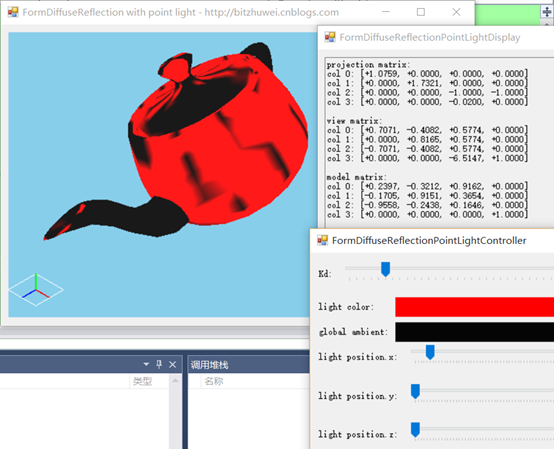
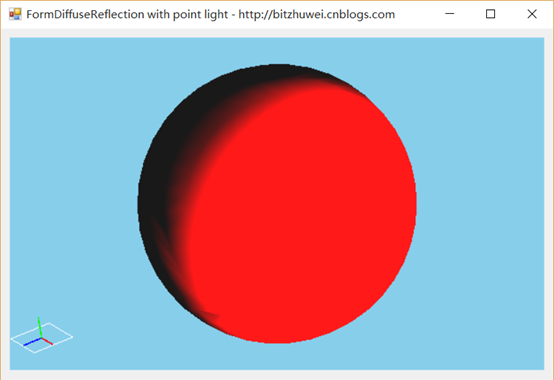
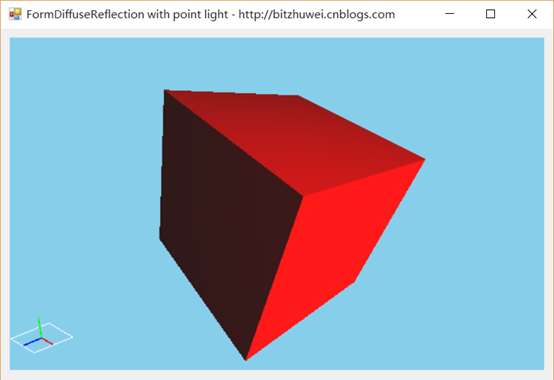
在一个场景中,一个点光源照射到物体上。如果物体旋转,那么光照效果会改变。如果光源位置改变,那么光照效果会改变。但是,如果摄像机改变位置,却不会改变漫反射的效果。(漫反射,反射到各个角度的光效是相同的,所以与摄像机位置无关。)
您可以下载此示例(https://github.com/bitzhuwei/CSharpGL)试验,鼠标左键旋转模型,光效会改变。鼠标右键旋转摄像机,光效是不变的。


总结
今后将继续整合一些镜面反射等类型的光照效果,为更多更强的shader效果做准备。
不得不说线性代数在计算机3D效果方面的应用彻底证明了它的强大。
学OpenGL有2年了,从NEHE到SharpGL,从《3D Math Primer for Graphics and Game Development》到《OpenGL Programming Guide》,算是对OpenGL有了初级的认识。最近我纠集整理了SharpGL,GLM,SharpFont等开源库,想做一个更好用的纯C#版OpenGL。欢迎对OpenGL有兴趣的同学加入(https://github.com/bitzhuwei/CSharpGL)
CSharpGL(13)用GLSL实现点光源(point light)和平行光源(directional light)的漫反射(diffuse reflection)的更多相关文章
- CSharpGL(15)用GLSL渲染2种类型的文字
CSharpGL(15)用GLSL渲染2种类型的文字 2016-08-13 由于CSharpGL一直在更新,现在这个教程已经不适用最新的代码了.CSharpGL源码中包含10多个独立的Demo,更适合 ...
- _LightColor0将会是主要的directional light的颜色。
LightMode是个非常重要的选项,因为它将决定该pass中光源的各变量的值.如果一个pass没有指定任何LightMode tag,那么我们就会得到上一个对象残留下来的光照值,这并不是我们想要的. ...
- Directional Light,Ambient,Specular,光照感性认识...
- BIT祝威博客汇总(Blog Index)
+BIT祝威+悄悄在此留下版了个权的信息说: 关于硬件(Hardware) <穿越计算机的迷雾>笔记 继电器是如何成为CPU的(1) 继电器是如何成为CPU的(2) 关于操作系统(Oper ...
- [ZZ] D3D中的模板缓存(3)
http://www.cppblog.com/lovedday/archive/2008/03/25/45334.html http://www.cppblog.com/lovedday/ D3D中的 ...
- Unity3d笔试题大全
1. [C#语言基础]请简述拆箱和装箱. 答: 装箱操作: 值类型隐式转换为object类型或由此值类型实现的任何接口类型的过程. 1.在堆中开辟内存空间. 2.将值类型的数据复制到堆中. ...
- Deferred Shading延迟渲染
Deferred Shading 传统的渲染过程通常为:1)绘制Mesh:2)指定材质:3)处理光照效果:4)输出.传统的过程Mesh越多,光照处理越费时,多光源时就更慢了. 延迟渲染的步骤:1)Pa ...
- OpenGL开发环境配置-Windows/MinGW/Clion/CMake
因为某些原因,不想用过于臃肿的VS了,转而使用常用的jetbrains的CLion,Clion沿袭了jetbrans的优良传统,基本代码提示功能还是比较好的,不过就是对于windows不熟悉cmake ...
- Siki_Unity_2-7_Stealth秘密行动
Unity 2-7 Stealth秘密行动 Abstract:向量运算:Animation动画:Navigation寻路系统:Mecanim动画系统 任务1&2&3:游戏介绍 & ...
随机推荐
- 加深一下BlockingQueue的认识
认识BlockingQueue BlockingQueue是一种可以阻塞线程的队列,java中对这种队列提供了方法抽象,BlockingQueue则是抽象的接口. add:添加元素到队列里,添加成功返 ...
- myeclipse学习总结一(在MyEclipse中设置生成jsp页面时默认编码为utf-8编码)
1.每次我们在MyEclispe中创建Jsp页面,生成的Jsp页面的默认编码是"ISO-8859-1".在这种情况下,当我们在页面中编写的内容存在中文的时候,就无法进行保存.如下图 ...
- C# 多种方式发送邮件(附帮助类)
因项目业务需要,需要做一个发送邮件功能,查了下资料,整了整,汇总如下,亲测可用- QQ邮箱发送邮件 #region 发送邮箱 try { MailMessage mail = new MailMess ...
- CoreCRM 开发实录——开始之新项目的技术选择
2016年11月,接受了一个工作,是对"悟空CRM"进行一些修补.这是一个不错的 CRM,开源,并提供一个 SaaS 的服务.正好微软的 .NET Core 和 ASP.NET C ...
- Node.js:dgram模块实现UDP通信
1.什么是UDP? 这里简单介绍下,UDP,即用户数据报协议,一种面向无连接的传输层协议,提供不可靠的消息传送服务.UDP协议使用端口号为不同的应用保留其各自的数据传输通道,这一点非常重要.与TCP相 ...
- Android SDK 与API版本对应关系
Android SDK版本号 与 API Level 对应关系如下表: Code name Version API level (no code name) 1.0 API level 1 ( ...
- 报错:You need to use a Theme.AppCompat theme (or descendant) with this activity.
学习 Activity 生命周期时希望通过 Dialog 主题测试 onPause() 和 onStop() 的区别,点击按钮跳转 Activity 时报错: E/AndroidRuntime: FA ...
- ionic第一坑——ion-slide-box坑(ion-slide分两页的坑)
ionic.views.Slider = ionic.views.View.inherit({ initialize: function (options) { . . . function setu ...
- Hadoop的安装与设置(1)
在Ubuntu下安装与设置Hadoop的主要过程. 1. 创建Hadoop用户 创建一个用户,用户名为hadoop,在home下创建该用户的主目录,就不详细介绍了. 2. 安装Java环境 下载Lin ...
- MONO x64 amd_x64
SharpPcap 是一个.NET 环境下的网络包捕获框架,基于著名的 pcap/WinPcap 库开发.提供了捕获.注入.分析和构建的功能,SharpPcap 还是一个跨平台的库,可以在Mono/. ...