
Wcf for wp8 上传图片到服务器,将图片名字插入数据库字段(五)
环境:.NET Framework 3.5
服务: IIS EXpress托管 WCF服务程序
配置:Web.config
<!--<connectionStrings>
<add name="DbConnection"
connectionString="server=数据库地址;database=数据库名字;uid=用户名;pwd=密码;"/>
</connectionStrings>-->
  <system.serviceModel>

    <services>

      <service name="TestWcfService.Service1" behaviorConfiguration="TestWcfService.Service1Behavior">

        <!-- Service Endpoints -->

        <!--<endpoint address="" binding="basicHttpBinding" contract="TestWcfService.IService1" bindingConfiguration="LargeBuffer">-->

        <endpoint address="http://IP地址:端口号/PhoneApp/Service1.svc" binding="basicHttpBinding" contract="TestWcfService.IService1" bindingConfiguration="LargeBuffer">

          <identity>

            <dns value="localhost"/>

          </identity>

        </endpoint>

        <endpoint address="mex" binding="mexHttpBinding" contract="IMetadataExchange"/>

      </service>

    </services>

    <behaviors>

      <serviceBehaviors>

        <behavior name="TestWcfService.Service1Behavior">

          <!-- 为避免泄漏元数据信息,请在部署前将以下值设置为 false -->

          <serviceMetadata httpGetEnabled="true"/>

          <!-- 要接收故障异常详细信息以进行调试,请将以下值设置为 true。在部署前设置为 false 以避免泄漏异常信息 -->

          <serviceDebug includeExceptionDetailInFaults="false"/>

          <dataContractSerializer maxItemsInObjectGraph="" />

        </behavior>

      </serviceBehaviors>

    </behaviors>

    <bindings>

      <basicHttpBinding>

        <binding name="LargeBuffer"

                 maxBufferSize=""

                 maxBufferPoolSize=""

                 maxReceivedMessageSize="">

          <readerQuotas

            maxStringContentLength=""

            maxBytesPerRead=""

            maxDepth=""

            maxNameTableCharCount=""

            maxArrayLength="" />

          <security mode="None" />

        </binding>

      </basicHttpBinding>

    </bindings>

  </system.serviceModel>
Web.Debug.config and Web.Release.config
<configuration xmlns:xdt="http://schemas.microsoft.com/XML-Document-Transform">

  <connectionStrings>

    <add name="DbConnection"

       connectionString="server=数据库地址;database=数据库名字;uid=用户名;pwd=密码;"/>

  </connectionStrings>

  <system.web>

  </system.web>

</configuration>
说明:
本机调试程序的时候 打开Web.config 文件 绿色的标注的connectionStrings 和 endpoint address 节点 注销 红色的 endpoint address节点。调试成功
如果将WCF服务程序发布到网站的时候,关闭Web.config 文件 绿色的标注的connectionStrings 和 endpoint address 节点 打开 红色的 endpoint address节点。调试成功
为什么这么做:
客户端调用发布后的WCF服务接口的时候,有时候会出现 时而断时而连的情况。注明
<endpoint address="http://IP地址:端口号/PhoneApp/Service1.svc" binding="basicHttpBinding" contract="TestWcfService.IService1" bindingConfiguration="LargeBuffer">
这个节点说明是要访问指定的服务就不会出现 访问远程服务没有找到这个问题了 更新WCF服务的时候,要在客户端更新WCF服务,引用的就是新服务
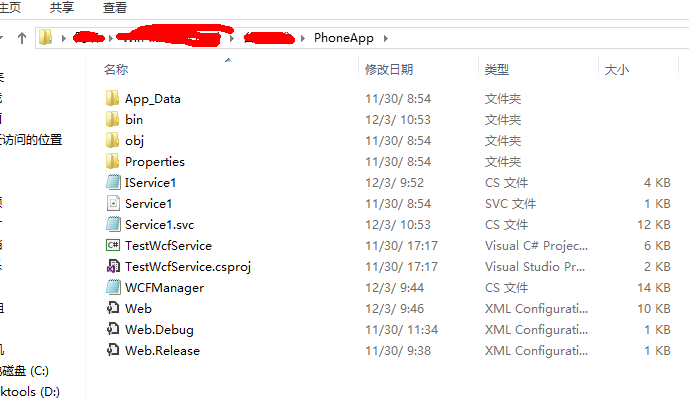
配置好WCF服务程序在WCF服务程序里实现2步
1.上传图片到服务器 IService1.cs Service1.svc
namespace TestWcfService

{

    [ServiceContract]

    public interface IService1

    {

        [OperationContract]

        bool StationUpFile(UpFileContent Date);

    }

    public class UpFileContent

    {

        public byte[] ImageContent { get; set; }

    }

}
        public bool StationUpFile(UpFileContent Date)

        {

            bool IsSuccess = false;

            #region UpImage

            string DiskName = "e:";

            string FileAddress = @"\ProductImages\Larger\";

            string LocationAddress = DiskName + FileAddress;

            string filePath = string.Empty;

            using (Stream sourceStream = new MemoryStream(Date.ImageContent))

            {

                if (!sourceStream.CanRead)

                {

                    throw new Exception("");

                }

                if (!Directory.Exists(LocationAddress))

                {

                    Directory.CreateDirectory(LocationAddress);

                }

                filePath = Path.Combine(LocationAddress, Date.StationImageName);

                if (!File.Exists(filePath))

                {

                    try

                    {

                        using (FileStream targetStream = new FileStream(filePath, FileMode.OpenOrCreate, FileAccess.Write))

                        {

                            int count = ;

                            const int bufferlength = ;

                            byte[] buffer = new byte[bufferlength];

                            while ((count = sourceStream.Read(buffer, , bufferlength)) > )

                            {

                                targetStream.Write(buffer, , count);

                            }

                            IsSuccess = true;

                        }

                    }

                    catch

                    {

                        return IsSuccess;

                    }

                }

            }

            LocationAddress = @"e:\ProductImages\Middle\";

            if (!Directory.Exists(LocationAddress))

                Directory.CreateDirectory(LocationAddress);

            MakeSmallImg(filePath, Path.Combine(LocationAddress, Date.StationImageName), , );

            LocationAddress = @"e:\ProductImages\Small\";

            if (!Directory.Exists(LocationAddress))

                Directory.CreateDirectory(LocationAddress);

            MakeSmallImg(filePath, Path.Combine(LocationAddress, Date.StationImageName), , );

            #endregion

      //这里实现将图片名字写到数据库的某个字段里


         }
此路径就是服务器的路径 (因为WCF服务程序部署到该服务器啦!写文件就写到这个服务器的路径下)
这是分成 大图 中图 小图的函数 可以略过
        private void MakeSmallImg(string filePath, string fileSaveUrl, System.Double templateWidth, System.Double templateHeight)

        {

            using (Image myImage = System.Drawing.Image.FromFile(filePath))

            {

                System.Double newWidth = myImage.Width, newHeight = myImage.Height;

                //宽大于模版的横图

                if (myImage.Width > myImage.Height || myImage.Width == myImage.Height)

                {

                    if (myImage.Width > templateWidth)

                    {

                        //宽按模版,高按比例缩放

                        newWidth = templateWidth;

                        newHeight = myImage.Height * (newWidth / myImage.Width);

                    }

                }

                //高大于模版的竖图

                else

                {

                    if (myImage.Height > templateHeight)

                    {

                        //高按模版,宽按比例缩放

                        newHeight = templateHeight;

                        newWidth = myImage.Width * (newHeight / myImage.Height);

                    }

                }

                System.Drawing.Size mySize = new System.Drawing.Size((int)newWidth, (int)newHeight);

                using (Image bitmap = new System.Drawing.Bitmap(mySize.Width, mySize.Height))

                {

                    using (Graphics graphics = Graphics.FromImage(bitmap))

                    {

                        graphics.InterpolationMode = InterpolationMode.High;

                        graphics.SmoothingMode = SmoothingMode.HighQuality;

                        graphics.Clear(Color.Transparent);

                        graphics.DrawImage(myImage, new System.Drawing.Rectangle(, , bitmap.Width, bitmap.Height), new System.Drawing.Rectangle(, , myImage.Width, myImage.Height), System.Drawing.GraphicsUnit.Pixel);

                        bitmap.Save(fileSaveUrl, System.Drawing.Imaging.ImageFormat.Jpeg);

                    }

                }

            }

        }
2.将编译好的WCF服务程序 放到该网站。
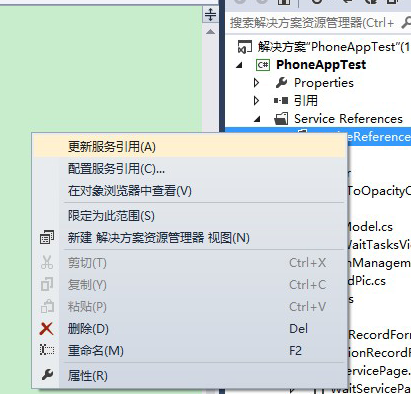
接下来 要在wp客户端程序 更新引用服务
wp 客户端程序调用WCF服务
        ServiceReference1.Service1Client Sc;

        public void Post(Action<bool> action)

        {

            //若用户选择了图片,则实例化 UploadPic 对象,用于上传图片

            //注意:必须在UI线程实例化该对象!

            new Thread(() =>

            {

                Sc = new ServiceReference1.Service1Client();

                Sc.OpenAsync();


                if (null != ImageSource)

                {

                    MemoryStream fileStream = new MemoryStream();

                    using (IsolatedStorageFile store = IsolatedStorageFile.GetUserStoreForApplication())

                    {

                        using (IsolatedStorageFileStream isoStream = store.OpenFile(pic.FullPathName, FileMode.Open))

                        {

                            isoStream.CopyTo(fileStream);

                        }

                    }

                    //流转换为字节数组

                    byte[] tbuffer = fileStream.ToArray();

                    UpFileContent upfile = new UpFileContent();

                    upfile.StationImageName = pic.FileName;

                    upfile.ImageContent = tbuffer;

                    try

                    {

                        Sc.StationUpFileAsync(upfile);

                        Sc.StationUpFileCompleted += (s1, e1) =>

                        {

                            Deployment.Current.Dispatcher.BeginInvoke(() =>

                            {

                                if (e1.Result)

                                {

                                    fileStream.Close();

                                    fileStream.Dispose();

                                }

                                Deployment.Current.Dispatcher.BeginInvoke(() =>

                                {

                                    if (null != action)

                                    {

                                        Sc.CloseAsync();

                                        ImageSource = null;

                                        action(true);

                                    }

                                });

                            });

                        };

                    }

                    catch (TimeoutException timeout)

                    {

                        Deployment.Current.Dispatcher.BeginInvoke(() =>

                        {

                            if (null != action)

                            {

                                Sc.Abort();

                                ImageSource = null;

                                MessageBox.Show(timeout.Message);

                                action(false);

                            }

                        });

                    }

                    catch (CommunicationException commException)

                    {

                        Deployment.Current.Dispatcher.BeginInvoke(() =>

                        {

                            if (null != action)

                            {

                                Sc.Abort();

                                MessageBox.Show(commException.Message);

                                ImageSource = null;

                                action(false);

                            }

                        });

                    }

                }

                else

                {

                }

            }).Start();

        }
THE END
WCF服务发布程序 到此告一段落!感谢!
Wcf for wp8 上传图片到服务器,将图片名字插入数据库字段(五)的更多相关文章
- PHP部分--图片上传服务器、图片路径存入数据库,并读取
html页面 <!DOCTYPE html PUBLIC "-//W3C//DTD XHTML 1.0 Transitional//EN" "http://www. ...
- PHP部分--file图片上传服务器、图片路径存入数据库,并读取
前端代码 <form action="shangchuan.php" method="post" enctype="multipart/form ...
- java后台中处理图片辅助类汇总(上传图片到服务器,从服务器下载图片保存到本地,缩放图片,copy图片,往图片添加水印图片或者文字,生成二维码,删除图片等)
最近工作中处理小程序宝箱活动,需要java画海报,所以把这块都快百度遍了,记录一下处理的方法,百度博客上面也有不少坑! 获取本地图片路径: String bgPath = Thread.current ...
- 小程序踩坑记录-上传图片及canvas裁剪图片后上传至服务器
最近在写微信小程序的上传图片功能,趟过了一些坑记录一下. 想要满足的需求是,从手机端上传图片至服务器,为了避免图片过大影响传输效率,需要把图片裁剪至适当大小后再传输 主要思路是,通过wx.choose ...
- 通过android 客户端上传图片到服务器
昨天,(在我的上一篇博客中)写了通过浏览器上传图片到服务器(php),今天将这个功能付诸实践.(还完善了服务端的代码) 不试不知道,原来通过android 向服务端发送图片还真是挺麻烦的一件事. 上传 ...
- Android 上传图片到服务器 okhttp一
[目录] (一)上传图片到服务器一 ---------------------------------Android代码 (二)上传图片到服务器二--------------------------- ...
- c#批量上传图片到服务器示例分享
这篇文章主要介绍了c#批量上传图片到服务器示例,服务器端需要设置图片存储的虚拟目录,需要的朋友可以参考下 /// <summary> /// 批量上传图片 /// </summary ...
- 5分钟Serverless实践:构建无服务器的图片分类系统
前言 在过去“5分钟Serverless实践”系列文章中,我们介绍了如何构建无服务器API和Web应用,从本质上来说,它们都属于基于APIG触发器对外提供一个无服务器API的场景.现在本文将介绍一种新 ...
- 改造vue-quill-editor: 结合element-ui上传图片到服务器
前排提示:现在可以直接使用封装好的插件vue-quill-editor-upload 需求概述 vue-quill-editor是我们再使用vue框架的时候常用的一个富文本编辑器,在进行富文本编辑的时 ...
随机推荐
- Oracle 客户端配置
nstantclient-basic-nt-12.1.0.1.0\instantclient_12_1下面新建NETWORK文件夹,NETWORK下新建ADMIN文件夹,ADMIN下新建tnsname ...
- Redis介绍以及安装(Linux与windows)
1.liunux系统 redis是当前比较热门的NOSQL系统之一,它是一个key-value存储系统.和Memcached类似,但很大程度补偿了memcached的 不足,它支持存储的value类型 ...
- APN APN指一种网络接入技术,是通过手机上网时必须配置的一个参数,它决定了手机通过哪种接入方式来访问网络。
apn 锁定 本词条由“科普中国”百科科学词条编写与应用工作项目 审核 . APN指一种网络接入技术,是通过手机上网时必须配置的一个参数,它决定了手机通过哪种接入方式来访问网络. 对于手机用户来说,可 ...
- [整理]Ajax Post请求下的Form Data和Request Payload
Ajax Post请求下的Form Data和Request Payload 通常情况下,我们通过Post提交表单,以键值对的形式存储在请求体中.此时的reqeuest headers会有Conten ...
- javascript工厂模式
工厂模式 设计工厂模式的目的是为了创建对象.它通常在类或者类的静态方法实现,具有下列目标: 1.在创建相似对象是执行重复操作 2.在编译时不知道具体类型(类)的情况下,为工厂客户提供一种创建对象的接口 ...
- cocos代码研究(1)sprite学习笔记
各种方法创建Sprite和Animate //图片创建法 参数一:图片资源路径 参数二:Rect选区 auto sprite = Sprite::create(, )); addChild(sprit ...
- 初识suse-Linux相关!
Linux这种系统很奇怪,差不多每种不同的版本,它所使用的安装等一些重要命令皆有所变化.假若,你要熟练掌握一种OS,那么如果安装软件/应用,那是入门的第一步. 安装命令中: RedHat.CentOS ...
- ios中的category与extension
http://blog.csdn.net/haishu_zheng/article/details/12873151 category和extension用来做类扩展的,可以对现有类扩展功能或者修 ...
- notepad正则表达式
文件名称匹配 文件名称: boost_chrono-vc100-mt-1_49.dll 对应的notepad正则表达式: \w*_\w*-\w*-\w*-\w*-\w*.dll 移除空行 查找目标: ...
- VS2010编译链接openssl静态库
最近工作需要使用一些加密算法.之前尝试过cryptopp以及polarssl,听说openssl中的加密模块特别全,并且特别好用.于是想尝试一下. 一.环境配置 下载openssl,我这里使用的是op ...