
QT网络编程UDP下C/S架构广播通信
QT有封装好的UDP协议的类,QUdpSocket,里面有我们想要的函数接口。感兴趣的话,可以看看。
先搞服务端吧,写一个子类,继承QDialog类,起名为UdpServer类。头文件要引用我们上边说的QUdpSocket这个类,还有我们想要的布局的类。
 #ifndef UDPSERVER_H

 #define UDPSERVER_H

 #include <QDialog>

 #include <QLabel>

 #include <QLineEdit>

 #include <QPushButton>

 #include <QVBoxLayout>

 #include <QtNetwork/QUdpSocket>

 #include <QtNetwork/QHostAddress>

 #include <QTimer>

 class UdpServer : public QDialog

 {

     Q_OBJECT

 public:

     UdpServer(QWidget *parent = ,Qt::WindowFlags f= );

     ~UdpServer();

 private:

     QLabel * TimerLabel;

     QLineEdit * TextLineEdit;

     QPushButton* StartBtn;

     QVBoxLayout * mainLayout;

  public slots:

     void StartBtnClicked();

     void timeout();

  private:

     int port;

     bool isStarted;

     QUdpSocket * udpSocket;

     QTimer *timer;

 };

 #endif // UDPSERVER_H
在.cpp文件里,我们先是把界面显示出来,然后用udp的writedategram把想要传的写进去。
 #include "udpserver.h"

 UdpServer::UdpServer(QWidget *parent,Qt::WindowFlags f)

     : QDialog(parent,f)

 {

    setWindowTitle(tr("UDP SERVER"));

    TimerLabel = new QLabel(tr("show time:"),this);

    TextLineEdit = new QLineEdit(this);

    StartBtn = new QPushButton(tr("start"),this);

    mainLayout = new QVBoxLayout(this);

    mainLayout-> addWidget(TimerLabel);

    mainLayout-> addWidget(TextLineEdit);

    mainLayout-> addWidget(StartBtn);

    connect(StartBtn,SIGNAL(clicked()),this,SLOT(StartBtnClicked()));

    port = ;

    isStarted = false;

    udpSocket = new QUdpSocket(this);

    timer = new QTimer(this);

    connect(timer,SIGNAL(timeout()),this,SLOT(timeout()));

 }

 UdpServer::~UdpServer()

 {

 }

 void UdpServer::StartBtnClicked()

 {

    if(!isStarted)

    {

       StartBtn->setText(tr("STOP"));

       timer->start();

       isStarted = true;

    }

     else

    {

        StartBtn->setText(tr("BEGIN"));

        isStarted = false;

        timer->stop();

    }

 }

 void UdpServer::timeout()

 {

     QString msg = TextLineEdit->text();

     int length=;

     if(msg=="")

     {

        return;

     }

     if((length=udpSocket->writeDatagram(msg.toLatin1(),msg.length(),QHostAddress::Broadcast,port))!=msg.length())

     {

         qDebug() << msg.toLatin1();

         return;

     }

 }
我这里用qDebug把要传的东西打印出来,进行测试,看看是否传过去了。
客户端:
 #ifndef UDPCLIENT_H

 #define UDPCLIENT_H

 #include <QDialog>

 #include <QVBoxLayout>

 #include <QTextEdit>

 #include <QPushButton>

 #include <QtNetwork/QUdpSocket>

  class UdpClient : public QDialog

 {

     Q_OBJECT

  public:

     UdpClient(QWidget *parent = );

     ~UdpClient();

  private:

     QTextEdit* ReceiceTextEdit;

     QPushButton* CloseBtn;

     QVBoxLayout* mainLayout;

  public slots:

     void CloseBtnClicked();

     void dataReceived();

  private:

     int port;

     QUdpSocket* udpSocket;

 };

 #endif // UDPCLIENT_H
客户端很简单,怎么实现布局,我就不多说了,主要是dataReceive函数。
 #include "udpclient.h"

 #include <QMessageBox>

 #include <QHostAddress>

 UdpClient::UdpClient(QWidget *parent)

     :QDialog(parent)

 {

   setWindowTitle("UDP CLIENT");

   ReceiceTextEdit = new QTextEdit(this);

   CloseBtn = new QPushButton(tr("Close"),this);

   mainLayout  = new QVBoxLayout(this);

   mainLayout->addWidget(ReceiceTextEdit);

   mainLayout->addWidget(CloseBtn);

   connect(CloseBtn,SIGNAL(clicked()),this,SLOT(CloseBtnClicked()));

   port =;

   udpSocket = new QUdpSocket(this);

   bool result = udpSocket->bind(port);

   if(!result)

   {

      QMessageBox::information(this,tr("ERROR"),tr("connect error"));

      return;

   }

   connect(udpSocket,SIGNAL(readyRead()),this,SLOT(dataReceived()));

 }

  UdpClient:: ~UdpClient()

 {

 }

 void UdpClient::CloseBtnClicked()

 {

    close();

 }

 void UdpClient::dataReceived()

 {

     while(udpSocket->hasPendingDatagrams())

     {

         QByteArray datagram;

         datagram.resize(udpSocket->pendingDatagramSize());

         udpSocket->readDatagram(datagram.data(),datagram.size());

         QString msg=datagram.data();

         ReceiceTextEdit->insertPlainText(msg);

     }

 }
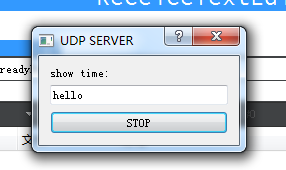
最后显示一下界面,服务端发送hello。
客户端收到的:
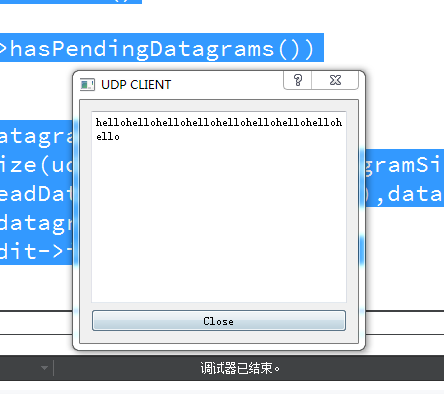
不停的在打印hello。直到点击关闭,或者服务端停止。
QT网络编程UDP下C/S架构广播通信的更多相关文章
- QT网络编程Tcp下C/S架构的即时通信
先写一个客户端,实现简单的,能加入聊天,以及加入服务器的界面. #ifndef TCPCLIENT_H #define TCPCLIENT_H #include <QDialog> #in ...
- c/c++ 网络编程 UDP 用if_nameindex和ioctl取得主机网络信息
网络编程 UDP 用if_nameindex和ioctl取得主机网络信息 getifaddrs函数取得的东西太多了,如果只想取得网卡名字和网卡编号可以用下面的2个函数. 1,if_nameindex ...
- Qt网络编程QTcpServer和QTcpSocket的理解
前一段时间通过调试Qt源码,大致了解了Qt的事件机制.信号槽机制.毕竟能力和时间有限.有些地方理解的并不是很清楚. 开发环境:Linux((fedora 17),Qt版本(qt-everywhere- ...
- c/c++ 网络编程 UDP 设定MTU
网络编程 UDP 设定MTU MTU(Maximun Transmisson Unit):一次送信的最大size. 在程序里动态改变MTU.注意:程序运行需要root权限. 程序运行的方法: sudo ...
- c/c++ 网络编程 UDP up/down 网卡
网络编程 UDP up/down 网卡 在程序里动态改变网卡的状态.注意:程序运行需要root权限. 程序运行的方法: sudo ./a.out 1,关闭网卡 #include <stdio.h ...
- c/c++ 网络编程 UDP 改变网关和网卡名字
网络编程 UDP 改变网关和网卡名字 在程序里动态改变网关和网卡名字 1,改变网卡名字 #include <stdio.h> #include <string.h> #incl ...
- c/c++ 网络编程 UDP 改变网卡的硬件地址
网络编程 UDP 改变网卡的硬件地址 在程序里动态改变网卡的硬件地址 1,取得网卡的硬件地址 #include <stdio.h> #include <string.h> #i ...
- c/c++ 网络编程 UDP 改变IP地址
网络编程 UDP 改变IP地址 在程序里动态改变主机的IP地址 1,改变ipv4的地址 #include <stdio.h> #include <string.h> #incl ...
- c/c++ 网络编程 UDP 主机网络信息取得
网络编程 UDP 主机网络信息取得 1,if_nametoindex 通过网卡名字取得网卡编号 2,if_indextoname 通过网卡编号取得网卡名字 #include <stdio.h&g ...
随机推荐
- oracle--错误笔记(一)
一,环境模拟 SQL> select status from v$instance; STATUS ------------ OPEN SQL> select * from v$backu ...
- ubuntu 16.04 屏幕截图
shift+prtsc 快捷键截取指定区域的图片 类似qq截图
- n皇后问题(分析)
这道题需要用到回溯算法,现在在这里先简单的介绍一下这个算法: 回溯算法也叫试探法,它是一种系统地搜索问题的解的方法.回溯算法的基本思想是:从一条路往前走,能进则进,不能进则退回来,换一条路再试.用回溯 ...
- 自适应网页设计(Responsive Web Design)别名(响应式web设计)转载阮一峰
随着3G的普及,越来越多的人使用手机上网. 移动设备正超过桌面设备,成为访问互联网的最常见终端.于是,网页设计师不得不面对一个难题:如何才能在不同大小的设备上呈现同样的网页? 手机的屏幕比较小,宽度通 ...
- Git学习系列之Git 的优势有哪些?
Git 的优势主要有: 1.更方便的 Merge 分布式管理必然导致大量的 Branch 和 Merge 操作.因此分布式版本控制系统都特别注意这方面.在传统的 CVS 里面制作 Branch 和 M ...
- JS中的instanceof和typeof
原文链接:http://hi.baidu.com/pryzjvvpkkbhjyq/item/440fb91cda5cb90b8ebde43f typeof用以获取一个变量的类型 语法:typeof a ...
- (原创).Net将EF运用于Oralce一 准备工作
网上有很多EF运用于Oracle的博文,但是找了半天发现大多数博文大都语焉不详,于是决定自己折腾. 首先我的开发工具为vs2010,那么最适用于VS2010的EF版本为多少呢?答案是EF5.我在Sta ...
- UVA 10328(DP,大数,至少连续)
http://acm.hust.edu.cn/vjudge/problem/viewProblem.action?id=19825 这道题和http://www.cnblogs.com/qlky/p/ ...
- Grunt usemin前端自动化打包流程
前端优化是尽量减少http请求,所以我们需要尽量合并压缩文件,然后调用压缩后的文件,比如多个css文件压缩成一个,多个js文件合并压缩等,usemin能够自动在html中使用压缩后的文件,达到上面的目 ...
- 51Nod1957 有限背包计数问题
传送门 另一个传送门 这题还挺有意思…… 先贴一波出题人的题解…… (啥你说你看不见?看来你还没过啊,等着A了再看或者乖乖花点头盾好了……) 然后是我的做法……思想都是一样的,只是细节不一样而已…… ...