
Android 蓝牙开发之A2DP基本功能
本文主要是Android做为Audio Source端,A2DP的基本操作:包括连接、断开连接、设置优先级、获取优先级、获取A2DP连接状态、获取A2DP连接的设备列表等功能。
1.简介
Audio Source(音频源) 音频的输入端对音频数据进行编码,发送到Sink端。 A2DP全名是Advanced Audio Distribution Profile,高质量音频数据传输的协议,其定义里了传送单声道或立体声等高质量音频(区别于蓝牙SCO链路上传输的普通语音)信息的协议和过程。A2DP的典型应用是将音乐播放器的音频数据发送到耳机或音箱。
A2DP定义了两种角色:
Audio Source(音频源) 音频的输入端对音频数据进行编码,发送到Sink端。
Audio Sink(音频接收器) 接收到音频数据后,进行解码操作还原出音频。
2.A2DP profile
要想操作A2DP相关,首先要获取A2DP代理对象,获取代理对象的方法比较简单,如下:
mBtAdapter = BluetoothAdapter.getDefaultAdapter();

if(!mBtAdapter.isEnabled()){

    //弹出对话框提示用户是后打开

    Intent enabler = new Intent(BluetoothAdapter.ACTION_REQUEST_ENABLE);

    startActivityForResult(enabler, 1);

}

//获取A2DP代理对象

mBtAdapter.getProfileProxy(mContext, mListener, BluetoothProfile.A2DP);
getProfileProxy并不会直接返回A2DP代理对象,而是通过mListener中回调获取。
private ServiceListener mListener = new ServiceListener() {

    @Override

    public void onServiceDisconnected(int profile) {

        if(profile == BluetoothProfile.A2DP){

            mA2dp = null;

        }

    }

    @Override

    public void onServiceConnected(int profile, BluetoothProfile proxy) {

        if(profile == BluetoothProfile.A2DP){

            mA2dp = (BluetoothA2dp) proxy; //转换

        }

    }

};
成功会回调mListener中的onServiceConnected函数,判断proflie是否为BluetoothProfile.A2DP,转换为BluetoothA2dp对象。通过代理对象即可进行A2DP的相关操作了
3.A2DP操作
A2DP连接首先需要与蓝牙耳机进行配对,如何配对这里就不细说了。
我这里是连接到之前配对过的一个设备。设备名称为:
private final String BT_NAME = "QCY-QY7";
获取该设备,首先获取配对的蓝牙设备,然后遍历这些蓝牙设备,找出蓝牙名称符合条件的设备,就是要操作的设备,
//获取配对的蓝牙设备

Set<BluetoothDevice> bondDevice = mBtAdapter.getBondedDevices();

for(BluetoothDevice device:bondDevice){

    //获取指定名称的设备

    if(BT_NAME.equals(device.getName())){

        mConnectDevice = device;

    }

}
mConnectDevice为要操作的设备。
3.1 A2DP连接
private void connectA2dp(BluetoothDevice device){

    setPriority(mConnectDevice, 100); //设置priority

    try {

        //通过反射获取BluetoothA2dp中connect方法(hide的),进行连接。

        Method connectMethod =BluetoothA2dp.class.getMethod("connect",

                BluetoothDevice.class);

        connectMethod.invoke(mA2dp, device);

    } catch (Exception e) {

        e.printStackTrace();

    }

}
BluetoothA2dp中的connect方法是hide的,不能直接访问,需要通过反射的机制获取该方法进行连接。连接成功后手机可以播放音乐,声音就会从蓝牙耳机出来。
3.2 断开连接
private void disConnectA2dp(BluetoothDevice device){

    setPriority(mConnectDevice, 0);

    try {

        //通过反射获取BluetoothA2dp中connect方法(hide的),断开连接。

        Method connectMethod =BluetoothA2dp.class.getMethod("disconnect",

                BluetoothDevice.class);

        connectMethod.invoke(mA2dp, device);

    } catch (Exception e) {

        e.printStackTrace();

    }

}
BluetoothA2dp中的disconnect方法也是hide的,与connect类似.
3.3 设置优先级
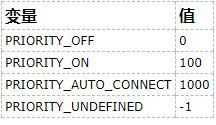
设置优先级是必要的,否则可能导致连接或断开连接失败等问题。
public void setPriority(BluetoothDevice device, int priority) {

    if (mA2dp == null) return;

    try {//通过反射获取BluetoothA2dp中setPriority方法(hide的),设置优先级

        Method connectMethod =BluetoothA2dp.class.getMethod("setPriority",

                BluetoothDevice.class,int.class);

        connectMethod.invoke(mA2dp, device, priority);

    } catch (Exception e) {

        e.printStackTrace();

    }

}
3.4 获取优先级
public int getPriority(BluetoothDevice device) {

    int priority = 0;

    if (mA2dp == null) return priority;

    try {//通过反射获取BluetoothA2dp中getPriority方法(hide的),获取优先级

        Method connectMethod =BluetoothA2dp.class.getMethod("getPriority",

                BluetoothDevice.class);

        priority = (Integer) connectMethod.invoke(mA2dp, device);

    } catch (Exception e) {

        e.printStackTrace();

    }

    return priority;

}
3.5 获取与某设备A2DP连接状态
mA2dp.getConnectionState(device);
3.6 获取连接设备列表
//返回值类型List<BluetoothDevice>

mA2dp.getConnectedDevices();
3.7 A2DP是否正在发送音频流
//返回值类型boolean,表示设备是否在通过A2DP发送音频流。

mA2dp.isA2dpPlaying(device);
4.状态监听
通过广播接收者监听A2DP连接状态的改变,A2DP播放状态的改变。
private void initReceiver(){

    //注册广播接收者监听状态改变

    IntentFilter filter = new IntentFilter(BluetoothA2dp.

            ACTION_CONNECTION_STATE_CHANGED);

    filter.addAction(BluetoothA2dp.ACTION_PLAYING_STATE_CHANGED);

    registerReceiver(mReceiver, filter);

}
广播接收者,通过intent获取状态值。
private BroadcastReceiver mReceiver = new BroadcastReceiver() {

    @Override

    public void onReceive(Context context, Intent intent) {

        String action = intent.getAction();

        Log.i(TAG,"onReceive action="+action);

        //A2DP连接状态改变

        if(action.equals(BluetoothA2dp.ACTION_CONNECTION_STATE_CHANGED)){

            int state = intent.getIntExtra(BluetoothA2dp.EXTRA_STATE, BluetoothA2dp.STATE_DISCONNECTED);

            Log.i(TAG,"connect state="+state);

        }else if(action.equals(BluetoothA2dp.ACTION_PLAYING_STATE_CHANGED)){

            //A2DP播放状态改变

            int state = intent.getIntExtra(BluetoothA2dp.EXTRA_STATE, BluetoothA2dp.STATE_NOT_PLAYING);

            Log.i(TAG,"play state="+state);

        }

    }

};
连接小demo:http://download.csdn.net/detail/vnanyesheshou/9841491
转载出处:http://blog.csdn.net/vnanyesheshou/article/details/71713786
Android 蓝牙开发之A2DP基本功能的更多相关文章
- Android混合开发之WebViewJavascriptBridge实现JS与java安全交互
前言: 为了加快开发效率,目前公司一些功能使用H5开发,这里难免会用到Js与Java函数互相调用的问题,这个Android是提供了原生支持的,不过存在安全隐患,今天我们来学习一种安全方式来满足Js与j ...
- Android混合开发之WebView与Javascript交互
前言: 最近公司的App为了加快开发效率选择了一部分功能采用H5开发,从目前市面的大部分App来讲,大致分成Native App.Web App.Hybrid App三种方式,个人觉得目前以Hybri ...
- Android安全开发之WebView中的地雷
Android安全开发之WebView中的地雷 0X01 About WebView 在Android开发中,经常会使用WebView来实现WEB页面的展示,在Activiry中启动自己的浏览器,或者 ...
- Android混合开发之WebView使用总结
前言: 今天修改项目中一个有关WebView使用的bug,激起了我总结WebView的动机,今天抽空做个总结. 混合开发相关博客: Android混合开发之WebView使用总结 Android混合开 ...
- Android安全开发之ZIP文件目录遍历
1.ZIP文件目录遍历简介 因为ZIP压缩包文件中允许存在“../”的字符串,攻击者可以利用多个“../”在解压时改变ZIP包中某个文件的存放位置,覆盖掉应用原有的文件.如果被覆盖掉的文件是动态链接s ...
- Android驱动开发之Hello实例
Android驱动开发之Hello实例: 驱动部分 modified: kernel/arch/arm/configs/msm8909-1gb_w100_hd720p-perf_defconf ...
- android软件开发之webView.addJavascriptInterface循环渐进【二】
本篇文章由:http://www.sollyu.com/android-software-development-webview-addjavascriptinterface-cycle-of-gra ...
- android软件开发之webView.addJavascriptInterface循环渐进【一】
本篇文章由:http://www.sollyu.com/android-software-development-webview-addjavascriptinterface-cycle-of-gra ...
- Android NDK开发之C调用Java及原生代码断点调试(二)
上一篇中,我们主要学习了Java调用本地方法,并列举了两大特殊实例来例证我们的论据,还没学习的伙伴必须先去阅读下,本次的学习是直接在上一篇的基础上进行了.点击:Android NDK开发之从Java与 ...
随机推荐
- 从零开始做SSH项目(二)
使用hibernate测试加载数据.删除数据和修改数据等功能时,针对的是与数据库表user对应的User. 为了简化对其他数据表对应的实体类的持久化操作,可以在项目中创建一个BaseHibernate ...
- Noip2015提高组解题报告
Day1 T1神奇的幻方 一道简单异常的小模拟,我们只需要确定数字1的位置,然后根据题意枚举即可,简简单单就A了,什么也不卡. 然而这题,我刚开始学OI的时候,因为当时比较蠢,被这题花式吊打啊.... ...
- HDU 6107 Typesetting (倍增)
Typesetting Time Limit: 2000/1000 MS (Java/Others) Memory Limit: 65536/65536 K (Java/Others)Total ...
- 叙Windows平台下基于MBR和UEFI的bootkit(一)--以MBR为例
安全的对抗首先在权限方面,权限高的进程对权限低的权限就是就是降维打击,无往不利.当权限相同时,启动得早便为王.所谓的bootkit也就是基于这个思路设计的一种复杂病毒.它优先于Windows系统启动, ...
- 具有jQuery背景的程序员如何转换为AngularJS思考模式(译)
最近一直在研究angularjs,最大的感受就是它和之前的jQuery以及基于jQuery的各种库设计理念完全不同,如果不能认识到这点而对于之前做jQuery开发的程序员,去直接学习angularjs ...
- bzoj 2286(虚树+树形dp) 虚树模板
树链求并又不会写,学了一发虚树,再也不虚啦~ 2286: [Sdoi2011]消耗战 Time Limit: 20 Sec Memory Limit: 512 MBSubmit: 5002 Sol ...
- ARC-100 D - Equal Cut
题面在这里! 我们枚举一下第2和第3段的分界点,显然这种情况下 第1与第2 和 第3与第4 之间的分界点都只有两种情况可能最优,吧这四种情况讨论一下就好了. 两边的分界点可以单调扫过去... # ...
- BZOJ 3289 Mato的文件管理(莫队+树状数组)
[题目链接] http://www.lydsy.com/JudgeOnline/problem.php?id=3289 [题目大意] 求静态区间逆序对. [题解] 我们对查询进行莫队操作,对于区间的删 ...
- 【计算几何】【凸包】Gym - 101164H - Pub crawl
平面上n个点,点之间沿直线走,规划一条路线,每次只能往左半平面的点走,走过最多的点. 显然所有的点都能走过. n^2的暴力显然是每次找左边与其所形成夹角最小的点,但这样过不了(卡常数?). 或者每轮不 ...
- redis源码解析之事件驱动
Redis 内部有个小型的事件驱动,它主要处理两项任务: 文件事件:使用I/O多路复用技术处理多个客户端请求,并返回执行结果. 时间事件:维护服务器的资源管理,状态检查. 主要的数据结构包括文件事件结 ...