
MyBatis逆向工程详细教程
1 导入逆向工程到eclipse中

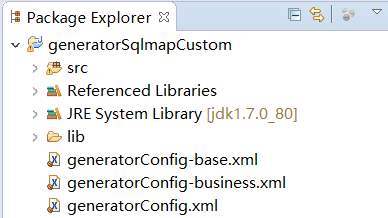
2 修改配置文件
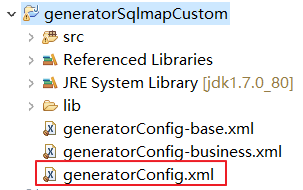
注意修改以下几点:
- 修改要生成的数据库表
- pojo文件所在包路径
- Mapper所在的包路径
配置文件如下:
<?xml version="1.0" encoding="UTF-8"?>

<!DOCTYPE generatorConfiguration

  PUBLIC "-//mybatis.org//DTD MyBatis Generator Configuration 1.0//EN"

  "http://mybatis.org/dtd/mybatis-generator-config_1_0.dtd">

<generatorConfiguration>

    <context id="testTables" targetRuntime="MyBatis3">

        <commentGenerator>

            <!-- 是否去除自动生成的注释[英文] true:是 : false:否 -->

            <property name="suppressAllComments" value="true" />

        </commentGenerator>

        <!--数据库连接的信息:驱动类、连接地址、用户名、密码 -->

        <jdbcConnection driverClass="com.mysql.jdbc.Driver"

            connectionURL="jdbc:mysql://39.105.94.154:3306/mybatis"

            userId="tom"

            password="tom,">

        </jdbcConnection>

        <!--

        <jdbcConnection driverClass="oracle.jdbc.OracleDriver"

            connectionURL="jdbc:oracle:thin:@127.0.0.1:1521:yycg"

            userId="yycg"

            password="yycg">

        </jdbcConnection>

        -->

        <!-- 默认false,把JDBC DECIMAL 和 NUMERIC 类型解析为 Integer,为 true时把JDBC DECIMAL 和

            NUMERIC 类型解析为java.math.BigDecimal -->

        <javaTypeResolver>

            <property name="forceBigDecimals" value="false" />

        </javaTypeResolver>

        <!-- targetProject:生成PO类的位置 -->

        <javaModelGenerator targetPackage="com.mybatis.spring.pojo"

            targetProject=".\src">

            <!-- enableSubPackages:是否让schema作为包的后缀 -->

            <property name="enableSubPackages" value="false" />

            <!-- 从数据库返回的值被清理前后的空格 -->

            <property name="trimStrings" value="true" />

        </javaModelGenerator>

        <!-- targetProject:mapper映射文件生成的位置 -->

        <sqlMapGenerator targetPackage="com.mybatis.spring.mapper"

            targetProject=".\src">

            <!-- enableSubPackages:是否让schema作为包的后缀 -->

            <property name="enableSubPackages" value="false" />

        </sqlMapGenerator>

        <!-- targetPackage:mapper接口生成的位置 -->

        <javaClientGenerator type="XMLMAPPER"

            targetPackage="com.mybatis.spring.mapper"

            targetProject=".\src">

            <!-- enableSubPackages:是否让schema作为包的后缀 -->

            <property name="enableSubPackages" value="false" />

        </javaClientGenerator>

        <!-- 指定数据库表 -->

        <table schema="" tableName="user"></table>

        <table schema="" tableName="orders"></table>

        <!-- 有些表的字段需要指定java类型

             比如我们表里面有一个字段是tinyint类型,范围-128~127.

             你会发现它自己生成的时候会生成一个Boolean类型。

             他认为之后装0,和 1.

             如果说你想装0,1,2,3,4,5,6多个值,这时候boolean就不行了。

             这时候你就需要指定一下tinyint类型的字段转换后的类型为int。

         <table schema="" tableName="">

            <columnOverride column="id" javaType="int" />

        </table> -->

    </context>

</generatorConfiguration>
3 生成逆向工程代码
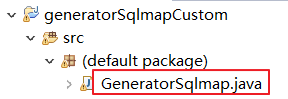
找到下图所示的java文件,执行工程main主函数,

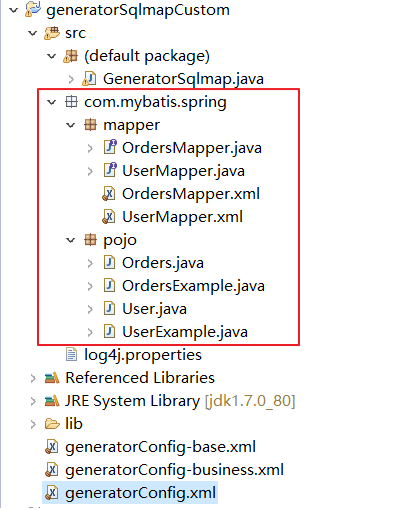
刷新工程,发现代码生成,如下图:
4 测试逆向工程代码
1 新建一个java工程名为mybatis-spring-second
2.复制刚刚生成的逆向工程代码到项目中,效果如下

修改spring配置文件
在applicationContext.xml修改.注意使用扫描的方式配置代理
<?xml version="1.0" encoding="UTF-8"?>

<beans xmlns:xsi="http://www.w3.org/2001/XMLSchema-instance"

       xmlns="http://www.springframework.org/schema/beans"

       xmlns:context="http://www.springframework.org/schema/context"

       xmlns:aop="http://www.springframework.org/schema/aop"

       xmlns:tx="http://www.springframework.org/schema/tx"

       xmlns:p="http://www.springframework.org/schema/p"

       xsi:schemaLocation="http://www.springframework.org/schema/beans

                           http://www.springframework.org/schema/beans/spring-beans-4.0.xsd

                        http://www.springframework.org/schema/context

                        http://www.springframework.org/schema/context/spring-context-4.0.xsd

                        http://www.springframework.org/schema/aop

                        http://www.springframework.org/schema/aop/spring-aop-4.0.xsd

                        http://www.springframework.org/schema/tx

                        http://www.springframework.org/schema/tx/spring-tx-4.0.xsd

                           http://www.springframework.org/schema/util

                           http://www.springframework.org/schema/util/spring-util-4.0.xsd">

    <!-- 1加载配置文件 -->

    <context:property-placeholder location="classpath:db.properties" />

    <!-- 2配置连接池 -->

    <bean name="dataSource" class="org.apache.commons.dbcp.BasicDataSource">

        <property name="driverClassName" value="${jdbc.driver}" />

        <property name="url" value="${jdbc.url}" />

        <property name="username" value="${jdbc.username}" />

        <property name="password" value="${jdbc.password}" />

        <property name="maxActive" value="10" />

        <property name="maxIdle" value="5" />

    </bean>

    <!--3 配置SqlSessionFactory  -->

    <bean id="sqlSessionFactory" class="org.mybatis.spring.SqlSessionFactoryBean">

        <!-- 配置mybatis核心配置文件 -->

        <property name="configLocation" value="classpath:SqlMapConfig.xml" />

        <!-- 配置数据源 -->

        <property name="dataSource" ref="dataSource" />

    </bean>

    <!-- Mapper代理的方式开发,扫描包方式配置代理 -->

    <bean class="org.mybatis.spring.mapper.MapperScannerConfigurer">

        <!-- 配置Mapper接口,如果需要加载多个包,直接写进来,中间用,分隔 -->

        <property name="basePackage" value="com.mybatis.spring.mapper"></property>

    </bean>

</beans>
修改SqlMapConfig.xml文件
<?xml version="1.0" encoding="UTF-8"?>

<!DOCTYPE configuration

PUBLIC "-//mybatis.org//DTD Config 3.0//EN"

"http://mybatis.org/dtd/mybatis-3-config.dtd">

<configuration>

    <!-- 设置别名 -->

    <typeAliases>

        <!-- 2. 指定扫描包,会把包内所有的类都设置别名,别名的名称就是类名,大小写不敏感 -->

        <package name="com.mybatis.spring.pojo" />

    </typeAliases>

    <mappers>

        <package name="com.mybatis.spring.mapper"/>

    </mappers>

</configuration>
注意事项
注意:
- 逆向工程生成的代码只能做单表查询
- 不能在生成的代码上进行扩展,因为如果数据库变更,需要重新使用逆向工程生成代码,原来编写的代码就被覆盖了。
- 一张表会生成4个文件
测试程序
package com.mybatis.spring.junit;

import java.util.Date;

import java.util.List;

import org.junit.Before;

import org.junit.Test;

import org.springframework.context.ApplicationContext;

import org.springframework.context.support.ClassPathXmlApplicationContext;

import com.mybatis.spring.mapper.UserMapper;

import com.mybatis.spring.pojo.User;

import com.mybatis.spring.pojo.UserExample;

public class UserMapperTest {

    private ApplicationContext ac;

    @Before

    public void setUp() throws Exception {

        this.ac = new ClassPathXmlApplicationContext("classpath:applicationContext.xml");

    }

    @Test

    //测试插入,插入全部字段

    public void testInsert() {

        // 获取Mapper

        UserMapper userMapper = ac.getBean(UserMapper.class);

        User user = new User();

        user.setUsername("曹操");

        user.setSex("1");

        user.setBirthday(new Date());

        user.setAddress("三国");

        userMapper.insert(user);

    }

    @Test

    //测试插入,插入部分字段全部字段

    public void testInsertSelective() {

        // 获取Mapper

        UserMapper userMapper = ac.getBean(UserMapper.class);

        User user = new User();

        user.setUsername("卢小西");

        user.setBirthday(new Date());

        userMapper.insertSelective(user);

    }

    @Test

    //测试根据条件删除

    public void testDeleteByExample(){

        // 获取Mapper

        UserMapper userMapper = ac.getBean(UserMapper.class);

        // 创建User对象扩展类,用户设置查询条件

        UserExample example = new UserExample();

        example.createCriteria().andUsernameLike("%西%");

        //删除数据

        int deleteCount = userMapper.deleteByExample(example);

        System.out.println("删除了:"+deleteCount+"条数据");

    }

    @Test

    //测试根据id删除

    public void testDeleteByPrimaryKey(){

        // 获取Mapper

        UserMapper userMapper = ac.getBean(UserMapper.class);

        //删除数据

        int deleteCount = userMapper.deleteByPrimaryKey(38);

        System.out.println("删除了:"+deleteCount+"条数据");

    }

    @Test

    //查询名字里面含有张的用户

    public void testSelectByExample1() {

        // 获取Mapper

        UserMapper userMapper = ac.getBean(UserMapper.class);

        // 创建User对象扩展类,用户设置查询条件

        UserExample example = new UserExample();

        example.createCriteria().andUsernameLike("%张%");

        // 查询数据

        List<User> list = userMapper.selectByExample(example);

        System.out.println(list.size());

    }

    @Test

    //查询性别为1,并且名字里面含有“明”字的,并且降序排序

    public void testSelectByExample2() {

        // 获取Mapper

        UserMapper userMapper = ac.getBean(UserMapper.class);

        // 创建User对象扩展类,用户设置查询条件

        UserExample example = new UserExample();

        String username = "明";

        example.createCriteria().andSexEqualTo("1").andUsernameLike("%" + username + "%");

        example.setOrderByClause("id desc");

        List<User> list = userMapper.selectByExample(example);

        for (User u : list) {

            System.out.println(u.getId() + "\t" + u.getUsername());

        }

    }

    @Test

    //查询性别为1,并且名字里面含有“明”字的用户数量

    public void testSelectByExample3() {

        // 获取Mapper

        UserMapper userMapper = ac.getBean(UserMapper.class);

        // 创建User对象扩展类,用户设置查询条件

        UserExample example = new UserExample();

        String username = "明";

        example.createCriteria().andSexEqualTo("1").andUsernameLike("%" + username + "%");

        int count = userMapper.countByExample(example);

        System.out.println(count);

    }

    @Test

    public void testSelectByPrimaryKey() {

        // 获取Mapper

        UserMapper userMapper = ac.getBean(UserMapper.class);

        User user = userMapper.selectByPrimaryKey(31);

        System.out.println(user.getId()+"\t"+user.getUsername()+"\t"+

        user.getAddress()+"\t"+user.getSex()+"\t"+user.getBirthday());

    }

    @Test

    //测试用户修改,根据id,修改全部字段

    public void testUpdateByPrimaryKey(){

        // 获取Mapper

        UserMapper userMapper = ac.getBean(UserMapper.class);

        User user = new User();

        user.setId(1);

        user.setUsername("曹操");

        user.setSex("1");

        user.setBirthday(new Date());

        user.setAddress("三国");

        userMapper.updateByPrimaryKey(user);

        System.out.println(user);

    }

    @Test

    //测试用户修改,根据id,但是只修改其中的某个字段,或者某几个字段,非全部字段

    public void testUpdateByPrimaryKeySelective(){

        // 获取Mapper

        UserMapper userMapper = ac.getBean(UserMapper.class);

        User user = new User();

        user.setId(1);

        user.setUsername("诸葛亮");

        userMapper.updateByPrimaryKeySelective(user);

        System.out.println(user.getId()+"\t"+user.getUsername());

    }

    @Test

    //测试用户修改,根据example,修改全部字段

    public void testUpdateByExample(){

        // 获取Mapper

        UserMapper userMapper = ac.getBean(UserMapper.class);

        //创建需要修改的用户对象

        User user = new User();

        user.setId(1);

        user.setUsername("习大大");

        user.setSex("1");

        user.setBirthday(new Date());

        user.setAddress("china");

        // 创建User对象扩展类,用户设置查询条件

        UserExample example = new UserExample();

        example.createCriteria().andIdEqualTo(1);

        userMapper.updateByExample(user, example);

        System.out.println(user.getId()+"\t"+user.getUsername());

    }

    @Test

    //测试用户修改,根据id,但是只修改其中的某个字段,或者某几个字段,非全部字段

    public void testUpdateByExampleSelective(){

        // 获取Mapper

        UserMapper userMapper = ac.getBean(UserMapper.class);

        //创建需要修改的用户对象

        User user = new User();

        user.setId(1);

        user.setUsername("小强");

        user.setSex("2");

        // 创建User对象扩展类,用户设置查询条件

        UserExample example = new UserExample();

        example.createCriteria().andIdEqualTo(1);

        userMapper.updateByExampleSelective(user, example);

        System.out.println(user.getId()+"\t"+user.getUsername());

    }

}
MyBatis逆向工程详细教程的更多相关文章
- 一步步教你整合SSM框架(Spring MVC+Spring+MyBatis)详细教程重要
前言 SSM(Spring+SpringMVC+Mybatis)是目前较为主流的企业级架构方案,不知道大家有没有留意,在我们看招聘信息的时候,经常会看到这一点,需要具备SSH框架的技能:而且在大部分教 ...
- mybatis0212 mybatis逆向工程 (MyBatis Generator)
1mybatis逆向工程 (MyBatis Generator) .1什么是mybatis的逆向工程 mybatis官方为了提高开发效率,提高自动对单表生成sql,包括生成 :mapper.xml.m ...
- JAVAEE——Mybatis第二天:输入和输出映射、动态sql、关联查询、Mybatis整合spring、Mybatis逆向工程
1. 学习计划 1.输入映射和输出映射 a) 输入参数映射 b) 返回值映射 2.动态sql a) If标签 b) Where标签 c) Sql片段 d) Foreach标签 3.关联查询 a) 一对 ...
- IDEA Maven项目的Mybatis逆向工程
IDEA Maven项目的Mybatis逆向工程 1.配置.pom 如果是在多模块开发下,该文件逆向工程要生成的那个模块下的pom文件. <build> <plugins> & ...
- Maven项目下的Mybatis逆向工程
IDEA Maven项目的Mybatis逆向工程 1.配置.pom 如果是在多模块开发下,该文件逆向工程要生成的那个模块下的pom文件. <build> <plugins> & ...
- SpringBoot整合Mybatis完整详细版
记得刚接触SpringBoot时,大吃一惊,世界上居然还有这么省事的框架,立马感叹:SpringBoot是世界上最好的框架.哈哈! 当初跟着教程练习搭建了一个框架,传送门:spring boot + ...
- 回顾一下MyBatis逆向工程——自动生成代码
前言 最近做的项目(SSM+Shiro)的数据库表已经创建完成,一共有15张表,如果我们一个个去写pojo/bean的代码以及各种sql语句的话未免太过麻烦而且很容易出错,这个时候我们就需要MyBat ...
- Mybatis学习笔记(九) —— Mybatis逆向工程
一.什么是Mybatis逆向工程? 简单的解释就是通过数据库中的单表,自动生成java代码. 我们平时在使用Mabatis框架进行Web应用开发的过程中,需要根据数据库表编写对应的Pojo类和Mapp ...
- (转)MyBatis框架的学习(七)——MyBatis逆向工程自动生成代码
http://blog.csdn.net/yerenyuan_pku/article/details/71909325 什么是逆向工程 MyBatis的一个主要的特点就是需要程序员自己编写sql,那么 ...
随机推荐
- Android 使用pk10系统架设RecyclerView实现轮播图
一.需求 ViewPager有个天生的缺陷是View无法重用,此外pk10系统架设详情咨询[企娥166848365]ViewPager的滑动过程会频繁requestLayout,尽管可以通过addVi ...
- 利用Trace.WriteLine定位难以重现的问题
最近的一个项目中,在客户测试环境(UAT)发现了一个bug,却反复尝试都无法在开发环境和QA环境来重现.界面上也没有出现任何异常和错误,只是某个数据的显示错误,其他数据都正常.仔细分析和调试了出错位置 ...
- jenkins+docker+docker machine 远程部署
dotnet publish -c Release docker build -t microtest:1.0 --build-arg microport=1000 -f "$WORKSPA ...
- easyui引入
<% String path = request.getContextPath()+"/"; out.println("<link href='"+ ...
- 五、Centos linux系统优化-实战
一.linux用户名和密码远程登陆的修改: windows默认的远程端口和管理员:user:administrator prot:3389在管理--->本地用户和组 进行权限设置或者修 ...
- 整理javascript基础
原始类型值(Primitive values) 下面的全是原始类型值(简称:原始值): 布尔类型:true,false 数字类型:1736,1.351 字符串类型: 'abc',"abc&q ...
- jQuery引入公共库问题
话说脚本最好放到底部,这样页面既可以逐步呈现,也可以提高下载,但是某些公共模块且有js效果,顺序优先公共库的话,效果是出不来的,所以以后就把公共库最好放在头部,(就是这个而已:http://apps. ...
- vm虚拟机安装,配置与使用
百度网盘下载地址: 链接: https://pan.baidu.com/s/1cNn458wUyKNOcAxQ8vEPQg密码: 8vrw 创建虚拟机: 1.创建一个虚拟机: 2.选择标准模式: 3. ...
- php生成N个不重复的随机数实例
思路: 将随机数存入数组,再在数组中去除重复的值,即可生成一定数量的不重复随机数. /* * array unique_rand( int $min, int $max, int $num ) * 生 ...
- [Swift]扩展String类:extension String
请参考本博客另一篇技术博文: <[Swift]字符串(String类.NSString类)常用操作> extension String { //获取字符串首字符 var first: St ...