
PHP——菜单及内容轮换(Jquery)
效果:


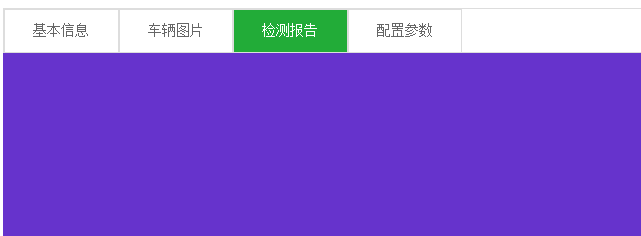

<!DOCTYPE html PUBLIC "-//W3C//DTD XHTML 1.0 Transitional//EN" "http://www.w3.org/TR/xhtml1/DTD/xhtml1-transitional.dtd">

<html xmlns="http://www.w3.org/1999/xhtml">

<head>

<meta http-equiv="Content-Type" content="text/html; charset=utf-8" />

<script type="text/javascript" src="../jquery-1.11.2.min.js"></script>

<title>无标题文档</title>

</head>

<body>

<div style="width:100%; height:48px; border:solid 1px #ddd; color:#666;font-size:16px;">

    <div class="cd" bs="jbxx" style="width:125px; height:46px; background-color:#22ac38; float:left; border:solid 1px #ddd; color:white; text-align:center; line-height:46px; vertical-align:middle ">基本信息

    </div>

    <div class="cd" bs="cltp" style="width:125px; height:46px; background-color:#FFF; float:left; border:solid 1px #ddd; color:#666; text-align:center; line-height:46px; vertical-align:middle ">车辆图片

    </div>

    <div class="cd" bs="jcbg" style="width:125px; height:46px; background-color:#FFF; float:left; border:solid 1px #ddd; color:#666; text-align:center; line-height:46px; vertical-align:middle ">检测报告

    </div>

    <div class="cd" bs="pzcs" style="width:125px; height:46px; background-color:#FFF; float:left; border:solid 1px #ddd; color:#666; text-align:center; line-height:46px; vertical-align:middle ">配置参数

    </div>

</div>

<!--基本信息-->

<div class="xq" id="jbxx" style="width:100%; display:block">

    <div style=" margin-top:10px;font-size:16px; color:#666; font-weight:bold">

    <div style="background-color:#22ac38; height:16px; width:4px;float:left; margin-right:5px;"></div>

    基本信息</div>

    <div style="width:100%; font-size:14px;margin-top:20px">

        <div style="width:220px; height:24px; float:left;margin-right:30px">车主: 王先生| 职员| 顺义</div>

        <div style="width:200px; height:24px;float:left;margin-right:30px">年检到期:2017-10</div>

         <div style="width:200px; height:24px;float:left;margin-right:30px">交强险到期:2016-10</div>

         <div style="width:200px; height:24px;float:left;margin-right:30px">商业险到期:2016-10</div>

          <div style="width:200px; height:24px;float:left;margin-right:30px">过户次数:2016-10</div>

    </div>

    <div style="clear:both"></div>

    <div style="width:100%; height:80px; background-color:#f9f9f9;border:solid 1px #ddd; margin-top:10px; word-wrap:break-word; word-break:break-all;font-size:14px; padding:15px 0px 15px 15px;">还拉黑的卡拉哈里还法拉赫客户</div>

</div>

<!--车辆图片-->

<div class="xq" id="cltp" style="width:100%; display:none">

    <div style=" margin-top:10px;font-size:16px; color:#666; font-weight:bold">

    <div style="background-color:#22ac38; height:16px; width:4px;float:left; margin-right:5px;"></div>

    车辆图片</div>

    <?php

            for($i=0;$i<count($attr);$i++)

            {

                echo "<img src='{$attr[$i][0]}' style='width:580px; height:400px; margin:10px;'/>";

            }

        ?>

</div>

<!--检测报告-->

<div class="xq" id="jcbg" style="width:100%; height:500px; background-color:#63C; display:none"></div>

<!--配置参数-->

<div class="xq" id="pzcs" style="width:100%; height:500px; background-color:#FC0; display:none">

</div>

</div>

<script type="text/javascript">

$(document).ready(function(e) {

    $(".cd").click(function(){

            //所有DIV背景变白,字体变灰色

            $(".cd").css("background-color","#FFF");

            $(".cd").css("color","#666");

            //自己变绿,字体变白

            $(this).css("background-color","#22ac38");

            $(this).css("color","#FFF");

            //控制详情显示

            var id = $(this).attr("bs");

            $(".xq").css("display","none");

            $("#"+id).css("display","block");

            //添加一个自定义属性

            $(".cd").removeAttr("xz");

            $(this).attr("xz","1");

        })

    $(".cd").mouseover(function(){

            //自己变绿,字体变白

            $(this).css("background-color","#22ac38");

            $(this).css("color","#FFF");

        })

    $(".cd").mouseout(function(){

        if($(this).attr("xz") == "1")

        {

        }

        else

        {

        //变回原形

        $(this).css("background-color","#FFF");

        $(this).css("color","#666");

        }

    })

});

</script>

</body>

</html>
PHP——菜单及内容轮换(Jquery)的更多相关文章
- 下拉菜单;手风琴;九宫格的Jquery的使用实例
下拉菜单;手风琴;九宫格的Jquery的使用实例 1.下拉菜单 效果如图: 代码如下: <!DOCTYPE html> <html lang="en"> & ...
- Android菜单项内容大全
一.介绍: 菜单是许多应用中常见的用户界面组件. Android3.0版本以前,Android设备会提供一个专用"菜单"按钮呈现常用的一些用户操作, Android3.0版本以后, ...
- 推荐一个内容滚动jquery插件
myslider是一个内容滚动jquery插件,版本0.1.2的每次滚动内容是一行内容,可以是文字,可以是一个链接,还可以是图片. 官方网址:http://keleyi.com/jq/myslider ...
- C# WPF 左侧菜单右侧内容布局效果实现
原文:C# WPF 左侧菜单右侧内容布局效果实现 我们要做的效果是这样的,左侧是可折叠的菜单栏,右侧是内容区域,点击左侧的菜单项右侧内容区域则相应地切换. wpf实现的话,我的办法是用一个tabcon ...
- 折腾linux随笔 之 关闭Budgie默认自动隐藏应用的菜单栏 与 Gnome系桌面应用菜单无内容解决
关闭Budgie默认自动隐藏应用菜单栏 首选项 -> 设置 -> 通用辅助功能 -> 打开 始终显示通用辅助菜单 后的开关 -> 注销桌面重新登录. done. 解决Gnome ...
- [jquery]添加行内容后根据下拉菜单选择内容对比之前已有选项,若有重置再提示
今天页面上一个添加列内容时,要对选择内容与之前已有选项内容作对比,防止用户重复选择内容 页面HTML代码 <ul class="list-group xj-list-NObor xj- ...
- 菜单与内容下拉jQuery
<!DOCTYPE html> <html lang="en"> <head> <meta charset="UTF-8&quo ...
- 创建基于Bootstrap的下拉菜单的DropDownList的JQuery插件
Bootstrap是当下流行的前端UI组件库之一.利用Bootstrap,可以很方便的构造美观.统一的页面.把设计师从具体的UI编码中解放出来. Bootstrap提供了不少的前端UI组件.带下拉 ...
- php部分---函数、四类常用函数、例子(下拉菜单添加内容);
1.简单函数 四要素:返回类型,函数名,参数列表,函数体 function Show() { echo "hello"; } Show(); 2.有返回值的函数 function ...
随机推荐
- shadow mapping实现动态shadow实现记录 【转】
http://blog.csdn.net/iaccepted/article/details/45826539 前段时间一直在弄一个室内场景,首先完成了render,效果还可以.然后给其加上shado ...
- Java笔记12:Java对象排序
代码: import java.util.Arrays; import java.util.Comparator; class Person { private String name; privat ...
- ThreadLocal的简单应用
概括起来说,对于多线程资源共享的问题,同步机制采用了“以时间换空间”的方式,而ThreadLocal采用了“以空间换时间”的方式.前者仅提供一份变量,让不同的线程排队访问,而后者为每一个线程都提供了一 ...
- (转)一个基于vue2的天气js应用
基于vue.js 2.0的百度天气应用 vue-weather 基于vue.js 2.0的百度天气应用. 说明 初学vue,在看完一个简单的视频教程和走两遍完官方文档之后仍然感觉云里雾里,知其然不知其 ...
- 2018.1.9 博客迁移至csdn
http://blog.csdn.net/liyuhui195134?ref=toolbar
- 省市区县三级联动JAVA+MySQL+JQuery
场景介绍: 由于项目要求,需要做一个进件(新增)功能,而该功能里要用到车品牌.车系.车型的联动查询,也就是经典的三级联动. 大体思路如下: 进入页面,会把所有的车品牌(第一级)在后台查询出来,放到缓存 ...
- 安装程序集'' policy.8.0.microsoft.vc80.atl,type=''win32-
ThinkPad Bluetooth with Enhanced Data Rate II 软件 在Windows 7 64-bit 下无法安装完成,弹出窗口提示 :安装程序集''policy.8.0 ...
- Uber 四年时间增长近 40 倍,背后架构揭秘
据报道,Uber 仅在过去4年的时间里,业务就激增了 38 倍.Uber 首席系统架构师 Matt Ranney 在一个非常有趣和详细的访谈<可扩展的 Uber 实时市场平台>中告诉我们 ...
- websphere中的会话超时设置 和 web应用中web.xml中session-timeout关系
Tomcat默认的会话的超时时间设置 设置Tomcat session有效期的三种方式有: 1.在tomcat/conf/web.xml中修改session-timeout的值,该设置是TOMCAT全 ...
- iOS APP 上传
原地址:http://www.cnblogs.com/uvsjoh/archive/2012/11/14/2769739.html 流程:1 开发好要发布的程序 -- 需要在程序中包含符合要求规格的i ...