
jquery.cookie中的操作之与换肤
jquery.cookie.js的插件,插件的源代码如下:
/**

 * Cookie plugin

 *

 * Copyright (c) 2006 Klaus Hartl (stilbuero.de)

 * Dual licensed under the MIT and GPL licenses:

 * http://www.opensource.org/licenses/mit-license.php

 * http://www.gnu.org/licenses/gpl.html

 *

 */

/**

 * Create a cookie with the given name and value and other optional parameters.

 *

 * @example $.cookie('the_cookie', 'the_value');

 * @desc Set the value of a cookie.

 * @example $.cookie('the_cookie', 'the_value', { expires: 7, path: '/', domain: 'jquery.com', secure: true });

 * @desc Create a cookie with all available options.

 * @example $.cookie('the_cookie', 'the_value');

 * @desc Create a session cookie.

 * @example $.cookie('the_cookie', null);

 * @desc Delete a cookie by passing null as value. Keep in mind that you have to use the same path and domain

 *       used when the cookie was set.

 *

 * @param String name The name of the cookie.

 * @param String value The value of the cookie.

 * @param Object options An object literal containing key/value pairs to provide optional cookie attributes.

 * @option Number|Date expires Either an integer specifying the expiration date from now on in days or a Date object.

 *                             If a negative value is specified (e.g. a date in the past), the cookie will be deleted.

 *                             If set to null or omitted, the cookie will be a session cookie and will not be retained

 *                             when the the browser exits.

 * @option String path The value of the path atribute of the cookie (default: path of page that created the cookie).

 * @option String domain The value of the domain attribute of the cookie (default: domain of page that created the cookie).

 * @option Boolean secure If true, the secure attribute of the cookie will be set and the cookie transmission will

 *                        require a secure protocol (like HTTPS).

 * @type undefined

 *

 * @name $.cookie

 * @cat Plugins/Cookie

 * @author Klaus Hartl/klaus.hartl@stilbuero.de

 */

/**

 * Get the value of a cookie with the given name.

 *

 * @example $.cookie('the_cookie');

 * @desc Get the value of a cookie.

 *

 * @param String name The name of the cookie.

 * @return The value of the cookie.

 * @type String

 *

 * @name $.cookie

 * @cat Plugins/Cookie

 * @author Klaus Hartl/klaus.hartl@stilbuero.de

 */

jQuery.cookie = function(name, value, options) {

    if (typeof value != 'undefined') { // name and value given, set cookie

        options = options || {};

        if (value === null) {

            value = '';

            options.expires = -;

        }

        var expires = '';

        if (options.expires && (typeof options.expires == 'number' || options.expires.toUTCString)) {

            var date;

            if (typeof options.expires == 'number') {

                date = new Date();

                date.setTime(date.getTime() + (options.expires *  *  *  * ));

            } else {

                date = options.expires;

            }

            expires = '; expires=' + date.toUTCString(); // use expires attribute, max-age is not supported by IE

        }

        // CAUTION: Needed to parenthesize options.path and options.domain

        // in the following expressions, otherwise they evaluate to undefined

        // in the packed version for some reason...

        var path = options.path ? '; path=' + (options.path) : '';

        var domain = options.domain ? '; domain=' + (options.domain) : '';

        var secure = options.secure ? '; secure' : '';

        document.cookie = [name, '=', encodeURIComponent(value), expires, path, domain, secure].join('');

    } else { // only name given, get cookie

        var cookieValue = null;

        if (document.cookie && document.cookie != '') {

            var cookies = document.cookie.split(';');

            for (var i = ; i < cookies.length; i++) {

                var cookie = jQuery.trim(cookies[i]);

                // Does this cookie string begin with the name we want?

                if (cookie.substring(, name.length + ) == (name + '=')) {

                    cookieValue = decodeURIComponent(cookie.substring(name.length + ));

                    break;

                }

            }

        }

        return cookieValue;

    }

};
Cookie插件的操作
创建一个会话cookie:
$.cookie(‘cookieName’,'cookieValue’);
注:当没有指明cookie时间时,所创建的cookie有效期默认到用户浏览器关闭止,故被称为会话cookie。
创建一个持久cookie:
$.cookie(‘cookieName’,'cookieValue’,{expires:7});
注:当指明时间时,故称为持久cookie,并且有效时间为天。
创建一个持久并带有效路径的cookie:
$.cookie(‘cookieName’,'cookieValue’,{expires:7,path:’/'});
注:如果不设置有效路径,在默认情况下,只能在cookie设置当前页面读取该cookie,cookie的路径用于设置能够读取cookie的顶级目录。
创建一个持久并带有效路径和域名的cookie:
$.cookie(‘cookieName’,'cookieValue’,{expires:7,path:’/',domain: ‘chuhoo.com’,secure: false,raw:false});
注:domain:创建cookie所在网页所拥有的域名;secure:默认是false,如果为true,cookie的传输协议需为https;raw:默认为false,读取和写入时候自动进行编码和解码(使用encodeURIComponent编码,使用decodeURIComponent解码),关闭这个功能,请设置为true。
获取cookie:
$.cookie(‘cookieName’); //如果存在则返回cookieValue,否则返回null。
删除cookie:
$.cookie(‘cookieName’,null);
或者这样也能删除: $.cookie('cookieName', '', { expires: -1, path: '/' }); // 删除 cookie
注:如果想删除一个带有效路径的cookie,如下:$.cookie(‘cookieName’,null,{path:’/'});
来演示一个换肤的粟子:


代码之div+css
<link rel="stylesheet" href="styles/skin/skin_0.css" type="text/css" id="cssfile" />

<!--头部开始-->

<div id="header">

    <a id="logo" href="#">Jane Shopping</a>

    <ul id="skin">

        <li id="skin_0" title="蓝色" class="selected">蓝色</li>

        <li id="skin_1" title="紫色">紫色</li>

        <li id="skin_2" title="红色">红色</li>

        <li id="skin_3" title="天蓝色">天蓝色</li>

        <li id="skin_4" title="橙色">橙色</li>

        <li id="skin_5" title="淡绿色">淡绿色</li>

    </ul>

</div>

<!--头部结束-->
/*切换皮肤样式*/

#skin {

    float:right;

    margin:10px;

    padding:4px;

    width:120px;

    list-style:none;

    border: 1px solid #CCCCCC;

    background:#FFF;

}

#skin li {

    float:left;

    margin-right:4px;

    width:15px;

    height:15px;

    text-indent:-9999px;

    overflow:hidden;

    display:block;

    cursor:pointer;

    background-image:url(../images/theme.gif);

}

#skin_0 { background-position:0px 0px; }

#skin_1 { background-position:15px 0px; }

#skin_2 { background-position:35px 0px; }

#skin_3 { background-position:55px 0px; }

#skin_4 { background-position:75px 0px; }

#skin_5 { background-position:95px 0px; }

#skin_0.selected { background-position:0px 15px; }

#skin_1.selected { background-position:15px 15px; }

#skin_2.selected { background-position:35px 15px; }

#skin_3.selected { background-position:55px 15px; }

#skin_4.selected { background-position:75px 15px; }

#skin_5.selected { background-position:95px 15px; }

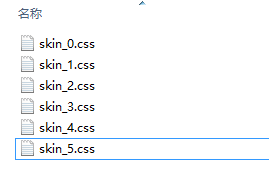
不同皮肤的css文件都放在styles/skins 文件夹下,命名如下:
代码之jQuery代码
版本一:
        $(function(){

            var $li =$("#skin li");

            $li.click(function(){

                $("#"+this.id).addClass("selected")                //当前<li>元素选中

                            .siblings().removeClass("selected");  //去掉其它同辈<li>元素的选中

                $("#cssfile").attr("href","styles/skin/"+ (this.id) +".css"); //设置不同皮肤

                $.cookie( "MyCssSkin" ,  this.id , { path: '/', expires:  });

            });

            var cookie_skin = $.cookie( "MyCssSkin");//将MyCssSkin这个cookie值this.id赋给变量cookie_skin

        if (cookie_skin) {

                    $("#"+cookie_skin).addClass("selected")                //当前<li>元素选中

                                      .siblings().removeClass("selected");  //去掉其它同辈<li>元素的选中

                    $("#cssfile").attr("href","styles/skin/"+ cookie_skin +".css"); //设置不同皮肤

                    $.cookie( "MyCssSkin" ,  cookie_skin  , { path: '/', expires:  });

            }

        })
版本一不好的地方,就是有大量的重复代码,可以模块化,函数化,来看版本二:
//网站换肤

$(function(){

        var $li =$("#skin li");

        $li.click(function(){

            switchSkin( this.id );

        });

        var cookie_skin = $.cookie("MyCssSkin");

        if (cookie_skin) {

            switchSkin( cookie_skin );

        }

});

function switchSkin(skinName){

        $("#"+skinName).addClass("selected")                //当前<li>元素选中

                       .siblings().removeClass("selected");  //去掉其他同辈<li>元素的选中

        $("#cssfile").attr("href","styles/skin/"+ skinName +".css"); //设置不同皮肤

        $.cookie( "MyCssSkin" ,  skinName , { path: '/', expires:  });

}
下面代码也是换肤的例子
html:
<script>
//加载皮肤文件
loadCss(_skinId,'Main.css');
</script> <div style="right:10px; top: 5px; position: absolute; height: 21px; text-align:right">
<a>皮肤:</a><a href="#" onclick="loadSkin('1')">藤蔓绿</a> <a href="#" onclick="loadSkin('2')">经典蓝</a> <a href="#" onclick="loadSkin('3')">甜蜜橙</a> <a href="#" onclick="loadSkin('4')">淡雅灰</a>
</div>
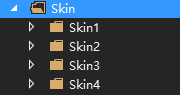
皮肤路径 :
js代码:
var _skinId = getCookie("_skinId") ? getCookie("_skinId"):"";

function loadSkin(skinId)

{

    writeCookie("_skinId",skinId);

    top.window.location.reload();

}

function $(id)

{

    return document.getElementById(id);

}

function loadCss(skinId,cssName)

{

    var head = document.getElementsByTagName('head').item();

    css = document.createElement('link');

    css.href = "Skin/Skin" + skinId + "/"+cssName;

    css.rel = 'stylesheet';

    css.type = 'text/css';

    css.id = 'loadCss';

    head.appendChild(css);

}

function loadJs(file)

{

    var scriptTag = document.getElementById('loadScript');

    var head = document.getElementsByTagName('head').item();

    if(scriptTag) head.removeChild(scriptTag);

    script = document.createElement('script');

    script.src = "../js/mi_"+file+".js";

    script.type = 'text/javascript';

    script.id = 'loadScript';

    head.appendChild(script);

}

function setCookie(sKey, sValue, sDomain, sPath, sExpires, blSecure)

{

    var sCookieStr = sKey + "=" + sValue + ";";

    if (sDomain)    sCookieStr += " DOMAIN=" + sDomain + ";";

    if (sPath)        sCookieStr += " PATH=" + sPath + ";";

    if (sExpires)    sCookieStr += " EXPIRES=" + sExpires + ";";

    if (blSecure)    sCookieStr += " SECURE";

    document.cookie = sCookieStr;

}

function writeCookie(key,value)

{

    var sExpires=new Date();

    sExpires.setTime(sExpires.getTime()+****);

    setCookie(key,value,"","",sExpires.toGMTString(),"");

    if(getCookie(key) == null)

    {

        alert("您的浏览器安全设置过高,不支持Cookie,请重新设置浏览器的。");

    }

}

function getCookie(sKey)

{

    var sCookie = document.cookie;

    if( !sCookie ) return null;

    var sTag = sKey + "=";

    var iBegin = sCookie.indexOf(sTag);

    if (iBegin < )    return null;

    iBegin += sTag.length;

    var iEnd = sCookie.indexOf(";", iBegin);

    if (iEnd < )    iEnd = sCookie.length;

    return sCookie.substring(iBegin, iEnd);

}

function delCookie(sKey)

{

    var tNow = new Date();

    setCookie(sKey, "", null, null, tNow.toGMTString(), null);

}
jquery.cookie中的操作之与换肤的更多相关文章
- jquery.cookie中的操作
http://w3school.com.cn/js/js_cookies.asp jquery.cookie中的操作: jquery.cookie.js是一个基于jquery的插件,点击下载! 创建一 ...
- (转)jquery.cookie中的操作
jquery.cookie中的操作: jquery.cookie.js是一个基于jquery的插件,点击下载! 创建一个会话cookie: $.cookie(‘cookieName’,'cooki ...
- 5.2 《锋利的jQuery》jQuery对表格的操作(选项卡/换肤)
表格隔行变色以及单选/复选 表格展开关闭 表格筛选 字体变大/缩小 选项卡 网页换肤 tip1: $("tr:odd")和$("tr:even")选择器索引是从 ...
- vue中利用scss实现整体换肤和字体大小设置
一.前言 利用Sass预处理实现换肤和字体大小调整. 思路及达到的效果:字体大小的适配使用window.devicePixelRatio的值和需要调整的差量进行控制.页面初始化是的字体适配可以根据de ...
- Android中插件开发篇之----应用换肤原理解析
一.前言 今天又到周末了,感觉时间过的很快呀.又要写blog了.那么今天就来看看应用的换肤原理解析.在之前的一篇博客中我说道了Android中的插件开发篇的基础:类加载器的相关知识.没看过的同学可以转 ...
- vue 中使用sass实现主体换肤
有如下代码要实现换肤功能 <template> <div class="app-root" :class="themeClass"> & ...
- jQuery + Cookie引导客户操作
网址:http://www.sucaihuo.com/js/707.html 示例:http://www.sucaihuo.com/jquery/7/707/demo/
- jquery.cookie 使用文档,$.cookie() 文档教程, js 操作 cookie 教程文档。
jquery.cookie 使用文档,$.cookie() 文档教程, js 操作 cookie 教程文档. jquery.cookie中的操作: jquery.cookie.js是一个基于jquer ...
- 管理Cookie的插件——jquery.cookie.js
下载地址:http://plugins.jquery.com/cookie/ jquery.cookie中的操作: 一.创建cookie: 1.创建一个会话cookie: $.cookie('cook ...
随机推荐
- Mysql双主实战
参考:http://dev.mysql.com/doc/refman/5.1/en/replication-options-slave.htmlhttp://blog.chinaunix.net/ui ...
- location和history
<!DOCTYPE html> <html> <head> <meta charset="UTF-8"> <title> ...
- spring boot 利用redisson实现redis的分布式锁
原文:http://liaoke0123.iteye.com/blog/2375469 利用redis实现分布式锁,网上搜索的大部分是使用java jedis实现的. redis官方推荐的分布式锁实现 ...
- 【SQL Sever】安装过程
下载了sql sever,如下: 首先把iso解压,如下: 1.点击 2.打开页面后 3. 接下来直接下一步下一步 完成之后,需要重启计算机才能使用! 4. 重启之后,进入配置工具 将所有的端口号更改 ...
- appium+python自动化51-adb文件导入和导出(pull push)
前言 用手机连电脑的时候,有时候需要把手机(模拟器)上的文件导出到电脑上,或者把电脑的图片导入手机里做测试用,我们可以用第三方的软件管理工具直接复制粘贴,也可以直接通过adb命令导入和导出. adb ...
- Eureka的自我保护机制
最近项目在Kubernetes上使用Eureka遇到一些问题,在网站上找到一篇针对Eureka自我保护机制原理的文章,觉得不错,总结如下: Eureka的自我保护特性主要用于减少在网络分区或者不稳定状 ...
- JS夯实基础:Javascript 变态题解析 (下)
function sidEffecting(ary) { ary[] = ary[]; } function bar(a,b,c) { c = sidEffecting(arguments); ret ...
- 更改"xxxx" 的权限: 不允许的操作
[摘要:做为root用户,用chmod为何改没有了文件权限 以ROOT用户上岸,当用chmod改文件权限时,体系表现无权变动,为何 文件名是:aa chmod 777 aa chmod: changi ...
- 百度编辑器同一id重复调用不能生效的办法
在使用js 调用表单组件模板的时候,表单内有一个编辑框 第一次调出的时候,百度编辑器正常显示,关闭后,再打开,百度编辑器不能显示 原因:第一次使用的时候, UE.getEditor('node_con ...
- Caused by: org.apache.ibatis.reflection.ReflectionException我碰到的情况,原因不唯一
映射文件: <select id="selectKeyByUserId" resultMap="Xxx"> <![CDATA[ ...