
div+css实现导航示意箭头
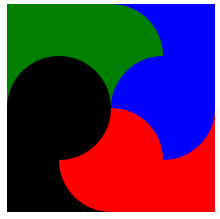
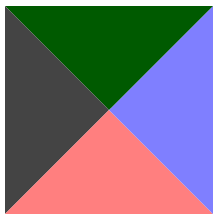
1、Div的宽高为100
 <!DOCTYPE html>

 <html xmlns="http://www.w3.org/1999/xhtml">

 <head>

     <meta http-equiv="Content-Type" content="text/html; charset=utf-8" />

     <title></title>

     <style type="text/css">

         div

         {

             border-color: green blue red black;

             border-style: solid;

             border-width: 16px;

             height: 100px;

             width: 100px;

         }

     </style>

 </head>

 <body>

     <div></div>

 </body>

 </html>
显示效果:
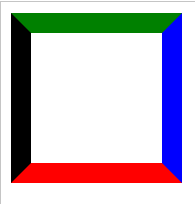
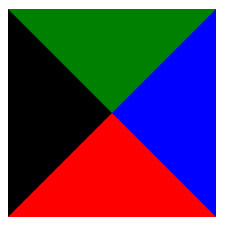
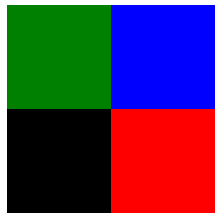
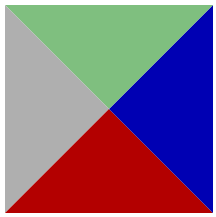
2、将宽高均设置为0
 <!DOCTYPE html>

 <html xmlns="http://www.w3.org/1999/xhtml">

 <head>

     <meta http-equiv="Content-Type" content="text/html; charset=utf-8" />

     <title></title>

     <style type="text/css">

         div

         {

             border-color: green blue red black;

             border-style: solid;

             border-width: 80px;

             height: 0px;

             width: 0px;

         }

     </style>

 </head>

 <body>

     <div></div>

 </body>

 </html>
显示效果:
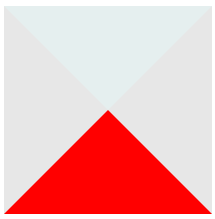
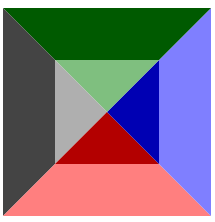
3、只显示下面的▲
半透明示意
 <!DOCTYPE html>

 <html xmlns="http://www.w3.org/1999/xhtml">

 <head>

     <meta http-equiv="Content-Type" content="text/html; charset=utf-8" />

     <title></title>

     <style type="text/css">

         div

         {

             border-color: rgba(0,100,100,0.1) rgba(20,20,20,0.1) red;

             border-style: solid;

             border-width: 80px;

             height: 0px;

             width: 0px;

         }

     </style>

 </head>

 <body>

     <div></div>

 </body>

 </html>
显示效果:
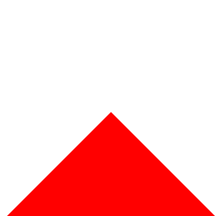
设置为全透明
 <!DOCTYPE html>

 <html xmlns="http://www.w3.org/1999/xhtml">

 <head>

     <meta http-equiv="Content-Type" content="text/html; charset=utf-8" />

     <title></title>

     <style type="text/css">

         div

         {

             border-color: rgba(0,0,0,0) rgba(0,0,0,0) red;

             border-style: solid;

             border-width: 80px;

             height: 0px;

             width: 0px;

         }

     </style>

 </head>

 <body>

     <div></div>

 </body>

 </html>
显示效果:
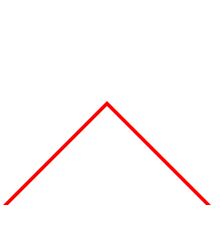
4、通过2个▲的重叠实现导航示意符号Λ
 <!DOCTYPE html>

 <html xmlns="http://www.w3.org/1999/xhtml">

 <head>

     <meta http-equiv="Content-Type" content="text/html; charset=utf-8" />

     <title></title>

     <style type="text/css">

         div.one

         {

             border-color: rgba(0,0,0,0) rgba(0,0,0,0) red;/*这里为导航符号颜色*/

             border-style: solid;

             border-width: 80px;

             height: 0px;

             width: 0px;

             position:absolute;

         }

     div.two

         {

             border-color: rgba(0,0,0,0) rgba(0,0,0,0) white;/*这里为背景色*/

             border-style: solid;

             border-width: 80px;

             height: 0px;

             width: 0px;

             position:absolute;

             margin-top:4px;/*需要一个偏移量*/

         }

     </style>

 </head>

 <body>

     <div class="one"></div>

     <div class="two"></div>

 </body>

 </html>
显示效果:
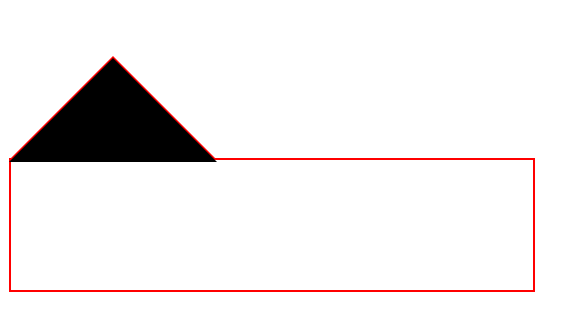
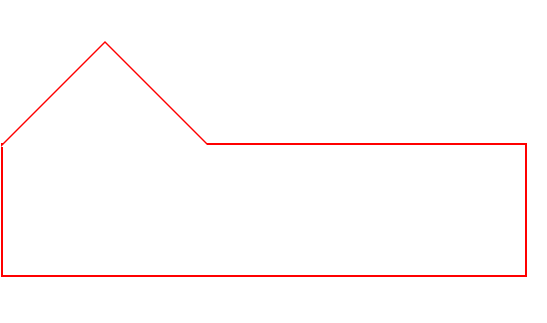
5、与下方的DIV组合
 <!DOCTYPE html>

 <html xmlns="http://www.w3.org/1999/xhtml">

 <head>

     <meta http-equiv="Content-Type" content="text/html; charset=utf-8" />

     <title></title>

     <style type="text/css">

         div.one

         {

             border-color: rgba(0,0,0,0) rgba(0,0,0,0) red;

             border-style: solid;

             border-width: 80px;

             height: 0px;

             width: 0px;

             position:absolute;

         }

     div.two

         {

             border-color: rgba(0,0,0,0) rgba(0,0,0,0) black;/*black不是背景色,便于观察*/

             border-style: solid;

             border-width: 80px;

             height: 0px;

             width: 0px;

             position:absolute;

             margin-top:2px;

             z-index:1;

         }

       div.three{

          position:absolute;

          width:400px;

          height:100px;

          border:2px solid red;/*需要设置边界宽度*/

          margin-top:158px

       }

     </style>

 </head>

 <body>

     <div class="one"></div>

     <div class="two"></div>

     <div class="three"></div>

 </body>

 </html>
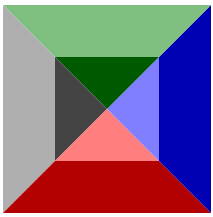
便于观察的黑色背景:
改为背景色"白色"后显示效果:
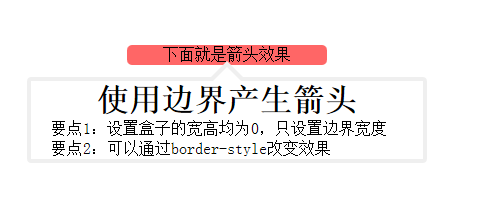
6、完整的小例子
 <!DOCTYPE html>

 <html xmlns="http://www.w3.org/1999/xhtml">

 <head>

     <meta http-equiv="Content-Type" content="text/html; charset=utf-8" />

     <title></title>

     <style>

         *

         {

             margin: 0px;

             padding: 0px;

         }

         #show

         {

             margin: 10px auto;

             position: absolute;

             top: 50px;

             left: 50px;

             text-align: center;

         }

         #some

         {

             width: 200px;

             margin-left: 100px;

             text-align: center;

             position: absolute;

             background-color: rgba(255, 0, 0,0.6);

             border-radius: 5px;

         }

         #info

         {

             width: 400px;

             height: 300px;

             position: absolute;

         }

         #outarrow

         {

             border-color: transparent transparent #efefef;

             border-style: solid;

             border-width: 16px;

             height: 0;

             width: 0;

             position: absolute;

             top: 0px;

             left: 184px;

         }

         #innerarrow

         {

             border-color: transparent transparent white;

             border-style: solid;

             border-width: 16px;

             height: 0;

             width: 0;

             position: absolute;

             top: 0px;

             left: 184px;

             margin-top: 6px;

         }

         #content

         {

             border: 4px solid;

             border-radius: 4px;

             border-color: #efefef;

             width: 400px;

             margin: 32px auto 0px;

             -moz-box-sizing: border-box;

             -webkit-box-sizing: border-box;

             box-sizing: border-box;

         }

             #content p

             {

                 text-align: left;

                 text-indent: 20px;

             }

     </style>

 </head>

 <body>

     <div id="show">

         <div id="some">下面就是箭头效果</div>

         <div id="info">

             <div id="outarrow"></div>

             <div id="innerarrow"></div>

             <div id="content">

                 <h1>使用边界产生箭头</h1>

                 <p>要点1:设置盒子的宽高均为0,只设置边界宽度</p>

                 <p>要点2:可以通过border-style改变效果</p>

             </div>

         </div>

     </div>

 </body>

 </html>
显示效果:
7、改变border-style 有趣的效果
   <!DOCTYPE html>

   <html xmlns="http://www.w3.org/1999/xhtml">

   <head>

       <meta http-equiv="Content-Type" content="text/html; charset=utf-8" />

       <title></title>

       <style type="text/css">

           div

           {

              border-color: green blue red black;

              border-style: dotted;/*除了solid,可以试试dotted,dashed;grooved等*/

              border-width: 80px;

              height: 0px;

              width: 0px;

          }

      </style>

  </head>

  <body>

      <div></div>

  </body>

  </html>
|
dotted |
dashed | groove |
 |
 |
 |
|
outset |
inset | ridge |
 |
 |
 |
div+css实现导航示意箭头的更多相关文章
- 十天学会<div+css>横向导航菜单和纵向导航菜单
纵向导航菜单及二级弹出菜单 纵向导航菜单:一级菜单 <head><style type="text/css">body { font-family: Ver ...
- CSS绘制三角形和箭头,不用再用图片了
前言 还在用图片制作箭头,三角形,那就太lou了.css可以轻松搞定这一切,而且颜色大小想怎么变就怎么变,还不用担心失真等问题. 先来看看这段代码: /**css*/.d1{ width: 0; he ...
- HTML5 div+css导航菜单
HTML5 div+css导航菜单 视频 音乐 小说 故事 作品 阅读 联系
- 【转】一个DIV+CSS代码布局的简单导航条
原文地址:http://www.divcss5.com/shili/s731.shtml 简单的DIV CSS代码布局实现导航条 一个蓝色主题的导航条布局案例,本CSS小实例,采用DIV CSS实现. ...
- 使用div+css制作简单导航 以及要注意问题
<!DOCTYPE html PUBLIC "-//W3C//DTD XHTML 1.0 Transitional//EN" "http://www.w3.org/ ...
- 43个实例xHTML+CSS(DIV+CSS)网页及导航布局
在中国,很多前端开发初学者都会把xHTML+CSS页面制作说成DIV+CSS,甚至很多人都还不知道xHTML+CSS是什么意思,只知道盲目的追求DIV+CSS,但在国外,是没有DIV+CSS这个概念的 ...
- DIV+CSS规范命名大全
网页制作中规范使用DIV+CSS命名规则,可以改善优化功效特别是团队合作时候可以提供合作制作效率,具体DIV CSS命名规则CSS命名大全内容篇. 常用DIV+CSS命名大全集合,即CSS命名规则 D ...
- DIV+CSS系统学习:转载
第一部分 HTML 第一章 职业规划和前景 职业方向规划定位: web前端开发工程师 web网站架构师 自己创业 转岗管理或其他 web前端开发的前景展望: 未来IT行业企业需求最多的人才 结合最新的 ...
- DIV+CSS命名规范-转载1
命名规则说明: 1).所有的命名最好都小写 2).属性的值一定要用双引号("")括起来,且一定要有值如class="divcss5",id="divc ...
随机推荐
- ios fix UIRefreshControl bug
NS_CLASS_AVAILABLE_IOS(6_0) UIRefreshControl 有个毛病有时会出bug 动画下拉就不动了,这里给出修复处理: @interface UICollecti ...
- selenium文件上传的实现
一.对于上传文件, 从手动操作我们可以看出, 需要对window 窗体进行操作, 而对于selenium webdriver 在这方面应用就受到了限制. 但是, 庆幸的是, 对于含有input ele ...
- [GeekBand] C++学习笔记(1)——以复数类为例
本篇笔记以复数类(不含指针的类)为例进行面向对象的学习 ========================================================= 复数类的声明: class ...
- [cocos2d-x 2.0.4][iOS7]图片加载错误
本篇文章由:http://www.sollyu.com/cocos2d-x-2-0-4-ios7-image-loading-errors/ 说明 错误提示 <Error>: CGBitm ...
- OpenJudge/Poj 1661 帮助 Jimmy
1.链接地址: bailian.openjudge.cn/practice/1661 http://poj.org/problem?id=1661 2.题目: 总Time Limit: 1000ms ...
- A Case for Flash Memory SSD in Enterprise Database Applications
通过分析固态硬盘的特性对数据库中不同对象,如:表,索引,回滚段,重做日志等的应用进行具体研究,最后将数据库中不同的对象进行区别应用
- 解决Ubuntu和Windows的文件乱码问题(转载)
解决Ubuntu和Windows的文件乱码问题(debian也通用) 1.转换文件内容编码 Windows下天生的纯文本文件,其中文编码为GBK,在Ubuntu下显示为乱码,可以使用iconv命令 ...
- C# 中关闭当前线程的四种方式 .
.net类库已经帮助我们实现了窗口的关闭,如果此窗口是系统的主窗口,关闭此窗口即应该退出了整个应用程序.但事实上有时候并不是这样的,关闭窗口,只是停止了当前窗口的消息循环.系统主窗口,实质上是Main ...
- JQuery 绑定事件时传递参数的实现方法
如题,比如我想在$(":text").bind("keyup",funcionName);将当前的文本框作为参数传递给 functionName所代表的函数,应 ...
- err: exp-00056 rra-12154 exp-00000
一直用的是win7系统+oracle11g r1 server端(后简称r1). 由于工作需要装了oracle11g r2 client端(后简称r2). 在装r2之前,r1的导出exp是没有问题的. ...