
Flask jQuery ajax
http://www.runoob.com/jquery/jquery-ref-ajax.html
http://jun1986.iteye.com/blog/1399242
下面是jQuery官方给出的完整的Ajax事件列表:
- ajaxStart (Global Event)
This event is broadcast if an Ajax request is started and no other Ajax requests are currently running.- beforeSend (Local Event)
This event, which is triggered before an Ajax request is started, allows you to modify the XMLHttpRequest object (setting additional headers, if need be.) - ajaxSend (Global Event)
This global event is also triggered before the request is run. - success (Local Event)
This event is only called if the request was successful (no errors from the server, no errors with the data). - ajaxSuccess (Global Event)
This event is also only called if the request was successful. - error (Local Event)
This event is only called if an error occurred with the request (you can never have both an error and a success callback with a request). - ajaxError (Global Event)
This global event behaves the same as the local error event. - complete (Local Event)
This event is called regardless of if the request was successful, or not. You will always receive a complete callback, even for synchronous requests. - ajaxComplete (Global Event)
This event behaves the same as the complete event and will be triggered every time an Ajax request finishes.
- beforeSend (Local Event)
- ajaxStop (Global Event)
This global event is triggered if there are no more Ajax requests being processed.
$.post、$.get是一些简单的方法,如果要处理复杂的逻辑,还是需要用到jQuery.ajax()
一、$.ajax的一般格式
$.ajax({
type: 'POST',
url: url ,
data: data ,
success: success ,
dataType: dataType
});
二、$.ajax的参数描述
参数 描述
| url | 必需。规定把请求发送到哪个 URL。 |
| data | 可选。映射或字符串值。规定连同请求发送到服务器的数据。 |
| success(data, textStatus, jqXHR) | 可选。请求成功时执行的回调函数。 |
| dataType |
可选。规定预期的服务器响应的数据类型。 默认执行智能判断(xml、json、script 或 html)。 |
三、$.ajax需要注意的一些地方:
1.data主要方式有三种,html拼接的,json数组,form表单经serialize()序列化的;通过dataType指定,不指定智能判断。
2.$.ajax只提交form以文本方式,如果异步提交包含<file>上传是传过不过去,需要使用jquery.form.js的$.ajaxSubmit
通过 jQuery 使用 AJAX
http://dormousehole.readthedocs.org/en/latest/patterns/jquery.html
Flask中服务器端怎样接受ajax发送的json?
Flask 如何响应 JSON 数据
一、一个小小的例子,展示 Flask 如果响应 JSON 数据
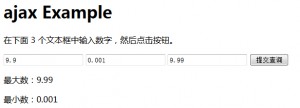
flask-ajax-json
Flask 代码:
|
1 2 3 4 5 6 7 8 9 10 11 12 13 14 15 16 17 18 19 20 21 22 23 24 |
|
模板代码:
|
1 2 3 4 5 6 7 8 9 10 11 12 13 14 15 16 17 18 19 20 21 22 23 24 25 26 27 28 29 30 31 32 33 34 35 36 37 38 39 40 41 42 43 44 |
|
flask resquest响应POST请求的json数据问题?
http://www.oschina.net/question/2337216_233467
Post函数未添加关键字。
r = requests.post('http://localhost:5000/login',json.dumps(values),headers);
具体参见:
http://www.python-requests.org/en/latest/user/quickstart/#more-complicated-post-requests
http://stackoverflow.com/questions/14112336/flask-request-and-application-json-content-type?rq=1
http://blog.csdn.net/iloveyin/article/details/21444613
Flask jQuery ajax的更多相关文章
- flask jQuery ajax 上传文件
1.html 代码 <div> <form id="uploadForm" enctype="multipart/form-data" > ...
- 前端和后端的数据交互(jquery ajax+python flask+mysql)
上web课的时候老师布置的一个实验,要求省市连动,基本要求如下: 1.用select选中一个省份. 2.省份数据传送到服务器,服务器从数据库中搜索对应城市信息. 3.将城市信息返回客户,客户用sele ...
- python Flask JQuery使用说明
0.前言 近期因为某种原因再次学习Flask框架.借助博客整理相关内容.Flask框架和Apache+PHP存在少许不同,Flask框架中JS和CSS文件存放于一个相对固定的位置. 普通情况下 ...
- 教你如何使用flask实现ajax数据入库
摘要:在正式编写前需要了解一下如何在 python 函数中去判断,一个请求是 get 还是 post. 本文分享自华为云社区<[首发]flask 实现ajax 数据入库,并掌握文件上传>, ...
- IE8/9 JQuery.Ajax 上传文件无效
IE8/9 JQuery.Ajax 上传文件有两个限制: 使用 JQuery.Ajax 无法上传文件(因为无法使用 FormData,FormData 是 HTML5 的一个特性,IE8/9 不支持) ...
- jquery ajax解析
jQuery确实是一个挺好的轻量级的JS框架,能帮助我们快速的开发JS应用,并在一定程度上改变了我们写JavaScript代码的习惯. 废话少说,直接进入正题,我们先来看一些简单的方法,这些方法都是对 ...
- jQuery.ajax 根据不同的Content-Type做出不同的响应
使用H5+ASP.NET General Handler开发项目,使用ajax进行前后端的通讯.有一个场景需求是根据服务器返回的不同数据类型,前端进行不同的响应,这里记录下如何使用$.ajax实现该需 ...
- jQuery.ajax(url,[settings])
概述 通过 HTTP 请求加载远程数据. jQuery 底层 AJAX 实现.简单易用的高层实现见 $.get, $.post 等.$.ajax() 返回其创建的 XMLHttpRequest 对象. ...
- jQuery Ajax 实例 ($.ajax、$.post、$.get)
jQuery Ajax 实例 ($.ajax.$.post.$.get) 转 Jquery在异步提交方面封装的很好,直接用AJAX非常麻烦,Jquery大大简化了我们的操作,不用考虑浏览器的诧异了. ...
随机推荐
- 部署MongoDB扩展并测试使用php简单连接操作之
1,下载MongoDB数据库扩展介质 wget http://pecl.php.net/get/mongo-1.5.1.tgz 2,tar zxvf mongo-1.5.1.tgz &&am ...
- 长沙Uber优步司机奖励政策(1月18日~1月24日)
滴快车单单2.5倍,注册地址:http://www.udache.com/ 如何注册Uber司机(全国版最新最详细注册流程)/月入2万/不用抢单:http://www.cnblogs.com/mfry ...
- HIVE自定义函数 UDF
自定义my_md5hash 具体hive源码怎么调用看我另外一篇博客 package udf.hive.myudf; import org.apache.commons.codec.digest.Di ...
- Python脚本运行出现语法错误:IndentationError: unindent does not match any outer indentation level(转)
[问题] 一个python脚本,本来都运行好好的,然后写了几行代码,而且也都确保每行都对齐了,但是运行的时候,却出现语法错误: IndentationError: unindent does not ...
- Ubuntu 命令行下快速打开各类文件 分类: ubuntu shell 2014-11-18 20:06 210人阅读 评论(0) 收藏
xdg-open 命令可以用来在Ubuntu下快速打开各类文件. 下面是从 manual 文档里截取的内容: 可以知道,该命令的功能是在图形界面下按照用户的平时习惯打开各类文件,甚至是链接. 这样,我 ...
- android 49 广播接收者中启动其他组件
main.xml <LinearLayout xmlns:android="http://schemas.android.com/apk/res/android" andro ...
- objective c 学习(一)
问题一:我在程序中看到大量的减号.中括号和NS****这种东西,他们是什么玩意儿? 1 减号(或者加号) 减号表示一个函数.或者方法.或者消息的开始,怎么说都行. 比如c#中,一个方法的写法可能是: ...
- 使用JExcel导出excel文件
package org.aaa.portal.tools; import java.io.File; import java.io.IOException; import java.util.List ...
- [转]C#中yield用法
yield 关键字向编译器指示它所在的方法是迭代器块.编译器生成一个类来实现迭代器块中表示的行为.在迭代器块中,yield 关键字与 return 关键字结合使用,向枚举器对象提供值.这是一个返回值, ...
- PHP利用超级全局变量$_GET来接收表单数据。
我们在linux上用 touch php_get.html php_get.php创建两个文件. php_get.html文件的代码如下: <!doctype html> <html ...