
Struts2+JFreeChart
前言
关于Struts2入门以及提高等在这里就不介绍了,但是关于Struts2的学习有以下推荐:
- struts2-showcase-2.0.6.war:这个是官方自带的Demo(struts-2.0.6-all.zip\struts-2.0.6\apps目录下),非常全面,直接部署就可以了(很多朋友Struts2能学很好我估计还是直接从这里学来的)。
- wiki-WebWork:入了门的朋友应该都知道,strust2由webwork2和struts1.x合并起来的,但主要还是以webwork2为主,所以如果找不到Struts2的资料可以找WebWork资料看看。
- Max On Java的博客,他的博客的资料在中文的Struts2算是比较全的了,写得很详细。
- The Code Project、Google - CodeSearch、Koders:这几个代码搜索网站在我找不到中文资料甚至英文文章的时候帮了我大忙!
关于JFreeChart入门等这里我也不打算介绍了,中文资料很多了。
正题
下面以边帖图片和代码的方式来讲解Struts2与JFreeChart的整合。
搭建环境:首先帖一张工程的目录结构以及所需的jar包。注意:如果你不打算自己写ChartResult的话只需要引入struts2-jfreechart-plugin-2.0.6.jar(这个在struts-2.0.6-all.zip可以找到了):
1.依次帖web.xml、struts.xml、struts.properties和struts-jfreechart.xml几个配置文件的代码:
web.xml
<?xml version="1.0" encoding="UTF-8"?>

<web-app version="2.4"

    xmlns="http://java.sun.com/xml/ns/j2ee"

    xmlns:xsi="http://www.w3.org/2001/XMLSchema-instance"

    xsi:schemaLocation="http://java.sun.com/xml/ns/j2ee

    http://java.sun.com/xml/ns/j2ee/web-app_2_4.xsd">

    <filter>

        <filter-name>struts2</filter-name>

        <filter-class>

            org.apache.struts2.dispatcher.FilterDispatcher

        </filter-class>

    </filter>

    <filter-mapping>

        <filter-name>struts2</filter-name>

        <url-pattern>/*</url-pattern>

    </filter-mapping>

</web-app>
struts.xml
<?xml version="1.0" encoding="UTF-8"?>

<!DOCTYPE struts PUBLIC

    "-//Apache Software Foundation//DTD Struts Configuration 2.0//EN"

    "http://struts.apache.org/dtds/struts-2.0.dtd">

<struts>

    <include file="struts-jfreechart.xml" />

</struts>
struts.properties
struts.ui.theme=simple
struts-jfreechart.xml
<!DOCTYPE struts PUBLIC

    "-//Apache Software Foundation//DTD Struts Configuration 2.0//EN"

    "http://struts.apache.org/dtds/struts-2.0.dtd">

<struts>

    <package name="jFreeChartDemonstration" extends="struts-default"

        namespace="/jfreechart">

        <result-types>

            <result-type name="chart" class="org.apache.struts2.dispatcher.ChartResult"></result-type>

        </result-types>

        <action name="JFreeChartAction" class="com.tangjun.struts2.JFreeChartAction">

              <result type="chart">

                   <param name="width"></param>

                   <param name="height"></param>

            </result>

        </action>

    </package>

</struts>
说明:这里只需要说明下struts-jfreechart.xml,这里直接调用已经写好的类ChartResult,这个类是继承自com.opensymphony.xwork2.Result,传入生成图片大小的参数width和height就可以了。
2. 新建JFreeChartAction继承ActionSupport,生成JFreeChart对象并保存到chart中,注意这个名称是固定的。
package com.tangjun.struts2;

import com.opensymphony.xwork2.ActionSupport;

import org.jfree.chart.ChartFactory;

import org.jfree.chart.JFreeChart;

import org.jfree.data.general.DefaultPieDataset;

public class JFreeChartAction extends ActionSupport {

    /**

     *

     */

    private static final long serialVersionUID = 5752180822913527064L;

    //供ChartResult调用->ActionInvocation.getStack().findValue("chart")

    private JFreeChart chart;

    @Override

    public String execute() throws Exception {

        //设置数据

        DefaultPieDataset data = new DefaultPieDataset();

        data.setValue("Java", new Double(43.2));

        data.setValue("Visual Basic", new Double(1.0));

        data.setValue("C/C++", new Double(17.5));

        data.setValue("tangjun", new Double(60.0));

        //生成JFreeChart对象

        chart = ChartFactory.createPieChart("Pie Chart", data, true,true, false);

        return SUCCESS;

    }

    public JFreeChart getChart() {

        return chart;

    }

    public void setChart(JFreeChart chart) {

        this.chart = chart;

    }

}
OK!至此代码已经全部贴完。
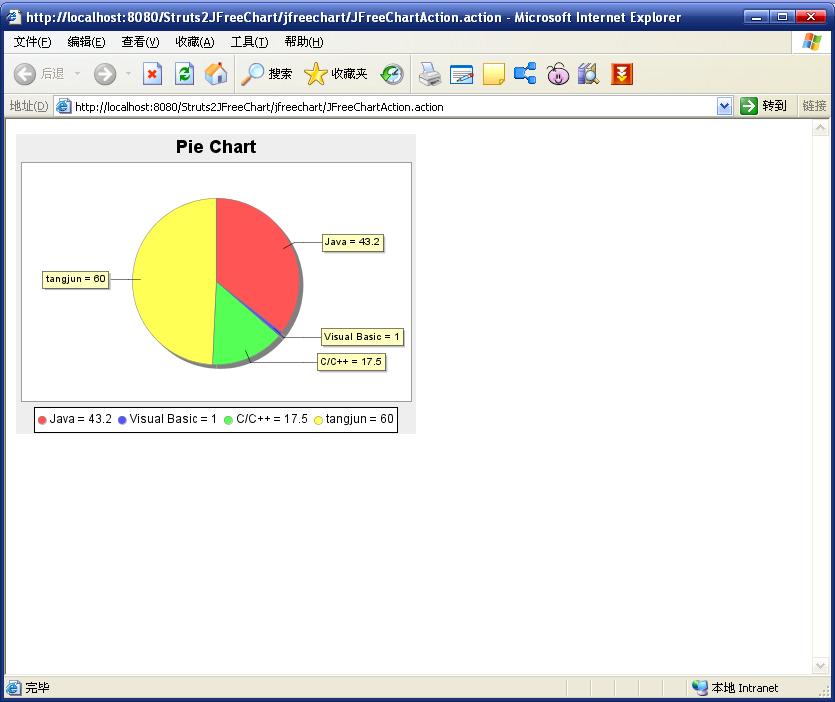
输入访问 http://localhost:8080/Struts2JFreeChart/jfreechart/JFreeChartAction.action
显示结果如下:
补充
以上生成的图片是PNG格式的图片,如果需要自定义图片格式的话(好像只能支持JPG和PNG格式),那么自己写一个ChartResult继承自StrutsResultSupport,见代码:
package com.tangjun.struts2.chartresult;

import java.io.OutputStream;

import javax.servlet.http.HttpServletResponse;

import org.apache.struts2.ServletActionContext;

import org.apache.struts2.dispatcher.StrutsResultSupport;

import org.jfree.chart.ChartUtilities;

import org.jfree.chart.JFreeChart;

import com.opensymphony.xwork2.ActionInvocation;

public class ChartResult extends StrutsResultSupport {

    /**

     *

     */

    private static final long serialVersionUID = 4199494785336139337L;

    //图片宽度

    private int width;

    //图片高度

    private int height;

    //图片类型 jpg,png

    private String imageType;

    @Override

    protected void doExecute(String arg0, ActionInvocation invocation) throws Exception {

        JFreeChart chart =(JFreeChart) invocation.getStack().findValue("chart");

        HttpServletResponse response = ServletActionContext.getResponse();

        OutputStream os = response.getOutputStream();

        if("jpeg".equalsIgnoreCase(imageType) || "jpg".equalsIgnoreCase(imageType))

            ChartUtilities.writeChartAsJPEG(os, chart, width, height);

        else if("png".equalsIgnoreCase(imageType))

            ChartUtilities.writeChartAsPNG(os, chart, width, height);

        else

            ChartUtilities.writeChartAsJPEG(os, chart, width, height);

        os.flush();

    }

    public void setHeight(int height) {

        this.height = height;

    }

    public void setWidth(int width) {

        this.width = width;

    }

    public void setImageType(String imageType) {

        this.imageType = imageType;

    }

}
如此的话还需要小小的修改一下struts-jfreechart.xml:
<!DOCTYPE struts PUBLIC

    "-//Apache Software Foundation//DTD Struts Configuration 2.0//EN"

    "http://struts.apache.org/dtds/struts-2.0.dtd">

<struts>

    <package name="jFreeChartDemonstration" extends="struts-default"

        namespace="/jfreechart">

        <!-- 自定义返回类型 -->

        <result-types>

            <!--

            <result-type name="chart" class="org.apache.struts2.dispatcher.ChartResult"></result-type>

             -->

            <result-type name="chart" class="com.tangjun.struts2.chartresult.ChartResult"></result-type>

        </result-types>

        <action name="JFreeChartAction" class="com.tangjun.struts2.JFreeChartAction">

              <!--

              <result type="chart">

                   <param name="width"></param>

                   <param name="height"></param>

            </result>

            -->

              <result type="chart">

                   <param name="width"></param>

                   <param name="height"></param>

                   <param name="imageType">jpg</param>

            </result>

        </action>

    </package>

</struts>
OK!显示的效果是一样的,只是图片格式不一样,当然这里面你可以做更多操作!
Struts2+JFreeChart的更多相关文章
- 投票系统开发总结struts2,jfreechart,cookie应用,以及前端技术
struts2配置web.xml+struts.xml: <?xml version="1.0" encoding="UTF-8"?> <we ...
- [六]JFreeChart实践五之与Struts2整合
1.Action,返回Chart package com.java1234.chart.bar; import java.awt.Color; import org.jfree.chart.Chart ...
- struts2整合JFreechart 饼图、折线图、柱形图
struts2整合JFreechart 饼图.折线图.柱形图 上效果图: 当然可以将数据导出图片格式存储.具体下的链接里的文件有保存成图片的操作. 因为是strust2整合JFreechart,所以s ...
- JFreeChart与struts2整合实例
1. 3个jar包 jcommon,jfreechart,strust2-jfreechart-plugin 2 <?xml version="1.0" encoding=& ...
- struts2整合jfreechart
需要的包: struts2-jfreechart-plugin-2.2.1.1.jar jfreechart-1.0.13.jar jcommon-1.0.17.jar 前台jsp页面中可以使用ifr ...
- java项目中显示图表:struts2整合jfreechart
需要的包: struts2-jfreechart-plugin-2.2.1.1.jar jfreechart-1.0.13.jar jcommon-1.0.17.jar 前台jsp页面中可以使用ifr ...
- struts2中 JFreeChart使用
添加3个包 struts2-jfreechart-plugin-2.3.16.3.jar jcommon-1.0.16.jar jfreechart-1.0.13.jar struts.xml中配置 ...
- struts2中各个jar包作用
Struts2.3.4 所需的Jar包及介绍 Jar包的分类 jar包名称 jar包版本 jar包 文件名 jar包 的作用 jar包内包含的主要包路径及主要类 依赖的自有jar包名称 依赖的第三方j ...
- 【Java EE 学习 74 下】【数据采集系统第六天】【使用Jfreechart的统计图实现】【将JFreechart整合到项目中】
之前说了JFreechart的基本使用方法,包括生成饼图.柱状统计图和折线统计图的方法.现在需要将其整合到数据采集系统中根据调查结果生成三种不同的统计图. 一.统计模型的分析和设计 实现统计图显示的流 ...
随机推荐
- android 01
安卓开源(就是免费),谷歌收购后推出,可以山寨(小米,三星都是安卓的山寨),ios不是开源(苹果应用要商用就要交钱).安卓3.0是平板,现在安卓至少是4.0以上,否则out了. 微软主要是系统和off ...
- 汉诺塔-Hanoi
1. 问题来源: 汉诺塔(河内塔)问题是印度的一个古老的传说. 法国数学家爱德华·卢卡斯曾编写过一个印度的古老传说:在世界中心贝拿勒斯(在印度北部)的圣庙里,一块黄铜板上插着三根宝石针.印度教的主神梵 ...
- python----------进程、线程、协程
进程与线程 什么是进程(process)? An executing instance of a program is called a process. Each process provides ...
- StructureMap Exception Code: 207 Internal exception while creating Instance '06fc8bd7-76db-47c1-8d71-31090a074f5e' of PluginType QIMS.Repository.IComStaffRepository. Check the inner exception for more
标题翻译: StructureMap异常代码:207内部异常,同时创造PluginType QIMS.Repository.IComStaffRepository的实例“06fc8bd7-76db-4 ...
- ASP.NET 微信支付
一.在支付前期,我们需要获取用户的OpenId,此块内容只针对于JSAPI(微信中直接支付)才需要,如果生成二维码(NATIVE)扫描支付,请跳过此步骤 思路大致是:获取用户的code值 > 根 ...
- ASP.NET-FineUI开发实践-16(一)
还是基础的东西,grid全选没有事件,给加个事件,除了需要会复制粘贴外还要点推荐那! 第一步:原理 事件被触发,方法被实现. 对于全选事件,被触发有两种方式可写,一个是通过原生extjs方式触发 ...
- discuz论坛几种安全策略(二)
大头看了我给的方案,http://www.cnblogs.com/itsmylife/p/4012000.html 今早给的回复如下: “ 补充几点,供参考: 第一条,配置一下允许上传文件的格式以及大 ...
- HTML5 WebAudioAPI-实例(二)
简单播放实例1: var url='../content/audio/海阔天空.mp3'; if (!window.AudioContext) { alert('您的浏览器不支持AudioContex ...
- metalink下载补丁包
以下截图 截取自 某 升级包中携带的 readme文档 把以上图片转换为 文字 Download and Install Patch Updates Refer to the My Oracle Su ...
- TOM大师脚本-show space 多个版本,谢谢大牛们
示例一 该脚本需区分 对象的管理方式是 自动还是 手动, 对手动管理方式 的表显示很全面 SQL> exec show_space_old('MAN_TAB','DEV','TABLE'); F ...