
Sitemesh 3 的使用及配置
1 . Sitemesh 3 简介
Sitemesh 是一个网页布局和修饰的框架,基于 Servlet 中的 Filter,类似于 ASP.NET 中的‘母版页’技术。参考:百度百科,相关类似技术:Apache Tiles。
官网:http://wiki.sitemesh.org/wiki/display/sitemesh/Home 。

2 . Sitemesh 3 下载
最新版本:3.0.0-SNAPSHOT
① GitHub 地址:https://github.com/sitemesh/sitemesh3
② maven:
1 <dependency>

2   <groupId>org.sitemesh</groupId>

3   <artifactId>sitemesh</artifactId>

4   <version>3.0.0</version>

5 </dependency>
3 . 配置 Sitemesh 3 过滤器
在 web.xml 中添加 Sitemesh Filter:

 1 <web-app>

 2

 3   ...

 4

 5   <filter>

 6     <filter-name>sitemesh</filter-name>

 7     <filter-class>org.sitemesh.config.ConfigurableSiteMeshFilter</filter-class>

 8   </filter>

 9   <filter-mapping>

10     <filter-name>sitemesh</filter-name>

11     <url-pattern>/*</url-pattern>

12   </filter-mapping>

13

14 </web-app>
4 . 准备两个页面:demo.html 和 decorator.html
① demo.html - “被装饰的页面”,实际要呈现的内容页。
1 <!DOCTYPE html>

2 <html>

3 <head>

4     <title>内容页的标题</title>

5 </head>

6 <body>

7     内容页的body部分

8 </body>

9 </html>
② decorator.html - “装饰页面”,所谓的“母版页”。
 1 <!DOCTYPE html>

 2 <html>

 3 <head>

 4 <title>

 5     <sitemesh:write property='title' /> - ltcms

 6 </title>

 7 <sitemesh:write property='head' />

 8 </head>

 9 <body>

10     <header>header</header>

11     <hr />

12     demo.html的title将被填充到这儿:

13     <sitemesh:write property='title' /><br />

14     demo.html的body将被填充到这儿:

15     <sitemesh:write property='body' />

16     <hr />

17     <footer>footer</footer>

18 </body>

19 </html>
5 . 添加 /WEB-INF/sitemesh3.xml
1 <?xml version="1.0" encoding="UTF-8"?>

2 <sitemesh>

3     <!-- 指明满足“/*”的页面,将被“/WEB-INF/views/decorators/decorator.html”所装饰 -->

4     <mapping path="/*" decorator="/WEB-INF/views/decorators/decorator.html" />

5

6     <!-- 指明满足“/exclude.jsp*”的页面,将被排除,不被装饰 -->

7     <mapping path="/exclude.jsp*" exclue="true" />

8 </sitemesh>
6 . 运行效果
访问 demo.html 页面,实际效果如下:
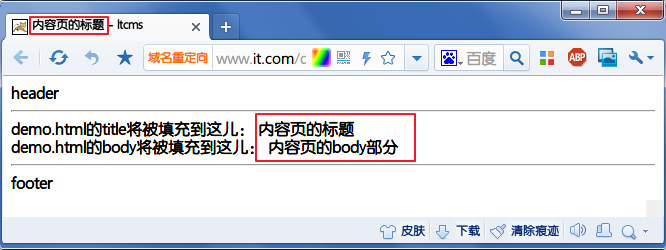
7 . sitemesh3.xml 配置详解
 1 <sitemesh>

 2     <!--默认情况下,

 3         sitemesh 只对 HTTP 响应头中 Content-Type 为 text/html 的类型进行拦截和装饰,

 4         我们可以添加更多的 mime 类型-->

 5   <mime-type>text/html</mime-type>

 6   <mime-type>application/vnd.wap.xhtml+xml</mime-type>

 7   <mime-type>application/xhtml+xml</mime-type>

 8   ...

 9

10   <!-- 默认装饰器,当下面的路径都不匹配时,启用该装饰器进行装饰 -->

11   <mapping decorator="/default-decorator.html"/>

12

13   <!-- 对不同的路径,启用不同的装饰器 -->

14   <mapping path="/admin/*" decorator="/another-decorator.html"/>

15   <mapping path="/*.special.jsp" decorator="/special-decorator.html"/>

16

17   <!-- 对同一路径,启用多个装饰器 -->

18   <mapping>

19     <path>/articles/*</path>

20     <decorator>/decorators/article.html</decorator>

21     <decorator>/decorators/two-page-layout.html</decorator>

22     <decorator>/decorators/common.html</decorator>

23   </mapping>

24

25   <!-- 排除,不进行装饰的路径 -->

26   <mapping path="/javadoc/*" exclue="true"/>

27   <mapping path="/brochures/*" exclue="true"/>

28

29   <!-- 自定义 tag 规则 -->

30   <content-processor>

31     <tag-rule-bundle class="com.something.CssCompressingBundle" />

32     <tag-rule-bundle class="com.something.LinkRewritingBundle"/>

33   </content-processor>

34   ...

35

36 </sitemesh>
8 . 自定义 tag 规则
Sitemesh 3 默认只提供了 body,title,head 等 tag 类型,我们可以通过实现 TagRuleBundle 扩展自定义的 tag 规则:
 1 public class MyTagRuleBundle implements TagRuleBundle {

 2     @Override

 3     public void install(State defaultState, ContentProperty contentProperty,

 4             SiteMeshContext siteMeshContext) {

 5         defaultState.addRule("myHeader", new ExportTagToContentRule(contentProperty.getChild("myHeader"), false));

 6

 7     }

 8

 9     @Override

10     public void cleanUp(State defaultState, ContentProperty contentProperty,

11             SiteMeshContext siteMeshContext) {

12     }

13 }
最后在 sitemesh3.xml 中配置即可:
1 <content-processor>

2     <tag-rule-bundle class="com.lt.common.ext.sitemesh3.MyTagRuleBundle" />

3 </content-processor>
Sitemesh 3 的使用及配置的更多相关文章
- SiteMesh在项目中的配置
SiteMesh在项目中的配置 首先在web.xml里面增加siteMesh的配置: <filter> <filter-name>sitemesh</filter-nam ...
- Sitemesh 3 配置和使用(最新)
Sitemesh 3 配置和使用(最新) 一 Sitemesh简介 Sitemesh是一个页面装饰器,可以快速的创建有统一外观Web应用 -- 导航 加 布局 的统一方案~ Sitemesh可以拦截任 ...
- Sitemesh 3
Sitemesh 3 的使用及配置(收藏自:http://www.cnblogs.com/luotaoyeah/p/3776879.html) 1 . Sitemesh 3 简介 Sitemesh 是 ...
- SiteMesh 2.X 的使用(网页结构模板)
SiteMesh是基于Servlet的filter的,即过滤流.它是通过截取reponse,并进行装饰后再交付给客户. 其中涉及到两个名词: 装饰页面(decorator page)和 "被 ...
- SiteMesh3整合SpringMVC+FreeMarker
SiteMesh3配置 添加maven依赖 添加filter 配置servlet 添加sitemesh配置文件 decorator示例 SpringMVC.FreeMarker配置(404问题处理) ...
- struts2.1.3之后使用自定义Filter
struts2中 ActionContextCleanUp, StrutsPrepareAndExecuteFilter, StrutsPrepareFilter,StrutsExecuteFilte ...
- SiteMesh, SpringMVC, Shiro 配置
1. 首先在在web.xml文件中,加入SiteMesh和shiro的过滤器,保证SiteMesh的过滤器配置放在shiro的过滤器后面,不然的话,shiro的标签不能正确处理. <?xml v ...
- 使用 sitemesh/decorator装饰器装饰jsp页面(原理及详细配置)
摘要:首先这个Decorator解释一下这个单词:“装饰器”,我觉得其实可以这样理解,他就像我们用到的Frame,他把每个页面共有的东西提炼了出来,也可能我们也会用各种各样的include标签,将我们 ...
- Sitemesh 3使用及配置
1:Sitemesh简介 SiteMesh是一个网页布局和修饰的框架,利用它可以将网页的内容和页面结构分离,以达到页面结构共享的目的. SiteMesh是基于Servlet的filter的,即过滤流. ...
随机推荐
- python学习笔记--导入tab键自动补全功能的配置
今天开始学习Python,必须配置tab键补全功能 1.首先我们需要查看python的安装路径 [root@abc ~]# python Python 2.6.6 (r266:84292, Jan 2 ...
- android开发之SwipeListView的使用
实现一种类似于qq中滑动列表的功能: 向左或者向右滑动,然后执行相关操作. 这里用到的是GitHub上的开源控件SwipeListView,下载地址https://github.com/47deg/a ...
- Android(java)学习笔记180:Android MediaPlayer 播放prepareAsync called in state 8解决办法
使用android MediaPlayer播放音频文件时,有时会出现prepareasync called in state 8错误. 以下方法可以避免这个异常出现. 第一种方法: private ...
- 利用AWS简单存储服务(S3)托管网站
1.首先建立Storage Bucket存储桶,名为网站域名: 2.在[属性]中选择启用网站托管或重定向到另一主机,即可. 3.官方参考文档:https://docs.aws.amazon.com/z ...
- ArcGIS API for Javascript配置
1.去官网下载最新版: ArcGIS API for JavaScript 3.9 API 参考文档:https://developers.arcgis.com/javascr 智能提示下载:http ...
- CSS样式表其它知识点
1.cursor:pointer鼠标放到上面变形状,pointer为手 2.margin:auto 页面居中 3.显示方式:dispaly:none不显示/block 块换行/inline在一行上,宽 ...
- ROW_NUMBER () 与 PARTITION组合拳
--在一个Book表里面里有字段AuthorID与Author表关联,现在要求按PublishDate字段倒序排列,列出每个作者的前五本书.要求有没有一条语句搞定的--可用游标或者临时表--最好解决方 ...
- Java文件File操作一:文件的创建和删除
一.简述 File 文件类,主要对文件进行相关操作.常用的File操作有:文件(夹)的创建.文件(夹)的删除,文件的读入和下载(复制)等: 二.文件(夹)的创建和删除 1.创建过程 实例: //cre ...
- spring boot 中文文档翻译地址
https://github.com/qibaoguang/Spring-Boot-Reference-Guide/blob/master/SUMMARY.md
- C++ 不使用virtual实现多态
不使用virtual实现多态可以用成员函数指针完成. 成员函数指针形式:返回类型(A::*指针名)(形参表) 其中A是类类型,即这个指针是指向A类的成员函数的函数指针 例如:int(A::*P)(in ...