
CH58X/CH57X/V208的Broadcaster(广播者)例程讲解
在对ble进行应用的时候,每个用户的需求可能不尽相同。这里着重介绍从机Broadcaster例程,只广播不连接。
使用该例程时可以在手机使用APP上对Broadcaster进行调试。
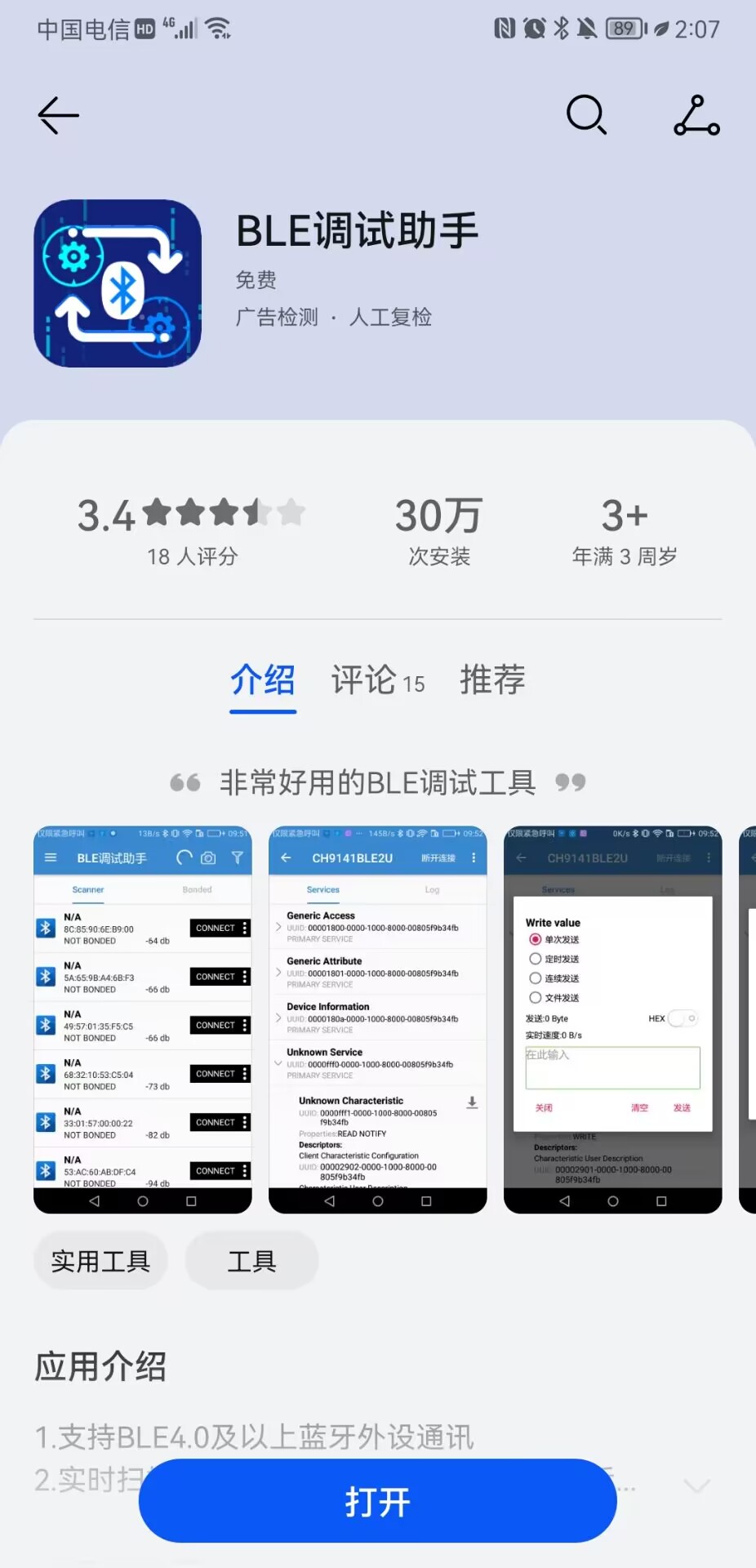
安卓端在应用市场搜索BLE调试助手下载使用,使用时要开启提示所需开启的权限。
将Broadcaster例程烧录到DEMO板中。
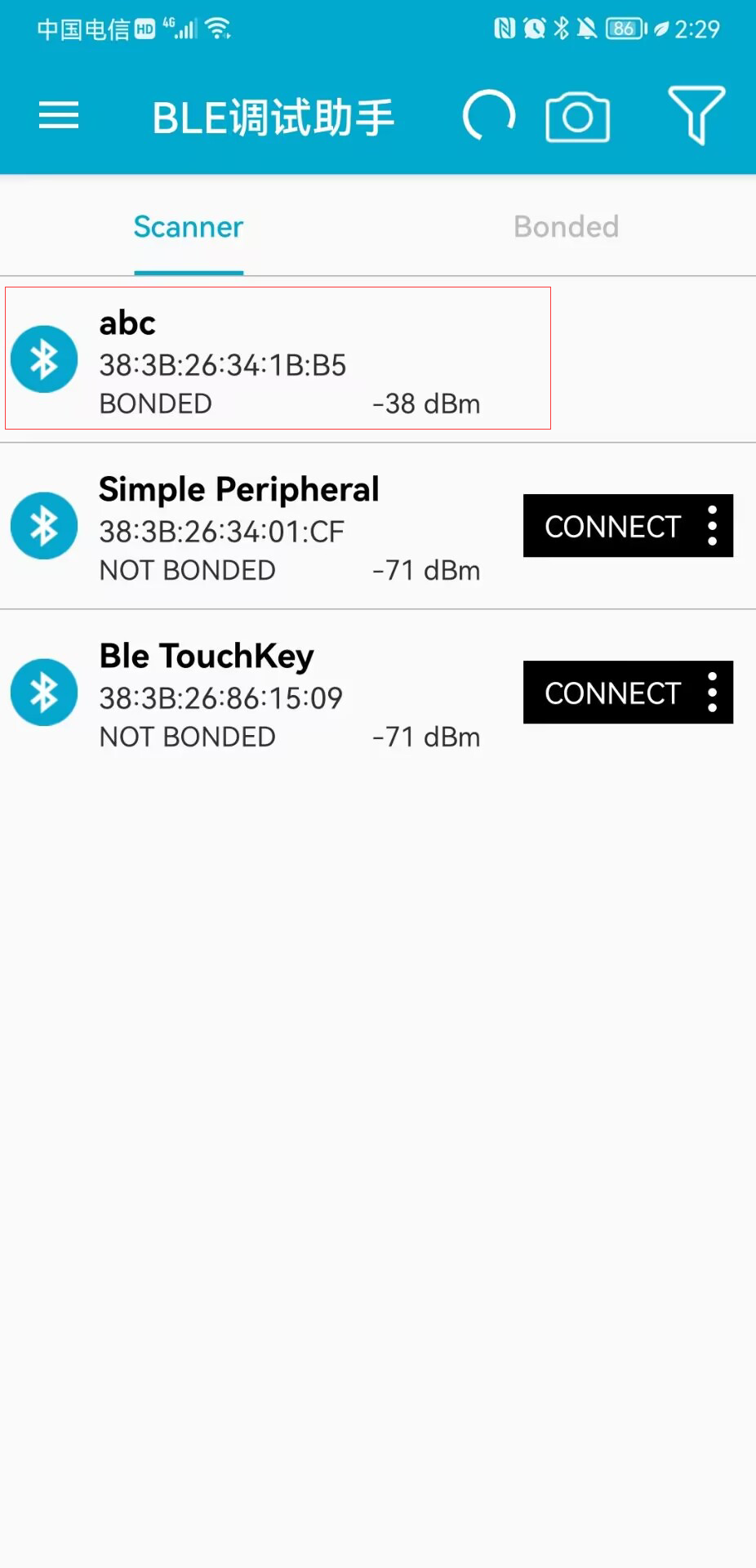
烧录后发现一个蓝牙名称为abc的设备没有connect(连接)的选项,只能广播我无法连接。
接下来主要的程序拆分讨论:相对于peripheral例程,Broadcaster是比较精简的。这里直接从扫描应答包开始讨论,在APP上我们看到设备的是名称是abc,对比一下peripheral的名称为Simple Peripheral。
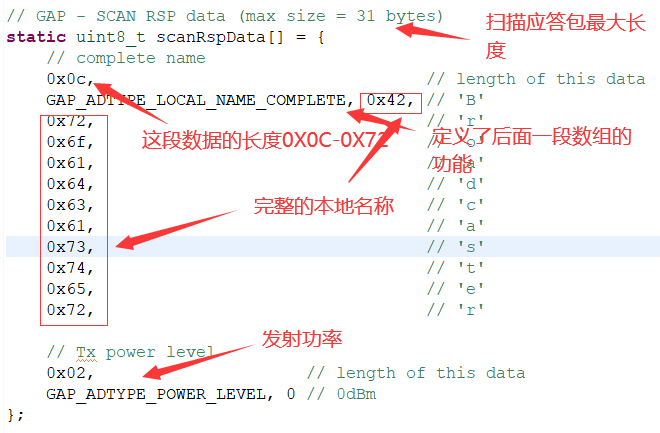
此时我们应该会有个疑问Broadcaster扫描应答包中的名称应该是Broadcaster,为什么APP上显示的是abc呢?
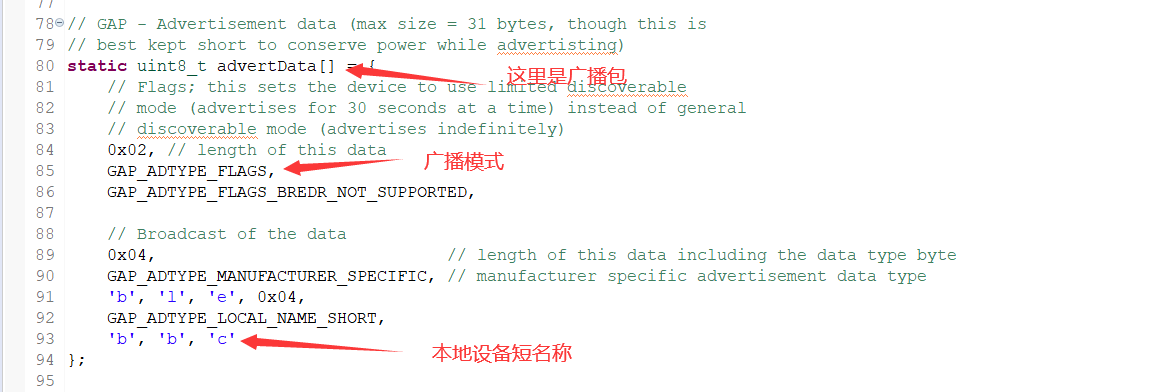
这样就可以解释为什么设备名称不是Broadcaster而是abc,这个例程只有广播的功能,所以扫描应答包的设备名是不会显示出来的。
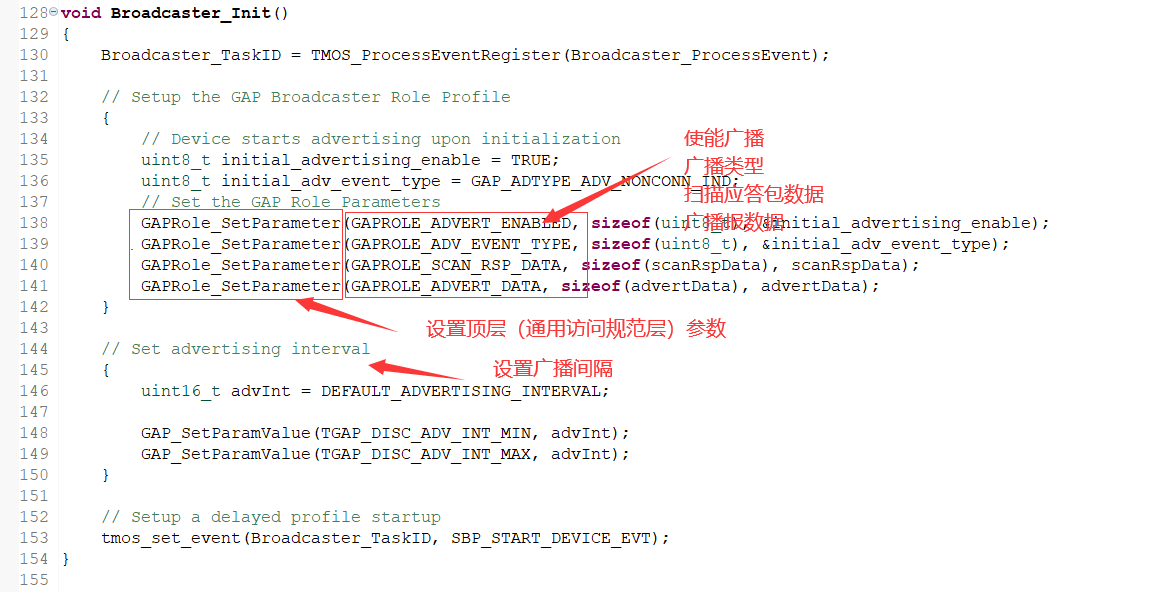
其中对 GAPRole_SetParameter(GAPROLE_ADVERT_ENABLED, sizeof(uint8_t), &initial_advertising_enable);进行更多的讨论
/*-------------------------------------------------------------------

 * FUNCTIONS - GAPRole API

 */

/**

 * @brief   Set a GAP Role parameter.

 *

 * @note    You can call this function with a GAP Parameter ID and it will set a GAP Parameter.

 *

 * @param   param - Profile parameter ID: @ref GAPROLE_PROFILE_PARAMETERS

 * @param   len - length of data to write

 * @param   pValue - pointer to data to write.  This is dependent on the parameter ID and

 *                   WILL be cast to the appropriate data type (example: data type of uint16_t

 *                   will be cast to uint16_t pointer).

 *

 * @return  SUCCESS or INVALIDPARAMETER (invalid paramID)

 */

extern bStatus_t GAPRole_SetParameter( uint16_t param, uint16_t len, void *pValue );
GAPRole_SetParameter后的三个参数值分别是配置文件参数 ID、要写入的数据长度、指向要写入的数据的指针。
配置文件参数在lib文件里。
#define GAPROLE_PROFILEROLE                     0x300  //!< Reading this parameter will return GAP Role type. Read Only. Size is uint8_t.

#define GAPROLE_IRK                             0x301  //!< Identity Resolving Key. Read/Write. Size is uint8_t[KEYLEN]. Default is all 0, which means that the IRK will be randomly generated.

#define GAPROLE_SRK                             0x302  //!< Signature Resolving Key. Read/Write. Size is uint8_t[KEYLEN]. Default is all 0, which means that the SRK will be randomly generated.

#define GAPROLE_SIGNCOUNTER                     0x303  //!< Sign Counter. Read/Write. Size is uint32_t. Default is 0.

#define GAPROLE_BD_ADDR                         0x304  //!< Device's Address. Read Only. Size is uint8_t[B_ADDR_LEN]. This item is read from the controller.

#define GAPROLE_ADVERT_ENABLED                  0x305  //!< Enable/Disable Advertising. Read/Write. Size is uint8_t. Default is TRUE=Enabled.

#define GAPROLE_ADVERT_DATA                     0x306  //!< Advertisement Data. Read/Write. Max size is B_MAX_ADV_EXT_LEN. Default to all 0.

#define GAPROLE_SCAN_RSP_DATA                   0x307  //!< Scan Response Data. Read/Write. Max size is B_MAX_ADV_EXT_LEN. Defaults to all 0.

#define GAPROLE_ADV_EVENT_TYPE                  0x308  //!< Advertisement Type. Read/Write. Size is uint8_t.  Default is GAP_ADTYPE_ADV_IND.

#define GAPROLE_ADV_DIRECT_TYPE                 0x309  //!< Direct Advertisement Address Type. Read/Write. Size is uint8_t. Default is ADDRTYPE_PUBLIC.

#define GAPROLE_ADV_DIRECT_ADDR                 0x30A  //!< Direct Advertisement Address. Read/Write. Size is uint8_t[B_ADDR_LEN]. Default is NULL.

#define GAPROLE_ADV_CHANNEL_MAP                 0x30B  //!< Which channels to advertise on. Read/Write Size is uint8_t. Default is GAP_ADVCHAN_ALL

#define GAPROLE_ADV_FILTER_POLICY               0x30C  //!< Filter Policy. Ignored when directed advertising is used. Read/Write. Size is uint8_t. Default is GAP_FILTER_POLICY_ALL.

#define GAPROLE_STATE                           0x30D  //!< Reading this parameter will return GAP Peripheral Role State. Read Only. Size is uint8_t.

#define GAPROLE_MAX_SCAN_RES                    0x30E  //!< Maximum number of discover scan results to receive. Default is 0 = unlimited.

#define GAPROLE_MIN_CONN_INTERVAL               0x311  //!< Minimum Connection Interval to allow (n * 1.25ms).  Range: 7.5 msec to 4 seconds (0x0006 to 0x0C80). Read/Write. Size is uint16_t. Default is 7.5 milliseconds (0x0006).

#define GAPROLE_MAX_CONN_INTERVAL               0x312  //!< Maximum Connection Interval to allow (n * 1.25ms).  Range: 7.5 msec to 4 seconds (0x0006 to 0x0C80). Read/Write. Size is uint16_t. Default is 4 seconds (0x0C80).

// v5.x

#define GAPROLE_PHY_TX_SUPPORTED                0x313  //!< The transmitter PHYs that the Host prefers the Controller to use.Default is GAP_PHY_BIT_ALL

#define GAPROLE_PHY_RX_SUPPORTED                0x314  //!< The receiver PHYs that the Host prefers the Controller to use.Default is GAP_PHY_BIT_ALL

#define GAPROLE_PERIODIC_ADVERT_DATA            0x315  //!< Periodic advertisement Data. Read/Write. Max size is B_MAX_ADV_PERIODIC_LEN. Default to all 0.

#define GAPROLE_PERIODIC_ADVERT_ENABLED         0x316  //!< bit0:Enable/Disable Periodic Advertising. Read/Write. Size is uint8_t. Default is FALSE=Disable.

                                                       //!< bit1:Include the ADI field in AUX_SYNC_IND PDUs
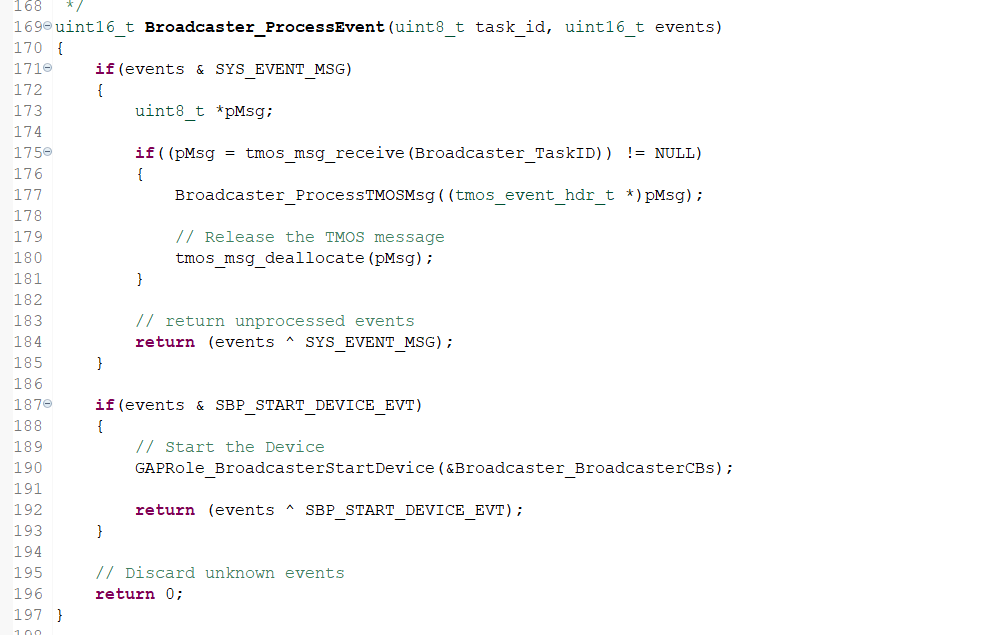
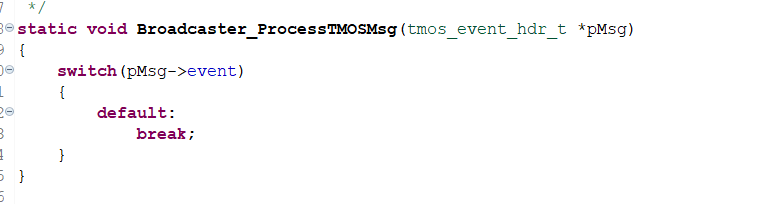
这段代码为TMOS事件,TMOS的讲解可以参照这篇博客WCH TMOS用法详解 - debugdabiaoge - 博客园 (cnblogs.com)
广播流程与状态函数,
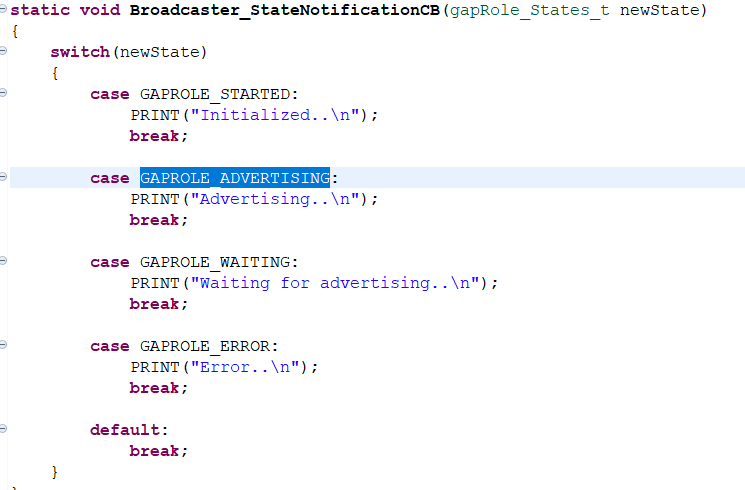
GAPROLE_STARTED的定义可以在lib库中看到
#define GAPROLE_STATE_ADV_MASK             (0xF)    //!< advertising states mask

#define GAPROLE_STATE_ADV_SHIFT            (0x0)    //!< advertising states shift

#define GAPROLE_INIT                        0       //!< Waiting to be started

#define GAPROLE_STARTED                     1       //!< Started but not advertising

#define GAPROLE_ADVERTISING                 2       //!< Currently Advertising

#define GAPROLE_WAITING                     3       //!< Device is started but not advertising, is in waiting period before advertising again

#define GAPROLE_CONNECTED                   4       //!< In a connection

#define GAPROLE_CONNECTED_ADV               5       //!< In a connection + advertising

#define GAPROLE_ERROR                       6       //!< Error occurred - invalid state
这只是最基础的讨论,如有问题请指正!
如转载请标明出处!文章可能被无良网站搬运。某些网站拿着别人的文章写着“我的编程学习分享”。
禁止写着我的编程学习分享的网站转载。
CH58X/CH57X/V208的Broadcaster(广播者)例程讲解的更多相关文章
- CH58X/CH57X/V208 Observer(观察者)例程讨论讲解
使用的是沁恒的CH582M的Observer例程与官方的demo板. 本例程的功能是主机扫描到从机的MAC地址并打印出来. 先对宏定义进行理解讨论. 最大响应扫描数为8,在串口调试助手那里可以看到打印 ...
- 6、CC2541修改按键调节广播发送功率例程为持续发送4DB的蓝牙基站
一.目的 在 OSAL操作系统-实验31 从机广播功率修改-(20141029更新).zip 基础上进行修改,该工程是通过5向按键的上下按键来控制广播功率的加减,总共有4个档位.我们的目的是直接用最高 ...
- 说说M451例程讲解之LED
/**************************************************************************//** * @file main.c * @ve ...
- 说说M451例程讲解之串口
/**************************************************************************//** * @file main.c * @ve ...
- 说说M451例程讲解之定时器
关于定时器 相信很多人都不会陌生,无论是51还是32,任何微控制器,都会有定时器 定时器控制器包含 4 组 32-位定时器,TIMER0~TIMER3,提供用户便捷的计数定时功能.定时器可执行很多功能 ...
- M451例程讲解之GPIO.H
到了CORTEX-M4,几乎每一快都有很大的知识量,单单GPIO库文件这一项就有很长的章节要描述,加油吧 GPIO.h.是最基础的一个库文件,下面结合数据手册来一一进行讲解: 先把库文件粘上,方便一一 ...
- M451例程讲解之按键
/**************************************************************************//** * @file main.c * @ve ...
- Rocket - util - Broadcaster
https://mp.weixin.qq.com/s/ohBVNAXZUA538qSxfBGMKA 简单介绍Broadcaster的实现. 1. Broadcaster 广播即是 ...
- 【iCore2 模块相关资料】iM_LAN 100M 以太网模块UDP例程
============================== 技术论坛:http://www.eeschool.org 博客地址:http://xiaomagee.cnblogs.com 官方网店:h ...
随机推荐
- Vue刷新页面VueX中数据清空了,怎么重新获取?
Vue刷新页面VueX数据清空了,怎么重新获取? 点击打开视频讲解更详细 在vue中刷新页面后,vuex中的数据就没有了,这时我们要想使用就要重新获取数据了, 怎么在刷新后重新获取数据呢??? 这时我 ...
- C#基础_XML文件读写
使用C#对XML文件进行操作,包括生成一个XML文档,以及读取XML文档中的内容,修改某个元素中的内容 using System; using System.Collections.Generic; ...
- 【Java】学习路径53-InetAdress获取服务器ip
InetAdress如何使用? import java.net.*; public class InetAdress { public static void main(String[] args) ...
- 【java】IDEA-jar包导出与导入
导出步骤: 1.CTRL + SHIFT + ALT + S 2.选择:Artifacts ,点击"+",在添加页面中选择:JAR-From modules with depend ...
- 【java】学习路线10-权限修饰符详解
/*关于修饰符:类:public default public protected default privatesame class √ ...
- 第五十八篇:webpack的Source Map
好家伙,Source Map没听过 1.什么是Source Map? 字面意义上来看应该是个好东西 Source Map 就是一个信息文件,里面储存着位置信息. 也就是说,Source Map 文件中 ...
- 表单动态增加div元素提交方法
实现的效果如下: 1 var detail_div = 1; 2 var i=0; 3 function add_div() { 4 var e = document.getElementById(& ...
- Docker安装Openresty总结
1. 启动Docker systemctl start docker 2. 查询有没有openresty镜像 docker search openresty -s 30 -s 30 stars数大于3 ...
- Beats: Filebeat和pipleline processors
简要来说: 使用filebeat读取log日志,在filebeat.yml中先一步处理日志中的个别数据,比如丢弃某些数据项,增加某些数据项. 按照之前的文档,是在filebeat.yml中操作的,具体 ...
- Java泛型的总结
泛型可以用于接口.类.方法上.还有泛型通配符这个概念 泛型的好处:可以在编译时检查 1.用于方法中,指定该方法中的形参的类型. 语法:修饰符 <代表泛型的变量> 返回值类型 方法名(参数) ...