
php注解使用示例
<?php

class indexController

{

    #[route('/controller/index','get')]

    public function index():void

    {

        echo "This is attribute index controller \r\n";

    }

    #[route('/controller/test','get')]

    public function test():void

    {

        echo "This is attribute test controller \r\n";

    }

}
<?php

class workController

{

    #[route('/controller/work','post')]

    public function work():void

    {

        echo "This is attribute work controller \r\n";

    }

}
<?php

#[Attribute(Attribute::IS_REPEATABLE|Attribute::TARGET_METHOD)]

class route{

    public static $all = [];

    public static $path = '';

    public static $method = 'GET';

    public static $function = '';

    public static $controller = '';

    public function __construct(){}

    public function setPath(string $path):self

    {

        $this->path = $path;

        return $this;

    }

    public function setMethod(string $method):self

    {

        $this->method = $method;

        return $this;

    }

    public function setFunction(string $function):self

    {

        $this->function = $function;

        return $this;

    }

    public function setController(string $controller):self

    {

        $this->controller = $controller;

        return $this;

    }

    public function addRoute():void

    {

        self::$all[str_replace("Controller","",$this->controller)][$this->function] = $this;

    }
<?php

    public static function setRoute($controllerClass){

        $ref = new ReflectionClass($controllerClass);

        $controller = $ref->getName();

        $methods = $ref->getMethods();

        foreach($methods as $method){

            $function = $method->getName();

            $attributes = $method->getAttributes(route::class);

            foreach($attributes as $attribute){

                 $route = $attribute->newInstance();

                // 拿到注解上的参数

                $params = $attribute->getArguments();

                $route->setController($controller)

                    ->setFunction($function)

                    ->setPath($params[0])

                    ->setMethod($params[1])

                    ->addRoute();

            }

        }

    }

}
<?php

class app{

    public function appInit():self

    {

        if(glob("./controller/*.php")){

            foreach(glob("./controller/*.php") as $fileName){

                require_once($fileName);

                $className = str_replace("./controller/","",str_replace(".php","",$fileName));

                route::setRoute($className);

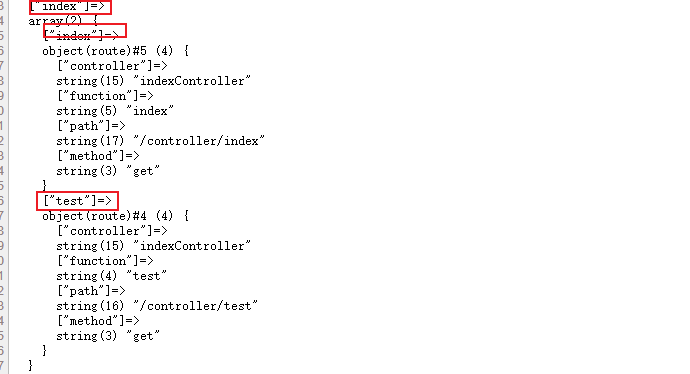
                //route::$all;exit();

            }

        }

        return $this;

    }

    public function run($config){

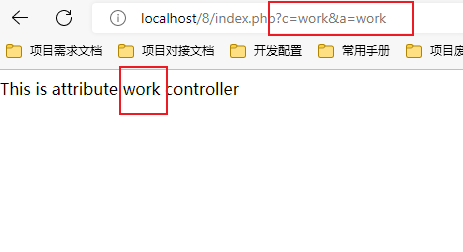
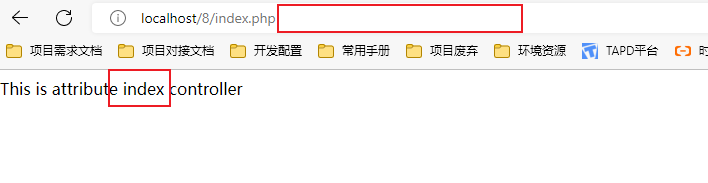
        $controller = $_GET['c']??$config['default_controller'];

        $action = $_GET['a']??$config['default_function'];

        if(isset(route::$all[$controller][$action])){

            $route = route::$all[$controller][$action];

            $className = $route->controller;

            $function = $route->function;

            (new $className)->$function();

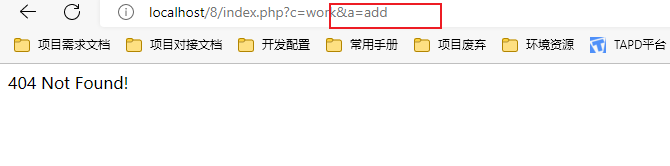
        }else{

            exit("404 Not Found!");

        }

    }

}
<?php

$config = array(

    'default_controller'=>'index',

    'default_function'=>'index',

);

return $config;
<?php

#[Attribute(Attribute::IS_REPEATABLE|Attribute::TARGET_METHOD)]

class route{

    public static $all = [];

    public static $path = '';

    public static $method = 'GET';

    public static $function = '';

    public static $controller = '';

    public function __construct(){}

    public function setPath(string $path):self

    {

        $this->path = $path;

        return $this;

    }

    public function setMethod(string $method):self

    {

        $this->method = $method;

        return $this;

    }

    public function setFunction(string $function):self

    {

        $this->function = $function;

        return $this;

    }

    public function setController(string $controller):self

    {

        $this->controller = $controller;

        return $this;

    }

    public function addRoute():void

    {

        self::$all[str_replace("Controller","",$this->controller)][$this->function] = $this;

    }

    public static function setRoute($controllerClass){

        $ref = new ReflectionClass($controllerClass);

        $controller = $ref->getName();

        $methods = $ref->getMethods();

        foreach($methods as $method){

            $function = $method->getName();

            $attributes = $method->getAttributes(route::class);

            foreach($attributes as $attribute){

                 $route = $attribute->newInstance();

                // 拿到注解上的参数

                $params = $attribute->getArguments();

                $route->setController($controller)

                    ->setFunction($function)

                    ->setPath($params[0])

                    ->setMethod($params[1])

                    ->addRoute();

            }

        }

    }

}
<?php

class app{

    public function appInit():self

    {

        if(glob("./controller/*.php")){

            foreach(glob("./controller/*.php") as $fileName){

                require_once($fileName);

                $className = str_replace("./controller/","",str_replace(".php","",$fileName));

                route::setRoute($className);

                //route::$all;exit();

            }

        }

        return $this;

    }

    public function run($config){

        $controller = $_GET['c']??$config['default_controller'];

        $action = $_GET['a']??$config['default_function'];

        if(isset(route::$all[$controller][$action])){

            $route = route::$all[$controller][$action];

            $className = $route->controller;

            $function = $route->function;

            (new $className)->$function();

        }else{

            exit("404 Not Found!");

        }

    }

}
<?php

class indexController

{

    #[route('/controller/index','get')]

    public function index():void

    {

        echo "This is attribute index controller \r\n";

    }

    #[route('/controller/test','get')]

    public function test():void

    {

        echo "This is attribute test controller \r\n";

    }

}
<?php

class workController

{

    #[route('/controller/work','post')]

    public function work():void

    {

        echo "This is attribute work controller \r\n";

    }

}
<?php

$config = array(

    'default_controller'=>'index',

    'default_function'=>'index',

);

return $config;
<?php

require_once('./config.php');

require_once('./route.php');

require_once('./init.php');

(new app)->appInit()->run($config);
php注解使用示例的更多相关文章
- MyBatis3-基于注解的示例
在基于注解的示例中,可以简化编写XML的过程,全部采用注解方式进行编写,并在注解上写SQL语句,语句和XML的语句保持一致,并且可以省略掉XML文件不用引入的好处.但还有一点,基于注解的方式还没有百分 ...
- MyBatis多参数传递之注解方式示例--转
原文地址:http://legend2011.blog.51cto.com/3018495/1015003 若映射器中的方法只有一个参数,则在对应的SQL语句中,可以采用#{参数名}的方式来引用此参数 ...
- spring注解controller示例
依赖库 spring 3.0 配置web.xml文件如下: <?xml version="1.0" encoding="UTF-8"?> <w ...
- spring mvc 注解入门示例
web.xml <?xml version="1.0" encoding="UTF-8"?> <web-app xmlns:xsi=" ...
- Hibernate注解开发示例
-------------------------------------------------------------------customer------------------------- ...
- Spring 注解学习 详细代码示例
学习Sping注解,编写示例,最终整理成文章.如有错误,请指出. 该文章主要是针对新手的简单使用示例,讲述如何使用该注释,没有过多的原理解析. 已整理的注解请看右侧目录.写的示例代码也会在结尾附出. ...
- Spring bean依赖注入、bean的装配及相关注解
依赖注入 Spring主要提供以下两种方法用于依赖注入 基于属性Setter方法注入 基于构造方法注入 Setter方法注入 例子: public class Communication { priv ...
- 基于注解的SpringMVC
相比传统的继承Controller体系中某些类的方式,SpringMVC的注解具有以下优点: 1.Controller不再需要继承某个特定类,只是简单的POJO. 2.请求映射的配置非常方便灵活. 3 ...
- 【Java EE 学习 49 下】【Spring学习第一天】【MVC】【注解回顾】
一.MVC 1.使用Spring有一个非常大的好处,那就是能够实现完全面向接口编程,传统的使用Dao.Service并不能实现完全的面向接口编程. 2.示例:https://github.com/kd ...
随机推荐
- C#通过反射实现简单的控制反转和依赖注入(一)
Java项目中通过@Autowire便可以实现将对象实例化到指定的字段,无需手动new一个对象出来,用起来非常方便,因为Java类加载器在在加载过程会将扫描所有@Servie.@Mapper.@Com ...
- 深入分析JVM执行引擎
程序和机器沟通的桥梁 一.闲聊 相信很多朋友在出国旅游,或者与外国友人沟通的过程中,都会遇到语言不通的烦恼.这时候我们就需要掌握对应的外语或者拥有一部翻译机.而笔者只会中文,所以需要借助一部翻译器才能 ...
- 在 C# CLR 中学习 C++ 之了解 extern
一:背景 在 CLR 源码中有很多的 extern 和 extern "C" 这样的关键词,比如下面这些代码: extern size_t gc_global_mechanisms ...
- python 二分法查找字典中指定项第一次出现的索引
import time #引入time库,后续计算时间. inform_m = {} #创建母字典 inform_s = {} #母字典下嵌套的子字典 #给母字典添加键-值 for i in rang ...
- RHEL7从安装的字符界面转为桌面GUI图形化步骤
1.光驱装载原版光盘镜像 2.挂载光盘镜像 mount /dev/sr0 /media 3.配置本地yum源 vi /etc/yum.repos.d/local.repo [rhel] name=rh ...
- KingbaseES 数据脱敏功能介绍
数据脱敏,指对某些敏感信息通过脱敏规则进行数据的变形,实现敏感隐私数据的可靠保护. KingbaseES主要提供动态数据脱敏功能. 动态数据脱敏(Dynamic Data Masking)是与生产环境 ...
- sedona(Geospark)读取csv
package com.grady.sedona import org.apache.sedona.sql.utils.SedonaSQLRegistrator import org.apache.s ...
- Windows 2012 R2 iSCSI server
Windows 2012 R2可以充当一台简单的SAN,提供iSCSI方式的连接,供客户端使用.不确定是否有人会这么使用,但至少在做实验的时候我觉得挺方便的.不用再像以前专门安装windows ...
- G&GH04 本地连接至远程
注意事项与声明 平台: Windows 10 作者: JamesNULLiu 邮箱: jamesnulliu@outlook.com 博客: https://www.cnblogs.com/james ...
- uniapp scroll-view组件隐藏滚动条
在pages.json增加如下配置 "globalStyle": { "navigationBarTextStyle": "black", ...