
048_Search Lookup
The Problematic Situation:
When you add any lookup in Salesforce on a layout from one object to another, and try searching for available values, you face the below issues:
1-You can only search by record name. (main value) – Default settings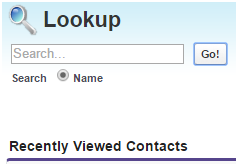
2-You need at least 2 characters to for the search to work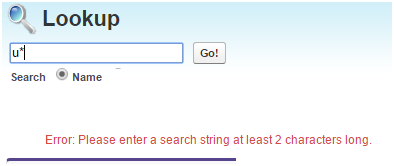
3-You cannot search for values in any other field, your search is limited to the main field.
4-System will only display by default recent viewed items (by you) and not all the available values.
Therefore users are expected to know all possible values of the record name field, usually a challenge for users.
The Workaround solution:
First let us go over the search tools and options that are provided by Salesforce :
1-The Wild Search (*)
Salesforce provides a wild search, *, but you need to provide along with it at least 2 characters to work.
This is a great feature, right, but not good enough to find all possible options.
2-The “All Fields” Search
This is also a great feature where you can search not only the main field, but all fields within an object.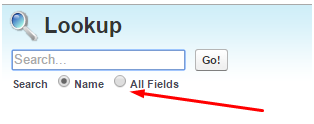
In order to enable this options , called Enhanced Lookups, of a certain object, go to
Setup>Customize > Search > Search Settings and check the Enhanced Lookups.

You will not have a new option on the lookup search “All Fields”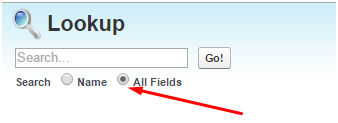
3-The workaround.
If you wish to display all available value, all you need to do is create a new field on the destination object, of Type Text with default value “ALL”
You may display or hide the field from the layout, below is an example.
Note: for existing records, you will need to update this field manually(手动地) with the “All” value. While for any new record, it will automatically take the default value “All”
Solved!
Now you can do a lookup search, searching for the value “All” using the “All Fields” option.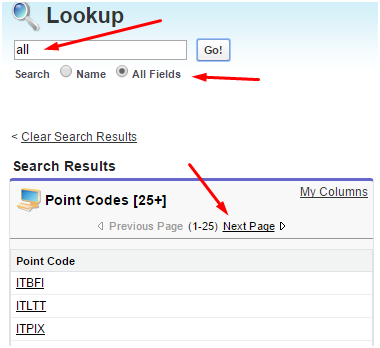
If you wish to edit the columns to be displayed on the Lookup search Dialogs
Setup -> App Setup -> Customize -> Search Layouts.
补充:为标准对象中的lookup新增“新建”按钮,如下图:
文章转载自:http://www.salesforce-me.com/how-to-show-all-available-records-in-a-lookup-search/
相关问题:https://success.salesforce.com/answers?id=90630000000gvLoAAI
048_Search Lookup的更多相关文章
- SQL Server-聚焦移除Bookmark Lookup、RID Lookup、Key Lookup提高SQL查询性能(六)
前言 前面几节都是讲的基础内容,本节我们讲讲索引性能优化,当对大数据进行处理时首先想到的就是索引,一旦遇到这样的问题则手忙脚乱,各种查资料,为何平常不扎实基本功呢,我们由浅入深,简短的内容,深入的理解 ...
- Salesforce的sharing Rule 不支持Lookup型字段解决方案
Salesforce 中 sharing rule 并不支持Look up 字段 和 formula 字段.但在实际项目中,有时会需要在sharing rule中直接取Look up型字段的值,解决方 ...
- eclipse调试(debug)的时候,出现Source not found,Edit Source Lookup Path,一闪而过
问题描述 使用Eclipse调试代码的时候,打了断点,经常出现Source not found,网上找了半天,大部分提示点击Edit Source Lookup Path,添加被调试的工程,然而往往没 ...
- mongodb 3.x 之实用新功能窥看[2] ——使用$lookup做多表关联处理
这篇我们来看mongodb另一个非常有意思的东西,那就是$lookup,我们知道mongodb是一个文档型的数据库,而且它也是最像关系型数据库的 一种nosql,但是呢,既然mongodb是无模式的, ...
- Lookup component 用法
Lookup component 类似于Tsql的join子句, select a.* ,b.* from dbo.tis a left join dbo. tdes b on a.code=b.co ...
- [SharePoint]javascript client object model 获取lookup 类型的field的值,包括user类型(单人或者多人)的值。how to get the multiple user type/lookup type field value by Javascript client object model
1. how to get value var context = new SP.ClientContext.get_current(); var web = context.get_web(); v ...
- [SharePoint 2010] Modify lookup mapping with PowerShell
SharePoint支持将列表保存成列表模板,但当列表包含Lookup字段时,通过模板创建的列表会丢失Lookup字段的信息. 通过PowerShell,可以修改Lookup字段的xml内容. Fun ...
- Informatica Lookup Transformation组件的Connect 与Unconnected类型用法
Informatica Lookup Transformation组件的Connect 与Unconnected类型用法及区别:下面是通一个Lookup在不同Mapping中的使用: 1. Conne ...
- AX 2012 两种lookup 的显示方式
第一种:只能单选的lookup: 代码: public void BusinessUnitLookup(FormStringControl _formstrcontroll) { //OMOperat ...
- 创建一个List获取数据的lookup
第一步,在类:syslookup中新建方法 public static client void lookupList(FormStringControl _formStringControl, Lis ...
随机推荐
- web开发(2): html标签/web语义化
chapter2 html 标签 在sublime中敲入!, 按tab 进行拓展,得到如下框架 <!DOCTYPE html> <html lang="en"&g ...
- element ui tabs 标签页支持展开收起修改
<template> <div class="com-resource-legend" style=""> <el-tabs ty ...
- js-惰性函数
1. 需求:我们现在需要写一个 foo 函数,这个函数返回首次调用时的 Date 对象,注意是首次. 使用场景:当我们每次都需要进行条件判断,其实只需要判断一次,接下来的使用方式都不会发生改变的时候, ...
- 阐述智能站变电站时钟同步系统(NTP时间同步服务器)的意义
阐述智能站变电站时钟同步系统(NTP时间同步服务器)的意义 阐述智能站变电站时钟同步系统(NTP时间同步服务器)的意义 阐述观点只代表本人,如有疑问可加微 ahjzsz 1.概述 在现代电网中,统一的 ...
- css悬浮动画
1.Grow-Shadow /* Grow-Shadow */ .hvr-grow-shadow { display: inline-block; vertical-align: middle; -w ...
- 利用拉格朗日乘子法从最优化问题中推导出KKT条件
优化问题的一般形式 在优化问题中,我们将其一般形式定义为有约束(不等式约束.等式约束)的最小化优化问题,其具体定义如下: \[\begin{array}{ll} \min _{x} & f_{ ...
- 思科数据中心CCIE v3.0考试内容
考试内容: CCIE DC LAB V3.0 考试内容 1 Design 30 + 选择,拖图及勾选题 2 Deploy&Operate&Optimize 1 套 含3部分 备考安排: ...
- 【azw3】麻省理工深度思考法:从模型及动力机制来思考现象
书本详情 标题:麻省理工深度思考法:从模型及动力机制来思考现象作者:[日]平井孝志 著:张玉虹 译年份:2018出版社:北京:中国华侨出版社ISBN:9787511373441,7511373445格 ...
- Vue.js的使用经验
Vue.js的使用经验 Vue.js的意义 解耦了视图与数据 可复用的组件 前端路由 状态管理 虚拟DOM Vue提供了很多实例属性与方法,都以$开头 $el可以访问挂载Vue实例的元素. $se ...
- VUE3 API之watch与watchEffect
watch(source,callback,options) 官方术语:侦听一个或多个响应式数据源,并在数据源变化时调用所给的回调函数. watchEffect(effect,options) 官方术 ...