
vue - axios简单封装
分析:
(1)axios处理接口请求。可能需处理请求拦截,响应拦截,不同类型的请求,所以需要一个http.js文件
(2)请求都是基于相关环境的,所以需要一个url.js处理环境
(3)可根据不同模块将同一个模块的请求放在一起,所以可将test模块的请求放在test.js中
(4)新建一个文件,将不同模块的请求都集合在一起,所以需要一个api.js
(5)使用
目录:
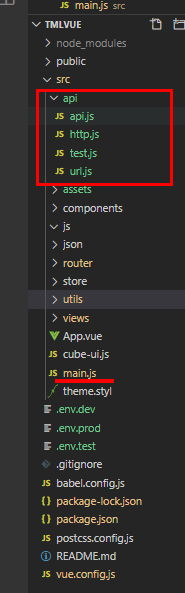
main.js 将所有api挂载在vue原型上
import api from './api/api.js'

Vue.prototype.$api = api;
url.js
/*

 * @Author: lingxie

 * @Date: 2020-06-29 11:37:09

 * @Descripttion:

 */

let baseUrl;

if(process.env.NODE_ENV == 'development'){

    baseUrl = '/api' //此处使用了代理,请看vue.config.js

}else if(process.en .NODE_ENV == 'test'){

   baseUrl = 'https://www.test.com'

}else if(process.en .NODE_ENV == 'production'){

   baseUrl = 'https://www.prod.com'

}

export default baseUrl
http.js
/*

 * @Author: lingxie

 * @Date: 2020-06-29 09:36:50

 * @Descripttion:

 */

import axios from 'axios';

import qs from 'qs';

import baseurl from './url';

console.log(baseurl);

// 创建axios实例

// const instance = axios.create({

//     baseURL:this.$utils.baseURL,

//     timeout:2000

// });

const instance = axios.create();


instance.defaults.baseURL = baseurl;

instance.defaults.timeout = 2000;

// 添加请求拦截器

instance.interceptors.request.use(function (config) {

    // 在发送请求之前做些什么

    // config.headers['token'] = '1111111111111111'

    if(config.method  === 'post'){

        // config.data = qs.stringify(config.data);

        // config.headers['Content-Type'] = 'application/x-www-form-urlencoded'

        // config.headers['token'] = '222222222222'

    }

    return config;

}, function (err) {

    // 对请求错误做些什么

    return Promise.reject(err);

});

// 添加响应拦截器

instance.interceptors.response.use(function (res) {

    // 对响应数据做点什么

    return res;

}, function (err) {

    // 对响应错误做点什么

    return Promise.reject(err);

});

function get(url,params){

    return  new Promise((resolve,reject)=>{

        instance.get(url,{

            params:params

        }).then(res =>{

            resolve(res.data);

        }).catch(err=>{

            reject(err)

        });

    });

};

// 适合于Content-Type'为'application/x-www-form-urlencoded post请求

// 客户端把form数据转换成一个字串append到url后面,用?分割。

function post(url,params,){

    console.log(qs.stringify(params));// 形如type=top&key=136f240edd201502102577573e95f208

    const header ={

        headers:{

            'Content-Type':'application/x-www-form-urlencoded',

            'token':'333333333333333333'

        }

    }

    return  new Promise((resolve,reject)=>{

        instance.post(url,qs.stringify(params),header).then(res =>{

            resolve(res.data);

        }).catch(err=>{

            reject(err)

        });

    });

};

// 适合于Content-Type'为'multipart/form-data post请求

function post1(url,params,){

    console.log(qs.stringify(params));// 形如type=top&key=136f240edd201502102577573e95f208

    const header ={

        headers:{

            'Content-Type':'multipart/form-data; charset=utf-8;',

            'token':'4444444'

        }

    }

    return  new Promise((resolve,reject)=>{

        instance.post1(url,qs.stringify(params),header).then(res =>{

            resolve(res.data);

        }).catch(err=>{

            reject(err)

        });

    });

};

export {

    get,

    post,

    post1

};
test.js
/*

 * @Author: lingxie

 * @Date: 2020-06-29 10:43:02

 * @Descripttion:

 */

import {get,post,post1} from './http';

const toutiao =params => post('/toutiao/index',params);//新闻头条

const joke =params =>get('/joke/content/list.php',params);//笑话

const test ={

    toutiao,

    joke

}

export default test
api.js
import test from './test' //引入test模块的api

const api = {

    test

}

export default api;
vue.config.js代理配置
/*

 * @Author: lingxie

 * @Date: 2020-04-23 13:38:18

 * @Descripttion:

 */

module.exports = {

  devServer: {

    proxy: {

       // 匹配所有以api开头的请求路径

       '/api': {

        target: 'http://v.juhe.cn/',

        changeOrigin: true,

        // 把api替换掉

        pathRewrite: {

          '^/api': ''

        }

      }

    }

  },

}
使用:
<!--

 * @Author: lingxie

 * @Date: 2020-04-23 13:35:57

 * @Descripttion:

-->

<template>

  <div class="about">

  </div>

</template>

<script>

export default {

  created(){

    this.fetch_toutiao();

    this.fetch_joke();

  },

  methods:{

    fetch_toutiao(){

      let jsonData ={

        type:'top',

        key:'136f240edd201502102577573e95f208'

      }

      this.$api.test.toutiao(jsonData).then(res=>{

        console.log(res);

      });

    },

    fetch_joke(){

      console.log('1111', this.$api);

      let jsonData ={

       sort:'asc',

       time:'1418816972',

       key:'14ec2ba9cfdfa38a712ae8c5e80a728c'

      }

      this.$api.test.joke(jsonData).then(res=>{

        console.log(res);

      });

    }

  }

}

</script>
vue - axios简单封装的更多相关文章
- vue axios 简单封装以及思考
先安装 axios npm install axios axios的详细介绍以及用法 就不多说了请 移步 github ➡️ https://github.com/axios/axios 下面是简单 ...
- vue axios接口封装、Promise封装、简单的axios方法封装、vue接口方法封装、vue post、get、patch、put方法封装
相信大家在做前后端数据交互的时候都会给请求做一些简单的封装就像之前封装ajax方法一样axios的封装也是一样的简单下面这个就是封装的axios的方法,require.js import axios ...
- axios简单封装
写在最前面 新手前端刚刚接触vue,感觉真的好用.项目中需要使用axios,然后学习了一下.借鉴网上一些大佬的经验,现在分享一下axios的简单封装,如果有什么错误的地方,请大家指出. axios安装 ...
- Vue.js(18)之 axios简单封装
基于vue-cli2.x封装axios src目录 axios.js import axios from 'axios' import { Indicator, Toast } from 'mint- ...
- Vue: axios 请求封装及设置默认域名前缀 (for Vue 2.0)
1. 实现效果 以get方法向http://192.168.32.12:8080/users 发起请求.获取数据并进行处理 this.apiGet('/users', {}) .then((res) ...
- VUE axios请求 封装 get post Http
创建httpService.js 文件 import axios from 'axios'; import { Loading , Message } from 'element-ui'; impor ...
- Vue Axios 的封装使用
目录 Axios 说明 安装 Axios 请求配置 响应结构 常用请求方法 默认值配置 全局的 请求配置项 自定义实例默认值 配置的优先顺序 拦截器 个人完整 axios 配置 Axios 说明 Ax ...
- vue axios简单配置
参考:https://www.cnblogs.com/sophie_wang/p/7844119.html 1. 安装 npm install axios 2. main.js import axio ...
- 用XHR简单封装一个axios
<!DOCTYPE html> <html lang="en"> <head> <meta charset="UTF-8&quo ...
- vue中axios的封装以及简单使用
一.axios的封装 在vue中为了使用axios使用方便,不需要每一个模块进行导入,就需要对其进行封装: 1.新建http.js模块 import axios from 'axios' // 设置基 ...
随机推荐
- VUE学习-过渡 & 动画
过渡 & 动画 Vue 在插入.更新或者移除 DOM 时,提供多种不同方式的应用过渡效果.包括以下工具: 在 CSS 过渡和动画中自动应用 class 在过渡钩子函数中使用 JavaScrip ...
- less 4-7
LESS--4 先试一下单引号,发现没有效果,不报错,然后根据题目用双引号,报错. 根据报错的内容可以发现,参数ID是包括在一对双引号和括号之中的.和上一题类似,构造注入查询语句. ") a ...
- 靶场练习3: Funbox2
信息收集阶段 扫描端口 sudo nmap -p- -n -v -sS --max-retries=0 172.16.33.30 发现开放端口21,22,80,扫描版本 sudo nmap -p21, ...
- NVIDIA显卡安装
查看是否有gcc命令. 执行gcc -v 查看相关版本信息.一般完整安装是有此命令的.没有就要自行安装. yum -y install gcc gcc-c++ 修改文件vim /lib/mod ...
- HIVE- concat方法
(1)concat_ws() select user ,concat_ws(';' , collect_set(cast(amt as string))) as amt from table grou ...
- sudo:Operation not permitted事件
转载请注明来源:https://www.cnblogs.com/Sherlock-L/p/14933949.html 前言 事情是这样的,在风和日丽的一天,我如往常一样在服务器上敲下了sudo xxx ...
- 学习笔记-Java面向对象
学习来源: B站[狂神说Java]Java零基础学习视频通俗易懂 static关键字详解 package com.oop.demo07; //static public class Student{ ...
- Mac下Homebrew更新国内源brew update卡死(完美解决,网上都不完整)
https://blog.csdn.net/zz00008888/article/details/113880633
- flutter 图片加载缓存以及圆角的实现
使用最多的图片缓存组建库cached_network_image 地址:cached_network_image 配置: dependencies: cached_network_image: ^2. ...
- 使用JFinal实现简单的学生管理系统
JFinal简介 Controller是JFinal核按心类美之一,该类作为MVC模式中的控制器.基于JFinal的Web应用的控制器需要继承该类.Controller是定义Action方法的地点,是 ...