
web执行shell脚本
转载请注明来源:https://www.cnblogs.com/Sherlock-L/p/15584456.html
缘起
去年写过一个shell脚本用来校验统计打点,工作使用。发现同事不太熟悉这块,使用起来也就不太顺,而且数据文件更新也是个问题。于是我萌生了一个想法,要不做成web傻瓜式工具吧,just do it!
过程
直接用bash做成web server,我还真没试过,忽然有点无从下手的感觉。Stack Overflow上倒是给了我灵感,别死盯着shell,考虑下别家呗:https://stackoverflow.com/questions/44443164/execute-a-shell-script-from-html
环境准备
先说明一下,我用的是Ubuntu系统。
leah@ubuntu:/var/www/html$ cat /proc/version

Linux version 4.4.0-31-generic (buildd@lgw01-43) (gcc version 4.8.4 (Ubuntu 4.8.4-2ubuntu1~14.04.3) ) #50~14.04.1-Ubuntu SMP Wed Jul 13 01:07:32 UTC 2016
1.安装PHP和apache
软件包安装
执行命令
sudo apt-get install php5-cli

sudo apt-get install apache2
运行php -v以及service apache2 status查看php和apache是否安装成功,

源码安装
我是因为在某个机器上没有root权限,才用了源码安装方式把东西装在自己的家目录里,如果只是为了使用不做别的,还是建议用软件包安装方式
apache需要下载下面几个依赖包:
apr:http://apr.apache.org/download.cgi
apr-util:http://apr.apache.org/download.cgi
pcre:https://sourceforge.net/projects/pcre/files/pcre/
httpd:http://httpd.apache.org/download.cgi
我下载的是tar.gz文件,然后解压到了家目录(tar -zxvf xxxxxx.tar.gz -C /home/leah/),接下来是依次安装:
- apr:
./configure --prefix=/home/leah/apr

make

make install
- apr-util(需要expat库,参考下方②):
./configure --prefix=/home/leah/apr-util --with-apr=/home/leah/apr/bin/apr-1-config --with-expat=/home/leah/expat

make

make install
- pcre:
./configure --prefix=/home/leah/pcre --with-apr=/home/leah/apr/bin/apr-1-config

make

make install
- httpd(需要先安装openssl,参考下方③,这里configure的参数,是根据各种报错才加那么长的参数的):
./configure --prefix=/home/leah/apache2 --with-apr=/home/leah/apr/bin/apr-1-config --with-apr-util=/home/leah/apr-util/bin/apu-1-config --with-pcre=/home/leah/pcre/bin/pcre-config --with-ssl=/home/leah/openssl --sysconfdir=/home/leah/httpd --enable-so --enable-rewrite --enable-ssl

make

make install
可能遇到的问题:
①安装apr过程中执行./configure -C xxxxx时遇到rm: cannot remove 'libtoolT': No such file or directory,可注释这一行
$RM "$cfgfile"
或者参考这篇博文,加个-f参数
②安装apr-util过程中执行make,报错:
xml/apr_xml.c:35:19: fatal error: expat.h: No such file or directory

 #include <expat.h>

                   ^

compilation terminated.

make[1]: *** [xml/apr_xml.lo] Error 1

make[1]: Leaving directory `/home/leah/apr-util-1.6.1'

make: *** [all-recursive] Error 1
解决方式为,安装expat库:https://libexpat.github.io/doc/packages/
./configure --prefix=/home/leah/expat

make

make install
但是有个问题,由于expat我也是自定义路径安装的,这导致了即使安装完expat后,在安装apr-util的时候,make仍然报上述错误。
make clean

./configure的时候加上--with-expat=/path-to-expat-installation-dir
问题完美解决。
make clean:清除上次的make命令所产生的object文件(后缀为“.o”的文件)及可执行文件。
注:若使用源码编译的expat,建议在后续编译apache的时候添加--with-expat=/path-to-expat-installation-dir参数
③安装httpd时,执行./configure xxxxxx,报错:
checking whether to enable mod_ssl... configure: error: mod_ssl has been requested but can not be built due to prerequisite failures
解决方式为安装openssl:https://www.openssl.org/source/
我安装的是openssl-1.1.1l.tar.gz,参考了https://linuxtect.com/how-to-install-openssl-libraries-on-ubuntu-debian-mint/ 进行安装,这里用的不是Configure而是config哦~
./config --prefix=/home/leah/openssl --openssldir=/home/leah/openssl

make

make install
注:上面的make install会有一个关于权限的报错:Cannot create directory /usr/local/openssl: Permission denied ,这个我没有理会。
④安装完成后执行/home/leah/apache2/bin/apachectl start,报错:
(13)Permission denied: AH00072: make_sock: could not bind to address [::]:80

(13)Permission denied: AH00072: make_sock: could not bind to address 0.0.0.0:80

no listening sockets available, shutting down

AH00015: Unable to open logs

Action 'start' failed.

The Apache error log may have more information.
然而用root身份执行是可以正常启动apache的,果然,不用root身份,是真的寸步难行,先探索到这里吧。
2.测试apache能否解析php
执行命令
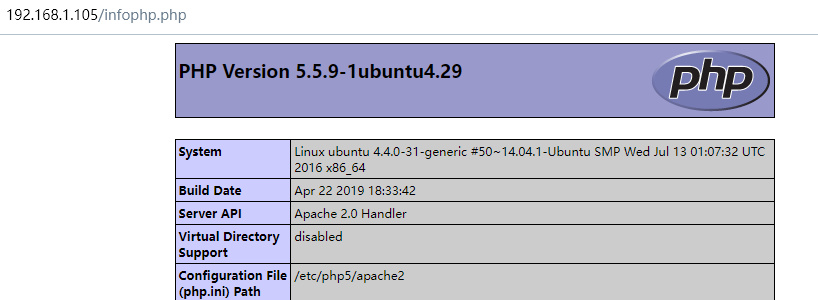
echo '<?php phpinfo(); ?>' > /var/www/html/infophp.php
p.s.:如果permission denied,那就chmod修改一下权限。
浏览器访问http://你的机器ip/infophp.php,可以看到php的版本信息
代码编写
在php中调用shell脚本可以使用shell_exec,由于实际代码涉及公司数据就不放出来了,下面是个简单的例子
<?php

 if(isset($_POST['submit']))

 {

   $output=shell_exec('sh /somePATH/cgi-bin/script.sh');

   echo $output;

 }

?>

<form action="" method="post">

<input type="submit" name="submit" value="Call my Shell Script">

</form>
From:https://stackoverflow.com/questions/44443164/execute-a-shell-script-from-html
当然,除了shell_exec,还有exec()、passthru() 和 system(),见:https://www.jb51.net/article/28241.htm
转载请注明来源:https://www.cnblogs.com/Sherlock-L/p/15584456.html
web执行shell脚本的更多相关文章
- 利用python执行shell脚本 并动态传参 及subprocess基本使用
最近工作需求中 有遇到这个情况 在web端获取配置文件内容 及 往shell 脚本中动态传入参数 执行shell脚本这个有多种方法 最后还是选择了subprocess这个python标准库 su ...
- 在PHP中调用php_ssh实现远程登陆linux服务器并执行shell脚本。
这个功能主要用于在web端利用程序对远程服务器进行操作,通过PHP_ssh执行shell脚本来实现. 首先要安装php_ssh2组件,linux中centos7下有ssh2源,直接安装.window下 ...
- Linux中执行shell脚本的4种方法总结
bash shell 脚本的方法有多种,现在作个小结.假设我们编写好的shell脚本的文件名为hello.sh,文件位置在/data/shell目录中并已有执行权限. 方法一:切换到shell脚本所在 ...
- Linux中执行shell脚本的4种方法
bash shell 脚本的方法有多种,现在作个小结.假设我们编写好的shell脚本的文件名为hello.sh,文件位置在/data/shell目录中并已有执行权限. 方法一:切换到shell脚本所在 ...
- 执行shell脚本的几种方法及区别
执行shell脚本的几种方法及区别 http://blog.csdn.net/lanxinju/article/details/6032368 (认真看) 注意:如果涉及到脚本之间的调用一定要用 . ...
- Java SSH远程执行Shell脚本实现(转)
前言 此程序需要ganymed-ssh2-build210.jar包(下载地址:http://www.ganymed.ethz.ch/ssh2/) 为了调试方便,可以将\ganymed-ssh2-bu ...
- JAVA远程执行Shell脚本类
1.java远程执行shell脚本类 package com.test.common.utility; import java.io.IOException; import java.io.Input ...
- 转:linux执行shell脚本的方式及一些区别
假设shell脚本文件为hello.sh放在/root目录下.下面介绍几种在终端执行shell脚本的方法: [root@localhost home]# cd /root/ [root@localho ...
- Java实践 — SSH远程执行Shell脚本(转)
原文地址:http://www.open-open.com/lib/view/open1384351384024.html 1. SSH简介 SSH是Secure Shell的缩写,一 ...
- 每天一个linux命令(62):sh命令 /Linux中执行shell脚本的4种方法总结
bash shell 脚本的方法有多种,现在作个小结.假设我们编写好的shell脚本的文件名为hello.sh,文件位置在/data/shell目录中并已有执行权限. 方法一:切换到shell脚本所在 ...
随机推荐
- 如何在阿里云服务器搭建flask
下载flask不用我多说了,pip3 install flask 今天在阿里云的服务器上测试一个Flask程序,命名指定了 ip:0.0.0.0,port:5000,但是外网IP确怎么也访问不了网页 ...
- 腾讯出品小程序自动化测试框架【Minium】系列(六)常见组件的处理
写在前面 我发现一件神奇的事,当你学一门新技术或者新的知识点遇到不会的时候,真的可以先放一放,第二天再去学习,也许说不定也就会了. 为什么这么说? 昨天文章断断续续的写了近一天,有一个组件不认识,自然 ...
- 重拾prometheus
1.引入依赖 <dependency> <groupId>org.springframework.boot</groupId> <artifactId> ...
- C++ 从数组中拿值,每个值不相同
代码和思路 原理就是生成0,n个索引,每个索引不相同即可. 索引再到数组拿数据就行 #include <iostream> #include <vector> #include ...
- 真正“搞”懂HTTP协议13之HTTP2
在前面的章节,我们把HTTP/1.1的大部分核心内容都过了一遍,并且给出了基于Node环境的一部分示例代码,想必大家对HTTP/1.1已经不再陌生,那么HTTP/1.1的学习基本上就结束了.这两篇文章 ...
- STM32F4寄存器初始化:编码器
RCC->APB1ENR|=1<<0; //TIM2时钟使能 RCC->APB1ENR|=1<<1; //TIM3时钟使能 RCC->APB1ENR|=1&l ...
- STL中的智能指针(Smart Pointer)及其源码剖析: std::unique_ptr
STL中的智能指针(Smart Pointer)及其源码剖析: std::unique_ptr 和 std::auto_ptr一样,std::unique_ptr也是一种智能指针,它也是通过指针的方式 ...
- noip2020模拟赛 背包 (knapsack)
题目 区间 \(01\) 背包 \(1 \le l_i \le r_i \le n \le 20000,1 \le q \le 100000,1 \le m_i \le 500, 1 \le w_i ...
- Windows下小狼毫配置五笔拼音方案
Windows下小狼毫配置五笔拼音方案 目录 Windows下小狼毫配置五笔拼音方案 1 下载并安装小狼毫rime 2 配置五笔.五笔拼音方案 3 安装设置五笔拼音混合输入 4 设置输入方案 1 下载 ...
- vue 获取select选中的当前option所在对象的各种值