
解决git仓库项目 添加到github非空仓库冲突问题 error: failed to push some refs to 'https://github.com/Qtoken/......'
error: failed to push some refs to 'https://github.com/Qtoken/......'
1. 问题描述:执行命令:git push origin master 将git仓库项目 添加到github非空仓库报错
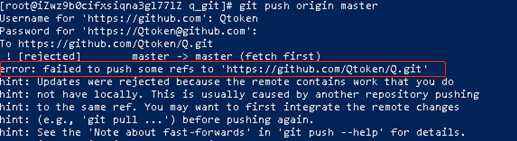
2.返回内容:
error: failed to push some refs to 'https://github.com/Qtoken/......'
hint: Updates were rejected because the remote contains work that you do
hint: not have locally. This is usually caused by another repository pushing
hint: to the same ref. You may want to first integrate the remote changes
hint: (e.g., 'git pull ...') before pushing again.
hint: See the 'Note about fast-forwards' in 'git push --help' for details.
3.原因: git仓库与远程连接的github库,内容不一致
4.解决方法:
4.1 执行 git pull --rebase origin master 将github仓库内容同步到git仓库
4.2 再执行git push origin master 此时git仓库项目正常 添加到github非空仓库
解决git仓库项目 添加到github非空仓库冲突问题 error: failed to push some refs to 'https://github.com/Qtoken/......'的更多相关文章
- 错误:error: failed to push some refs to 'https://github.com/pzq7025/KG.git'的解决办法
一.问题在进行[git push orgin master]的时候出现如下错误 ! [rejected] master -> master (non-fast-forward) error: f ...
- git 解决 error: failed to push some refs to 'https://github.com/xxxx.git'
在github远程创建仓库后, 利用gitbash进行提交本地文件的时候出现如下错误 [root@foundation38 demo]# git push -u origin master Usern ...
- git 报错:error: failed to push some refs to 'https://github.com/Anderson-An/******.git'(已解决)
提交push 报错: $ git push origin masterTo https://github.com/Anderson-An/******.git ! [rejected] master ...
- git push ! [rejected] master -> master (non-fast-forward) error: failed to push some refs to 'https://github.com/Operater9/guest' hint: Updates were rejected because the tip of your current bra
推送本地代码到github报错 git push报错 ! [rejected] master -> master (non-fast-forward) error: failed to push ...
- error: failed to push some refs to 'https://github.com/username/python.git'
解决error: failed to push some refs to 'https://github.com/bluepen/python.git' 当我们在使用git工具上传我们自己的代码时,可 ...
- 【错误】上传新的项目出错 error: failed to push some refs to 'https://github.com/...
问题描述:在git bash中键入 $ git push origin master 进行提交的时候出现 如下错误: error: failed to push some refs to 'https ...
- git 本地推送远程仓库报错: error: failed to push some refs to 'https://github.com/yangtuothink/mxonline.git'
报错现象 添加远程仓库后 推送代码的时候报错 报错分析 远程代码和本地代码不匹配问题 远程初始仓库的创建有些默认 的 README什么的本地是没有的 需要先同步后再上传 报错解决 git push - ...
- git上传文件夹报错: ! [rejected] master -> master (fetch first) error: failed to push some refs to 'https://github.com/taminachen/rjxm.git' hint: Updates were rejected because the remote contains work
使用git上传本地文件夹到远程仓库,使用如下命令:git push -u origin master时报错 原因是在GitHub创建仓库时创建了readme文件,但是本地没有这个文件,造成本地目录与远 ...
- git/github error: failed to push some refs to 'https://github.com/shenhaha/cloudletter.git'
git 提交代码到github上报如下错误 报错分析: 解决方法: 关闭这两个设置 再次提交代码 success
- error: failed to push some refs to 'https://github.com/github账号/learn_git.git' hint: Updates were rejected because the remote contains work that you do hint: not have locally. This is usually caus
在使用git 对源代码进行push到gitHub时可能会出错,信息如下 此时很多人会尝试下面的命令把当前分支代码上传到master分支上. $ git push -u origin master ...
随机推荐
- MacOS系统下selenium之火狐浏览器驱动firefoxdriver安装
https://blog.csdn.net/weixin_44107321/article/details/106452468
- ES 快速开始
ES语句构造麻烦,每次都拼,这次备份一下 1. 创建索引 PUT http://sae1002.qihoo.ai:9200/kosmos {"settings":{"in ...
- studiostyl.es网站scheme文件无法下载
原因网站引用Google的服务 解决方法:查看网页源码.选择选取页面中的元素,选择download按钮,如下图所示 downloadExisting后面的数字代表主题的ID. 在网站中输入https: ...
- 5.docker安装redis
下载redis镜像 不讲那么细了,可以参考docker安装mysql的介绍 docker pull redis 不加冒号和版本表示下载最新版本的 镜像下载完后可以数据 docker images 命令 ...
- Webservice EASLogin登录接口说明
https://club.kingdee.com/forum.php?mod=viewthread&tid=1332944
- css制作仿商城侧边导航
<!DOCTYPE html> <html> <head> <meta charset="utf-8" /> <title&g ...
- Selector 如何关联 channel,以及需要注意的点
一.创建 selector Selector selector = Selector.open(); 1.一个 selector 可以管理多个 channel . 二.channel 如何注册到 se ...
- 8.golang语言学习,运算符介绍
1.算术运算 自增,自减,只能单独使用,++,--只能写在变量后面 2.赋值运算符 优先级,单目运算,赋值运算从右到左运算,其余从左到右,无三目运算,用if实现 3.比较运算符/关系 4.逻辑运算符 ...
- js - script标签的for属性和event属性
js - script标签的for属性和event属性 <script language="javascript" for="window" event= ...
- 在安装SDK8.1和Visual Studio 2017时,提示“已停止工作”
解决办法:在微软官网下载 .net framework 的最新的开发包(Build apps - Dev Pack),重新安装后问题得到解决. https://dotnet.microsoft.com ...