
css3小代码
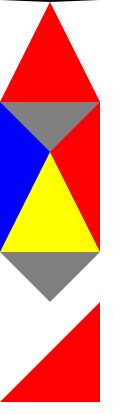
1.三角
<!doctype html>

<html lang="en">

<head>

    <meta charset="UTF-8">

    <meta name="viewport" content="width=device-width,initial-scale=1,maximum-scale=1,minimum-scale=1,user-scalable=no"/>

    <meta name="format-detection" content="telphone=no, email=no"/>

    <meta name="apple-touch-fullscreen" content="yes"/>

    <meta name="apple-mobile-web-app-capable" content="yes"/>

    <meta name="apple-mobile-web-app-status-bar-style" content="black"/>

    <title>sanjiao</title>

    <style type="text/css">

        *{

            margin:0;

            padding:0;

        }

        .sanjiao{

            width: 0;

            height: 0;

            border-left: 50px solid transparent;

            border-right: 50px solid transparent;

            border-bottom: 100px solid red;

        }

        .sanjiao:hover{

            border-left: 50px solid transparent;

            border-right: 50px solid transparent;

            border-top: 100px solid red;

            transition: 5s all;

        }

        .arr_down_a{

            width: 0;

            height: 0;

            border-color:pink;

            display: block;

            border-left: 50px solid blue;

            border-right: 50px solid red;

            border-bottom: 100px solid yellow;

            border-top: 50px solid grey;

        }

        .test_a{

            width: 0;

            height: 0;

            display: block;

            border-left: 50px solid transparent;

            border-right: 50px solid transparent;

            border-bottom: none;

            border-top: 50px solid grey;

        }

        .triangle-bottomright {

            width: 0;

            height: 0;

            border-bottom: 100px solid red;

            border-left: 100px solid transparent;

        }

        .trans-scroll{

            width: 0;

            height: 0;

            display: block;

            margin-top: 60px;

            border-top: 6px solid #969696;

            border-left: 5px solid transparent;

            border-right: 5px solid transparent;

            border-bottom: 1px solid transparent;

        }

        .trans-scroll:hover{

            -moz-transform: rotate(180deg);

            -ms-transform: rotate(180deg);

            -o-transform: rotate(180deg);

            -webkit-transform: rotate(180deg);

            transform: rotate(180deg);

            transition: 500ms all;

        }

    </style>

</head>

<body>

<div class="sanjiao"></div>

<div class='arr_down_a'></div>

<div class='test_a' ></div>

<div class='triangle-bottomright' ></div>

<span class="trans-scroll"></span>

</body>

</html>
2.css兼容符号:
background:#ffc; /* 对firefox有效*/
*background:#ccc; /* 对ie7有效 */
_background:#000; /* 只对ie6有效 */
3.商品hover-animate
<!DOCTYPE html PUBLIC "-//W3C//DTD XHTML 1.0 Transitional//EN" "http://www.w3.org/TR/xhtml1/DTD/xhtml1-transitional.dtd">

<html xmlns="http://www.w3.org/1999/xhtml">

<head>

<meta http-equiv="Content-Type" content="text/html; charset=utf-8" />

<title>hover-animate</title>

<link rel="stylesheet" type="text/css" href="css/common.css"/>

    <style type="text/css">

        a{

            color: blueviolet;

        }

        .div-demo-box{

            padding: 20px;

        }

        .a-box{

            width: 290px;

            height: 250px;

            background-color: pink;

        }

        .a-box>img{

            display: block;

        }

        /*hover-animate 放大*/

        .hover-box{

            display: block;

            overflow: hidden;

        }

        .hover-box:hover .hover-animation {

          -webkit-transform: scale(1.05);

          -moz-transform: scale(1.05);

          -o-transform: scale(1.05);

          -ms-transform: scale(1.05);

          transform: scale(1.05);

          -webkit-transition: transform 1s ease;

          -moz-transition: transform 1s ease;

          -o-transition: transform 1s ease;

          -ms-transition: transform 1s ease;

          transition: transform 1s ease;

      }

      .hover-animation {

          -webkit-transform: scale(1);

          -moz-transform: scale(1);

          -o-transform: scale(1);

          -ms-transform: scale(1);

          transform: scale(1);

          -webkit-transition: transform 1s ease;

          -moz-transition: transform 1s ease;

          -o-transition: transform 1s ease;

          -ms-transition: transform 1s ease;

          transition: transform 1s ease;

      }

      /*hover-animate-shadow*/

      .hover-shadow {

          width: 100%;

          padding-top: 20px;

          padding-bottom: 20px;

          margin-bottom: 6px;

          border-bottom: #e3e2e2 solid 1px;

          box-shadow: 0 0 5px rgba(0, 0, 0, 0.1);

          background-color: pink;

      }

      .hover-shadow:after {

          clear: both;

          content: '';

          display: table;

      }

      /*@media only screen and (min-width: 320) {*/

          .hover-shadow {

            width: 286px;

            padding: 60px 10px 45px;

            margin-right: 10px;

            border-bottom: none;

            box-shadow: none;

            -webkit-transform: translate3d(0, 0, 0);

            -moz-transform: translate3d(0, 0, 0);

            -o-transform: translate3d(0, 0, 0);

            -ms-transform: translate3d(0, 0, 0);

            transform: translate3d(0, 0, 0);

            -webkit-transition: transform 0.3s ease;

            -moz-transition: transform 0.3s ease;

            -o-transition: transform 0.3s ease;

            -ms-transition: transform 0.3s ease;

            transition: transform 0.3s ease;

        }

        .hover-shadow:hover {

            box-shadow: 0 15px 30px rgba(0, 0, 0, 0.1);

            -webkit-transform: translate3d(0, -2px, 0);

            -moz-transform: translate3d(0, -2px, 0);

            -o-transform: translate3d(0, -2px, 0);

            -ms-transform: translate3d(0, -2px, 0);

            transform: translate3d(0, -2px, 0);

            -webkit-transition: transform 0.3s ease;

            -moz-transition: transform 0.3s ease;

            -o-transition: transform 0.3s ease;

            -ms-transition: transform 0.3s ease;

            transition: transform 0.3s ease;

        }

        /*商品题目+简介布局     */

        .brick-img{

            width: 100%;

            padding:0 40px;

            *width: 236px; /*IE7*/

            *margin: 0 auto;

            *padding: 0;

            display: block;

            box-sizing: border-box;

        }

        .brick-title {

          text-align: center;

          color: #141414;

          font-size: 1.6rem;

          margin-top: 12px;

          line-height: 20px;

        /*control text 1 line ...*/

          text-overflow: ellipsis;

          display: -webkit-box;

          -webkit-line-clamp: 1;

          -webkit-box-orient: vertical;

          overflow: hidden;

          text-align: center;

          height: 1.8rem;

      }

      .brick-desc {

          text-align: center;

          color: #a0a0a0;

          font-size: 12px;

          font-size: 0.75rem;

          line-height: 18px;

          margin-top: 4px;

           text-overflow: ellipsis;

          display: -webkit-box;

          -webkit-line-clamp: 2;

          -webkit-box-orient: vertical;

          overflow: hidden;

          text-align: center;

          height: 2.8rem;

      }

    </style>

</head>

<body>

<div class="div-demo-box">

    <h2>hover-animate

</h2>

<a href="javascript:void(0)" class="a-box hover-box">

    <img src="data:images/cris_ban_01.jpg" alt="" class="hover-animation" />

</a>

<!-- pc商品 -->

<div class="brick-box hover-shadow margin-top20">

  <a href="javascript:void(0)" class="display-block">

    <img src="data:images/cris_ban_01.jpg" alt="" class="brick-img" />

    <h3 class="brick-title">题目题目</h3>

    <p class="brick-desc">标题标题标题标题标题标题标题标题标题标题标题标题标题标题标题标题标题标题标题标题标题标题标题标题标题标题标题标题标题标题</p>

 </a>

</div>

</div>

</body>

</html>
css3小代码的更多相关文章
- 【processing】小代码
今天无意间发现的processing 很有兴趣 实现很简洁 void setup(){ } void draw(){ background(); && mouseY > heig ...
- 小代码编写神器:LINQPad 使用入门
原文:小代码编写神器:LINQPad 使用入门 一:概述 1:想查看程序运行结果,又不想启动 VS 怎么办? 2:想测试下自己的 C# 能力,不使用 VS 的智能感知,怎么办? 那么,我们有一个选择, ...
- 几个常用的CSS3样式代码以及不兼容的解决办法
原文:几个常用的CSS3样式代码以及不兼容的解决办法 border-radius实现圆角效果 CSS3代码: -webkit-border-radius:10px; -moz-border-radiu ...
- Python小代码_2_格式化输出
Python小代码_2_格式化输出 name = input("name:") age = input("age:") job = input("jo ...
- Python小代码_1_九九乘法表
Python小代码_1_九九乘法表 max_num = 9 row = 1 while row <= max_num: col = 1 while col <= row: print(st ...
- 简单的Java逻辑小代码(打擂台,冒泡排序,水仙花数,回文数,递归)
1.打擂台 简单的小代码,打擂台.纪念下过去,祝福下新人. public static void main(String[] args){ int[] ld = {1,4,2,10,8,9,5}; i ...
- python的mysql小代码
我因为懒,就想写个批量insert数据的小代码 这里是代码 # _*_ encoding:utf-8 _*_ import os import MySQLdb import numpy as np d ...
- 一段小代码秒懂C++右值引用和RVO(返回值优化)的误区
关于C++右值引用的参考文档里面有明确提到,右值引用可以延长临时变量的周期.如: std::string&& r3 = s1 + s1; // okay: rvalue referen ...
- css3 小图标提示特效
最近的计划,就是每天来几个特效,当然这里有限制,在什么候选区只能放一个,还每天有限制发布的,哎, 啊 终于写完了,看到一个挺好玩的东西,想到能不能用网页的特效做出来,试试呗!不过,一想肯东有很多的 相 ...
随机推荐
- [在读]HTML5数据推送应用开发
最近买的,讲SSE的,才看完前2章.
- oop典型应用,代码。
遍历获得一个实体类的所有属性名,以及该类的所有属性的值.//先定义一个类: public class User{ public string name { get; set; } public str ...
- Java中的变量——通过示例学习Java编程(4)
作者:CHAITANYA SINGH 来源:https://www.koofun.com/pro/kfpostsdetail?kfpostsid=14&cid= 变量是用来存放可以更改的值的容 ...
- Spark-水库抽样-根据抽样率确定每个分区的样本大小
/* * 输入:采样率,待采样的RDD * 输出:每个分区的样本大小(记录数) * 由采样率确定,每个分区的样本大小 */ def findNumPerPartition[T: ClassTag, U ...
- uvm_factory——我们的工厂(一)
factory 机制是实现(功能):通过一个字符串来创建此字符串所代表的的类的一个实例. //----------------------------------------------------- ...
- 一次性删除数据库所有表和所有存储过程 SQL语句
一次性删除数据库所有表和所有存储过程 SQL语句 今天转移数据库数据,需要把数据库原来的表和存储过程清空.删除所有的表:如果由于外键约束删除table失败,则先删除所有约束: --/第1步****** ...
- Window10 开启传统启动界面
Windows 10沿袭了Windows 8的快速启动,导致在启动过程中无法通过按F8进入启动选项,这样当系统遇到问题无法进入时根本无法通过进入安全模式等方式进行处理(当然通过其他一些工具还是能够引导 ...
- UVA 11324 The Largest Clique (强连通分量,dp)
给出一个有向图,求一个最大的结点集合,任意两个点u,v.u可到达v或v可到达u. 一个强连通分量肯定一起选的.而且只能在一条路径上. 所以先找出所有scc,然后缩点找一条最大权的路径,按拓扑序跑DAG ...
- UVA1001 Say Cheese (dijkstra)
如果没有洞,那么任意两点的最短距离就是直线距离,洞里是瞬间的,所以看成一个点就行了(其实点也可以当作半径为0的洞来处理),洞到洞的最短距离都是圆心距离减去半径.剩下的就是求单源最短路径,是完全图,用不 ...
- 给我说说你能想到几种分布式session实现
附录: https://mp.weixin.qq.com/s/8Hh4j0CjfF5S8zM29JZl2w # 面试官心理分析 面试官问了你一堆 dubbo 是怎么玩儿的,你会玩儿 dubbo 就可以 ...