https
http over ssl = https 443/tcp
ssl: v3
tls: v1
https://
SSL会话的简化过程
(1) 客户端发送可供选择的加密方式,并向服务器请求证书;
(2) 服务器端发送证书以及选定的加密方式给客户端;
(3) 客户端取得证书并进行证书验正:
如果信任给其发证书的CA:
(a) 验正证书来源的合法性;用CA的公钥解密证书上数字签名;
(b) 验正证书的内容的合法性:完整性验正
(c) 检查证书的有效期限;
(d) 检查证书是否被吊销;
(e) 证书中拥有者的名字,与访问的目标主机要一致;
(4) 客户端生成临时会话密钥(对称密钥),并使用服务器端的公钥加密此数据发送给服务器,完成密钥交换;
(5) 服务用此密钥加密用户请求的资源,响应给客户端;
注意:SSL会话是基于IP地址创建;所以单IP的主机上,仅可以使用一个https虚拟主机;
回顾几个术语:PKI,CA,CRL,X.509 (v1, v2, v3)
配置httpd支持https:
(1) 为服务器申请数字证书;
测试:通过私建CA发证书
(a) 创建私有CA
(b) 在服务器创建证书签署请求
(c) CA签证
(2) 配置httpd支持使用ssl,及使用的证书;
# yum -y install mod_ssl
配置文件:/etc/httpd/conf.d/ssl.conf
DocumentRoot
ServerName
SSLCertificateFile
SSLCertificateKeyFile
(3) 测试基于https访问相应的主机;
# openssl s_client [-connect host:port] [-cert filename] [-CApath directory] [-CAfile filename]
测试实例过程:
用centos7:192.168.244.101 作为CA服务器
[root@bogon ~]# cd /etc/pki/CA/
[root@bogon CA]# ls
certs crl newcerts private
[root@bogon CA]# (umask 077;openssl genrsa -out private//cakey.pem 2048) #生成私钥
Generating RSA private key, 2048 bit long modulus
...............................................................................................................................................+++
........................+++
e is 65537 (0x10001)
[root@bogon CA]# ll
total 0
drwxr-xr-x. 2 root root 6 Jun 29 2015 certs
drwxr-xr-x. 2 root root 6 Jun 29 2015 crl
drwxr-xr-x. 2 root root 6 Jun 29 2015 newcerts
drwx------. 2 root root 22 May 9 22:00 private
[root@bogon CA]# ll private/
total 4
-rw-------. 1 root root 1675 May 9 22:00 cakey.pem
[root@bogon CA]# ls
certs crl newcerts private
[root@bogon CA]# touch index.txt
[root@bogon CA]# echo 01 > serial
[root@bogon CA]# openssl req -new -x509 -key private/cakey.pem -out cacert.pem -days 7300 #给自己创建一个自签证书
You are about to be asked to enter information that will be incorporated
into your certificate request.
What you are about to enter is what is called a Distinguished Name or a DN.
There are quite a few fields but you can leave some blank
For some fields there will be a default value,
If you enter '.', the field will be left blank.
-----
Country Name (2 letter code) [XX]:CN
State or Province Name (full name) []:FuJian
Locality Name (eg, city) [Default City]:XiaMen
Organization Name (eg, company) [Default Company Ltd]:wangsu
Organizational Unit Name (eg, section) []:Tech
Common Name (eg, your name or your server's hostname) []:www.fush.com
Email Address []:344256938@qq.com
[root@bogon CA]# ll
total 8
-rw-r--r--. 1 root root 1407 May 9 22:05 cacert.pem
drwxr-xr-x. 2 root root 6 Jun 29 2015 certs
drwxr-xr-x. 2 root root 6 Jun 29 2015 crl
-rw-r--r--. 1 root root 0 May 9 22:01 index.txt
drwxr-xr-x. 2 root root 6 Jun 29 2015 newcerts
drwx------. 2 root root 22 May 9 22:00 private
-rw-r--r--. 1 root root 3 May 9 22:01 serial
到web(httpd)服务器上192.168.244.100:
[root@server conf]# cd /etc/httpd/
[root@server httpd]# mkdir ssl
[root@server httpd]# cd ssl/
[root@server ssl]# (umask 077;openssl genrsa -out httpd.key 1024) ###生成key
Generating RSA private key, 1024 bit long modulus
.++++++
.............++++++
e is 65537 (0x10001)
[root@server ssl]# ll
total 4
-rw------- 1 root root 891 Jun 13 07:35 httpd.key
[root@server ssl]# openssl req -new -key httpd.key -out httpd.csr ###生成证书签署请求
You are about to be asked to enter information that will be incorporated
into your certificate request.
What you are about to enter is what is called a Distinguished Name or a DN.
There are quite a few fields but you can leave some blank
For some fields there will be a default value,
If you enter '.', the field will be left blank.
-----
Country Name (2 letter code) [XX]:CN
State or Province Name (full name) []:FuJian
Locality Name (eg, city) [Default City]:XiaMen
Organization Name (eg, company) [Default Company Ltd]:wangsu
Organizational Unit Name (eg, section) []:Tech
Common Name (eg, your name or your server's hostname) []:www.web1.com
Email Address []:webadmin@fush.com
Please enter the following 'extra' attributes
to be sent with your certificate request
A challenge password []:
An optional company name []:
[root@server ssl]# ll
total 8
-rw-r--r-- 1 root root 696 Jun 13 07:38 httpd.csr
-rw------- 1 root root 891 Jun 13 07:35 httpd.key
接下来把httpd.csr 传给ca服务器
[root@server ssl]# scp httpd.csr root@192.168.244.101:/tmp/
在ca服务器签署证书
[root@bogon CA]# openssl ca -in /tmp/httpd.csr -out certs/www.web1.com.crt -days 365
Using configuration from /etc/pki/tls/openssl.cnf
Check that the request matches the signature
Signature ok
Certificate Details:
Serial Number: 1 (0x1)
Validity
Not Before: May 10 02:30:52 2017 GMT
Not After : May 10 02:30:52 2018 GMT
Subject:
countryName = CN
stateOrProvinceName = FuJian
organizationName = wangsu
organizationalUnitName = Tech
commonName = www.web1.com
emailAddress = webadmin@fush.com
X509v3 extensions:
X509v3 Basic Constraints:
CA:FALSE
Netscape Comment:
OpenSSL Generated Certificate
X509v3 Subject Key Identifier:
84:0F:DF:DE:6B:A2:CE:38:5E:E3:A4:8D:64:00:9B:0D:9B:AA:7B:16
X509v3 Authority Key Identifier:
keyid:AE:F2:75:4B:53:5B:9E:2E:30:1F:AE:09:48:EE:0C:87:D2:87:E8:D0
Certificate is to be certified until May 10 02:30:52 2018 GMT (365 days)
Sign the certificate? [y/n]:y
1 out of 1 certificate requests certified, commit? [y/n]y
Write out database with 1 new entries
Data Base Updated
[root@bogon CA]# ls
cacert.pem certs crl index.txt index.txt.attr index.txt.old newcerts private serial serial.old
[root@bogon CA]# ls newcerts/
01.pem
[root@bogon CA]# ls certs/
再将签署好的证书返回给httpd服务器
[root@bogon CA]# scp certs/www.web1.com.crt 192.168.244.100:/etc/httpd/ssl
接下来配置httpd,让其支持使用ssl
[root@server ssl]# yum install -y mod_ssl
[root@server ssl]# httpd -M |grep ssl
ssl_module (shared)
[root@server ssl]# rpm -ql mod_ssl
/etc/httpd/conf.d/ssl.conf
/usr/lib64/httpd/modules/mod_ssl.so
/var/cache/mod_ssl
/var/cache/mod_ssl/scache.dir
/var/cache/mod_ssl/scache.pag
/var/cache/mod_ssl/scache.sem
编辑前先复制一份
[root@server conf.d]# cp ssl.conf{,.bak}
[root@server conf.d]# ll
total 32
-rw-r--r-- 1 root root 392 Jan 13 2017 README
-rw-r--r-- 1 root root 9465 Dec 13 2016 ssl.conf
-rw-r--r-- 1 root root 9465 Jun 13 08:11 ssl.conf.bak
-rw-r--r-- 1 root root 299 Dec 13 2016 welcome.conf
[root@server conf.d]# vim /etc/httpd/conf.d/ssl.conf
主要修改如下几项:
<VirtualHost *:443>
DocumentRoot "/vhost/web1/htdocs"
SSLCertificateFile /etc/httpd/ssl/www.web1.com.crt
SSLCertificateKeyFile /etc/httpd/ssl/httpd.key
[root@server conf.d]# ss -tnl|grep 443
LISTEN 0 128 :::443 :::*
测试证书(用openssl s_client命令):
# openssl s_client [-connect host:port] [-cert filename] [-CApath directory] [-CAfile filename]
[root@bogon CA]# openssl s_client -connect 192.168.244.100:443 -CAfile /etc/pki/CA/cacert.pem
GET / HTTP/1.1
Host: www.web1.com 输入红色部分内容得到,连续回车可以得到内容
HTTP/1.1 200 OK
Date: Mon, 13 Jun 2016 00:47:59 GMT
Server: Apache/2.2.15 (CentOS)
Last-Modified: Sun, 12 Jun 2016 18:58:27 GMT
ETag: "216dd-13-535195b6de019"
Accept-Ranges: bytes
Content-Length: 19
Vary: Accept-Encoding
Connection: close
Content-Type: text/html; charset=UTF-8
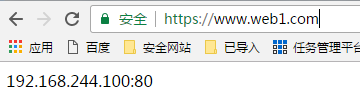
192.168.244.100:80
closed
[root@bogon CA]# openssl s_client -connect 192.168.244.100:443 -servername
www.web1.com
浏览器要先导入ca
通过浏览器测试:
18、httpd自带的工具程序
htpasswd: basic认证基于文件实现时,用到的账号密码文件生成工具;
apachectl:httpd自带的服务控制脚本,支持start, stop;
apxs:由httpd-devel包提供的,扩展httpd使用第三方模块的工具;
rotatelogs:日志滚动工具;
access.log -->
access.log, access.1.log
access.log, access.1.log, access.2.log
suexec:
访问某些有特殊权限配置的资源时,临时切换至指定用户运行;
ab: apache benchmark
19、http压力测试工具
ab
webbench
http_load
jmeter
loadrunner
tcpcopy
ab [OPTIONS] URL
-n: 总的请求数
-c:模拟的并发数 (类似于多少个人同时请求)
-k: 以持久连接模式测试
ulimit -n #: 调整当前用户所同时打开的文件数;
测试例子:
[root@bogon CA]# ab -c 100 -n 10000 http://192.168.244.100/deflate.html
This is ApacheBench, Version 2.3 <$Revision: 1430300 $>
Copyright 1996 Adam Twiss, Zeus Technology Ltd, http://www.zeustech.net/
Licensed to The Apache Software Foundation, http://www.apache.org/
Benchmarking 192.168.244.100 (be patient)
Completed 1000 requests
Completed 2000 requests
Completed 3000 requests
Completed 4000 requests
Completed 5000 requests
Completed 6000 requests
Completed 7000 requests
Completed 8000 requests
Completed 9000 requests
Completed 10000 requests
Finished 10000 requests
Server Software: Apache/2.2.15
Server Hostname: 192.168.244.100
Server Port: 80
Document Path: /deflate.html
Document Length: 20097 bytes
Concurrency Level: 100
Time taken for tests: 9.905 seconds
Complete requests: 10000
Failed requests: 0
Write errors: 0
Total transferred: 203920000 bytes
HTML transferred: 200970000 bytes
Requests per second: 1009.59 [#/sec] (mean)
Time per request: 99.050 [ms] (mean)
Time per request: 0.991 [ms] (mean, across all concurrent requests)
Transfer rate: 20105.06 [Kbytes/sec] received
Connection Times (ms)
min mean[+/-sd] median max
Connect: 0 2 7.6 0 122
Processing: 15 96 56.9 76 443
Waiting: 2 91 53.8 70 423
Total: 47 98 57.8 77 443
Percentage of the requests served within a certain time (ms)
50% 77
66% 89
75% 108
80% 122
90% 163
95% 218
98% 297
99% 332
100% 443 (longest request)
- 【HTTPS】自签CA证书 && nginx配置https服务
首先,搭建https服务肯定需要一个https证书.这个证书可以看做是一个应用层面的证书.之所以这么说是因为https证书是基于CA证书生成的.对于正式的网站,CA证书需要到有资质的第三方证书颁发机构 ...
- nginx配置https双向验证(ca机构证书+自签证书)
nginx配置https双向验证 服务端验证(ca机构证书) 客户端验证(服务器自签证书) 本文用的阿里云签发的免费证书实验,下载nginx安装ssl,文件夹有两个文件 这两个文件用于做服务器http ...
- nginx 之 https 证书配置
HTTPS原理和作用 为什么需要HTTPS 原因:HTTP不安全 传输数据被中间人盗用.信息泄露 数据内容劫持.篡改 HTTPS协议的实现 对传输内容进行加密以及身份验证 对称加密:加密秘钥和解密秘钥 ...
- K8s 系列(三) - 如何配置 etcd https 证书?
在 K8s 中,kube-apiserver 使用 etcd 对 REST object 资源进行持久化存储,本文介绍如何配置生成自签 https 证书,搭建 etcd 集群给 apiserver 使 ...
- 一个空行引起的阿里云负载均衡上部署https证书的问题
今天在阿里云上购买了WoSign的https证书,在证书签发后,在控制台下载证书文件,一共有2个文件,一个是.key文件(私钥文件),一个是.pem文件(证书文件). 然后在阿里云负载均衡“证书管理” ...
- 自制Https证书并在Spring Boot和Nginx中使用
白话Https一文中, 介绍了Https存在的目的和工作原理,但多是偏向于原理性的介绍,本文介绍如何一步一步自制一个能够通过浏览器认证的Https证书,并讲解在Spring Boot环境和Nginx环 ...
- 申请https证书需要注意的4大问题
HTTPS证书是什么 https证书是数字证书中的一种,由受信任的数字证书颁发机构CA如[沃通CA]在验证服务器身份后颁发,具有服务器身份验证和数据传输加密 功能,因其要配置在服务器上,所以也称SSL ...
- 如何申请https证书、搭建https网站
如何申请https证书.搭建https网站 随着国内搜索引擎巨头百度启用全站https加密服务,全国掀起了网站https加密浪潮.越来越多的站点希望通过部署https证书来解决“第三方”对用户隐私的嗅 ...
- https证书申请
因为要为海外组的aws设置https证书,由于使用的是新的域名,所以要先申请购买证书,然后设置上去.由于是第一次做这件事.所以过程有些坎坷. 先购买https证书.看了几家,感觉GoDad ...
随机推荐
- mac 查看系统位数
uname -a
- xshell登陆腾讯云服务器
2016-12-11 00:17:36 前段时间在同学的介绍下关注了一下腾讯云:然后里面有学生优惠可以拿到免费的域名和云服务器.所以感兴趣就实验了一下,今天中午抢到了“1元特惠的学生包”,里面有免 ...
- mysql 授权新的root用户
grant all privileges to *.* on system@'localhost' identified by 'woshishui' with grant option;
- [Codevs 1230]元素查找(手写哈希表)
题目连接:http://codevs.cn/problem/1230/ 说白了就是要我们自己手写一个哈希表的数据结构来实现加入和查找功能.map也能直接过(我第一次写就是用map骗AC的) 提一下个人 ...
- kubernetes资源调度之LimitRange
系列目录 LimitRange从字面意义上来看就是对范围进行限制,实际上是对cpu和内存资源使用范围的限制 前面我们讲到过资源配额,资源配额是对整个名称空间的资源的总限制,是从整体上来限制的,而Lim ...
- Fedora21 安装视频播放解码器
12 12月 2014年12月12日 Posted by 涛儿 2 首先启用RPM Fusion软件源: sudo rpm -ivh http://download1.rpmfusion.org/fr ...
- 关于input:-webkit-autofill样式问题
最近在整理项目的时候,遇到了一个chrome浏览器自动填充的样式问题, 用户名跟密码的input都设置为透明颜色,但是会变成黄色,打开chrome调试工具,发现有个input:-webkit-auto ...
- java 最长回文字串
package string.string1_6; public class LongestPalidrome { /** * 使用常规方法, 以字符串的每一个字符作为中心进行判断, 包括奇数和偶 ...
- android android:duplicateParentState="true" "false"
今天要做一个效果.组件RelativeLayout上有两个TextView.这两个TextView具有不同的颜色值,如今要的效果是,当RelativeLayout被点击时,整个item有高亮背景. 同 ...
- 3438: 小M的作物[最小割]
3438: 小M的作物 Time Limit: 10 Sec Memory Limit: 256 MBSubmit: 1073 Solved: 465[Submit][Status][Discus ...