
分享知识-快乐自己:Struts2文件上传及文件下载
1)Struts2单文件上传
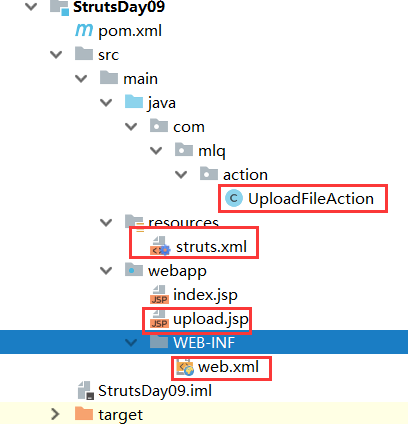
action:类文件
package com.mlq.action;

import com.opensymphony.xwork2.ActionSupport;

import org.apache.commons.io.FileUtils;

import org.apache.struts2.ServletActionContext;

import java.io.File;

import java.io.IOException;

/**

 * Struts2:单文件上传

 *

 * @author asus

 */

public class UploadFileAction extends ActionSupport {

    //临时文件

    private File upload;

    //文件类型(底层规定属性名称)

    private String uoloadContextType;

    //文件名称(底层规定属性名称)

    private String uploadFileName;

    //文件存放路径

    private String savePath;

    @Override

    public void validate() {

        System.out.println("严重方法");

    }

    //默认访问方法

    @Override

    public String execute() throws IOException {

        //文件全路径

        File destFile = new

                File(ServletActionContext.getRequest().getRealPath(savePath) + "\\" + getUploadFileName());

        String path = destFile.getPath();

        System.out.println(path + "------");

        FileUtils.copyFile(upload, destFile);

        return "success";

    }

    public String getSavePath() {

        return savePath;

    }

    public void setSavePath(String savePath) {

        this.savePath = savePath;

    }

    public File getUpload() {

        return upload;

    }

    public void setUpload(File upload) {

        this.upload = upload;

    }

    public String getUoloadContextType() {

        return uoloadContextType;

    }

    public void setUoloadContextType(String uoloadContextType) {

        this.uoloadContextType = uoloadContextType;

    }

    public String getUploadFileName() {

        return uploadFileName;

    }

    public void setUploadFileName(String uploadFileName) {

        this.uploadFileName = uploadFileName;

    }

}
struts.xml:核心配置文件
<?xml version="1.0" encoding="UTF-8" ?>

<!DOCTYPE struts PUBLIC  "-//Apache Software Foundation//DTD Struts Configuration 2.0//EN"

        "http://struts.apache.org/dtds/struts-2.0.dtd">

<struts>

    <package name="user" namespace="/user" extends="struts-default">

        <!--全局配置信息-->

        <global-results>

            <result name="input">/upload.jsp</result>

        </global-results>

        <!--文件上传-->

        <action name="upload" class="com.mlq.action.UploadFileAction">

            <!--内置设定action类中的属性值-->

            <param name="savePath">/upload</param>

            <result>/upload.jsp</result>

            <!--设定文件参数-->

            <interceptor-ref name="fileUpload">

                <param name="maximumSize">512000</param>

                <param name="allowedType">image/jpg</param>

            </interceptor-ref>

            <!--默认的拦截器-->

            <interceptor-ref name="defaultStack"></interceptor-ref>

        </action>

    </package>

</struts>
upload.jsp:JSP页面
<%@ taglib prefix="s" uri="/struts-tags" %>

<%--

  Created by IntelliJ IDEA.

  User: asus

  Date: 2018/10/4

  Time: 10:32

  To change this template use File | Settings | File Templates.

--%>

<%@ page contentType="text/html;charset=UTF-8" language="java" isELIgnored="false" %>

<html>

<head>

    <title>StrutsTow文件上传</title>

</head>

<body>

<div>

    <fieldset>

        <legend>Struts2文件上传</legend>

        <form action="/user/upload" enctype="multipart/form-data" method="post">

            选择文件:<input type="file" name="upload">

            <input type="submit" value="提交">

        </form>

    </fieldset>

    <br/><br/>

    <fieldset>

        <legend>上传的图片回显</legend>

        <img width="200px" height="300px" src="/upload/<s:property value='uploadFileName'/>"/>

    </fieldset>

    <br/><br/>

    <fieldset>

        <legend>错误信息</legend>

        <s:fielderror></s:fielderror>

    </fieldset>

</div>

</body>

</html>
Web.xml:核心配置
    <!--核心控制器-->

    <filter>

        <filter-name>struts2</filter-name>

        <filter-class>org.apache.struts2.dispatcher.ng.filter.StrutsPrepareAndExecuteFilter</filter-class>

    </filter>

    <filter-mapping>

        <filter-name>struts2</filter-name>

        <url-pattern>/*</url-pattern>

    </filter-mapping>

    <welcome-file-list>

        <welcome-file>upload.jsp</welcome-file>

    </welcome-file-list>
2)Struts2多文件上传

action:类文件
package com.mlq.action;

import com.opensymphony.xwork2.ActionSupport;

import org.apache.commons.io.FileUtils;

import org.apache.struts2.ServletActionContext;

import java.io.File;

import java.io.IOException;

/**

 * Struts2:单文件上传

 *

 * @author asus

 */

public class UploadsFileAction extends ActionSupport {

    //临时文件

    private File[] upload;

    //文件类型

    private String[] uoloadContextType;

    //文件名称

    private String[] uploadFileName;

    //文件存放路径

    private String savePath;

    @Override

    public void validate() {

        System.out.println("严重方法");

    }

    //默认访问方法

    @Override

    public String execute() throws IOException {

        for (int i = 0; i < upload.length; i++) {

            File temp=upload[i];

            //文件全路径

            File destFile = new

                    File(ServletActionContext.getRequest().getRealPath(savePath) + "\\" + uploadFileName[i]);

            String path = destFile.getPath();

            System.out.println(path + "------");

            FileUtils.copyFile(temp, destFile);

        }

        return "success";

    }

    public File[] getUpload() {

        return upload;

    }

    public void setUpload(File[] upload) {

        this.upload = upload;

    }

    public String[] getUoloadContextType() {

        return uoloadContextType;

    }

    public void setUoloadContextType(String[] uoloadContextType) {

        this.uoloadContextType = uoloadContextType;

    }

    public String[] getUploadFileName() {

        return uploadFileName;

    }

    public void setUploadFileName(String[] uploadFileName) {

        this.uploadFileName = uploadFileName;

    }

    public String getSavePath() {

        return savePath;

    }

    public void setSavePath(String savePath) {

        this.savePath = savePath;

    }

}
struts.xml:核心配置文件
<?xml version="1.0" encoding="UTF-8" ?>

<!DOCTYPE struts PUBLIC  "-//Apache Software Foundation//DTD Struts Configuration 2.0//EN"

        "http://struts.apache.org/dtds/struts-2.0.dtd">

<struts>

    <!--全局总文件大小设置-->

    <constant name="struts.multipart.maxSize" value="5097152"/>

    <package name="user" namespace="/user" extends="struts-default">

        <!--全局配置信息-->

        <global-results>

            <result name="input">/upload.jsp</result>

        </global-results>

        <!--文件上传-->

        <action name="upload" class="com.mlq.action.UploadsFileAction">

            <!--内置设定action类中的属性值-->

            <param name="savePath">/upload</param>

            <result>/upload.jsp</result>

            <!--设定文件参数-->

            <interceptor-ref name="fileUpload">

                <param name="maximumSize">512000</param>

                <param name="allowedType">image/jpg</param>

            </interceptor-ref>

            <!--默认的拦截器-->

            <interceptor-ref name="defaultStack"></interceptor-ref>

        </action>

    </package>

</struts>
upload.jsp:JSP页面
<%@ taglib prefix="s" uri="/struts-tags" %>

<%--

  Created by IntelliJ IDEA.

  User: asus

  Date: 2018/10/4

  Time: 10:32

  To change this template use File | Settings | File Templates.

--%>

<%@ page contentType="text/html;charset=UTF-8" language="java" isELIgnored="false" %>

<html>

<head>

    <title>StrutsTow文件上传</title>

</head>

<body>

<div>

    <fieldset>

        <legend>Struts2文件上传</legend>

        <form action="/user/upload" enctype="multipart/form-data" method="post">

            选择文件:<input type="file" name="upload">

            <br/>

            选择文件:<input type="file" name="upload">

            <br/>

            选择文件:<input type="file" name="upload">

            <input type="submit" value="提交">

        </form>

    </fieldset>

    <br/><br/>

    <fieldset>

        <legend>上传的图片回显</legend>

        <s:iterator value="uploadFileName">

            <img width="200px" height="300px" src="/upload/<s:property/>"/>

        </s:iterator>

    </fieldset>

    <br/><br/>

    <fieldset>

        <legend>错误信息</legend>

        <s:fielderror></s:fielderror>

    </fieldset>

</div>

</body>

</html>
web.xml:核心配置
<!--核心控制器-->

  <filter>

    <filter-name>struts2</filter-name>

    <filter-class>org.apache.struts2.dispatcher.ng.filter.StrutsPrepareAndExecuteFilter</filter-class>

  </filter>

  <filter-mapping>

    <filter-name>struts2</filter-name>

    <url-pattern>/*</url-pattern>

  </filter-mapping>

  <welcome-file-list>

    <welcome-file>upload.jsp</welcome-file>

  </welcome-file-list>
3)Struts2文件下载
action:类文件
package com.mlq.action;

import com.opensymphony.xwork2.ActionSupport;

import org.apache.struts2.ServletActionContext;

import java.io.BufferedInputStream;

import java.io.FileInputStream;

import java.io.FileNotFoundException;

import java.io.InputStream;

/**

 * Struts2:文件下载

 *

 * @author asus

 */

public class FileDownAction extends ActionSupport {

    /***

     * 读取下载文件的目录

     */

    private String inputPath;

    /***

     * 下载文件的文件名

     */

    private String fileName;

    /***

     * 读取下载文件的输入流

     */

    private InputStream inputStream;

    public String getInputPath() {

        return inputPath;

    }

    public void setInputPath(String inputPath) {

        this.inputPath = inputPath;

    }

    public String getFileName() {

        return fileName;

    }

    public void setFileName(String fileName) {

        this.fileName = fileName;

    }

    public InputStream getInputStream() throws FileNotFoundException {

        String realPath =

                ServletActionContext.getServletContext().getRealPath(inputPath);

        System.out.println(realPath+"\\"+fileName);

        return new BufferedInputStream(new FileInputStream(realPath+"\\"+fileName));

    }

    public void setInputStream(InputStream inputStream) {

        this.inputStream = inputStream;

    }

}
struts.xml:核心配置文件
<?xml version="1.0" encoding="UTF-8" ?>

<!DOCTYPE struts PUBLIC  "-//Apache Software Foundation//DTD Struts Configuration 2.0//EN"

        "http://struts.apache.org/dtds/struts-2.0.dtd">

<struts>

    <package name="user" namespace="/user" extends="struts-default">

        <!--文件上传-->

        <action name="downLoad" class="com.mlq.action.FileDownAction">

            <!--指定文件下载目录地址-->

            <param name="inputPath">/upload</param>

            <!--设置下载类型-->

            <result name="success" type="stream">

                <!--设置发送到浏览器的MIMe类型-->

                <param name="contentType">application/octet-stream</param>

                <!--设置输入流的名称-->

                <param name="inputStream">inputStream</param>

                <!--提示用户打开还是下载-->

                <param name="contentDisposition">attachment;filename="${fileName}"</param>

                <!--缓冲区的大小:没有严格要求可随意设置-->

                <param name="bufferSize">4096</param>

            </result>

        </action>

    </package>

</struts>
index.jsp
<%@ taglib prefix="s" uri="/struts-tags" %>

<%--

  Created by IntelliJ IDEA.

  User: asus

  Date: 2018/10/4

  Time: 10:32

  To change this template use File | Settings | File Templates.

--%>

<%@ page contentType="text/html;charset=UTF-8" language="java" isELIgnored="false" %>

<html>

<head>

    <title>StrutsTow文件下载</title>

</head>

<body>

<div>

    <fieldset>

        <legend>Struts2文件下载</legend>

        <a href="/user/downLoad?fileName=t01a4036c8714c169fd.jpg">文件下载</a>

    </fieldset>

</div>

</body>

</html>
web.xml核心配置
<!--核心控制器-->

  <filter>

    <filter-name>struts2</filter-name>

    <filter-class>org.apache.struts2.dispatcher.ng.filter.StrutsPrepareAndExecuteFilter</filter-class>

  </filter>

  <filter-mapping>

    <filter-name>struts2</filter-name>

    <url-pattern>/*</url-pattern>

  </filter-mapping>
单文件上传Demo: 多文件上传Demo: 文件下载Demo:
分享知识-快乐自己:Struts2文件上传及文件下载的更多相关文章
- Struts2文件上传和文件下载
一.单个文件上传 文件上传需要两个jar包: 首先制作一个简单的页面,用于实现文件上传 <h1>单个文件上传</h1> <s:form action="uplo ...
- Struts2 文件上传和文件下载
一.单个文件上传 文件上传需要两个jar包: 首先制作一个简单的页面,用于实现文件上传 <h1>单个文件上传</h1> <s:form action="uplo ...
- struts2的文件上传和文件下载
实现使用Struts2文件上传和文件下载: 注意点: (1)对应表单的file1和私有成员变量的名称必须一致 <input type="file" name="fi ...
- 分享知识-快乐自己:SpringMvc中的单多文件上传及文件下载
摘要:SpringMvc中的单多文件上传及文件下载:(以下是核心代码(拿过去直接能用)不谢) <!--设置文件上传需要的jar--> <dependency> <grou ...
- 【Java EE 学习 35 下】【struts2】【struts2文件上传】【struts2自定义拦截器】【struts2手动验证】
一.struts2文件上传 1.上传文件的时候要求必须使得表单的enctype属性设置为multipart/form-data,把它的method属性设置为post 2.上传单个文件的时候需要在Act ...
- springMvc 使用ajax上传文件,返回获取的文件数据 附Struts2文件上传
总结一下 springMvc使用ajax文件上传 首先说明一下,以下代码所解决的问题 :前端通过input file 标签获取文件,通过ajax与后端交互,后端获取文件,读取excel文件内容,返回e ...
- Struts2文件上传下载
Struts2文件上传 Struts2提供 FileUpload拦截器,用于解析 multipart/form-data 编码格式请求,解析上传文件的内容,fileUpload拦截器 默认在defau ...
- Struts2文件上传和下载(原理)
转自:http://zhou568xiao.iteye.com/blog/220732 1. 文件上传的原理:表单元素的enctype属性指定的是表单数据的编码方式,该属性有3个值:1) ...
- struts2文件上传大小限制问题小结
一:首先看一下程序执行中出现的对应报错信息,如下所示: [WARN ] 2015-03-03 15:31:11 :Unable to parse request org.apache.commons. ...
随机推荐
- eclipse 安装java web插件
1.eclipse java web搭建以及tomcat配置: http://www.cnblogs.com/yangyxd/articles/5615965.html 注意选择Eclipse IDE ...
- [Android]egit取消文件版本号控制
开发项目,多人合作开发变得越来越重要了,在此同一时候,使用git作为协同工具也是越来越多.在此.介绍一下egit取消文件版本号控制的方法. (egit即为eclipse中的git插件) 1.打开Nav ...
- UDP最大传输字节
每个包最大可携带字节长度:65507个byte. 封装成 IP 后,大小超出 PMTU 的分组将可能被 fragmented. 如果设置了 Don't Frag,超出 PMTU 的分组将不能被发送. ...
- socket 、 udp 和 tcp
强调一点: socket . udp . tcp之间的区别. socket只是一种套接字,就是两台电脑两端的东西,中间传输以流的格式进行. IBEO好像是TCP/IP , 无论对于TCP和UDP, ...
- 2、C++ 的升级
1.内联函数 define 可以定义宏代码片段,但是,C++ 推荐使用内联函数替代宏代码片段. inline int f(int a, int b) { } 只需要在 函数定义(实现) ...
- CSS解决无空格太长的字母,数字不会自己主动换行的问题
事实上非常easy,代码例如以下所看到的,注意 Style: <div class="detail_title" style="word-break: break- ...
- arcgis水文分析
前言 1.在开始之前首先需要注意几点: 1.arcgis 需要 python2.7 的支持,并有必要的模块库,请一定注意避免与其他软件冲突,例如tecplot 2009 需要python2.5的支持, ...
- android开发系列之视频断点续传
今天在这篇博客里面,我想说说自己在这几天遇到的一个棘手的问题,就是视频断点续传的问题.其实这在我们开发中是一个很常见的应用场景,比如视频.音频.pdf等相关的文档.如果之前没有接触过的话,你也许会被这 ...
- javascript关闭弹出窗体时刷新父窗体和居中显示弹出窗
居中显示用到了moveTO()方法: 关闭弹出窗时刷新父窗体用到了window.opener方法: 父窗体代码例如以下: <%@ Page Language="C#" Aut ...
- gulp入门-压缩js/css文件(windows)
类似于grunt,都是基于Node.js的前端构建工具.不过gulp压缩效率更高. 工具/原料 nodejs/npm 方法/步骤 首先要确保pc上装有node,然后在global环境和项目文件中都in ...