
django前端渲染多对多关系(比如一本书的作者有哪些)
自己遇到的问题是,前端渲染不出多对多关系,咨询Yuan后解决,特此记录。
urls.py
from django.conf.urls import url

from book import views

urlpatterns = [

    url(r'^index/', views.index),

    url(r'^add/', views.add),

    url(r'^delete/', views.delete),

    url(r'^modify/', views.modify),

]
models.py
from django.db import models

# Create your models here.

class Publisher(models.Model):

    name = models.CharField(max_length=, verbose_name="名称")

    address = models.CharField("地址", max_length=)

    city = models.CharField('城市', max_length=)

    state_province = models.CharField(max_length=)

    country = models.CharField(max_length=)

    website = models.URLField()

    class Meta:

        verbose_name = '出版商'

        verbose_name_plural = verbose_name

    def __str__(self):

        return self.name

class Author(models.Model):

    name = models.CharField(max_length=)

    def __str__(self):

        return self.name

class AuthorDetail(models.Model):

    # sex = models.BooleanField(max_length=, choices=((, '男'), (, '女'),))

    sex = models.CharField(max_length=)

    email = models.EmailField()

    address = models.CharField(max_length=)

    birthday = models.DateField()

    author = models.OneToOneField(Author)

    def __str__(self):

        return '(%s,%s,%s)' % (self.sex, self.email, self.address)

class Book(models.Model):

    title = models.CharField(max_length=)

    price = models.DecimalField(max_digits=, decimal_places=, default=)

    authors = models.ManyToManyField('Author')

    publisher = models.ForeignKey('Publisher')

    publication_date = models.DateField(default='2017-08-20')

    def __str__(self):

        return self.title
views.py
def index(request):

    all_book_list = Book.objects.all()  # 获取所有book对象

    if request.method == "POST":  # 搜索框的POST请求和数据

        key_word = request.POST.get('key_word')

        all_book_list = Book.objects.filter(title__contains=key_word)

    return render(request, "book/index.html", {"all_book_list": all_book_list})
book/book.index.html
<!--{% load book_to_author %}-->
{% load staticfiles %}
<!DOCTYPE html>
<html>
<head>
<meta charset="utf-8">
<title>内部管理系统</title>
<link rel="stylesheet" href="https://cdn.bootcss.com/bootstrap/3.3.7/css/bootstrap.min.css">
<script src="https://cdn.bootcss.com/jquery/2.1.1/jquery.min.js"></script>
<script src="https://cdn.bootcss.com/bootstrap/3.3.7/js/bootstrap.min.js"></script>
<style>
ul{
padding: 20px 30px 20px 50px;
}
ul li {
margin: 30px ;
}
{# 分割 #}
.outer{
margin: 100px auto;
width: %;
height: 400px;
border: 1px solid rebeccapurple;
position: relative;
}
.search_form {
position: absolute;
top: 10px;
left: 750px;
}
.table-content {
position: absolute;
top: 50px;
}
.form {
display: inline-block;
}
.add-button{
position: absolute;
right: 20px;
bottom: 20px;
}
</style>
<link rel="stylesheet" href="{% static "dist/css/bootstrap.css" %}">
</head>
<body>
<ul id="myTab" class="nav nav-tabs">
<li class="active">
<a href="#book" data-toggle="tab">书籍管理</a>
</li>
<li>
<a href="/author/index">作者管理</a>
</li>
<li>
<a href="/publisher/index">出版社管理</a>
</li>
<li class="dropdown">
<a href="#" id="myTabDrop1" class="dropdown-toggle"
data-toggle="dropdown">学科<b class="caret"></b>
</a>
<ul class="dropdown-menu" role="menu" aria-labelledby="myTabDrop1">
<li><a href="#yuwen" tabindex="-1" data-toggle="tab">
语文</a>
</li>
<li><a href="#shuxue" tabindex="-1" data-toggle="tab">
数学</a>
</li>
</ul>
</li>
</ul>
<div id="myTabContent" class="tab-content">
<div class="tab-pane fade in active" id="book">
<div class="outer">
<form class="col-lg-2 input-group search_form" action="/index/" method="post">
<input class="form-control form" placeholder="Search for..." type="text" name="key_word">
<!--<input type="submit" value="">-->
<span class="input-group-btn">
<input class="btn btn-default" type="submit">Go2!</input>
</span>
</form>
<table class="table table-striped table-content">
<tbody>
<tr>
<th>编号</th>
<th>书名</th>
<th>价格</th>
<th>作者</th>
<th>出版社</th>
<th>出版日期</th>
<th> action</th>
</tr>
{% for book in all_book_list %}
<tr>
<td>{{ book.id }}</td>
<td>{{ book.title }}</td>
<td>{{ book.price }}</td>
<td>{{ book.authors }}</td> //这块是问题点
<td>{{ book.publisher }}</td>
<td>{{ book.publication_date|date:'Y-m-d'}}</td>
<td>
<a href="/book/delete/?id={{ book.id }}"><button type="button" class="btn btn-danger">删除</button></a>
<!-- Button trigger modal -->
<button type="button" class="btn btn-primary modify" data-toggle="modal" data-target="#myModal">编辑</button>
</td>
</tr>
{% endfor %}
</tbody>
</table>
<a href="/book/add/"><button type="button" class="btn btn-primary add-button">添加</button></a>
</div>
<!-- Modal -->
<div class="modal fade" id="myModal" tabindex="-1" role="dialog" aria-labelledby="myModalLabel">
<div class="modal-dialog" role="document">
<div class="modal-content">
<div class="modal-header">
<button type="button" class="close" data-dismiss="modal" aria-label="Close"><span aria-hidden="true">×</span></button>
<h4 class="modal-title" id="myModalLabel">编辑模式</h4>
</div>
<form action="/book/modify/" method="post">
<div class="modal-body">
<div class="input-group">
<span class="input-group-addon" id="basic-addon1">ID</span>
<input type="text" class="form-control BookId" aria-describedby="basic-addon1" name="BookId">
</div>
<div class="input-group">
<span class="input-group-addon" id="basic-addon1">书名</span>
<input type="text" class="form-control BookName" aria-describedby="basic-addon1" name="BookName">
</div>
<div class="input-group">
<span class="input-group-addon" id="basic-addon1">价格</span>
<input type="text" class="form-control Price" aria-describedby="basic-addon1" name="Price">
</div>
<div class="input-group">
<span class="input-group-addon" id="basic-addon1">作者</span>
<input type="text" class="form-control Author" aria-describedby="basic-addon1" name="Author">
</div>
<div class="input-group">
<span class="input-group-addon" id="basic-addon1">出版社</span>
<input type="text" class="form-control Publisher" aria-describedby="basic-addon1" name="Publisher">
</div>
<div class="input-group">
<span class="input-group-addon" id="basic-addon1">出版日期</span>
<input type="text" class="form-control Publication_date" aria-describedby="basic-addon1" name="Publication_date">
</div>
</div>
<div class="modal-footer">
<button type="button" class="btn btn-default" data-dismiss="modal">Close</button>
<button type="submit" class="btn btn-primary" id="modify_confirm">Save changes</button>
</div>
</form>
</div>
</div>
</div>
</div>
<div class="tab-pane fade" id="author">
</div>
<div class="tab-pane fade" id="publisher">
</div>
<div class="tab-pane fade" id="jmeter">
<p>语文。。。。</p>
</div>
<div class="tab-pane fade" id="ejb">
<p>数学。。。。。</p>
</div>
</div>
<!--page bottom js-->
<script src="{% static "dist/js/BookManagerSystem_book.js" %}"></script>
</body>
</html>
在前端模板语言中,如上方式使用
<td>{{ book.authors }}</td>
结果:
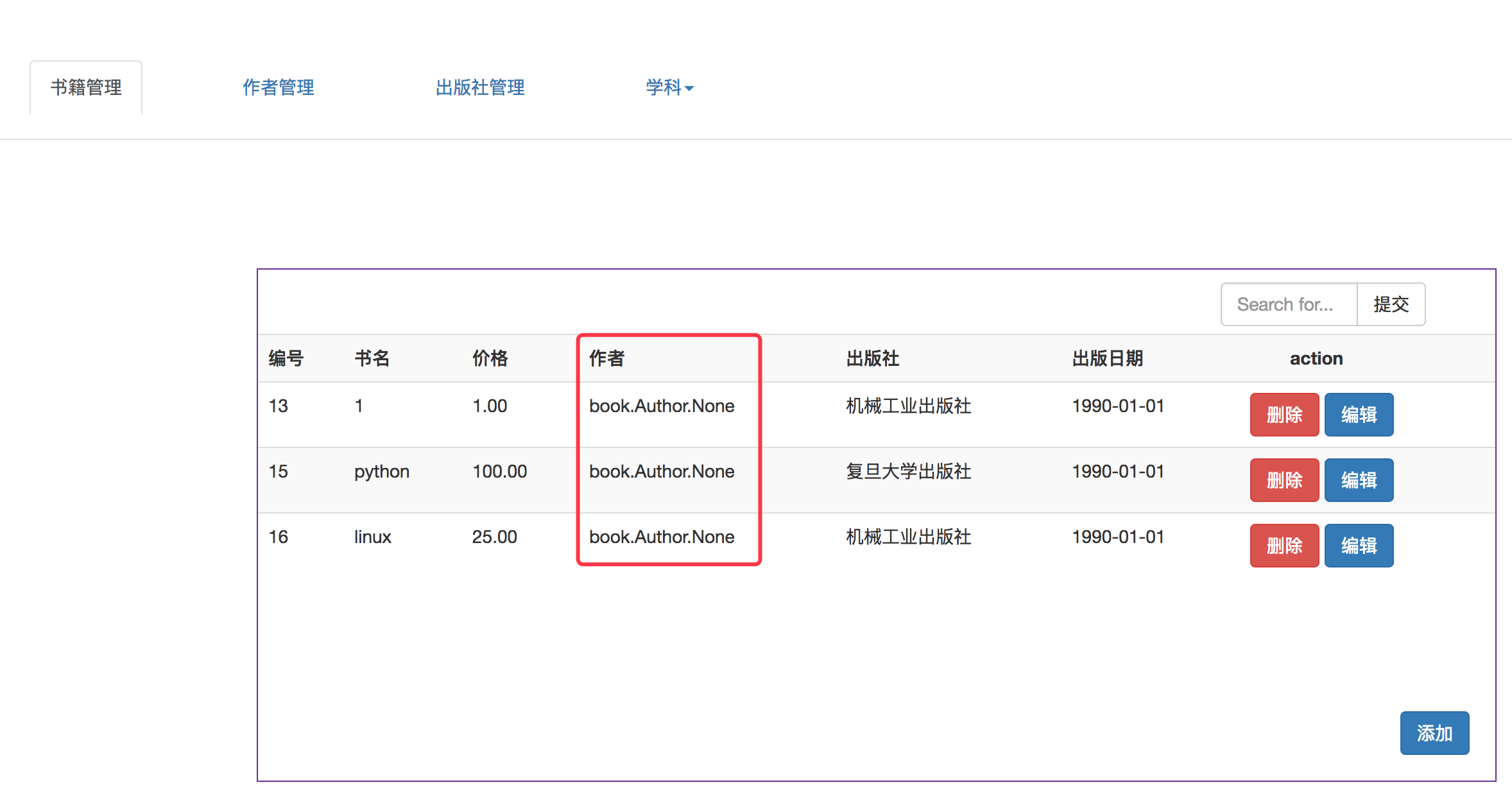
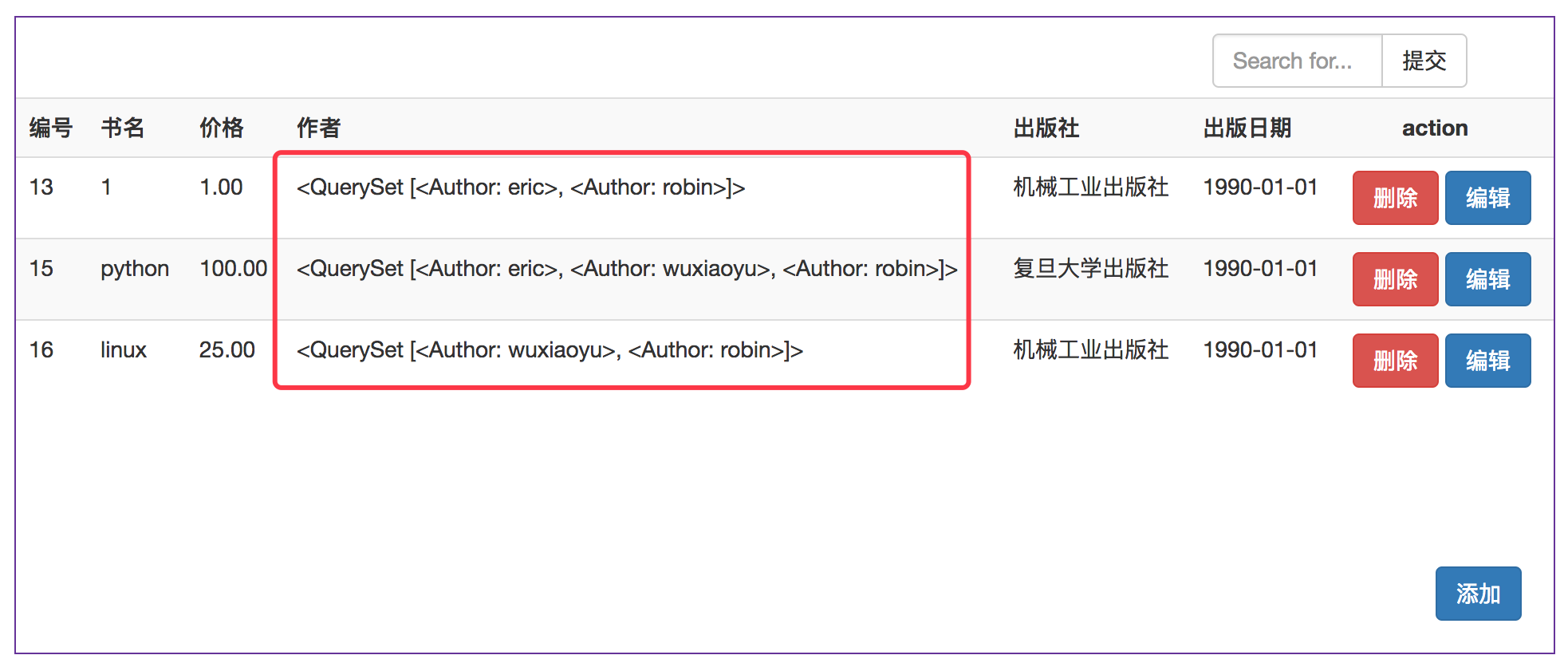
使用
<td>{{ book.authors.all }}</td>
结果
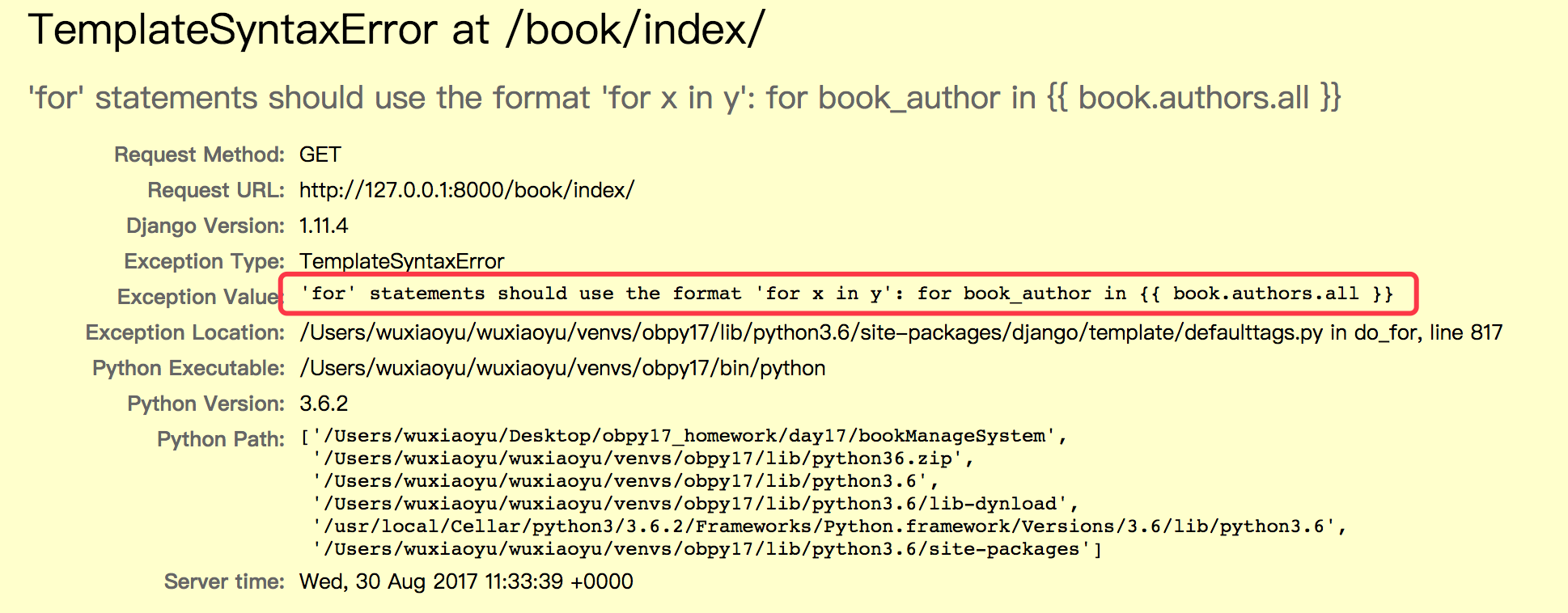
使用:
{% for book_author in {{ book.authors.all }} %}

         <td>{{ book_author }}</td>

{% endfor %}
效果
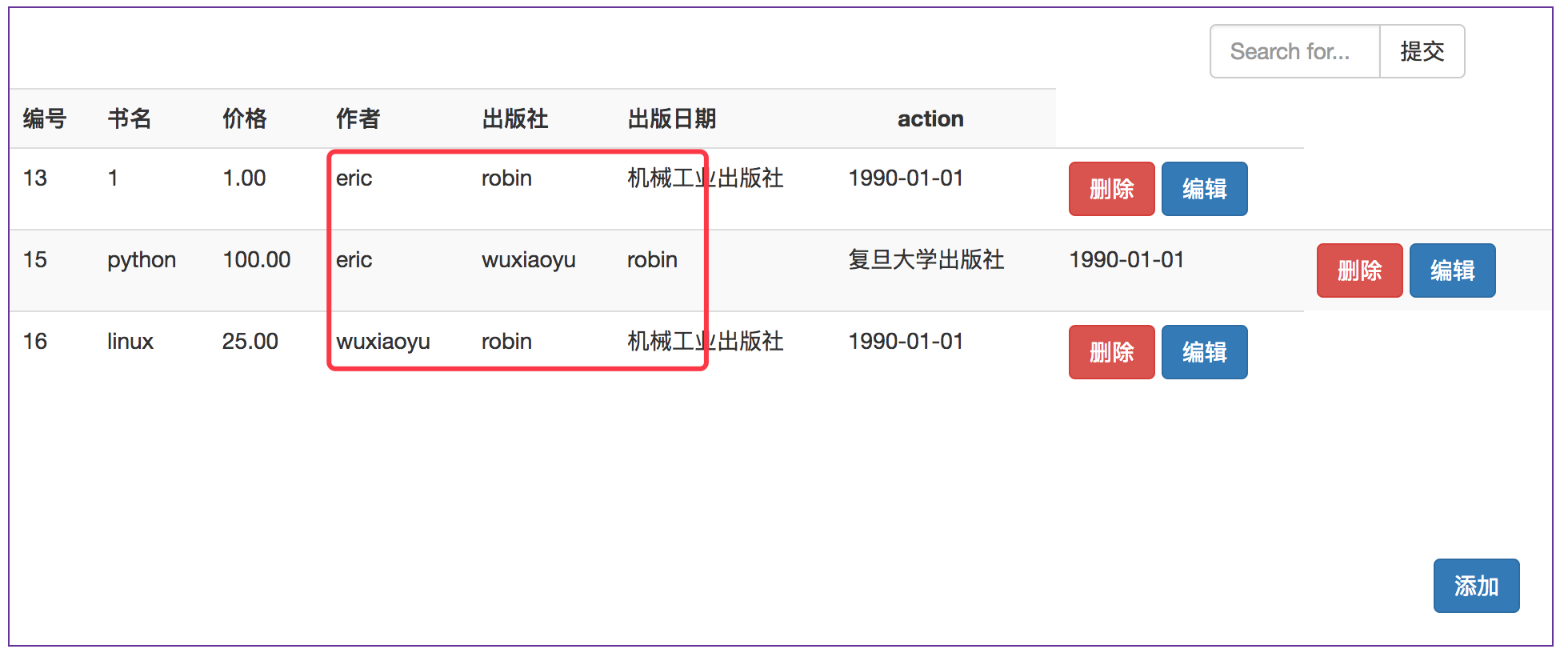
使用:
{% for book_author in book.authors.all %}

          <td>{{ book_author }}</td>

 {% endfor %}
效果
正确的做法:
            {% for book in all_book_list %}

                   <tr>

                        <td>{{ book.id  }}</td>

                        <td>{{ book.title }}</td>

                        <td>{{ book.price }}</td>

                       <td>

                            {% for book_author in book.authors.all %}

                                {{ book_author }}

                            {% endfor %}

                       </td>  //将循环放在td标签内

                        <td>{{ book.publisher }}</td>

                        <td>{{ book.publication_date|date:'Y-m-d'}}</td>

                       <td>

                           <a href="/book/delete/?id={{ book.id }}"><button  type="button" class="btn btn-danger">删除</button></a>

                           <!-- Button trigger modal -->

                           <button type="button" class="btn btn-primary modify" data-toggle="modal" data-target="#myModal">编辑</button>

                       </td>

                   </tr>

                {% endfor %}
效果
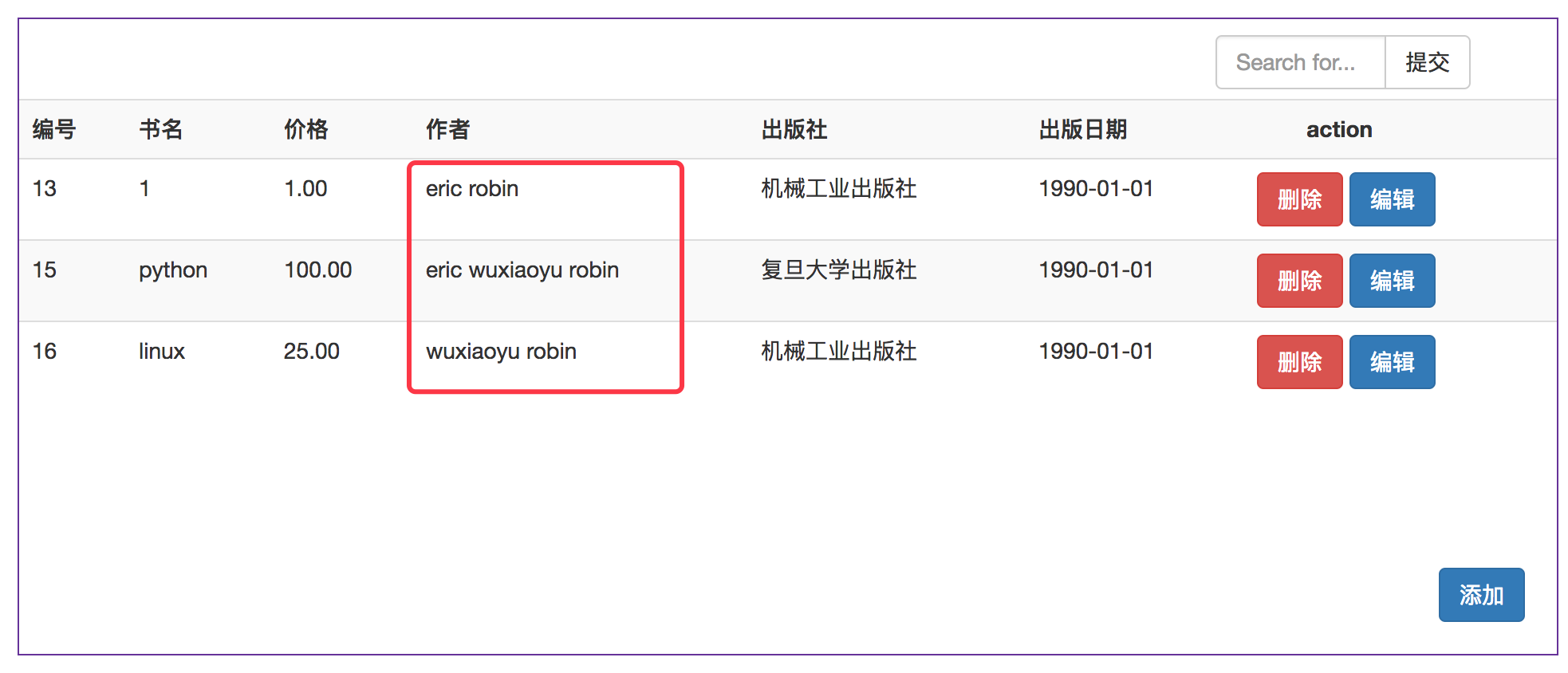
哎~~~踩坑的地方,以为在{% for %} 内部循环的时候变量也要使用{{变量名}},其实不用,另外td和元素的嵌套关系没设置正确~~~
django前端渲染多对多关系(比如一本书的作者有哪些)的更多相关文章
- Django学习--9 多对一关系模型
保持前面的不变只是增加了一些 1.vim sdj/models.py class Blog(models.Model): name = models.CharField(max_leng ...
- django -- 多对多关系的实现
在django中表和表之间的多对多关系有两种实现方案: 方案一:直接使用django自动实现的多对多关系. 方案二:自己写连接表.然而告诉django在实现多对多关系时要使用的连接表. 一.方案一: ...
- django笔记-模型数据模板呈现过程记录(多对多关系)
首先,推荐一个网址:http://www.tuicool.com/articles/BfqYz2F,因为这里的比我的要有条理,更有利于各位的理解. 以下仅为为个人一次不完整的笔记: 环境:ubuntu ...
- Django多对多关系建立及Form组件
目录 Django多对多关系 1.创建方式一全自动 2.创建方式二纯手撸 3.半自动(推荐使用) forms校验组件 使用forms组件实现注册功能 form常用字段和插件 数据校验 钩子函数 HOO ...
- Django中多对多关系的orm表设计
作者的管理 1.设计表结构 出版社 书籍 作者 一个出版社出版多个书籍 1对多 书籍和作者的关系:一个作者写多本书,一本书可以是多个作者写.多对多 1)创建一张表,表中多对多的数据关系.使用 多对多 ...
- Django 一对多,多对多关系解析
[转]Django 一对多,多对多关系解析 Django 的 ORM 有多种关系:一对一,多对一,多对多. 各自定义的方式为 : 一对一: OneToOneField ...
- django ORM模型表的一对多、多对多关系、万能双下划线查询
一.外键使用 在 MySQL 中,如果使用InnoDB引擎,则支持外键约束.(另一种常用的MyIsam引擎不支持外键) 定义外键的语法为fieldname=models.ForeignKey(to_c ...
- Django 之多对多关系
1. 多对多关系 作者 <--> 书籍 1. 表结构设计 1. SQL版 -- 创建作者表 create table author( id int primary key auto_inc ...
- Linux下开发python django程序(django数据库多对多关系)
1.多对多关系数据访问 models.py设置 from django.db import models # Create your models here. sex_choices=( ('f',' ...
随机推荐
- 一步一步教你用IntelliJ IDEA 搭建SSM框架(1)
1.基本概念 SSM框架指:Spring MVC + Spring + MyBatis Spring MVC是一种web层mvc框架,用于替代servlet,处理|响应请求,获取表单参数,表单校验等 ...
- SC || 那些CheckStyle中的错误们
lab5里给了我们一个checkstyle查代码风格的方法.. 然后 lab4代码 copy一份! 添加checkstyle! 项目 右键 checkstyle!(自信脸) 3s后——7256 war ...
- 安装mysql时出现问题的解决办法
问题一:在安装.重装时出现could not start the service mysql error:0 原因: 卸载mysql时并没有完全删除相关文件和服务,需要手动清除. 安装到最后一步exe ...
- Silverlight日记:字符串装换成Path对象
一,需要动态绑定Path <UserControl x:Class="Secom.Emx2.SL.Common.Controls.EleSafe.Ele.Line" xmln ...
- 1_HDFS理论及安装部署
一.hadoop简介 1.hadoop的初衷是为了解决Nutch的海量数据爬取和存储的需要,HDFS来源于google的GFS,MapReduce来源于Google的MapReduce,HBase来源 ...
- 学习笔记(三): Generalization/Overfitting/Validation
目录 Generalization: Peril of Overfitting Low loss, but still a bad model? How Do We Know If Our Mod ...
- springboot maven 多环境配置
1.使用Intellij IDEA创建Spring Boot和Maven项目 2.Spring Boot项目下application.yaml(yaml支持中文)或者application.prope ...
- destoon 列表页面增加手动选择排序方式
在mobile/include/mall.inc.php 行60 $order = $MOD['order']; 之前增加 排序方式判断 如果有order参数则$order接受参数,没有就用默认 ...
- 多本Python极速入门最佳书籍,不可错过的Python学习资料!
Python作为现在很热门的一门编程语言,介于Python的友好,许多的初学者都将其作为首选,为了帮助大家更好的学习Python,我筛选了2年内优秀的python书籍,个别经典的书籍扩展到5年内. ...
- LeetCode(306) Additive Number
题目 Additive number is a string whose digits can form additive sequence. A valid additive sequence sh ...