
[蓝牙] 4、Heart Rate Service module
Detailed Description
Heart Rate Service module.
This module implements the Heart Rate Service with the Heart Rate Measurement, Body Sensor Location and Heart Rate Control Point characteristics. During initialization it adds the Heart Rate Service and Heart Rate Measurement characteristic to the BLE stack database. Optionally it also adds the Body Sensor Location and Heart Rate Control Point characteristics.
If enabled, notification of the Heart Rate Measurement characteristic is performed when the application calls ble_hrs_heart_rate_measurement_send().(这个主要是指notification,HRS主动向客户端发送消息的事件触发,下文在timers_init部分会讲:在周期性timeout回调函数中执行ble_hrs_heart_rate_measurement_send()来触发notification)
The Heart Rate Service also provides a set of functions for manipulating the various fields in the Heart Rate Measurement characteristic, as well as setting the Body Sensor Location characteristic value.
If an event handler is supplied提供 by the application, the Heart Rate Service will generate形成 Heart Rate Service events to the application.(来自应用提供的事件句柄,HRS会形成HRS事件给应用)
- Note
- The application must propagate传送 BLE stack events to the Heart Rate Service module by calling ble_hrs_on_ble_evt() from the from the ble_stack_handler callback.
- Attention! To maintain compliance with Nordic Semiconductor ASA Bluetooth profile qualification listings, this section of source code must not be modified.
timers_init()中关于hrs的部分
    err_code = app_timer_create(&m_heart_rate_timer_id,

                                 APP_TIMER_MODE_REPEATED,

                                 heart_rate_meas_timeout_handler);

     APP_ERROR_CHECK(err_code);
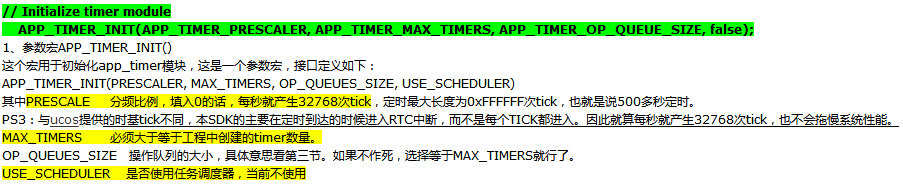
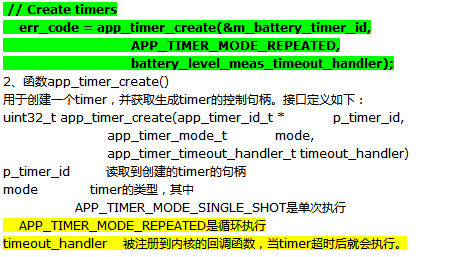
我对这里的timer暂时的理解是:这里的每次create都会产生一个timer,每个timer绑定一个timerout回调函数,如果是循环执行模式的话,会根据定时周期性触发timeout回调函数执行相关操作~
 /**@brief Function for handling the Heart rate measurement timer timeout.

  *

  * @details This function will be called each time the heart rate measurement timer expires.

  *          It will exclude RR Interval data from every third measurement.

  *

  * @param[in]   p_context   Pointer used for passing some arbitrary information (context) from the

  *                          app_start_timer() call to the timeout handler.

  */

 static void heart_rate_meas_timeout_handler(void * p_context)

 {

     uint32_t err_code;

     UNUSED_PARAMETER(p_context);

     err_code = ble_hrs_heart_rate_measurement_send(&m_hrs, m_cur_heart_rate);

     if (

         (err_code != NRF_SUCCESS)

         &&

         (err_code != NRF_ERROR_INVALID_STATE)

         &&

         (err_code != BLE_ERROR_NO_TX_BUFFERS)

         &&

         (err_code != BLE_ERROR_GATTS_SYS_ATTR_MISSING)

     )

     {

         APP_ERROR_HANDLER(err_code);

     }

 }
这里每个周期都会触发timeout_handler函数,并执行其内部的ble_hrs_heart_rate_measurement_send函数
 /**@brief Function for sending heart rate measurement if notification has been enabled.

  *

  * @details The application calls this function after having performed a heart rate measurement.

  *          If notification has been enabled, the heart rate measurement data is encoded and sent to

  *          the client.

  *

  * @param[in]   p_hrs                    Heart Rate Service structure.

  * @param[in]   heart_rate               New heart rate measurement.

  * @param[in]   include_expended_energy  Determines if expended energy will be included in the

  *                                       heart rate measurement data.

  *

  * @return      NRF_SUCCESS on success, otherwise an error code.

  */

 uint32_t ble_hrs_heart_rate_measurement_send(ble_hrs_t * p_hrs, uint16_t heart_rate)

 {

     uint32_t err_code;

     // Send value if connected and notifying

     if (p_hrs->conn_handle != BLE_CONN_HANDLE_INVALID)

     {

         uint8_t                encoded_hrm[MAX_HRM_LEN];

         uint16_t               len;

         uint16_t               hvx_len;

         ble_gatts_hvx_params_t hvx_params;

         len     = hrm_encode(p_hrs, heart_rate, encoded_hrm);

         hvx_len = len;

         memset(&hvx_params, , sizeof(hvx_params));

         hvx_params.handle   = p_hrs->hrm_handles.value_handle;

         hvx_params.type     = BLE_GATT_HVX_NOTIFICATION;

         hvx_params.offset   = ;

         hvx_params.p_len    = &hvx_len;

         hvx_params.p_data   = encoded_hrm;

         err_code = sd_ble_gatts_hvx(p_hrs->conn_handle, &hvx_params);

         if ((err_code == NRF_SUCCESS) && (hvx_len != len))

         {

             err_code = NRF_ERROR_DATA_SIZE;

         }

     }

     else

     {

         err_code = NRF_ERROR_INVALID_STATE;

     }

     return err_code;

 }
我们重点分析该函数是如何将heart_rate发送出去的,下面是ble_gatts_hvx_params_t的结构体:
 /**@brief GATT HVx parameters. */

 typedef struct

 {

   uint16_t          handle;             /**< Characteristic Value Handle. */

   uint8_t           type;               /**< Indication or Notification, see @ref BLE_GATT_HVX_TYPES. */

   uint16_t          offset;             /**< Offset within the attribute value. */

   uint16_t*         p_len;              /**< Length in bytes to be written, length in bytes written after successful return. */

   uint8_t*          p_data;             /**< Actual data content, use NULL to use the current attribute value. */

 } ble_gatts_hvx_params_t;
用这个封装一个notification包,然后调用sd_ble_gatts_hvx将该包发送出去~
//err_code = sd_ble_gatts_hvx(p_hrs->conn_handle, &hvx_params);
uint32_t sd_ble_gatts_hvx ( uint16_t conn_handle,
ble_gatts_hvx_params_t const *const p_hvx_params);
Notify or Indicate an attribute value.
This function checks for the relevant相关的 Client Characteristic Configuration descriptor描述符 value to verify判定 that the relevant operation (notification or indication) has been enabled by the client.
It is also able to update the attribute 属性 value before issuing发出 the PDU(protocol data unit:https://en.wikipedia.org/wiki/Protocol_data_unit && BLE 包结构及传输速率), so that the application can atomically原子级地 perform a value update and a server initiated开始 transaction事务 with a single API call. (仅仅调用一个API就能够将attribute的value有效地发出)If the application chooses to indicate an attribute value, a BLE_GATTS_EVT_HVC will be sent up as soon as the confirmation arrives from the peer.
Note
The local attribute value may be updated even if an outgoing packet is not sent to the peer due to an error during execution. When receiveing the error codes NRF_ERROR_INVALID_STATE, NRF_ERROR_BUSY, BLE_ERROR_GATTS_SYS_ATTR_MISSING and BLE_ERROR_NO_TX_BUFFERS the ATT table has been updated. The caller can check whether the value has been updated by looking at the contents of *(p_hvx_params->p_len).
 err_code = sd_ble_gatts_hvx(p_hrs->conn_handle, &hvx_params);

 if ((err_code == NRF_SUCCESS) && (hvx_len != len))

 {

        err_code = NRF_ERROR_DATA_SIZE;

 }
It is important to note that a notification will consume(消耗) an application buffer, and will therefore generate产生 a BLE_EVT_TX_COMPLETE event when the packet has been transmitted(发送完了会产生一个COMPLETE事件). An indication on the other hand will use the standard server internal buffer and thus will only generate a BLE_GATTS_EVT_HVC event as soon as the confirmation has been received from the peer. Please see the documentation of sd_ble_tx_buffer_count_get for more details.
services_init()中和hrs有关的部分
     hrs_init.evt_handler = hrs_event_handler;

     hrs_init.is_sensor_contact_supported = false;

     hrs_init.p_body_sensor_location      = &body_sensor_location;

     // Here the sec level for the Heart Rate Service can be changed/increased.

     BLE_GAP_CONN_SEC_MODE_SET_OPEN(&hrs_init.hrs_hrm_attr_md.cccd_write_perm);

     BLE_GAP_CONN_SEC_MODE_SET_NO_ACCESS(&hrs_init.hrs_hrm_attr_md.read_perm);

     BLE_GAP_CONN_SEC_MODE_SET_NO_ACCESS(&hrs_init.hrs_hrm_attr_md.write_perm);

     BLE_GAP_CONN_SEC_MODE_SET_OPEN(&hrs_init.hrs_bsl_attr_md.read_perm);

     BLE_GAP_CONN_SEC_MODE_SET_NO_ACCESS(&hrs_init.hrs_bsl_attr_md.write_perm);

     err_code = ble_hrs_init(&m_hrs, &hrs_init);
最后一个黄线部分阐明了事件如何关联——
application必须在ble_stack_handler的回调函数中调用ble_hrs_on_ble_evt()函数来将BLE stack events传送给Heart Rate Serice
下面这个函数负责分派 a BLE stack event to all modules 模块 with a BLE stack event handler.
是由ble_stack_handler的回调函数调用的,发生在:This function is called from the BLE Stack event interrupt handler after a BLE stack event has been received.
 /**@brief Function for dispatching a BLE stack event to all modules with a BLE stack event handler.

  *

  * @details This function is called from the BLE Stack event interrupt handler after a BLE stack

  *          event has been received.

  *

  * @param[in]   p_ble_evt   Bluetooth stack event.

  */

 static void ble_evt_dispatch(ble_evt_t * p_ble_evt)

 {

     ble_bondmngr_on_ble_evt(p_ble_evt);

     ble_hrs_on_ble_evt(&m_hrs, p_ble_evt);

     ble_bas_on_ble_evt(&bas, p_ble_evt);

     ble_conn_params_on_ble_evt(p_ble_evt);

     on_ble_evt(p_ble_evt);

 }
这样一旦有ble_stack_handler的回调收到一个BLE stack的事件就会将事件派送到ble_evt_dispatch函数,该函数将该事件派送到每个具体服务的on_ble_evt函数,实现消息传递
 void ble_hrs_on_ble_evt(ble_hrs_t * p_hrs, ble_evt_t * p_ble_evt)

 {

     switch (p_ble_evt->header.evt_id)

     {

         case BLE_GAP_EVT_CONNECTED:

             on_connect(p_hrs, p_ble_evt);

             break;

         case BLE_GAP_EVT_DISCONNECTED:

             on_disconnect(p_hrs, p_ble_evt);

             break;

         case BLE_GATTS_EVT_WRITE:

             on_write(p_hrs, p_ble_evt);

             break;

         default:

             // No implementation needed.

             break;

     }

 }
 /**@brief Function for handling the Connect event.

  *

  * @param[in]   p_hrs       Heart Rate Service structure.

  * @param[in]   p_ble_evt   Event received from the BLE stack.

  */

 static void on_connect(ble_hrs_t * p_hrs, ble_evt_t * p_ble_evt)

 {

     p_hrs->conn_handle = p_ble_evt->evt.gap_evt.conn_handle;

 }

 /**@brief Function for handling the Disconnect event.

  *

  * @param[in]   p_hrs       Heart Rate Service structure.

  * @param[in]   p_ble_evt   Event received from the BLE stack.

  */

 static void on_disconnect(ble_hrs_t * p_hrs, ble_evt_t * p_ble_evt)

 {

     UNUSED_PARAMETER(p_ble_evt);

     p_hrs->conn_handle = BLE_CONN_HANDLE_INVALID;

 }

 /**@brief Function for handling write events to the Heart Rate Measurement characteristic.

  *

  * @param[in]   p_hrs         Heart Rate Service structure.

  * @param[in]   p_evt_write   Write event received from the BLE stack.

  */

 static void on_hrm_cccd_write(ble_hrs_t * p_hrs, ble_gatts_evt_write_t * p_evt_write)

 {

     if (p_evt_write->len == )

     {

         // CCCD written, update notification state

         if (p_hrs->evt_handler != NULL)

         {

             ble_hrs_evt_t evt;

             if (ble_srv_is_notification_enabled(p_evt_write->data))

             {

                 evt.evt_type = BLE_HRS_EVT_NOTIFICATION_ENABLED;

             }

             else

             {

                 evt.evt_type = BLE_HRS_EVT_NOTIFICATION_DISABLED;

             }

             p_hrs->evt_handler(p_hrs, &evt);

         }

     }

 }

 /**@brief Function for handling the Write event.

  *

  * @param[in]   p_hrs       Heart Rate Service structure.

  * @param[in]   p_ble_evt   Event received from the BLE stack.

  */

 static void on_write(ble_hrs_t * p_hrs, ble_evt_t * p_ble_evt)

 {

     ble_gatts_evt_write_t * p_evt_write = &p_ble_evt->evt.gatts_evt.params.write;

     if (p_evt_write->handle == p_hrs->hrm_handles.cccd_handle)

     {

         on_hrm_cccd_write(p_hrs, p_evt_write);

     }

 }
注:
本篇讲了心率检测服务的业务流程
[蓝牙] 4、Heart Rate Service module的更多相关文章
- [蓝牙] 5、Battery Service module
Detailed Description This module implements the Battery Service with the Battery Level characteristi ...
- FreeBSD修改root密码错误passwd: pam_chau(www.111cn.net)thtok(): error in service module from:http://www.111cn.net/sys/freebsd/66713.htm
在FreeBSD中修改帐号密码有时候会出现一些错误,针对passwd: pam_chauthtok(): error in service module这样的错误提示,简单整理了以下解决方案:错误提示 ...
- 低功耗蓝牙ATT/GATT/Profile/Service/Characteristic规格解读
什么是蓝牙service和characteristic?到底怎么理解蓝牙profile?ATT和GATT两者如何区分?什么又是attribute?attribute和characteristic的区别 ...
- 蓝牙发现服务UUID(service UUID)
出至<蓝牙标准Core_V4.0>2.5.1 uuid(1576页) 其中 Bluetooth_Base_UUID定义为 00000000-0000-1000-8000-00805F9B3 ...
- Drupal service module 介绍
https://www.ostraining.com/blog/drupal/services/ https://www.drupal.org/node/1246470 https://www.dru ...
- [蓝牙] 6、基于nRF51822的蓝牙心率计工程消息流Log分析(详细)
开机初始化Log Log编号 函数名 所在文件名 000001: main ..\main.c 000002: timers_init ..\main.c 000003: gpiote_init ...
- [蓝牙] 3、 剖析BLE心率检测工程
位于:<KEIL path> \ARM\Device\Nordic\nrf51822\Board\pca10001\s110\ble_app_hrs Heart Rate Example ...
- [编译] 4、在Linux下搭建nRF51822的开发烧写环境(makefile版)
星期日, 09. 九月 2018 07:51下午 - beautifulzzzz 1.安装步骤 1) 从GNU Arm Embedded Toolchain官网下载最新的gcc-arm工具链,写文章时 ...
- 低功耗蓝牙4.0BLE编程-nrf51822开发(2)
相关下载:http://download.csdn.net/detail/xgbing/9565708 首先看的示例是心率计一个示例程序:<KEIL path> \ARM\Device\N ...
随机推荐
- CSV的导入导出
using System; using System.Data; using System.IO; namespace COMMON { public class CSVhelperClass { / ...
- HttpWebRequest header configuration
more details: http://www.cnblogs.com/yczz/archive/2012/06/01/2530484.html 在HttpWebRequest中,有一些header ...
- 区间型DP
区间型DP是一类经典的动态规划问题,主要特征是可以先将大区间拆分成小区间求解最后由小区间的解得到大区间的解. 有三道例题 一.石子合并 在一个圆形操场的四周摆放N堆石子,现要将石子有次序地合并成一堆. ...
- centos安装lamp环境
通过yum安装,需要联网且为su账号 yum -y install httpd php mysql mysql-server php-mysql 设置开启启动mysql,httpd /sbin ...
- tmpfs介绍
tmpfs 前几天发现服务器的内存(ram)和swap使用率非常低,于是就想这么多的资源不用岂不浪费了?google了一下,认识了tmpfs,总的来说tmpfs是一种虚拟内存文件系统正如这个定义它最大 ...
- Java学习笔记 04 类和对象
一.类和对象的概念 类 >>具有相同属性和行为的一类实体 对象 >>实物存在的实体.通常会将对象划分为两个部分,即静态部分和动态部分.静态部分指的是不能动的部分,被称为属性,任 ...
- Head First 设计模式读书笔记
在网上学习了一段时间设计模式,总感觉不系统,很容易忘,最近买书,学习了<Head First设计模式>,受益匪浅,特做此记录,以便激励自己不断的向后学习. 原书JAVA版本,本次学习记录及 ...
- 快手4.0 (KSCAD)
快手 4.0 (KSCAD) 是一款简单易用的矢量绘图软件,其功能和Visio类似,可以绘制工艺流程图,流程图.组织结构图.网络拓扑图.思维导图.商业图表等. 经过二次开发,可以应用于各种领域的图形化 ...
- 一步一步安装hive
安装hive 1.下载hive-0.11.0.tar.gz,解压; 2.下载mysql-connector-java-5.1.29-bin.jar并放到hive/lib/下: 3.配置hive/con ...
- jquery操作dom
1访问元素(属性,内容,值,css) 1元素属性(获取,设置,删除) .attr(name) .attr(key, value) || .attr({key0:value0, key1:value1 ...