
KTV项目 SQL数据库的应用 结合C#应用窗体
五道口北大青鸟校区
KTV项目
指导老师:袁玉明
歌曲播放原理

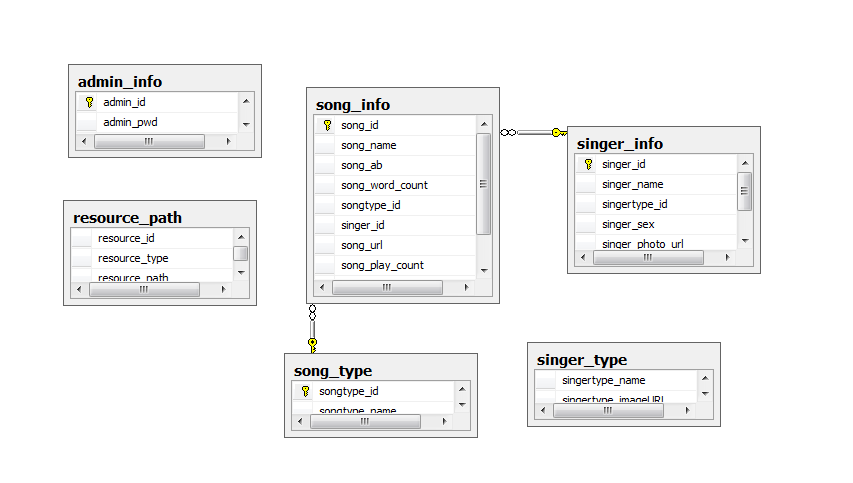
SQL数据库关系图

C#解决方案类图

第一步:创建数据库连接方法和打开方法和关闭方法!
  public class DBHelper
     {
        private  string str = "server=.;database=MyKtv;uid=sa";
        private SqlConnection _conection;

        public SqlConnection Conection
        {
            get
            {
                if (_conection==null)
                {
                    _conection = new SqlConnection(str);
                }
                return _conection;
            }
        }
        /// <summary>
        /// 打开方法
        /// </summary>
        public void OpenConnection()
        {
            if (Conection.State == ConnectionState.Closed)
            {
                Conection.Open();
            } if (Conection.State == ConnectionState.Broken)
            {
                Conection.Close();
                Conection.Open();
            }
        }
        /// <summary>
        /// 关闭方法`
        /// </summary>
        public void CloseConnection()
        {
            if (Conection.State == ConnectionState.Open && Conection.State == ConnectionState.Broken)
            {
                Conection.Close();
            }

        }
第二步:歌曲首页

歌曲首页:用到了窗体之间的转换和读取路径表中的图片路径放到filepath上
 public partial class FormMain : Form
     {
         DBHelper db = new DBHelper();
         public FormMain()
         {
             InitializeComponent();
         }
         private void Form1_Load(object sender, EventArgs e)
         {
             //读取路径表中的图片路径放到filepath上
             string sql = "select resource_path from resource_path where resource_id=1";
             SqlCommand cmd = new SqlCommand(sql,db.Conection);
             db.OpenConnection();
             KtvUtil.FilePath = cmd.ExecuteScalar().ToString();
             db.CloseConnection();
         }

         private void pictureBox1_Click(object sender, EventArgs e)
         {
             //打开明星点歌窗体
             FrmSinger frmSinger = new FrmSinger();
             frmSinger.Show();
         }

         private void toolStripButton4_Click(object sender, EventArgs e)
         {
             this.Close();
         }

         private void pictureBox4_Click(object sender, EventArgs e)
         {
             //打开拼音点歌窗体
             FrmOrderBySongName fobsn = new FrmOrderBySongName();
             fobsn.ShowDialog();
         }
第三步:歌星点歌


歌星点歌:用到了3个ListView之间的跳转,
 public partial class FrmSinger : Form
     {
         DBHelper db = new DBHelper();
         public string SingerType = "组合";
         ;

         public FrmSinger()
         {
             InitializeComponent();
         }

         private void panel1_Paint(object sender, PaintEventArgs e)
         {

         }
         /// <summary>
         /// 点击歌手类型后加载相应的信息
         /// </summary>
         public void ShowSingerDiQu()
         {
              ]!=null)
             {
                 lvtype.Visible = false;
                 lvSinger.Visible = true;
                 lvSinger.Location = lvtype.Location;

                 ].Tag);
             }
             string sql = "select singertype_name,singertype_id from singer_type";
             SqlCommand cmd = new SqlCommand(sql,db.Conection);
             SqlDataReader sdr;
             try
             {
                 db.OpenConnection();
                 sdr = cmd.ExecuteReader();
                 lvtype.Items.Clear();
                 if (sdr.HasRows)
                 {
                     ;
                     while (sdr.Read())
                     {
                         ListViewItem lvitem = new ListViewItem();
                         string typename = Convert.ToString(sdr["singertype_name"]);
                         int typeid = Convert.ToInt32(sdr["singertype_id"]);
                         lvitem.Text = typename;
                         lvitem.Tag = typeid;
                         lvitem.ImageIndex = result;
                         lvSinger.Items.Add(lvitem);
                         result++;
                     }
                     sdr.Close();
                 }
             }
             catch (Exception ex)
             {
                 MessageBox.Show("第二个系统报错" + ex.Message);
             }
             finally
             {
                 db.CloseConnection();
             }
         }

         private void listView2_SelectedIndexChanged(object sender, EventArgs e)
         {

         }

         private void FrmOrderBySinger_Load(object sender, EventArgs e)
         {
             this.lvSinger.Visible = false;
             this.lvContry.Visible=false;
         }

         private void listView1_Click(object sender, EventArgs e)
         {
              ShowSingerDiQu();
         }
         /// <summary>
         /// 读取对应地区的歌手名称
         /// </summary>
         public void ShowSingerName()
         {
             ]!=null)
             {
                 lvSinger.Visible = false;
                 lvContry.Visible = true;
                 lvContry.Location = lvtype.Location;
                 SingerId = Convert.ToInt32(lvSinger.SelectedItems[].Tag);
                 StringBuilder sb = new StringBuilder();
                 string sum = SingerType;
                 if (sum!="组合")
                 {
                     sum = SingerType == "女歌手" ? "男" : "女";
                 }
                 string sql = string.Format("select singer_name,singer_photo_url,singer_id from singer_info where singertype_id='{0}' and singer_sex='{1}'", SingerId,sum);
                 SqlCommand cmd = new SqlCommand(sql, db.Conection);
                 try
                 {
                     db.OpenConnection();
                     SqlDataReader read = cmd.ExecuteReader();
                     if (read.HasRows)
                     {
                         //歌手头像索引
                         ;
                         //清空图片集合
                         imageName.Images.Clear();
                         //清空listview列表集合
                         lvContry.Items.Clear();
                         if (read.HasRows)
                         {
                             while (read.Read())
                             {
                                 //图片的地址
                                 string path = KtvUtil.FilePath + @"" + Convert.ToString(read["singer_photo_url"]);
                                 imageName.Images.Add(Image.FromFile(path));
                                 ListViewItem lvitem = new ListViewItem();
                                 string typename = Convert.ToString(read["singer_name"]);
                                 int typeid = Convert.ToInt32(read["singer_id"]);
                                 lvitem.Text = typename;
                                 lvitem.Tag = typeid;
                                 lvitem.ImageIndex = imageindex;
                                 lvContry.Items.Add(lvitem);
                                 imageindex++;
                             }
                             read.Close();
                         }
                     }

                 }
                 catch (Exception ex)
                 {
                     MessageBox.Show("第三个系统报错!" + ex.Message);
                 }
                 finally
                 {
                     db.CloseConnection();
                 }
             }

         }
         private void lvName_Click(object sender, EventArgs e)
         {
             ShowList();
         }

         private void listView2_Click(object sender, EventArgs e)
         {
             ShowSingerName();
         }

         private void listView1_ChangeUICues(object sender, UICuesEventArgs e)
         {

         }
         /// <summary>
         /// 打开第三层ListView
         /// </summary>
         public void ShowList()
         {
             //定义一个StringBuilder对象
             StringBuilder sb = new StringBuilder();
             //sql语句
             ].Text,Convert.ToInt32(lvContry.SelectedItems[].Tag));
             //定义歌曲列表窗体的对象
             FrmSongList sl=new FrmSongList();
            //把sql语句传到第三个窗体上
             sl.Sql=sql;
             sl.ShowDialog();
             this.Close();
         }

         private void toolStripButton4_Click(object sender, EventArgs e)
         {
             this.Close();
         }

         private void toolStripButton1_Click(object sender, EventArgs e)
         {
             if (lvSinger.Visible)
             {
                 lvSinger.Visible = false;
                 lvContry.Visible = true;
             }
             else if (lvContry.Visible)
             {
                 lvContry.Visible = false;
                 lvtype.Visible = true;
             }
             else if (lvtype.Visible)
             {
                 FormMain dd = new FormMain();
                 dd.Show();
                 this.Close();
             }
         }
第四步:歌曲列表


歌曲列表:实现点击一下歌曲列表中的一行信息就到以点里面
 public partial class FrmSongList : Form
     {
         DBHelper db = new DBHelper();
         DataSet ds = new DataSet();

         private string sql = "";
         //歌曲的查询语句
         public string Sql
         {
             get { return sql; }
             set { sql = value; }
         }
         public FrmSongList()
         {
             InitializeComponent();
         }

         private void dataGridView1_CellContentClick(object sender, DataGridViewCellEventArgs e)
         {
             //第一步判断datagridView有没有选中的行
             //第二步从实例化SongList类
             //第三步调取歌曲song类的字段进行赋值(从datagridview中的列赋值);
             //第四部把从datagridview中获取到的数据添加到播放类里的数组中
             ]!=null)
             {
                 SongList song = new SongList();
                 song.SongName1 = ].Cells[].Value.ToString();
                 song.SongUl1 = ].Cells[].Value.ToString();
                 PalyList.AddSong(song);
             }

         }

         private void FrmSongList_Load(object sender, EventArgs e)
         {
             SqlDataAdapter sda = new SqlDataAdapter(sql,db.Conection);
             sda.Fill(ds,"songinfo");
             dataGridView1.DataSource = ds.Tables["songinfo"];
         }

         private void toolStripButton4_Click(object sender, EventArgs e)
         {
             this.Close();
         }

         private void toolStripButton6_Click(object sender, EventArgs e)
         {
             FrmSong frm = new FrmSong();
             frm.ShowDialog();
         }
第五步:已点歌曲

已点歌曲:进入了就是已播放状态一次往下添加都是未播放,如果到了下面的播放状态就还得改变成已播放
   private void FrmOrderedSongList_Load(object sender, EventArgs e)
         {
             //遍历播放类里面的数组
             foreach (SongList item in PalyList.song)
             {

                 if (item!=null)
                 {
                     ListViewItem lvitem = new ListViewItem(item.SongName1);
                     string type = item.PlaySong == PalySongState.unplayed ? "未播放" : "已播放";
                     lvitem.SubItems.Add(type);
                     this.listView1.Items.Add(lvitem);
                 }

             }
         }

         private void toolStripButton1_Click(object sender, EventArgs e)
         {
             FrmSinger dd = new FrmSinger();
             dd.Show();
         }
第六步:拼音点歌

     public partial class FrmSpeall : Form
     {
         private DBOpetion db = new DBOpetion();
         private SqlDataAdapter adapter = null;
         private DataSet ds = new DataSet();
         public FrmSpeall()
         {
             InitializeComponent();
         }
         [DllImportAttribute("user32.dll")]
         private static extern bool AnimateWindow(IntPtr hwnd, int dwTime, int dwFlags);
         private void FrmSpeall_Load(object sender, EventArgs e)
         {
             AnimateWindow(, FrmMain.AW_SLIDE + FrmMain.AW_VER_POSITIVE);
         //动态效果可以取消注释
             //for (int i = 97; i < 123; i++)
             //{
             //    for (int j = 0; j < 4; j++)
             //    {
             //        Label label = new Label();
             //        label.BackColor = Color.Yellow;
             //        label.Font=new System.Drawing.Font("宋体",14.25F,System.Drawing.FontStyle.Regular,
             //            System.Drawing.GraphicsUnit.Point,((byte)(134)));
             //        label.AutoSize = false;
             //        label.Size = new System.Drawing.Size(50, 25);
             //        label.Text = ((char)i).ToString();
             //        label.TextAlign = ContentAlignment.MiddleCenter;
             //        label.Location = new Point(60 + (i * 90), 60 + (j * 60));
             //        label.Parent = panel1;
             //    }
             //}
             ////for (int i = 97; i < 123; i++)
             ////{
             ////    Console.WriteLine((char)i);
             ////}
         }

         private void pictureBox1_Click(object sender, EventArgs e)
         {
             this.textBox1.Text = this.textBox1.Text + "a";
         }

         private void pictureBox2_Click(object sender, EventArgs e)
         {
             this.textBox1.Text = this.textBox1.Text + "b";
         }

         private void pictureBox3_Click(object sender, EventArgs e)
         {
             this.textBox1.Text = this.textBox1.Text + "c";
         }

         private void pictureBox4_Click(object sender, EventArgs e)
         {
             this.textBox1.Text = this.textBox1.Text + "d";
         }

         private void pictureBox5_Click(object sender, EventArgs e)
         {
             this.textBox1.Text = this.textBox1.Text + "e";
         }

         private void pictureBox6_Click(object sender, EventArgs e)
         {
             this.textBox1.Text = this.textBox1.Text + "f";
         }

         private void pictureBox7_Click(object sender, EventArgs e)
         {
             this.textBox1.Text = this.textBox1.Text + "g";
         }

         private void pictureBox8_Click(object sender, EventArgs e)
         {
             this.textBox1.Text = this.textBox1.Text + "h";
         }

         private void pictureBox9_Click(object sender, EventArgs e)
         {
             this.textBox1.Text = this.textBox1.Text + "i";
         }

         private void pictureBox10_Click(object sender, EventArgs e)
         {
             this.textBox1.Text = this.textBox1.Text + "j";
         }

         private void pictureBox11_Click(object sender, EventArgs e)
         {
             this.textBox1.Text = this.textBox1.Text + "k";
         }

         private void pictureBox12_Click(object sender, EventArgs e)
         {
             this.textBox1.Text = this.textBox1.Text + "l";
         }

         private void pictureBox13_Click(object sender, EventArgs e)
         {
             this.textBox1.Text = this.textBox1.Text + "m";
         }

         private void pictureBox14_Click(object sender, EventArgs e)
         {
             this.textBox1.Text = this.textBox1.Text + "n";
         }

         private void pictureBox15_Click(object sender, EventArgs e)
         {
             this.textBox1.Text = this.textBox1.Text + "o";
         }

         private void pictureBox16_Click(object sender, EventArgs e)
         {
             this.textBox1.Text = this.textBox1.Text + "p";
         }

         private void pictureBox17_Click(object sender, EventArgs e)
         {
             this.textBox1.Text = this.textBox1.Text + "q";
         }

         private void pictureBox18_Click(object sender, EventArgs e)
         {
             this.textBox1.Text = this.textBox1.Text + "r";
         }

         private void pictureBox19_Click(object sender, EventArgs e)
         {
             this.textBox1.Text = this.textBox1.Text + "s";
         }

         private void pictureBox20_Click(object sender, EventArgs e)
         {
             this.textBox1.Text = this.textBox1.Text + "t";
         }

         private void pictureBox21_Click(object sender, EventArgs e)
         {
             this.textBox1.Text = this.textBox1.Text + "u";
         }

         private void pictureBox22_Click(object sender, EventArgs e)
         {
             this.textBox1.Text = this.textBox1.Text + "v";
         }

         private void pictureBox23_Click(object sender, EventArgs e)
         {
             this.textBox1.Text = this.textBox1.Text + "w";
         }

         private void pictureBox24_Click(object sender, EventArgs e)
         {
             this.textBox1.Text = this.textBox1.Text + "x";
         }

         private void pictureBox25_Click(object sender, EventArgs e)
         {
             this.textBox1.Text = this.textBox1.Text + "y";
         }

         private void pictureBox26_Click(object sender, EventArgs e)
         {
             this.textBox1.Text = this.textBox1.Text + "z";
         }
         private void button1_Click(object sender, EventArgs e)
         {
             string text = this.textBox1.Text;
             ;
             )
             {
                 textBox1.Text = text.Remove(index);
             }
         }
         /// <summary>
         /// 按拼音查找歌曲
         /// </summary>
         private void SeleSong()
         {
             string sql =string.Format("select song_id,song_name,song_url,singer_name from song_info,singer_info" +
 " where song_info.singer_id=singer_info.singer_id and song_ab like '%{0}%'",this.textBox1.Text);
             adapter = new SqlDataAdapter(sql, db.Conntion);
             if (ds.Tables["song_info"]!=null)
             {
                 ds.Tables.Clear();
             }
             adapter.Fill(ds, "song_info");
             this.dataGridView1.DataSource = ds.Tables["song_info"];
         }
         private void textBox1_TextChanged(object sender, EventArgs e)
         {
             if (this.textBox1.Text !=string.Empty)
             {
                 SeleSong();
                 this.dataGridView1.AutoGenerateColumns = false;
             }
             else
             {
                 this.dataGridView1.DataSource = null;
             }

         }

         private void FrmSpeall_FormClosing(object sender, FormClosingEventArgs e)
         {
             AnimateWindow(, FrmMain.AW_SLIDE + FrmMain.AW_VER_POSITIVE);
         }

         private void dataGridView1_DoubleClick(object sender, EventArgs e)
         {
             ] != null)
             {
                 Song song = new Song();
                 song.SongName = ].Cells[].Value.ToString();
                 song.SongPath = ].Cells[].Value.ToString();
                 ListSong.AddSong(song);
                 MessageBox.Show("添加成功,请在已点歌曲中查看!!!");
                 this.Close();
             }
         }
第七部:金榜排行

    DataSet sb = new DataSet();
         SqlDataAdapter adapter = new SqlDataAdapter();
         public FrmOrderWordText()
         {
             InitializeComponent();
         }

         private void FrmOrderWordText_Load(object sender, EventArgs e)
         {
             DBHelper dd = new DBHelper();
             string sql = string.Format("select song_name,singer_name,song_play_count from song_info,singer_info where song_info.singer_id=singer_info.singer_id order by song_play_count desc");
             adapter.SelectCommand = new SqlCommand(sql, dd.Conection);
             adapter.Fill(sb, "song_info");
             DataTable table = sb.Tables["song_info"];

             foreach (DataRow row in table.Rows)
             {
                 ListViewItem list = ].ToString());
                 ].ToString(),row[].ToString()};
                 list.SubItems.AddRange(item);
                 listView1.Items.Add(list);
             }
         }

         private void toolStripButton1_Click(object sender, EventArgs e)
         {
             this.Close();
         }

         private void toolStripButton5_Click(object sender, EventArgs e)
         {
             FrmSong song = new FrmSong();
             song.Show();
         }

         private void toolStripButton6_Click(object sender, EventArgs e)
         {
             if (MessageBox.Show("确定要切歌吗?", "提示", MessageBoxButtons.OKCancel, MessageBoxIcon.Warning) == DialogResult.OK)
             {
                 PalyList.CutSong(-);
             }
         }

         private void toolStripButton7_Click(object sender, EventArgs e)
         {
             //PalyList.PlayAgain();

             FormMain dd = new FormMain();
             dd.palySong();
         }

         private void toolStripButton2_Click(object sender, EventArgs e)
         {
             FormMain dd = new FormMain();
             dd.Show();
             this.Close();
         }
第八步:字数点歌

  DBHelper db = new DBHelper();
         SqlDataAdapter sda = new SqlDataAdapter();
         DataSet ds = new DataSet();
         public FrmOrderByWordCount()
         {
             InitializeComponent();
         }
         /// <summary>
         /// 打开主界面
         /// </summary>
         /// <param name="sender"></param>
         /// <param name="e"></param>
         private void toolStripButton2_Click(object sender, EventArgs e)
         {
             FormMain f = new FormMain();
             f.Show();
         }
         /// <summary>
         /// 重唱歌曲
         /// </summary>
         /// <param name="sender"></param>
         /// <param name="e"></param>
         private void toolStripButton7_Click(object sender, EventArgs e)
         {

             FormMain dd = new FormMain();
             dd.palySong();
             //PalyList.PlayAgain();
         }
         /// <summary>
         /// 切歌
         /// </summary>
         /// <param name="sender"></param>
         /// <param name="e"></param>
         private void toolStripButton6_Click(object sender, EventArgs e)
         {
             if (MessageBox.Show("确定要切歌吗?", "提示", MessageBoxButtons.OKCancel, MessageBoxIcon.Warning) == DialogResult.OK)
             {
                 PalyList.CutSong(-);
             }
         }
         /// <summary>
         /// 已点歌曲
         /// </summary>
         /// <param name="sender"></param>
         /// <param name="e"></param>
         private void toolStripButton5_Click(object sender, EventArgs e)
         {
             FrmSong frmList = new FrmSong();
             frmList.Show();
         }
         /// <summary>
         /// 返回
         /// </summary>
         /// <param name="sender"></param>
         /// <param name="e"></param>
         private void toolStripButton1_Click(object sender, EventArgs e)
         {
             this.Close();

         }

         public void FrmOrderByWordCount_Load(object sender, EventArgs e)
         {
             string sql2 = "select resource_path from resource_path where resource_id=2";
             SqlCommand cmd2 = new SqlCommand(sql2, db.Conection);
             db.OpenConnection();
             KtvUtil.SongPath = cmd2.ExecuteScalar().ToString();
             db.CloseConnection();
             ; i <= ; i++)
             {
                 ; j<= ; j++)
                 {
                     Label label = new Label();
                     label.Text = "" + i + "";
                     )
                     {
                         label.Text = ) + "";
                     }
                     )
                     {
                         label.Text = ) + "";
                     }
                     label.Size = , );
                     label.TextAlign = ContentAlignment.MiddleCenter;
                     label.Font = );
                     label.BackColor = Color.Pink;
                     label.Click += label_Click;
                     label.Location =  +  * j,  +  * i);
                     this.Controls.Add(label);
                 }

             }
         }
         void label_Click(object sender, EventArgs e)
         {
             DBHelper dd = new DBHelper();
             DataSet ds = new DataSet();
             Label label = (Label)sender;
             string sql = string.Format("select song_name,song_url,singer_name from song_info,singer_info" +
                 " where song_info.singer_id=singer_info.singer_id and song_word_count={0}", Convert.ToInt32(label.Text));
             SqlDataAdapter da = new SqlDataAdapter(sql, dd.Conection);
             da.Fill(ds, "song_info");
             dataGridView1.DataSource = ds.Tables["song_info"];
             this.dataGridView1.Visible = true;

         }

         private void dataGridView1_CellContentClick(object sender, DataGridViewCellEventArgs e)
         {
             ].Cells["clnSongName"].Value.ToString();
             DBHelper db = new DBHelper();
             db.OpenConnection();
             string sql = string.Format("SELECT song_name,singer_name,song_url,song_photo_url FROM dbo.song_info,dbo.singer_info  where dbo.singer_info.singer_id=dbo.song_info.singer_id and song_name='{0}'", songname);
             SqlCommand cmd = new SqlCommand(sql, db.Conection);

             SqlDataReader read = cmd.ExecuteReader();
             if (read.Read())
             {
                 SongList song = new SongList();
                 song.SongName1 = read["song_name"].ToString();
                 song.SongUl1 = read["song_url"].ToString();
                 PalyList.AddSong(song);
             }
             read.Close();
         }

     }
第九步:类型点歌

  /// <summary>
         /// 切歌方法
         /// </summary>
         /// <param name="sender"></param>
         /// <param name="e"></param>
         private void toolStripButton6_Click(object sender, EventArgs e)
         {
             if (MessageBox.Show("确定要切歌吗?", "提示", MessageBoxButtons.OKCancel, MessageBoxIcon.Warning) == DialogResult.OK)
             {
                 PalyList.CutSong(-);
             }
         }

         private void FrmOrderBySongType_Load(object sender, EventArgs e)
         {
             LoadListView();
         }

         private void LoadListView()
         {
             DBHelper db = new DBHelper();
             string sql = "select songtype_id,songtype_name,songtype_URL from song_type";
             SqlCommand cmd = new SqlCommand(sql, db.Conection);

             try
             {
                 db.OpenConnection();
                 SqlDataReader reader = cmd.ExecuteReader();

                 if (reader.HasRows)
                 {
                     ;
                     while (reader.Read())
                     {
                         ListViewItem item = new ListViewItem();
                         item.Text = reader[].ToString();
                         item.Tag = reader[].ToString();
                         ].ToString()));
                         item.ImageIndex = index;
                         this.listView1.Items.Add(item);
                         index++;
                     }
                 }
                 reader.Close();
             }
             catch (Exception ex)
             {
                 MessageBox.Show(ex.Message);
             }
             finally
             {
                 db.CloseConnection();
             }
         }
         /// <summary>
         /// 查找到该类型的歌手的歌曲
         /// </summary>
         private void DoubleClickSong()
         {
             ] != null)
             {
                 string sql = string.Format("select song_id,song_name,song_url,singer_name from song_info,singer_info" +
                ].Tag));
                 FrmSongList fs = new FrmSongList();
                 fs.Sql = sql;
                 fs.Show();
             }
         }

         private void toolStripButton1_Click(object sender, EventArgs e)
         {

             this.Close();
         }

         private void toolStripButton5_Click(object sender, EventArgs e)
         {
             FrmSong song = new FrmSong();
             song.Show();
         }

         private void listView1_Click(object sender, EventArgs e)
         {
             listView1.ToString();
         }

         private void listView1_DoubleClick(object sender, EventArgs e)
         {
             DoubleClickSong();
         }

         private void toolStripButton2_Click(object sender, EventArgs e)
         {
             FormMain dd = new FormMain();
             dd.Show();
             this.Close();
         }

         private void toolStripButton7_Click(object sender, EventArgs e)
         {

             FormMain dd = new FormMain();
             dd.palySong();
         }
待续…………………………
KTV项目 SQL数据库的应用 结合C#应用窗体的更多相关文章
- C# 动态创建SQL数据库(二) 在.net core web项目中生成二维码 后台Post/Get 请求接口 方式 WebForm 页面ajax 请求后台页面 方法 实现输入框小数多 自动进位展示,编辑时实际值不变 快速掌握Gif动态图实现代码 C#处理和对接HTTP接口请求
C# 动态创建SQL数据库(二) 使用Entity Framework 创建数据库与表 前面文章有说到使用SQL语句动态创建数据库与数据表,这次直接使用Entriy Framwork 的ORM对象关 ...
- C# KTV 系统 SQL数据库连接 C# 应用窗体
---恢复内容开始--- 五道口 北大青鸟校区 KTV项目 指导老师: 袁玉明 SQL数据库关系图 第一步: private void DoubleClicklvContry() { ]!=null ...
- jquery autocomplete实现读取sql数据库自动补全TextBox
转自我本良人 原文 jquery autocomplete实现读取sql数据库自动补全TextBox 项目需要这样子一个功能,其他部门提的意见,只好去实现了哦,搞了好久才弄出来,分享一下. 1.前台页 ...
- matlab连接sql数据库
最近项目还涉及到matlab连接数据库,下面我就记录如何进行配置使得matlab能够连接sql数据库.由于最近工程做的多一些,所以分享的都在工程配置上,当初为了这些配置可是反复卸载与重装,算法其实也有 ...
- KTV项目总结
KTV项目总结 大约一个星期前吧,老湿说我们要开始做KTV项目了,说是KTV项目是贯穿整个学的内容的,会所的,要我们认真去对待,一开始,第一天搭前台界面,总是有不会的,要去问问,这个要用什么控件啊,用 ...
- 收缩SQL数据库日志文件
收缩SQL数据库日志文件 介绍具体的操作方法前,先说下我操作的实际环境和当时的状况.我的服务器是windows server 2008 R2 64位英文版,数据库是SQL server 2008英文版 ...
- 【MongoDB】MongoDB VS SQL数据库
MongoDB和SQL数据库都能满足数据库的基本功能:1.有组织的存放数据:2.按照需求查询数据 传统的SQL数据库(e.g.Oracle, MySQL) 对表的运用不够灵活,横向扩展不太容易,而它的 ...
- 聚焦 SQL 数据库活动异地复制
Tobias Ternstrom US-DS-PM 首席部门项目经理 本文作为一系列业务连续性和灾难恢复文章的开篇,概述了业务连续性的各种场景,然后重点介绍 SQL 数据库高级服务级别提供的活动异地 ...
- Azure SQL 数据库:新服务级别问答
ShawnBice 2014 年 5 月 1 日上午 11:10 本月初,我们庆祝了SQL Server 2014 的推出,并宣布正式发布分析平台系统,同时分享了智能系统服务预览版.Quentin ...
随机推荐
- eslintrc配置翻译
{ "env": { "browser": true, "node": true, "commonjs": true } ...
- message from server: "Host 'XXX' is not allowed to connect to this MySQL server
Access denied for user 'root'@'XXXXX' (using password: YES) mysql命令不正确造成: grant all privileges on *. ...
- 7 -- Spring的基本用法 -- 4...
7.4 使用 Spring 容器 Spring 有两个核心接口:BeanFactory 和 ApplicationContext,其中ApplicationContext 是 BeanFactory ...
- Python网络连接
import appuifw as ui import httplib from os import abort uia=ui.app uin=ui.note uiq=ui.query e32=ui. ...
- JavaScript的面向对象编程(OOP)(一)——类
在学习JavaScript面向对象的编程之前,需要知道,并了解面向对象的一些基本的常识.初学者中大多数都以为面向对象中,面向对象的编程是很重要和占据很大一部分精力.笔者在之前也是认为OOP是面向对象的 ...
- 《Linux内核设计与实现》课本第四章自学笔记——20135203齐岳
<Linux内核设计与实现>课本第四章自学笔记 进程调度 By20135203齐岳 4.1 多任务 多任务操作系统就是能同时并发的交互执行多个进程的操作系统.多任务操作系统使多个进程处于堵 ...
- ElasticSearch部署安装
测试版本:elasticsearch-5.1.1 1.Windows环境下安装(win10系统) 1)解压elasticsearch-5.1.1.zip. 2)执行elasticsearch.bat启 ...
- 项目实际部署记录(ubuntu)
服务器为Ubuntu系统 安装JDK版本:jdk-7u79-linux-x64.tar.gz 安装tomcat版本:apache-tomcat-7.0.69.tar.gz 数据库oracle ,已导出 ...
- spark2.0.1 安装配置
1. 官网下载 wget http://d3kbcqa49mib13.cloudfront.net/spark-2.0.1-bin-hadoop2.7.tgz 2. 解压 tar -zxvf spar ...
- oracle 存储过程访问其他用户的表
用户user2想在存储过程中查询用户User1的表table1, 在PL/SQL中用user1登陆,执行以下语句即可: grant select on User1.table1 to user2;