
C# MVC 自定义ActionResult实现EXCEL下载
前言
在WEB中,经常要使用到将数据转换成EXCEL,并进行下载。这里整理资料并封装了一个自定义ActionResult类,便于使用。如果文章对你有帮助,请点个赞。
话不多少,这里转换EXCEL使用的NPOI。还是用了一下反射的知识,便于识别实体类的一些自定义特性。
一、自定义一个Attribute
using System;

namespace WebSeat.Entity.Member.Attributes

{

    /// <summary>

    /// 说明:Excel属性特性

    /// 创建日期:2016/12/13 14:24:13

    /// 创建人:曹永承

    /// </summary>

    [AttributeUsage(AttributeTargets.All, Inherited = false, AllowMultiple = true), Serializable]

    public class ExcelDataOptionAttribute:Attribute

    {

        /// <summary>

        /// 显示列下标

        /// </summary>

        public ushort ColumnIndex { get; set; }

        /// <summary>

        /// 显示名称

        /// </summary>

        public string DisplayName { get; set; }

        /// <summary>

        /// 列宽

        /// </summary>

        public int ColumnWidth { get; set; }

        /// <summary>

        /// 单元格数据格式

        /// </summary>

        public string Formater { get; set; }

    }

}
该Attribute用于标记到实体对象的属性上,后面通过反射来识别具体的值
二、定义一个实体类
using WebSeat.Entity.Member.Attributes;

namespace WebSeat.Entity.Member.Excel

{

    /// <summary>

    /// 说明:市首页数据统计Excel表格样式

    /// 创建日期:2016/12/13 14:19:27

    /// 创建人:曹永承

    /// </summary>

    public class CityStatics

    {

        [ExcelDataOption(ColumnIndex = , DisplayName = "时段",Formater ="@", ColumnWidth = )]

        public string DataDuring { get; set; }

        [ExcelDataOption(ColumnIndex =,DisplayName ="城市",ColumnWidth =)]

        public string City { get; set; }

        [ExcelDataOption(ColumnIndex = , DisplayName = "登录人数", ColumnWidth = )]

        public int StudentLoginedCount { get; set; }

        [ExcelDataOption(ColumnIndex = ,DisplayName ="登录次数", ColumnWidth = )]

        public int StudentLoginTimes { get; set; }

        [ExcelDataOption(ColumnIndex = ,DisplayName ="登录率",Formater ="0.00%", ColumnWidth = )]

        public decimal StudentLoginRatio { get; set; }

        [ExcelDataOption(ColumnIndex = ,DisplayName ="学习节数", ColumnWidth = )]

        public int StudyPeriod { get; set; }

        [ExcelDataOption(ColumnIndex = , DisplayName = "学习次数", ColumnWidth = )]

        public int StudyTimes { get; set; }

        [ExcelDataOption(ColumnIndex = , DisplayName = "人均学习节数(节/人)", Formater = "0.00", ColumnWidth =)]

        public decimal StudyRatio { get; set; }

        [ExcelDataOption(ColumnIndex = , DisplayName = "转化率",Formater = "0.00%", ColumnWidth = )]

        public decimal StudyConvertRatio { get; set; }

    }

}
注意:如果属性没有标注ExcelDataOption特性,那么该属性是不会导出到EXCEL中。
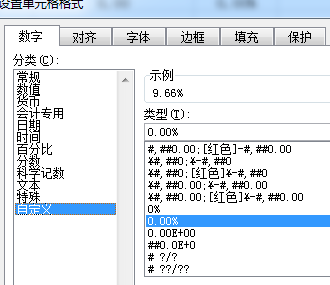
ExcelDataOption中Formater属性,是设置单元格数据类型,这里对于excel中单元格的数据显示个数,例如上面"0.00%"表示以百分百的形式显示数字,且保留2位有效小数
三、定义一个Excel导出父类
using System;

using System.Collections.Generic;

using System.IO;

using System.Linq;

using System.Text;

using System.Web;

using System.Web.Mvc;

using WebSeat.Site.Member.Helper;

namespace WebSeat.Site.Member.CustomResult

{

    /// <summary>

    /// 说明:导出Excel

    /// 创建日期:2016/12/13 13:12:37

    /// 创建人:曹永承

    /// </summary>

    public abstract class ExcelBaseResult<T> :ActionResult

    {

        #region 属性

        /// <summary>

        /// 数据实体

        /// </summary>

        public IList<T> Entity { get; set; }

        /// <summary>

        /// 下载文件名称(不包含扩展名)

        /// </summary>

        public string FileName { get; set; }

        /// <summary>

        /// 是否显示标题

        /// </summary>

        public bool ShowTitle { get; set; }

        /// <summary>

        /// 标题

        /// </summary>

        public string Title { get; set; }

        /// <summary>

        /// ContentType

        /// </summary>

        public string ContentType { get; set; }

        /// <summary>

        /// 扩展名

        /// </summary>

        public string ExtName { get; set; }

        /// <summary>

        /// 获取下载文件全名

        /// </summary>

        public string FullName { get { return FileName + ExtName; } }

        #endregion

        #region 构造函数

        public ExcelBaseResult(IList<T> entity, string fileName,bool showTitle,string title)

        {

            this.Entity = entity;

            this.FileName = fileName;

            this.ShowTitle = showTitle;

            this.Title = title;

        }

        #endregion

        #region 抽象方法

        public abstract MemoryStream GetExcelStream();

        #endregion

        #region 重写ExecuteResult

        public override void ExecuteResult(ControllerContext context)

        {

            using(MemoryStream ms = GetExcelStream())

            {

                context.HttpContext.Response.AddHeader("Content-Length", ms.Length.ToString());

                context.HttpContext.Response.ContentType = ContentType;

                context.HttpContext.Response.AddHeader("Content-Disposition", "attachment; filename=" + FullName.EncodingDownloadFileName());

                ms.Seek(, SeekOrigin.Begin);

                Stream output = context.HttpContext.Response.OutputStream;

                byte[] bytes = new byte[ * ];

                int readSize = ;

                while ((readSize = ms.Read(bytes, , bytes.Length)) > )

                {

                    output.Write(bytes, , readSize);

                    context.HttpContext.Response.Flush();

                }

            }

        }

        #endregion

    }

}
主要因为Excel有不同版本,所有定义了一个父类,其子类只需要实现方法
public abstract MemoryStream GetExcelStream();
四、定义一个子类继承ExcelBaseResult
这里实现了一个导出.xls格式(2003版本的)到子类
using System;

using System.Collections.Generic;

using System.IO;

using System.Linq;

using System.Reflection;

using System.Web;

using System.Web.Mvc;

using NPOI.HSSF.UserModel;

using NPOI.SS.UserModel;

using WebSeat.Entity.Member.Attributes;

using WebSeat.Site.Member.CustomResult;

namespace WebSeat.Site.Member.CustomResult

{

    /// <summary>

    /// 说明:导出成.xls格式的Excel

    /// 创建日期:2016/12/13 13:51:23

    /// 创建人:曹永承

    /// </summary>

    public class Excel2003Result<T>: ExcelBaseResult<T> where T:new()

    {

        public Excel2003Result(IList<T> entity, string fileName,bool showTitle,string title)

            :base(entity,  fileName,  showTitle,  title)

        {

            ContentType = "application/vnd.ms-excel";

            ExtName = ".xls";

        }

        public override MemoryStream GetExcelStream()

        {

            MemoryStream ms = new MemoryStream();

            //获取实体属性

            PropertyInfo[] propertys = typeof(T).GetProperties();

            if (propertys.Count() == )

            {

                return ms;

            }

            //创建Excel对象

            IWorkbook book = new HSSFWorkbook();

            //添加一个sheet

            ISheet sheet1 = book.CreateSheet("Sheet1");

            var index = ShowTitle ?  : ;

            //样式设置

            IFont cellfont = book.CreateFont();

            cellfont.FontHeightInPoints = ;

            cellfont.FontName = "宋体";

            ICellStyle cellStyle = book.CreateCellStyle();

            cellStyle.VerticalAlignment = VerticalAlignment.Center;

            cellStyle.Alignment = HorizontalAlignment.Center;

            cellStyle.SetFont(cellfont);

            IRow rowColumnHead = sheet1.CreateRow(index);

            IDataFormat format = book.CreateDataFormat();

            ushort firstColumn = ushort.MaxValue, lastColumn = ushort.MinValue;  //第一列下标和最后一列下标

            //添加列头

            for (int j = ; j < propertys.Count(); j++)

            {

                ExcelDataOptionAttribute dataOption = propertys[j].GetCustomAttribute<ExcelDataOptionAttribute>();

                if (dataOption == null)

                {

                    continue;

                }

                IFont font = book.CreateFont();

                font.FontHeightInPoints = ;

                font.FontName = "宋体";

                ICellStyle style = book.CreateCellStyle();

                style.VerticalAlignment = VerticalAlignment.Center;

                style.Alignment = HorizontalAlignment.Center;

                style.SetFont(font);

                if (!string.IsNullOrWhiteSpace(dataOption.Formater))

                {

                    style.DataFormat = format.GetFormat(dataOption.Formater);

                }

                sheet1.SetDefaultColumnStyle(dataOption.ColumnIndex, style);

                ICell cell = rowColumnHead.CreateCell(dataOption.ColumnIndex);

                cell.SetCellValue(dataOption.DisplayName);

                firstColumn = firstColumn < dataOption.ColumnIndex ? firstColumn : dataOption.ColumnIndex;

                lastColumn = lastColumn > dataOption.ColumnIndex ? lastColumn : dataOption.ColumnIndex;

            }

            index = ShowTitle ?  : ;

            //将各行数据显示出来

            for (int i = ; i < Entity.Count; i++)

            {

                IRow row = sheet1.CreateRow(i + index);

                //循环各属性,添加列

                for (int j = ; j < propertys.Count(); j++)

                {

                    ExcelDataOptionAttribute dataOption = propertys[j].GetCustomAttribute<ExcelDataOptionAttribute>();

                    if (dataOption == null)

                    {

                        continue;

                    }

                    ICell cell = row.CreateCell(dataOption.ColumnIndex);

                    //样式设置

                    //cell.CellStyle = cellStyle;

                    if (dataOption.ColumnWidth != )

                    {

                        sheet1.SetColumnWidth(dataOption.ColumnIndex, dataOption.ColumnWidth*);

                    }

                    //根据数据类型判断显示格式

                    if (propertys[j].PropertyType == typeof (int))

                    {

                        cell.SetCellValue((int)propertys[j].GetValue(Entity[i]));

                    }else if (propertys[j].PropertyType == typeof (decimal) || propertys[j].PropertyType == typeof(double) || propertys[j].PropertyType == typeof(float))

                    {

                        cell.SetCellValue(Convert.ToDouble(propertys[j].GetValue(Entity[i])) );

                    }

                    else

                    {

                        cell.SetCellValue(propertys[j].GetValue(Entity[i]).ToString());

                    }

                }

            }

            //将标题合并

            if (ShowTitle)

            {

                IRow rowHead = sheet1.CreateRow();

                ICell cellHead = rowHead.CreateCell(firstColumn);

                cellHead.SetCellValue(Title);

                //样式设置

                IFont font = book.CreateFont();

                font.FontHeightInPoints = ;

                font.IsBold = true;

                ICellStyle style = book.CreateCellStyle();

                style.VerticalAlignment = VerticalAlignment.Center;

                style.Alignment = HorizontalAlignment.Center;

                style.SetFont(font);

                cellHead.CellStyle = style;

                rowHead.HeightInPoints = 20.25f;

                sheet1.AddMergedRegion(new NPOI.SS.Util.CellRangeAddress(, , firstColumn, lastColumn));

            }

            book.Write(ms);

            ms.Seek(, System.IO.SeekOrigin.Begin);

            return ms;

        }

    }

}
五、下载文件中文名称出现乱码问题
上面第二步,在Excel导出父类中,有这么一句代码
context.HttpContext.Response.AddHeader("Content-Disposition", "attachment; filename=" + FullName.EncodingDownloadFileName());
其中EncodingDownloadFileName
方法是一个String的扩展类,用于将文件名称进行编码,避免出现乱码的情况。
之前测试过程中,在没有使用转码的过程中,发现IE浏览器在下载时,中文名称出现了乱码的情况,其他浏览器正常(这里只测试了IE浏览器、谷歌浏览器、火狐浏览器、QQ浏览器、360浏览器和360极速浏览器)。后来使用了
HttpContext.Current.Server.UrlEncode(filename)对文件名称进行转码后发现,IE浏览器正常了,除了火狐浏览器,其他浏览器都正常。所有就想到当使用火狐浏览器访问时不对名称进行转码,后来写一个String的扩展方法,方便后期其他下载类使用
using System;

using System.Collections.Generic;

using System.Linq;

using System.Web;

namespace WebSeat.Site.Member.Helper

{

    /// <summary>

    /// 说明:String扩展方法

    /// 创建日期:2016/12/19 9:45:10

    /// 创建人:曹永承

    /// </summary>

    public static class StringHelperExtend

    {

        public static string EncodingDownloadFileName(this string filename)

        {

            if (filename == null)

            {

                throw new NullReferenceException("filename不能为空");

            }

            string agent = HttpContext.Current.Request.Headers["User-Agent"];

            //如果不是火狐浏览器都进行编码

            if (agent != null && agent.ToLower().IndexOf("firefox") < )

            {

                return HttpContext.Current.Server.UrlEncode(filename);

            }

            return filename;

        }

    }

}
六、代码使用
public ActionResult ExportExcel()

        {

            //获取数据

            IList<CityStatics> list = new List<CityStatics>();

            ......

            ExcelBaseResult<CityStatics> excel = new Excel2003Result<CityStatics>(list, "1.xls", true, "全市各区数据    名称:成都");

            return excel;

        }
这样就可以了,看看下载后的excel

补充说明:如果使用gzip压缩方式的,那么文件下载时无法显示文件大小的
C# MVC 自定义ActionResult实现EXCEL下载的更多相关文章
- ASP.NET MVC自定义ActionResult实现文件压缩
有时候需要将单个或多个文件进行压缩打包后在进行下载,这里我自定义了一个ActionResult,方便进行文件下载 using System; using System.Collections; usi ...
- Asp.Net Mvc 自定义扩展
目录: 自定义模型IModelBinder 自定义模型验证 自定义视图引擎 自定义Html辅助方法 自定义Razor辅助方法 自定义Ajax辅助方法 自定义控制器扩展 自定义过滤器 自定义Action ...
- ASP.NET MVC 自定义Razor视图WorkContext
概述 1.在ASP.NET MVC项目开发的过程中,我们经常需要在cshtml的视图层输出一些公用信息 比如:页面Title.服务器日期时间.页面关键字.关键字描述.系统版本号.资源版本号等 2.普通 ...
- mvc自定义全局异常处理
异常信息处理是任何网站必不可少的一个环节,怎么有效显示,记录,传递异常信息又成为重中之重的问题.本篇将基于上篇介绍的html2cancas截图功能,实现mvc自定义全局异常处理.先看一下最终实现效果: ...
- MVC导出数据到EXCEL新方法:将视图或分部视图转换为HTML后再直接返回FileResult
导出EXCEL方法总结 MVC导出数据到EXCEL的方法有很多种,常见的是: 1.采用EXCEL COM组件来动态生成XLS文件并保存到服务器上,然后转到该文件存放路径即可: 优点:可设置丰富的EXC ...
- .Net MVC 导入导出Excel总结(三种导出Excel方法,一种导入Excel方法) 通过MVC控制器导出导入Excel文件(可用于java SSH架构)
.Net MVC 导入导出Excel总结(三种导出Excel方法,一种导入Excel方法) [原文地址] 通过MVC控制器导出导入Excel文件(可用于java SSH架构) public cl ...
- MVC 自定义过滤器/特性来实现登录授权及验证
最近悟出来一个道理,在这儿分享给大家:学历代表你的过去,能力代表你的现在,学习代表你的将来. 十年河东十年河西,莫欺少年穷 学无止境,精益求精 最近在做自学MVC,遇到的问题很多,索性一点点总结 ...
- MVC自定义AuthorizeAttribute实现权限管理
[转]MVC自定义AuthorizeAttribute实现权限管理 原文载自:小飞的DD http://www.cnblogs.com/feiDD/articles/2844447.html 网站的权 ...
- MVC自定义过滤器,自定义Area过滤器,自定义Controller,Action甚至是ViewData过滤器
实现MVC自定义过滤器,自定义Area过滤器,自定义Controller,Action甚至是ViewData过滤器 MVC开发中几种以AOP方式实现的Filters是非常好用的,默认情况下,我们通过A ...
随机推荐
- PHP网页
1.安装YUM源 2.安装httpd与PHP yum install httpd -y yum install php -y 3.进入htmi文件中 cd /var/www/html/ 4.将自己编写 ...
- Python虚拟开发环境
最近,一直在不同版本的Python之间来回折腾,发现了几个Python虚拟开发环境工具,具体如下: 1. Virtualenv,可以指定开发环境的Python版本.继承已有开发环境配置,virtual ...
- Using GET_APPLICATION_PROPERTY in Oracle D2k Forms
Using GET_APPLICATION_PROPERTY in Oracle D2k Forms DescriptionReturns information about the current ...
- C头文件
#include<cstdio>#include<iostream>#include<cstdlib>#include<cmath>#include&l ...
- R中数据拆分和整合
library(data.table)ID <- c(NA,1,2,2)IDTime <- c(1,2,NA,1)TimeX1 <- c(5,3,NA,2)X1X2 <- c( ...
- es6还欠完善的地方
const的可变性 const用于声明常量. 什么是常量,声明后的值不可更改. 对于值类型,比如string,number等等.const声明确实有效. const str = "strin ...
- Linux-设置固定IP
第一步:激活网卡 系统装好后默认的网卡是eth0,用下面的命令将这块网卡激活. # ifconfig eth0 up 第二步:设置网卡进入系统时启动 想要每次开机就可以自动获取IP地址上网,就要设置网 ...
- String转double或者float会有精度丢失的问题
float [] value=new float[5]; value[0]=Float.parseFloat(rs.getString(1)); value[1]=Float.parseFloat(r ...
- CSS3动画特效——transform详解
transform让css3可以做很优质的特效,transform的意思是:改变,使-变形,转换. 在css3中transform的作用也是改变,让元素倾斜,旋转,缩放,位移. 下面来一一分解tran ...
- javascript event(事件对象)详解
javascript event(事件对象)详解 1. 事件对象 1. 事件对象 Event 对象代表事件的状态,比如事件在其中发生的元素.键盘按键的状态.鼠标的位置.鼠标按钮的状态. 什 ...