
JOST数据 日期转换
开发中有时候需要从服务器端返回json格式的数据,在后台代码中如果有DateTime类型的数据使用系统自带的工具类序列化后将得到一个很长的数字表示日期数据,如下所示:
context.Response.ContentType = "text/plain";
//学生对象集合
List<Student> students = new List<Student>
{
new Student(){Name ="Tom",
Birthday =Convert.ToDateTime("2014-01-31 12:12:12")},
new Student(){Name ="Rose",
Birthday =Convert.ToDateTime("2014-01-10 11:12:12")},
new Student(){Name ="Mark",
Birthday =Convert.ToDateTime("2014-01-09 10:12:12")}
};
//javascript序列化器
JavaScriptSerializer jss=new JavaScriptSerializer();
//序列化学生集合对象得到json字符
string studentsJson=jss.Serialize(students);
//将字符串响应到客户端
context.Response.Write(studentsJson);
context.Response.End();
运行结果是:

其中Tom所对应生日“2014-01-31”变成了1391141532000,这其实是1970 年 1 月 1 日至今的毫秒数;1391141532000/1000/60/60/24/365=44.11年,44+1970=2014年,按这种方法可以得出年月日时分秒和毫秒。这种格式是一种可行的表示形式但不是普通人可以看懂的友好格式,怎么让这个格式变化?
解决办法:
方法1:在服务器端将日期格式使用Select方法或LINQ表达式转换后发到客户端:
using System.Collections.Generic;
using System.Web;
using System.Web.Script.Serialization;
namespace JsonDate1
{
using System.Linq;
/// <summary>
/// 学生类,测试用
/// </summary>
public class Student
{
/// <summary>
/// 姓名
/// </summary>
public String Name { get; set; }
/// <summary>
/// 生日
/// </summary>
public DateTime Birthday { get; set; }
}
/// <summary>
/// 返回学生集合的json字符
/// </summary>
public class GetJson : IHttpHandler
{
public void ProcessRequest(HttpContext context)
{
//设置服务器响应的结果为纯文本格式
context.Response.ContentType = "text/plain";
//学生对象集合
List<Student> students = new List<Student>
{
new Student(){Name ="Tom",Birthday =Convert.ToDateTime("2014-01-31 12:12:12")},
new Student(){Name ="Rose",Birthday =Convert.ToDateTime("2014-01-10 11:12:12")},
new Student(){Name ="Mark",Birthday =Convert.ToDateTime("2014-01-09 10:12:12")}
};
//使用Select方法重新投影对象集合将Birthday属性转换成一个新的属性
//注意属性变化后要重新命名,并立即执行
var studentSet =
students.Select
(
p => new { p.Name, Birthday = p.Birthday.ToString("yyyy-mm-dd") }
).ToList();
//javascript序列化器
JavaScriptSerializer jss = new JavaScriptSerializer();
//序列化学生集合对象得到json字符
string studentsJson = jss.Serialize(studentSet);
//将字符串响应到客户端
context.Response.Write(studentsJson);
context.Response.End();
}
public bool IsReusable
{
get
{
return false;
}
}
}
}
Select方法重新投影对象集合将Birthday属性转换成一个新的属性,注意属性变化后要重新命名,属性名可以相同;这里可以使用select方法也可以使用LINQ查询表达式,也可以选择别的方式达到相同的目的;这种办法可以将集合中客户端不用的属性剔除,达到简单优化性能的目的。
运行结果:
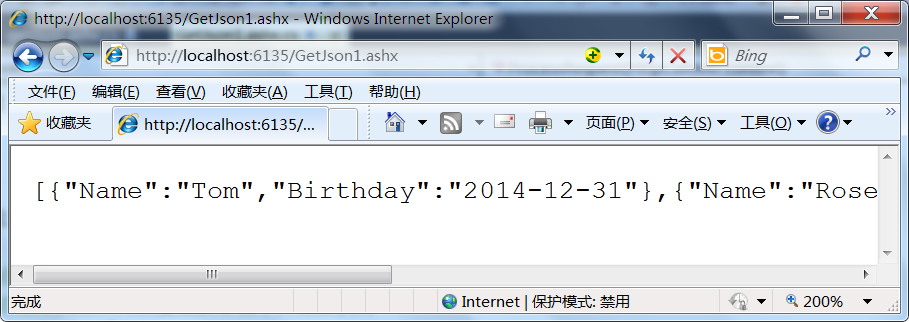
这时候的日期格式就已经变成友好格式了,不过在javascript中这只是一个字符串。
方法二:
在javascript中将"Birthday":"\/Date(1391141532000)\/"中的字符串转换成javascript中的日期对象,可以将Birthday这个Key所对应的Value中的非数字字符以替换的方式删除,到到一个数字1391141532000,然后实例化一个Date对象,将1391141532000毫秒作为参数,得到一个javascript中的日期对象,代码如下:
<html xmlns="http://www.w3.org/1999/xhtml">
<head>
<title>json日期格式处理</title>
<script src="Scripts/jquery-1.10.2.min.js" type="text/javascript"></script>
<script type="text/javascript">
$(function() {
$.getJSON("getJson.ashx", function (students) {
$.each(students, function (index, obj) {
$("<li/>").html(obj.Name).appendTo("#ulStudents");
//使用正则表达式将生日属性中的非数字(\D)删除
//并把得到的毫秒数转换成数字类型
var birthdayMilliseconds = parseInt(obj.Birthday.replace(/\D/igm, ""));
//实例化一个新的日期格式,使用1970 年 1 月 1 日至今的毫秒数为参数
var birthday = new Date(birthdayMilliseconds);
$("<li/>").html(birthday.toLocaleString()).appendTo("#ulStudents"); ;
});
});
});
</script>
</head>
<body>
<h2>json日期格式处理</h2>
<ul id="ulStudents">
</ul>
</body>
</html>
运行结果:
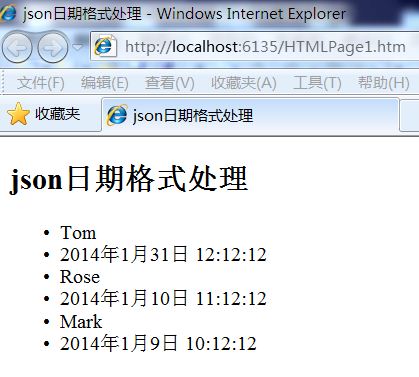
上的使用正则/\D/igm达到替换所有非数字的目的,\D表示非数字,igm是参数,分别表示忽视(ignore)大小写;多次、全局(global)替换;多行替换(multi-line);有一些时候还会出现+86的情况,只需要变换正则同样可以达到目的。另外如果项目中反复出现这种需要处理日期格式的问题,可以扩展一个javascript方法,代码如下:
$.getJSON("getJson.ashx", function (students) {
$.each(students, function (index, obj) {
$("<li/>").html(obj.Name).appendTo("#ulStudents");
//使用正则表达式将生日属性中的非数字(\D)删除
//并把得到的毫秒数转换成数字类型
var birthdayMilliseconds = parseInt(obj.Birthday.replace(/\D/igm, ""));
//实例化一个新的日期格式,使用1970 年 1 月 1 日至今的毫秒数为参数
var birthday = new Date(birthdayMilliseconds);
$("<li/>").html(birthday.toLocaleString()).appendTo("#ulStudents");
$("<li/>").html(obj.Birthday.toDate()).appendTo("#ulStudents");
});
});
});
//在String对象中扩展一个toDate方法,可以根据要求完善
String.prototype.toDate = function () {
var dateMilliseconds;
if (isNaN(this)) {
//使用正则表达式将日期属性中的非数字(\D)删除
dateMilliseconds =this.replace(/\D/igm, "");
} else {
dateMilliseconds=this;
}
//实例化一个新的日期格式,使用1970 年 1 月 1 日至今的毫秒数为参数
return new Date(parseInt(dateMilliseconds));
};
上面扩展的方法toDate不一定合理,也不够强大,可以根据需要修改。
方法三:
可以选择一些第三方的json工具类,其中不乏有一些已经对日期格式问题已处理好了的,常见的json序列化与反序列化工具库有:
1.fastJSON.
2.JSON_checker.
3.Jayrock.
4.Json.NET - LINQ to JSON.
5.LitJSON.
6.JSON for .NET.
7.JsonFx.
8.JSONSharp.
9.JsonExSerializer.
10.fluent-json
11.Manatee Json
这里以litjson为序列化与反序列化json的工具类作示例,代码如下:
using System.Collections.Generic;
using System.Web;
using LitJson;
namespace JsonDate2
{
using System.Linq;
/// <summary>
/// 学生类,测试用
/// </summary>
public class Student
{
/// <summary>
/// 姓名
/// </summary>
public String Name { get; set; }
/// <summary>
/// 生日
/// </summary>
public DateTime Birthday { get; set; }
}
/// <summary>
/// 返回学生集合的json字符
/// </summary>
public class GetJson : IHttpHandler
{
public void ProcessRequest(HttpContext context)
{
//设置服务器响应的结果为纯文本格式
context.Response.ContentType = "text/plain";
//学生对象集合
List<Student> students = new List<Student>
{
new Student(){Name ="Tom",Birthday =Convert.ToDateTime("2014-01-31 12:12:12")},
new Student(){Name ="Rose",Birthday =Convert.ToDateTime("2014-01-10 11:12:12")},
new Student(){Name ="Mark",Birthday =Convert.ToDateTime("2014-01-09 10:12:12")}
};
//序列化学生集合对象得到json字符
string studentsJson = JsonMapper.ToJson(students);
//将字符串响应到客户端
context.Response.Write(studentsJson);
context.Response.End();
}
public bool IsReusable
{
get
{
return false;
}
}
}
}
运行结果如下:
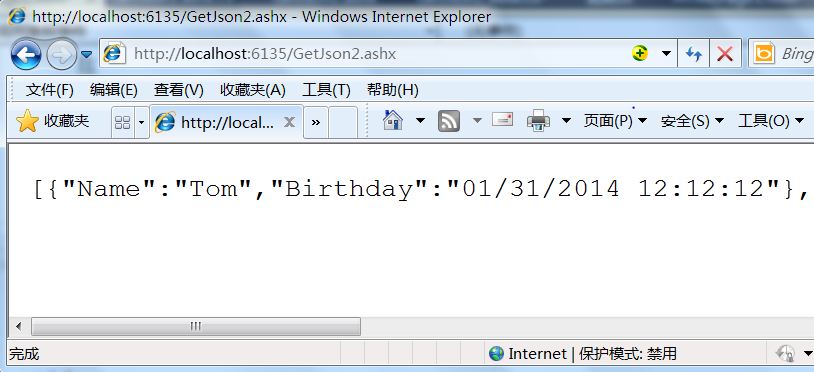
这时候的日期格式就基本正确了,只要在javascript中直接实例化日期就好了,
var date = new Date("01/31/2014 12:12:12");
alert(date.toLocaleString());
客户端的代码如下:
$.getJSON("GetJson2.ashx", function (students) {
$.each(students, function (index, obj) {
$("<li/>").html(obj.Name).appendTo("#ulStudents");
var birthday = new Date(obj.Birthday);
$("<li/>").html(birthday.toLocaleString()).appendTo("#ulStudents");
});
});
});
var date = new Date("01/31/2014 12:12:12");
alert(date.toLocaleString());
这里讲到了三种解决json中序列化后的日期格式问题,应该还有更好更完善的方法,欢迎您告诉我。因为有很多学生问我所以我写了这点文字,欢迎批评指正。
JOST数据 日期转换的更多相关文章
- MySql和Oracle的日期转换到底有哪些不同?我们来比较一下
1.MySql和Oracle的日期转换 mysql中有2种日期格式DATE和TIME,oracle只有一种日期格式DATE. oracle> select to_char(sysdate,'yy ...
- excel转换日期格式,将yyyymmdd类型日期转换成yyyy-mm-dd等日期类型方法
源数据日期格式:例如: 20160420 20160422 目标日期格式类型: 2016-4-20 2016-4-22 或 2016/04/20 2016/04/22 方法: 一.选中相应数据的单元格 ...
- struts1日期转换处理
问题场景 最近在维护公司旧的系统(用的struts1框架)的时候,在日期处理的时候,我将日期设定为Date类型,结果报以下错误: javax.servlet.ServletException: Bea ...
- java中的日期转换
在java中有两种Date对象,一种是java.sql.Date,另一种是java.util.Date 一.java.sql.Date对象: 这种Date对象使用了进行数据库操作的,它对应了数据库中的 ...
- SQL Server中使用convert进行日期转换
使用 CONVERT: CONVERT (data_type[(length)],expression[,style]) 参数 expression 是任何有效的 Microsoft® SQL Ser ...
- (转)SQL Server中使用convert进行日期转换
原文链接:http://www.cnblogs.com/weiqt/articles/1826847.html SQL Server中使用convert进行日期转换 一般存入数据库中的时间格式为yyy ...
- Sql 中常用日期转换Convert(Datetime)
CONVERT(data_type,expression[,style]) convert(varchar(10),字段名,转换格式) 说明:此样式一般在时间类型(datetime,smalldate ...
- php日期转时间戳,指定日期转换成时间戳
写过PHP+MySQL的程序员都知道有时间差,UNIX时间戳和格式化日期是我们常打交道的两个时间表示形式,Unix时间戳存储.处理方便,但 是不直观,格式化日期直观,但是处理起来不如Unix时间戳那么 ...
- java中json和字符串互转及日期转换 练习
一:以下是用到的jar名称: commons-beanutils-1.6.jar commons-collections-3.2.1.jar commons-lang-2.6.jar commons- ...
随机推荐
- sql中的跨库查询
在sql查询时,需要关联2个服务器上的不同数据库,只需要在所需查询的表名前加上服务器地址即可. 例如:在 192.168.0.15,8020的db110库 和 192.168.0.150,8082的d ...
- mouseover事件与mouseenter事件的区别
不论鼠标指针穿过被选元素或其子元素,都会触发 mouseover 事件.对应mouseout 只有在鼠标指针穿过被选元素时,才会触发 mouseenter 事件.对应mouseleave 被触发的 M ...
- window.onload与$(document).ready()区别
2013-12-08 17:11:34 window.onload一次只能执行一个程序,而$(document).ready()可以按照先后顺序执行多个程序. eg: function one(){ ...
- Arcgis Server 10.2默认服务端口号修改方法
本人安装Arcgis Server 10.2之后发布了一个地图服务,该服务默认使用的端口号是6080,本人使用的是教育网,使用教育网均能正常使用该服务,但是使用电信或者移动网络均不能正常访问该网站. ...
- vs2010 安装mvc3
下载链接如下:MVC 3安装包:http://www.microsoft.com/downloads/zh-cn/details.aspx?familyid=d2928bc1-f48c-4e95-a0 ...
- [zz]利用碎片时间健身
利用碎片时间健身(上) http://v.163.com/zixun/V96957QH6/VBSQ4D861.html#from=zixunplay_recommended 利用碎片时间健身(下) h ...
- STM32固件库3.5+uCOS2.86移植(转自暴走的工程师)
考了很多移植的资料和代码,终于移植好了...应该是完美移植吧~~哈哈哈~~ 编译环境是IAR 工程适用于STM32F10X大容量产品,如果不是,请自行修改启动文件和工程配置 编译器优化等级最高...这 ...
- WAMP虚拟目录的设置
1.打开Apache的配置文件httpd.conf,并去掉#Include conf/extra/httpd-vhosts.conf前面的#!! 2.打开Apache的apache/conf/extr ...
- Spark 1.6以后的内存管理机制
Spark 内部管理机制 Spark的内存管理自从1.6开始改变.老的内存管理实现自自staticMemoryManager类,然而现在它被称之为"legacy". " ...
- AS3 从外部SWF中获取资源的方法(ApplicationDomain的使用)
package { import flash.display.Bitmap; import flash.display.BitmapData; import flash.display.Loader; ...