
点击页面任何位置隐藏div
<include file="Public:header" />

<style type="text/css">

	table{width:100%;margin: 0;}

</style>

<script type='text/javascript' src="/{:APP_PATH}/Public/js/unslider.min.js"></script>

	<script type="text/javascript">

	//定义页面载入事件

	/*$(function(){

		$('#more').addClass('moreno');

		$('#more').click(function(){

			//隐藏元素(向左移动)

			if ($('#more').hasClass('moreno')) {

				$('#sider').animate({

				left:0

				},1000,function(){

					$('#more').removeClass('moreno');

				});

			}else{

				 $('#sider').animate({

	          	left:-120

	        },1000,function(){

				$('#more').addClass('moreno');

			});

	        }

		});

	});*/

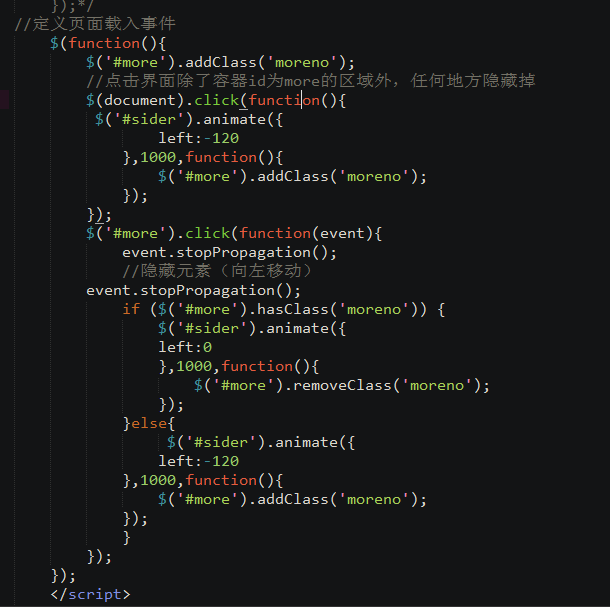
//定义页面载入事件

	$(function(){

		$('#more').addClass('moreno');

		//点击界面除了容器id为more的区域外,任何地方隐藏掉

		$(document).click(function(){

		 $('#sider').animate({

	          	left:-120

	        },1000,function(){

				$('#more').addClass('moreno');

			});

		});

		$('#more').click(function(event){

			event.stopPropagation();

			//隐藏元素(向左移动)

		event.stopPropagation();

			if ($('#more').hasClass('moreno')) {

				$('#sider').animate({

				left:0

				},1000,function(){

					$('#more').removeClass('moreno');

				});

			}else{

				 $('#sider').animate({

	          	left:-120

	        },1000,function(){

				$('#more').addClass('moreno');

			});

	        }

		});

	});

	</script>

    <div class="header_one">

       	<div class="Central">

	       	<div class="first_one" style="position:absolute;">

	    		<img  id="more" style="margin-top:8px;" src="/{:APP_PATH}/Public/img/pic/more.png" />

	    	</div>

	    	<div>

       			<img style="height:30px;" src="/{:APP_PATH}/Public/img/main/logo1.png" />

       		</div>

       	</div>

    </div>

    <div class="bg">

	    <div class="pic" style="height:180px;">

	   		<div id="lunbo" style="overflow: hidden;">

		    <ul style="margin:0px;" id="lunboul" style="position: relative;">

		        <volist name="pic" id="vo">

		        	<li style="float:left;text-align:center;">

		        		<img src="{$vo['pic']}" alt="" style="height:176px;margin:auto;" >

		        	</li>

		        </volist>

		    </ul>

		</div>

	<script type="text/javascript">

	$('#lunbo').unslider({

		speed: 0,

		delay: 3000,

		complete: function() {},

		keys: true,

		dots: true,

		fluid: false

	});

	function autoScroll(obj){

		$(obj).find("#voo").animate({

			marginTop : "-30px"

		},500,function(){

			$(this).css({marginTop : "0px"}).find("li:first").appendTo(this);

		})

	}

	$(function(){

		setInterval('autoScroll("#xst")',2000);

	})

	</script>

    </div>

    <div style="width:100%;background-color:#EEEEEE;height:30px;margin:10px 0;">

	    <div class="scroll" id="xst" style="float:right;margin-left:10px;height:30px;width:75%;overflow:hidden;">

			<ul id='voo' style="margin-top:0px;">

				<volist name='gonggao' id="vo">

					<li style="line-height:30px;height:30px;padding-left:5px;padding-top:2px;text-align:left;">

						<a href="{:U('/Index/PlatDetail',array('id'=>$vo['id']))}">{$vo['name']}</a>

					</li>

				</volist>

			</ul>

		</div>

		<div style="float:right;margin:5px 0;">

    		最新公告

    	</div>

	</div>

    <table id="fone" onclick="javascript:location.href='/Invest/InvestHp/biao_type/love'">

	   <tr>

		   <td class="norrow"><img src="/{:APP_PATH}/Public/img/pic/new.png"/></td>

		   <td class="secon">新手标</td>

		   <td><span class="blo">8-10%</span><span class="tblo">预期年化收益</span></td>

		   <td><span class="blo">7<span class="cao_one">天</span></span><span class="tblo">投资期限</span></td>

		   <td class="jian_rig"><img class="rig_pic" src="/{:APP_PATH}/Public/img/pic/rightshow.png" /></td>

	   </tr>

    </table>

    <table class="bird" onclick="javascript:location.href='/Invest/InvestList/biao_type/yxlc'">

	   <tr>

		   <td class="norrow"><img src="/{:APP_PATH}/Public/img/pic/fast.png" /></td>

		   <td class="secon">快系列</td>

		   <td><span class="blo">8-10%</span><span class="tblo">预期年化收益</span></td>

		   <td><span class="blo">1<span class="cao_one">个月</span></span><span class="tblo">投资期限</span></td>

		   <td class="jian_rig"><img class="rig_pic" src="/{:APP_PATH}/Public/img/pic/rightshow.png" /></td>

	   </tr>

    </table>

    <table class="se_cond" onclick="javascript:location.href='/Invest/InvestList/biao_type/gxd'">

	   <tr>

		   <td class="norrow"><img src="/{:APP_PATH}/Public/img/pic/stable.png" /></td>

		   <td class="secon">稳系列</td>

		   <td><span class="blo">12-14%</span><span class="tblo">预期年化收益</span></td>

		   <td><span class="blo">3-6<span class="cao_one">个月</span></span><span class="tblo">投资期限</span></td>

		   <td class="jian_rig"><img class="rig_pic" src="/{:APP_PATH}/Public/img/pic/rightshow.png" /></td>

   		</tr>

    </table>

	<if condition="$GLOBALS['userinfo']['org_code'] eq 'fc'">

    <table class="last_fcb" onclick="javascript:location.href='/Invest/InvestList/biao_type/fcb'">

	   <tr>

		   <td class="norrow"><img src="/{:APP_PATH}/Public/img/pic/house.png" /></td>

		   <td class="secon">房产宝</td>

		   <td><span class="blo">8-16%</span><span class="tblo">预期年化收益</span></td>

		   <td><span class="blo">3-6<span class="cao_one">个月</span></span><span class="tblo">投资期限</span></td>

		   <td class="jian_rig"><img class="rig_pic" src="/{:APP_PATH}/Public/img/pic/rightshow.png" /></td>

	   </tr>

    </table>

	</if>

    <div class="bott_ton" onclick="javascript:location.href='/Goods/Index'">

    	<img src="/{:APP_PATH}/Public/img/pic/logobean.png"/>

    </div>

    <div id="sider">

    	<ul id="usecond">

    	<li style="line-height:36px"> <a href="{:U('Index/Platann')}" style="color:#FFF">平台公告</a></li>

    	<li style="line-height:36px"> <a href="{:U('Index/HelpCenter')}" style="color:#FFF">帮助中心</a></li>

    	<li style="line-height:36px"> <a href="{:U('Index/PlatIntro')}" style="color:#FFF">平台介绍</a></li>

    	<li style="line-height:36px"> <a href="{:U('Index/Contact')}"style="color:#FFF">联系我们</a></li>

    	</ul>

    </div>

    </div>

<include file="Public:footer" />
点击页面任何位置隐藏div的更多相关文章
- JS 实现点击页面任意位置隐藏div、span
通过调用下面的 showhidden(“标签ID”) 显示div/span/…等标签内容,可以实现点击页面任意地方再次隐藏该标签内容,而showhidden(“标签ID”,”nohidden”)可保存 ...
- jquery点击页面其他位置隐藏div
$("#btnAdd").on('click', function (e) { $("#setUp").toggle(); $(document).one('c ...
- 点击页面其它地方隐藏div所想到的jQuery的delegate
在网页开发的过程中经常遇到的一个需求就是点击一div内部做某些操作,而点击页面其它地方隐藏该div.比如很多导航菜单,当菜单展开的时候,就会要求点击页面其它非菜单地方,隐藏该菜单. 先从最简单的开始, ...
- 由点击页面其它地方隐藏div所想到的jQuery的delegate
对于这个问题一般有两种思路,这两种思路都会利用事件冒泡这一原理,想要详细了解Javascript事件机制可以看看JavaScript与HTML交互——事件,这不是本文重点,所以这里只是简单介绍一下事件 ...
- html js点击按钮滚动跳转定位到页面指定位置(DIV)的方法代码
一:通过html锚点实现滚动定位到页面指定位置(DIV): 如果我们要点击实现跳转的地方是一个html锚点,也就是点击一个A标签超链接实现跳转,可以把A标签的href属性直接指向跳转指定位置的d ...
- jquery实现点击页面其他地方隐藏指定元素
代码实例如下: <!DOCTYPE html><html><head><meta charset=" utf-8"><meta ...
- jQuery 实现点击页面其他地方隐藏菜单
点击页面其它地方隐藏id为messageList的div 代码: $('body').delegate("#message", 'click', function(e) { var ...
- contains 之 点击元素外位置隐藏元素
contains 之 点击元素外位置隐藏元素 api: contains 检测一个元素包含在另一个元素之内 详解:http://www.runoob.com/jquery/misc-contai ...
- 点击页面其它地方隐藏该div的两种思路
思路一 第一种思路分两步 第一步:对document的click事件绑定事件处理程序,使其隐藏该div 第二步:对div的click事件绑定事件处理程序,阻止事件冒泡,防止其冒泡到document,而 ...
随机推荐
- Office 2016 正式发布——新特性预览
今天微软又发生了一件大事!Windows Office 2016正式发布,这标志着Windows Office 又达到了一个新的里程碑! 全新的Office 发布为Office 365 用户带来了新的 ...
- 分离EF connectionString里的db连接串
创建EF模型后,自动生成的connectionString如下: <add name="TravelPPEntities" connectionString="me ...
- Java-继承,多态练习0922-06
编写一个Shape类,具有属性:周长和面积: 定义其子类三角形和矩形,分别具有求周长的方法. 定义主类E,在其main方法中创建三角形和矩形类的对象, 并赋给Shape类的对象a.b,使用对象a.b来 ...
- WebApi系列~通过HttpClient来调用Web Api接口
回到目录 HttpClient是一个被封装好的类,主要用于Http的通讯,它在.net,java,oc中都有被实现,当然,我只会.net,所以,只讲.net中的HttpClient去调用Web Api ...
- MVVM架构~Knockoutjs系列之对象与对象组合
返回目录 在面向对象的程序设计里,对象是核心,一切皆为对象,对象与对象之间的关系可以表现为继承和组合,而在Knockoutjs或者JS里,也存在着对象的概念,今天主要说一下JS里的对象及对象的组合. ...
- Nginx下WordPress的Rewrite
最近接触WP Super Cache,该插件要求固定链接必须是重写的,故用到Rewrite. 我的是这样配置的: /usr/local/nginx/conf/rewrite/wordpress.con ...
- 关于stm32的正交解码
关于正交解码,我先解释何为正交解码,,,,其实名字挺高大上的,,,,还是先说编码器吧 看一下我用过的一种编码器 编码器的 线 数 ,是说编码器转一圈输出多少个脉冲,,,如果一个编码器是500线,,,说 ...
- Mysql 事件(定时任务)
mysql 创建任务(事件) 1.检查数据库事件是否开启,如果 event_scheduler 等于 NO表示开启 SELECT @@event_scheduler; SHOW VARIABLES L ...
- Android ListView 进阶学习
1.使用ListView展示数据结构为二维数组的数据 当我们遇到数据结构是二维数组的需求的时候,我们会首先想到ListView,但是要想实现二维数组,会想到ListView里面嵌套ListView,但 ...
- 阿里云部署Java web项目初体验(转)/linux 上配置jdk和安装tomcat
摘要:本文主要讲了如何在阿里云上安装JDK.Tomcat以及其配置过程.最后以一个实例来演示在阿里云上部署Java web项目. 一.准备工作 购买了阿里云的云解析,和云服务器ecs. 2.下载put ...