
【源码笔记】Nop定时任务
网站需要定时执行不同的任务,比如清理无效的数据、定时发送mail等,Nop的这个定时任务设计比较好,简单的说就是将所有任务相同的属性持久化,具体的执行通过继承接口来实现。
持久化对象:ScheduleTask
ScheduleTask定义了Seconds,Type等属性,分别记录执行周期和任务类型。
public class ScheduleTask:BaseEntity

    {

       public string Name { get; set; }

       /// <summary>

       /// Gets or sets the run period (in seconds)

       /// </summary>

       public int Seconds { get; set; }

       /// <summary>

       /// Gets or sets the type of appropriate ITask class

       /// </summary>

       public string Type { get; set; }

       /// <summary>

       /// Gets or sets the value indicating whether a task is enabled

       /// </summary>

       public bool Enabled { get; set; }

       /// <summary>

       /// Gets or sets the value indicating whether a task should be stopped on some error

       /// </summary>

       public bool StopOnError { get; set; }

       /// <summary>

       /// Gets or sets the machine name (instance) that leased this task. It's used when running in web farm (ensure that a task in run only on one machine). It could be null when not running in web farm.

       /// </summary>

       public string LeasedByMachineName { get; set; }

       /// <summary>

       /// Gets or sets the datetime until the task is leased by some machine (instance). It's used when running in web farm (ensure that a task in run only on one machine).

       /// </summary>

       public DateTime? LeasedUntilTime { get; set; }

       /// <summary>

       /// Gets or sets the datetime when it was started last time

       /// </summary>

       public DateTime? LastStartTime { get; set; }

       /// <summary>

       /// Gets or sets the datetime when it was finished last time (no matter failed ir success)

       /// </summary>

       public DateTime? LastEndTime { get; set; }

       /// <summary>

       /// Gets or sets the datetime when it was sucessfully finished last time

       /// </summary>

       public DateTime? LastSuccessTime { get; set; }

    }
比如定义一个deleteGuestTask,即2小时删除一次guest。
    var deleteGuestTask = new ScheduleTask

            {

                Name = "Delete Guest Task",

                Seconds = ,

                Type = "Portal.Services.Users.DeleteGuestTask,Portal.Services",

                StopOnError = true,

                LeasedByMachineName = "",

                Enabled = true,

            };
对数据库的基本操作就交给了ScheduleTaskService。ScheduleTaskService继承IScheduleTaskService。
public partial interface IScheduleTaskService

    {

        void DeleteTask(ScheduleTask task);

        ScheduleTask GetTaskById(int taskId);

        ScheduleTask GetTaskByType(string type);

        IList<ScheduleTask> GetAllTasks(bool showHidden = false);

        void InsertTask(ScheduleTask task);

        void UpdateTask(ScheduleTask task);

    }
面向接口ITask
ITask接口只有一个方法:
 public partial interface ITask

    {

        /// <summary>

        /// Execute task

        /// </summary>

        void Execute();

    }
Nop实现了多个任务
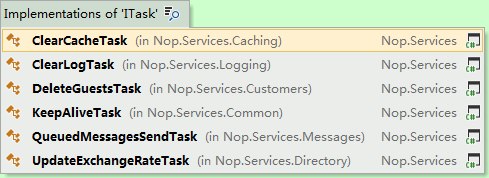
例如DeleteGuestTask:
 public class DeleteGuestTask:ITask

   {

       private readonly IUserService _userService;

       public DeleteGuestTask(IUserService userService)

       {

           _userService = userService;

       }

       public void Execute()

       {

           //60*24 = 1 day

           var olderThanMinutes = ;

           _userService.DeleteGuestUsers(null, DateTime.Now.AddMinutes(-olderThanMinutes), true);

       }

    }
而ScheduleTask如何和ITask关联的任务就交给了Task类。
 public partial class Task

    {

        /// <summary>

        /// Ctor for Task

        /// </summary>

        private Task()

        {

            this.Enabled = true;

        }

        /// <summary>

        /// Ctor for Task

        /// </summary>

        /// <param name="task">Task </param>

        public Task(ScheduleTask task)

        {

            this.Type = task.Type;

            this.Enabled = task.Enabled;

            this.StopOnError = task.StopOnError;

            this.Name = task.Name;

        }

        private ITask CreateTask(ILifetimeScope scope)

        {

            ITask task = null;

            if (this.Enabled)

            {

                var type2 = System.Type.GetType(this.Type);

                if (type2 != null)

                {

                    object instance;

                    if (!EngineContext.Current.ContainerManager.TryResolve(type2, scope, out instance))

                    {

                        //not resolved

                        instance = EngineContext.Current.ContainerManager.ResolveUnregistered(type2, scope);

                    }

                    task = instance as ITask;

                }

            }

            return task;

        }

        /// <summary>

        /// Executes the task

        /// </summary>

        /// <param name="scope"></param>

        /// <param name="throwException">A value indicating whether exception should be thrown if some error happens</param>

        /// <param name="dispose">A value indicating whether all instances hsould be disposed after task run</param>

        public void Execute(ILifetimeScope scope=null,bool throwException = false, bool dispose = true)

        {

            this.IsRunning = true;

            //background tasks has an issue with Autofac

            //because scope is generated each time it's requested

            //that's why we get one single scope here

            //this way we can also dispose resources once a task is completed

            if (scope == null)

            {

                scope = EngineContext.Current.ContainerManager.Scope();

            }

            var scheduleTaskService = EngineContext.Current.ContainerManager.Resolve<IScheduleTaskService>("", scope);

            var scheduleTask = scheduleTaskService.GetTaskByType(this.Type);

            try

            {

                var task = this.CreateTask(scope);

                if (task != null)

                {

                    this.LastStartUtc = DateTime.UtcNow;

                    if (scheduleTask != null)

                    {

                        //update appropriate datetime properties

                        scheduleTask.LastStartTime = this.LastStartUtc;

                        scheduleTaskService.UpdateTask(scheduleTask);

                    }

                    //execute task

                    task.Execute();

                    this.LastEndUtc = this.LastSuccessUtc = DateTime.UtcNow;

                }

            }

            catch (Exception exc)

            {

                this.Enabled = !this.StopOnError;

                this.LastEndUtc = DateTime.UtcNow;

                //log error

                  if (throwException)

                    throw;

            }

            if (scheduleTask != null)

            {

                //update appropriate datetime properties

                scheduleTask.LastEndTime = this.LastEndUtc;

                scheduleTask.LastSuccessTime = this.LastSuccessUtc;

                scheduleTaskService.UpdateTask(scheduleTask);

            }

            //dispose all resources

            if (dispose)

            {

                scope.Dispose();

            }

            this.IsRunning = false;

        }

        /// <summary>

        /// A value indicating whether a task is running

        /// </summary>

        public bool IsRunning { get; private set; }

        /// <summary>

        /// Datetime of the last start

        /// </summary>

        public DateTime? LastStartUtc { get; private set; }

        /// <summary>

        /// Datetime of the last end

        /// </summary>

        public DateTime? LastEndUtc { get; private set; }

        /// <summary>

        /// Datetime of the last success

        /// </summary>

        public DateTime? LastSuccessUtc { get; private set; }

        /// <summary>

        /// A value indicating type of the task

        /// </summary>

        public string Type { get; private set; }

        /// <summary>

        /// A value indicating whether to stop task on error

        /// </summary>

        public bool StopOnError { get; private set; }

        /// <summary>

        /// Get the task name

        /// </summary>

        public string Name { get; private set; }

        /// <summary>

        /// A value indicating whether the task is enabled

        /// </summary>

        public bool Enabled { get; set; }

    }
CreateTask方法用Autofac Resolve(相当于反射)出了对应的任务类型。
private ITask CreateTask(ILifetimeScope scope)

        {

            ITask task = null;

            if (this.Enabled)

            {

                var type2 = System.Type.GetType(this.Type);

                if (type2 != null)

                {

                    object instance;

                    if (!EngineContext.Current.ContainerManager.TryResolve(type2, scope, out instance))

                    {

                        //not resolved

                        instance = EngineContext.Current.ContainerManager.ResolveUnregistered(type2, scope);

                    }

                    task = instance as ITask;

                }

            }

            return task;

        }
而Task的Execute方法,调用的是各自任务的Execute。
TaskManager统一管理,TaskThread真正执行
TaskManager统一加载和执行任务,在Global中调用。
protected void Application_Start()

 {

   //...

   TaskManager.Instance.Initialize();

   TaskManager.Instance.Start();

 }
这里说一下TaskThread,它包含一个Timer和Dictionary<string, Task> _tasks;
public partial class TaskThread : IDisposable

    {

        private Timer _timer;

        private bool _disposed;

        private readonly Dictionary<string, Task> _tasks;

        internal TaskThread()

        {

            this._tasks = new Dictionary<string, Task>();

            this.Seconds =  * ;

        }

        private void Run()

        {

            if (Seconds <= )

                return;

            this.StartedUtc = DateTime.Now;

            this.IsRunning = true;

            foreach (Task task in this._tasks.Values)

            {

                task.Execute(Scope,false,false);

            }

            this.IsRunning = false;

        }

        private void TimerHandler(object state)

        {

            this._timer.Change(-, -);

            this.Run();

            if (this.RunOnlyOnce)

            {

                this.Dispose();

            }

            else

            {

                this._timer.Change(this.Interval, this.Interval);

            }

        }

        /// <summary>

        /// Disposes the instance

        /// </summary>

        public void Dispose()

        {

            if ((this._timer != null) && !this._disposed)

            {

                lock (this)

                {

                    this._timer.Dispose();

                    this._timer = null;

                    this._disposed = true;

                }

            }

        }

        private ILifetimeScope Scope { get; set; }

        /// <summary>

        /// Inits a timer

        /// </summary>

        public void InitTimer(ILifetimeScope scope)

        {

            Scope = scope;

            if (this._timer == null)

            {

                this._timer = new Timer(new TimerCallback(this.TimerHandler), null, this.Interval, this.Interval);

            }

        }

        /// <summary>

        /// Adds a task to the thread

        /// </summary>

        /// <param name="task">The task to be added</param>

        public void AddTask(Task task)

        {

            if (!this._tasks.ContainsKey(task.Name))

            {

                this._tasks.Add(task.Name, task);

            }

        }

        /// <summary>

        /// Gets or sets the interval in seconds at which to run the tasks

        /// </summary>

        public int Seconds { get; set; }

        /// <summary>

        /// Get or sets a datetime when thread has been started

        /// </summary>

        public DateTime StartedUtc { get; private set; }

        /// <summary>

        /// Get or sets a value indicating whether thread is running

        /// </summary>

        public bool IsRunning { get; private set; }

        /// <summary>

        /// Get a list of tasks

        /// </summary>

        public IList<Task> Tasks

        {

            get

            {

                var list = new List<Task>();

                foreach (var task in this._tasks.Values)

                {

                    list.Add(task);

                }

                return new ReadOnlyCollection<Task>(list);

            }

        }

        /// <summary>

        /// Gets the interval at which to run the tasks

        /// </summary>

        public int Interval

        {

            get

            {

                return this.Seconds * ;

            }

        }

        /// <summary>

        /// Gets or sets a value indicating whether the thread whould be run only once (per appliction start)

        /// </summary>

        public bool RunOnlyOnce { get; set; }

    }
在Run方法中执行所有包含的任务。这里其实是相同周期的任务。
TaskManager有一个_taskThreads集合,而Initialize方法的主要任务是从数据库加载ScheduleTask.然后将相同周期的任务组装成同一个TaskThread.还区分了只执行一次的任务。
  public void Initialize()

        {

            this._taskThreads.Clear();

            var taskService = EngineContext.Current.Resolve<IScheduleTaskService>();

            var scheduleTasks = taskService

                .GetAllTasks()

                .OrderBy(x => x.Seconds)

                .ToList();

              //group by threads with the same seconds

            foreach (var scheduleTaskGrouped in scheduleTasks.GroupBy(x => x.Seconds))

            {

                //create a thread

                var taskThread = new TaskThread

                                     {

                                         Seconds = scheduleTaskGrouped.Key

                                     };

                foreach (var scheduleTask in scheduleTaskGrouped)

                {

                    var task = new Task(scheduleTask);

                    taskThread.AddTask(task);

                }

                this._taskThreads.Add(taskThread);

            }

            var notRunTasks = scheduleTasks

                .Where(x => x.Seconds >= _notRunTasksInterval)

                .Where(x => !x.LastStartTime.HasValue || x.LastStartTime.Value.AddSeconds(_notRunTasksInterval) < DateTime.UtcNow)

                .ToList();

            //create a thread for the tasks which weren't run for a long time

            if (notRunTasks.Count > )

            {

                var taskThread = new TaskThread

                {

                    RunOnlyOnce = true,

                    Seconds =  *  //let's run such tasks in 5 minutes after application start

                };

                foreach (var scheduleTask in notRunTasks)

                {

                    var task = new Task(scheduleTask);

                    taskThread.AddTask(task);

                }

                this._taskThreads.Add(taskThread);

            }

        }
在Star中执行任务。
 public void Start()

        {

            foreach (var taskThread in this._taskThreads)

            {

                taskThread.InitTimer();

            }

        }
在后台管理任务的情况,可以立即执行。
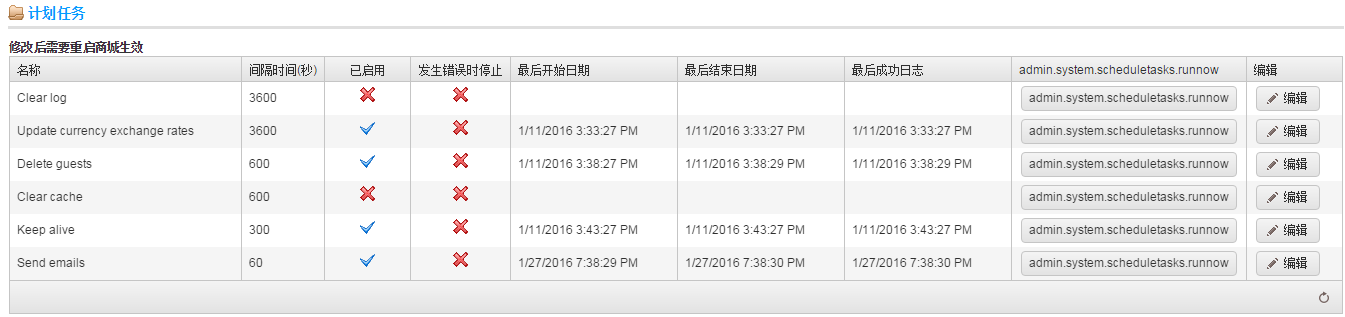
 public ActionResult RunNow(int id)

        {

            var scheduleTask = _taskService.GetTaskById(id);

            if (scheduleTask == null) return View("NoData");

            var task = new Task(scheduleTask);

            task.Enabled = true;

            task.Execute(null,false,false);

            return RedirectToAction("Index");

        }
个人感觉还是值得借鉴的,我已经用到自己的项目中,可以方便的扩展到自己的其他任务。
Nop源码3.7:http://www.nopcommerce.com/downloads.aspx
【源码笔记】Nop定时任务的更多相关文章
- redis源码笔记(一) —— 从redis的启动到command的分发
本作品采用知识共享署名 4.0 国际许可协议进行许可.转载联系作者并保留声明头部与原文链接https://luzeshu.com/blog/redis1 本博客同步在http://www.cnblog ...
- Zepto源码笔记(一)
最近在研究Zepto的源码,这是第一篇分析,欢迎大家继续关注,第一次写源码笔记,希望大家多指点指点,第一篇文章由于首次分析原因不会有太多干货,希望后面的文章能成为各位大大心目中的干货. Zepto是一 ...
- AsyncTask源码笔记
AsyncTask源码笔记 AsyncTask在注释中建议只用来做短时间的异步操作,也就是只有几秒的操作:如果是长时间的操作,建议还是使用java.util.concurrent包中的工具类,例如Ex ...
- Java Arrays 源码 笔记
Arrays.java是Java中用来操作数组的类.使用这个工具类可以减少平常很多的工作量.了解其实现,可以避免一些错误的用法. 它提供的操作包括: 排序 sort 查找 binarySearch() ...
- Tomcat8源码笔记(八)明白Tomcat怎么部署webapps下项目
以前没想过这么个问题:Tomcat怎么处理webapps下项目,并且我访问浏览器ip: port/项目名/请求路径,以SSM为例,Tomcat怎么就能将请求找到项目呢,项目还是个文件夹类型的? Tom ...
- Tomcat8源码笔记(七)组件启动Server Service Engine Host启动
一.Tomcat启动的入口 Tomcat初始化简单流程前面博客介绍了一遍,组件除了StandardHost都有博客,欢迎大家指文中错误.Tomcat启动类是Bootstrap,而启动容器启动入口位于 ...
- Tomcat8源码笔记(六)连接器Connector分析
根据 Tomcat8源码笔记(五)组件Container分析 前文分析,StandardService的初始化重心由 StandardEngine转移到了Connector的初始化,本篇记录下Conn ...
- Tomcat8源码笔记(五)组件Container分析
Tomcat8源码笔记(四)Server和Service初始化 介绍过Tomcat中Service的初始化 最先初始化就是Container,而Container初始化过程是咋样的? 说到Contai ...
- Tomcat8源码笔记(四)Server和Service初始化
上一章 简单说明下Tomcat各个组件: Server:服务器,Tomcat服务器,一个Tomcat只有一个Server组件; Service:业务层,是Server下最大的子容器,一个Server可 ...
- Tomcat8源码笔记(三)Catalina加载过程
之前介绍过 Catalina加载过程是Bootstrap的load调用的 Tomcat8源码笔记(二)Bootstrap启动 按照Catalina的load过程,大致如下: 接下来一步步分析加载过程 ...
随机推荐
- Daily Scrum 12.17
今日完成任务: 解决匿名回答时候字数限制问题:完善了用户界面的UI设计: 明日任务: 孙思权 接口设计 晏旭瑞 资源索引问题 冯飘飘 解决上传资源时候不勾选或不添加选项内容可以上传的问题 黎柱金 进行 ...
- 安装ubuntu系统
1. CTRL+ALT+F2 由图形界面进入命令行界面 ALT+CTRL+F7切换到图形界面 2. ubuntu12.04不会在安装时确定root的密码,需要你在后来更改密码有其他方法更改文件:在终端 ...
- MySQLdb操作mysql的blob值
一般情况下我们是把图片存储在文件系统中,而只在数据库中存储文件路径的,但是有时候也会有特殊的需求:把图片二进制存入数据库. 今天我们采用的是python+mysql的方式 MYSQL 是支持把图片存入 ...
- js判断字符串中是否含有指定汉语
核心代码: function haveChinese(str,c){ if(escape(str).indexOf(escape(c))!=-1){ retrun true; } return fal ...
- 其他浏览器(firefox,chrome)可以上网 ie(Internet Explorer)无法上网 解决方法
http://blog.csdn.net/andywangcn/article/details/8945366
- OD使用教程9
先运行程序打开about,发现这是一个未注册的软件需要注册后才能使用里面的工具,所以随便注册一下,跳出一个提示说注册的是非法的邮箱,所以就可以以此做为突破口来破解这个程序 将提示的语句作为关键字去找出 ...
- Java程序员从笨鸟到菜鸟之(一百零一)sql注入攻击详解(二)sql注入过程详解
在上篇博客中我们分析了sql注入的原理,今天我们就来看一下sql注入的整体过程,也就是说如何进行sql注入,由于本人数据库和网络方面知识有限,此文章是对网上大量同类文章的分析与总结,其中有不少直接引用 ...
- UDP及其组播,接收发送封装
1.Receiver public class Receiver { public delegate void HeartBeat(byte[] data); public event HeartBe ...
- AsyncOperation变成同步的代码
template <typename TResult> TResult PerformSynchronously(Windows::Foundation::IAsyncOperation& ...
- ubuntu10.04下修改mysql的datadir的问题
ubuntu10.04下修改mysql的datadir的问题 转自:http://blog.sina.com.cn/s/blog_4152a9f50100mq5i.html 昨天由于服务器空间告紧,需 ...