
python-selenium并发执行测试用例(方法一 各模块每一条并发执行)
总执行代码:
# coding=utf-8
import unittest,os,time
import HTMLTestRunner
import threading
import sys
sys.path.append('C:/Users/Dell/Desktop/CARE/program')#使用编辑器,要指定当前目录,不然无法执行第20行代码
def creatsuite():
casedir = []
list = os.listdir(os.path.dirname(os.getcwd()))#获取当前路径的上一级目录的所有文件夹,这里可以改成绝对路径(要搜索的文件路径)
for xx in list:
if "baidu" in xx:
casedir.append(xx)
suite =[]
for n in casedir:
testunit = unittest.TestSuite()
unittest.defaultTestLoader._top_level_dir = None
#(unittest.defaultTestLoader(): defaultTestLoader()类,通过该类下面的discover()方法可自动更具测试目录start_dir匹配查找测试用例文件(test*.py),
并将查找到的测试用例组装到测试套件,因此可以直接通过run()方法执行discover)
discover = unittest.defaultTestLoader.discover(str(n),pattern='tet_*.py',top_level_dir=None)
for test_suite in discover:
for test_case in test_suite:
testunit.addTests(test_case)
suite.append(testunit)
return suite, casedir
def runcase(suite,casedir):
lastPath = os.path.dirname(os.getcwd())#获取当前路径的上一级
resultDir = lastPath+"\\run\\report\\" #报告存放路径
now = time.strftime("%Y-%m-%d %H.%M.%S",time.localtime())
filename = resultDir + now +" result.html"
fp = file(filename, 'wb')
proclist=[]
s=0
for i in suite:
runner = HTMLTestRunner.HTMLTestRunner(stream=fp,title=str(casedir[s])+u'测试报告',description=u'用例执行情况:')
proc = threading.Thread(target=runner.run,args=(i,))
proclist.append(proc)
s=s+1
for proc in proclist:
proc.start()
for proc in proclist:
proc.join()
fp.close()
if __name__ == "__main__":
runtmp=creatsuite()
runcase(runtmp[0],runtmp[1])
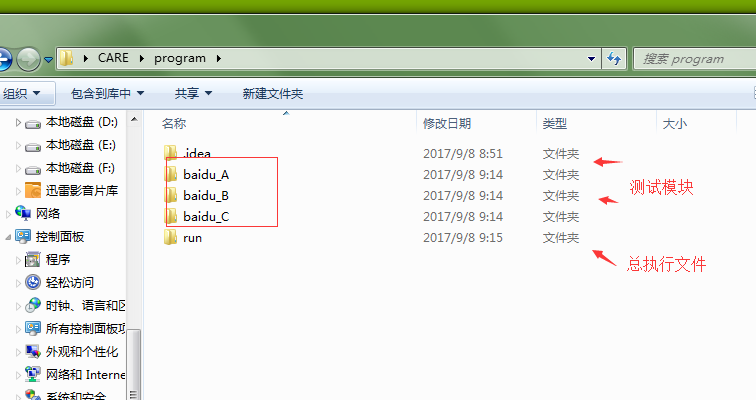
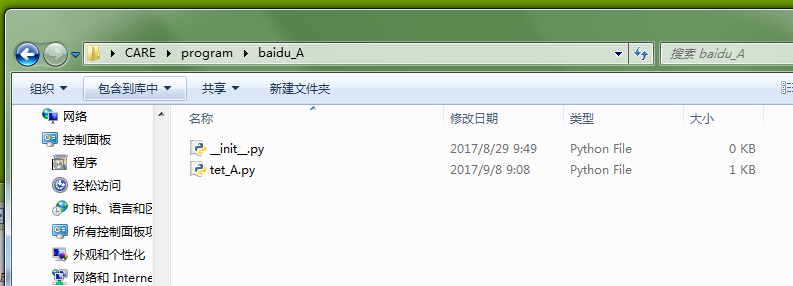
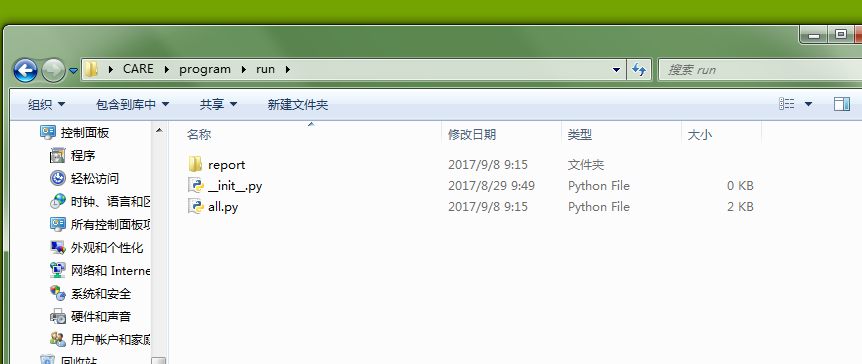
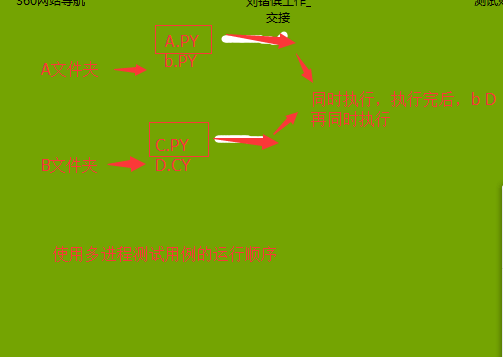
描述: 使用这个总执行文件,可以多进程 同时开始每个模块的测试用例(每个模块同时一条接着一条执行)
python-selenium并发执行测试用例(方法一 各模块每一条并发执行)的更多相关文章
- Python Nose框架编写测试用例方法
1. 关于Nose nose项目是于2005年发布的,也就是 py.test改名后的一年.它是由 Jason Pellerin 编写的,支持与 py.test 相同的测试习惯做法,但是这个包更容易安装 ...
- Python+Selenium定位元素的方法
Python+Selenium有以下八种定位元素的方法: 1. find_element_by_id() eg: find_element_by_id("kw") 2. find_ ...
- Python selenium 三种等待方法
1. 强制等待 sleep(xx) 是最简单粗暴的一种办法,不管你浏览器是否加载完了,程序都得等待3秒,3秒一到,继续执行下面的代码,作为调试很有用,不建议总用这种等待方式,严重影响程序执行速度. 代 ...
- 第8.5节 Python类中的__new__方法和构造方法__init__关系深入剖析:执行顺序及参数关系案例详解
上节介绍了__new__()方法这个比构造方法还重要的方法的语法,本节通过案例来详细剖析__new__()方法的细节以及它与构造方法之间的关系. 一. 案例说明 本节以圆Cir类为例来说明,为了 ...
- 5 Python+Selenium的元素定位方法(xpath)
[环境] Python3.6+selenium3.0.2+FireFox50+win7 [定位方法] 1.方法:find_element_by_xpath('') 说明:xpath定位方法有相对路径和 ...
- 4 Python+Selenium的元素定位方法(link/partial link)
[环境] Python3.6+selenium3.0.2+IE11+win7 [定位方法] 1.link/partial link定位方法:定位的元素为文字链接且链接很长时 方法:find_eleme ...
- 3 Python+Selenium的元素定位方法(id、class name、name、tag name)
[环境] Python3.6+selenium3.0.2+IE11+Win7 [定位方法] 1.通过ID定位 方法:find_element_by_id('xx') 2.通过name定位 方法:fin ...
- 6 Python+Selenium的元素定位方法(CSS)
[环境] python3.6+selenium3.0.2+Firefox50.0+win7 [定位方法] 1.方法:find_element_by_css_selector('xx') CSS的语法比 ...
- Python——cmd调用(os.system阻塞处理)(多条命令执行)
os.system(返回值为0,1,2)方法 0:成功 1:失败 2:错误 os.system默认阻塞当前程序执行,在cmd命令前加入start可不阻塞当前程序执行. 例如: import os os ...
随机推荐
- jeecg-org.jeecgframework.web.system.listener.InitListener
早上启动项目 发现报错 百度之后,发现这属于jeecg常见问题: http://www.jeecg.org/forum.php?mod=viewthread&tid=1830&extr ...
- Fedora初体验
========1. 下载https://getfedora.org/zh_CN/workstation/download/下载如下2个文件:Fedora-Workstation-Live-x86_6 ...
- centos7虚拟机安装elasticsearch5.0.x-安装篇
https://blog.csdn.net/u012371450/article/details/51776505 请预先安装jdk 创建新用户(非root用户)elasticsearch只能用非ro ...
- spring mvc发送请求404,不能进入处理方法,也不报错
找了很久找不到原因,那多半是字段绑定出错了.如字段不能为空的如int,double,没传给了空:字段是int的,给了double形式的值(1.0)..这些都会使spring mvc自动绑定出错,而且不 ...
- 【java编程】运算符
一.位移运算 java中有三种移位运算符 << : 左移运算符,num << 1,相当于num乘以2 >> : 右移运算符,nu ...
- 使用VUE搭建tab标签组件
Vue2.0 多 Tab切换组件简单封装,满足自己简单的功能,可以直接拿去使用! 首先上效果图: 功能简单介绍: 1.支持tab切换 2.支持tab定位 3.支持tab自动化 仿React多Tab实现 ...
- fcntl获取和修改文件打开状态标志
[root@bogon code]# cat b.c #include<stdio.h> #include<error.h> #include<unistd.h> ...
- Properties 类的使用
定义: 表示一个持久的集合,可以存在流中,或者从流中加载.是Hashtable子类,map集合方法都可以用. 方法的使用: /* * 集合对象 properties继承Hashtable实现了Map接 ...
- vm centos7中用NAT模式配置上网
第一步:设置虚拟机的NAT相关网络设置: 点击5标致处的“NAT设置”会出现设置6标致处的网关. 第二部:设置操作系统网络设置,右击上图中9标致处的系统,点击设置 第三部:配置操作系统ip ...
- SVN提交强制输入日志信息
在团队开发时,因一些团队成员提交代码时没有写提交说明的习惯,为了规范版本管理,增强大家的团队意识,上网找到了强制录入提交日志的方法.方法如下: 一.编写bat文件,命名为pre-commit.bat, ...