
centos6.5远程桌面连接(VNC\SPice)
在Linux下用vnc远程桌面,centos中默认没有安装VNC
查询系统是否安装VNC
# rpm -q tigervnc tigervnc-server

安装VNC服务
# yum install tigervnc tigervnc-server -y

为vncserver设置密码
[root@localhost ~]# vncserver

You will require a password to access your desktops.

Password:<输入vnc登录密码>

Verify:<再次输入vnc登录密码>

New 'localhost.localdomain:1 (root)' desktop is localhost.localdomain:

Creating default startup script /root/.vnc/xstartup

Starting applications specified in /root/.vnc/xstartup

Log file is /root/.vnc/localhost.localdomain:.log

[root@localhost ~]#
配置vnc
为了防止黑屏,需要修改一下/root/.vnc/xstartup,注释下面两行并添加一行内容
# vi /root/.vnc/xstartup
#xterm -geometry 80x24++ -ls -title "$VNCDESKTOP Desktop" &

#twm &
gnome-session &

修改用户配置文件
# vi /etc/sysconfig/vncservers
注释上面两行,最后增加下面两行
VNCSERVERS="2:root"

VNCSERVERARGS[]="-geometry 1024x768 -depth 32"

改变xstartup的权限
# chmod 777 /root/.vnc/xstartup
防火墙开放端或者也可以直接关闭防火墙
查看端口号
# netstat -antpl
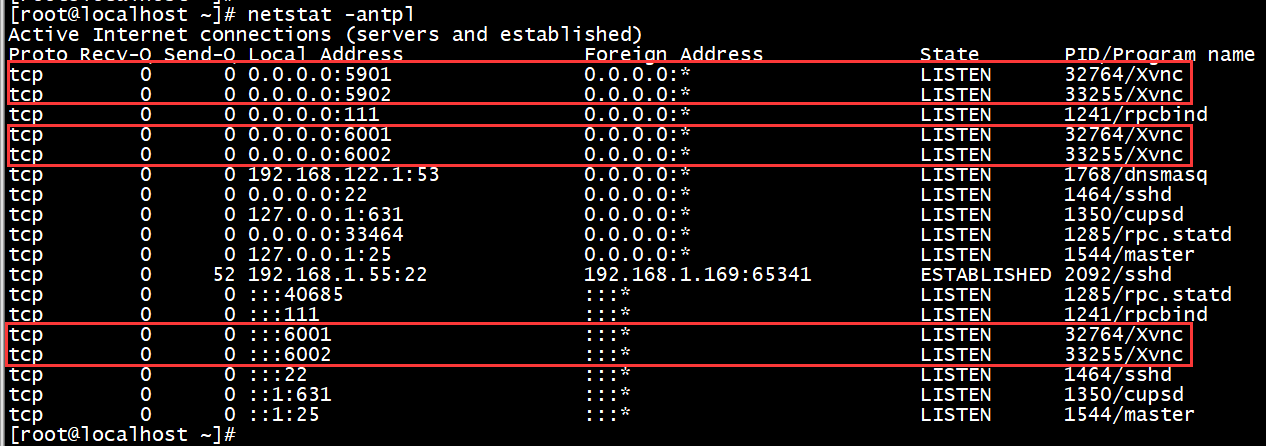
关闭防火墙
# service iptables stop

打开防火墙的监听端口
vi /etc/sysconfig/iptables
-A INPUT -m state --state NEW -m tcp -p tcp --dport 22 -j ACCEPT //在此行下方增加
-A INPUT -m state --state NEW -m tcp -p tcp --dport 5900:5903 -j ACCEPT
保存退出,重启防火墙
service iptables restart
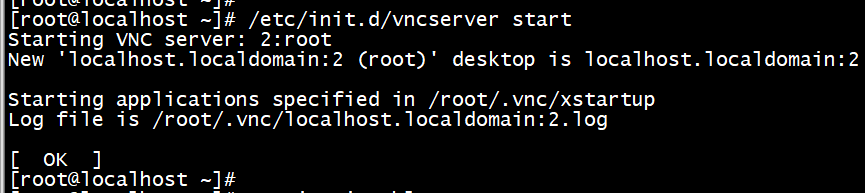
启动VNC
# /etc/init.d/vncserver start
然后在Windows中用客户端登录
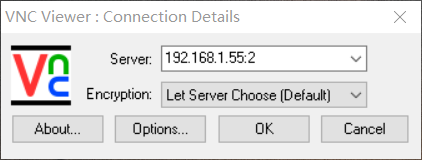
输入设置的VNC密码

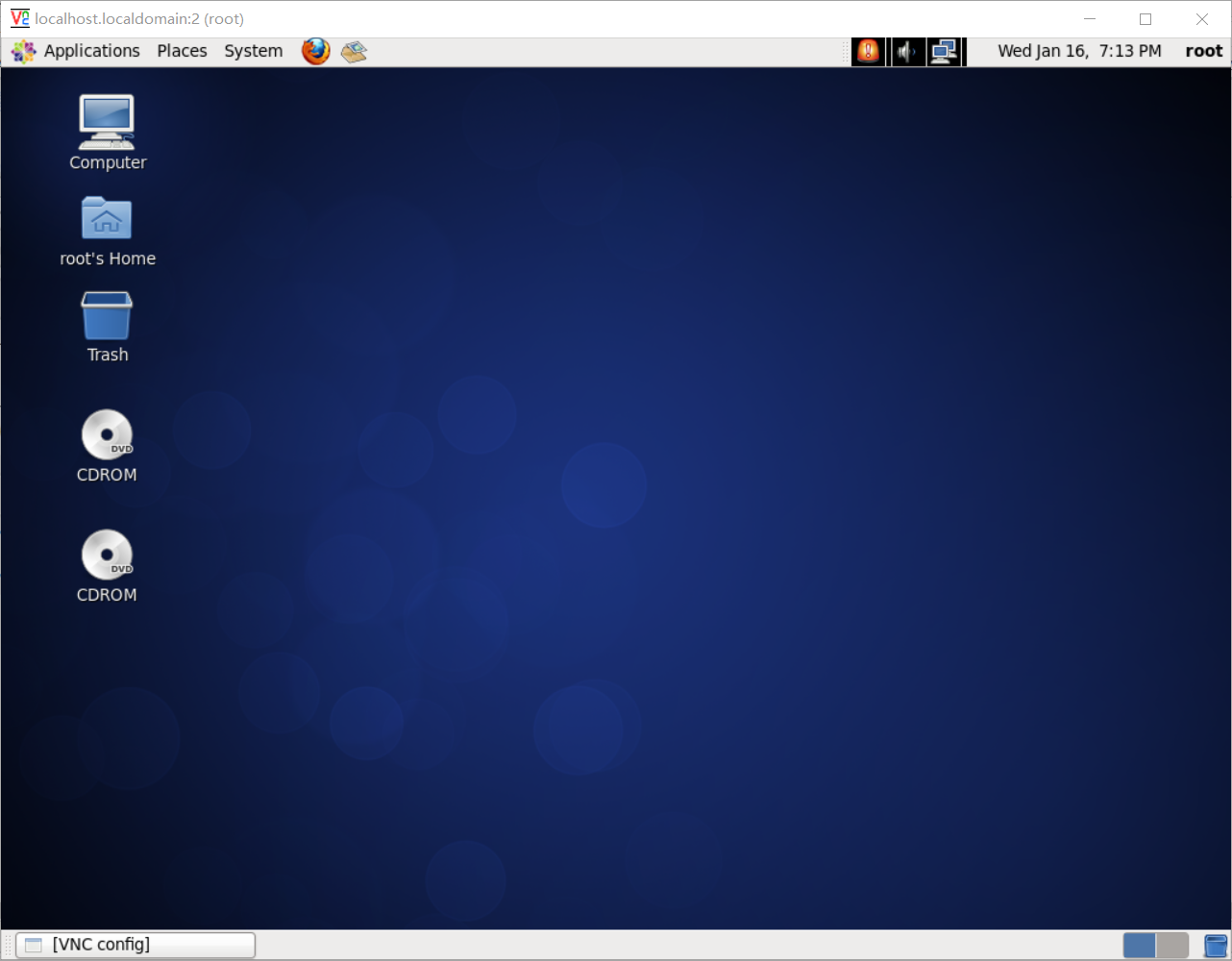
连接成功
centos6.5远程桌面连接(VNC\SPice)的更多相关文章
- linux远程桌面连接 VNC Server
更新源 # sudo apt-get update 安装vnc4server # sudo apt-get install vnc4server 修改vnc远程连接密码 # vncpasswd 编辑v ...
- 通过VNC Viewer使用VMware虚拟机的远程桌面连接
本文转自:http://www.14blog.com/archives/185 要在VMware虚拟机中使用远程桌面连接?方法有两个:一种是在虚拟机中做“端口映射”,当然,这个稍显复杂(虚拟机端口映射 ...
- CentOS7配置图形界面及设置vnc远程连接、windows远程桌面连接
安装CentOS桌面 yum groupinstall "GNOME Desktop" 重启,进入终端,将启动模式变更为图形模式 systemctl set-default gra ...
- 树莓派3_win10下使用"远程桌面连接"与树莓派通信(使用VNC实现连接后)
-----------------------------------------------------------学无止境------------------------------------- ...
- Windows与Linux相互远程桌面连接
对于远程桌面连接Linux,大家可能会第一时间想到使用VNC,,远程桌面Windows,大家第一时间会想到使用Windows自带的远程桌面.那么有没有办法,使得在Linux中可以远程Windo ...
- 远程桌面连接KVM虚拟机
问题描述 有些时候,由于网络存在问题,虚拟机无法获取到IP地址,无法使用spice或vnc来连接虚拟机,但是又需要连到虚拟机来排查故障 解决办法 编辑虚拟机配置 设置xml命名空间 <domai ...
- 阿里云服务器上开启linux远程桌面连接
一.说明: 本文的目的是实现在windows机器上利用远程桌面连接来访问远程的linux桌面. 这里使用的是阿里云服务器,操作系统为Centos6.5. 二.基本步骤: 1.首先保证服务器已经安装完毕 ...
- linux 远程桌面连接
我们知道在windows下面我们可以用远程桌面连接来控制其它电脑, 但linux 远程桌面连接?不过在说怎样连接之前还是要先明确一个概念,为什么我标题没有用linux中的远程桌面连接呢, 这是因为Li ...
- xmanager远程桌面连接Linux
远程桌面连接Linux,两种工具:vnc.xmanager xmanager使用参考如下,暂未整理: Xmanager连接Centos的远程桌面 | 大爱 http://lovesoo.org/xma ...
随机推荐
- jsp中引入jquery报错:Failed to load resource: the server responded with a status of 404 (Not Found)
问题描述: 今天自己在搭建spring.springMVC.hibernate框架,搭建完成后,在引入jquery时,发现jquery不管用.我的解决顺序是: 1.检查路径,发现路径没错,另外需要注意 ...
- 行级锁 java||数据库
http://www.cnblogs.com/xiyubaby/p/4623516.html select * from t for update 会等待行锁释放之后,返回查询结果. select * ...
- Spring boot Mybatis 整合
PS: 参考博客 PS: spring boot配置mybatis和事务管理 PS: Spring boot Mybatis 整合(完整版) 这篇博客里用到了怎样 生成 mybatis 插件来写程 ...
- Understanding Complex Event Processing (CEP)/ Streaming SQL Operators with WSO2 CEP (Siddhi)
转自:https://iwringer.wordpress.com/2013/08/07/understanding-complex-event-processing-cep-operators-wi ...
- haproxy prometheus 监控docker-compose 运行试用
haproxy prometheus 的监控metrics 使用的是exporter ,因为haproxy 对于状态统计报告处理的 比较好,我们可以了stats 同时支持一个csv的api 接口,所以 ...
- Linux内核设计基础(三)之定时器和时间管理
版权声明:本文为博主原创文章.未经博主同意不得转载. https://blog.csdn.net/BlueCloudMatrix/article/details/29294529 内核知道连续两次时钟 ...
- python 属性的访问权限,_,__,__XXX__
1. 非私有变量,可以随意调用和修改 在class内部,有属性和方法,如下面的class Student 有name和score class Student(object): def __init__ ...
- 深入探讨JavaScript如何实现深度复制(deep clone)
在代码复用模式里面有一种叫做“复制属性模式”(copying properties pattern).谈到代码复用的时候,很有可能想到的是代码的继承性(inheritance),但重要的是要记住其最终 ...
- petalinux--执行子进程“oe-gnome-terminal-phonehome”失败(没有那个文件或目录)(转)
简介 使用petalinux配置kernel时候提示 “Failed to execute child process “oe-gnome-terminal-phonehome” (No such f ...
- 基于Eclipse搭建hadoop开发环境
一.基础环境准备 1.Eclipse 下载地址:http://pan.baidu.com/s/1slArxAP 2.JDK1.8 下载地址:http://pan.baidu.com/s/1i5iNy ...