
offse家族属性
在JavaScript中,常用offset、scroll和client家族属性来表示元素的位置和大小相关属性,最近在网上找到了一张图来表示三者之间的关系,正好可以在此借鉴一下。
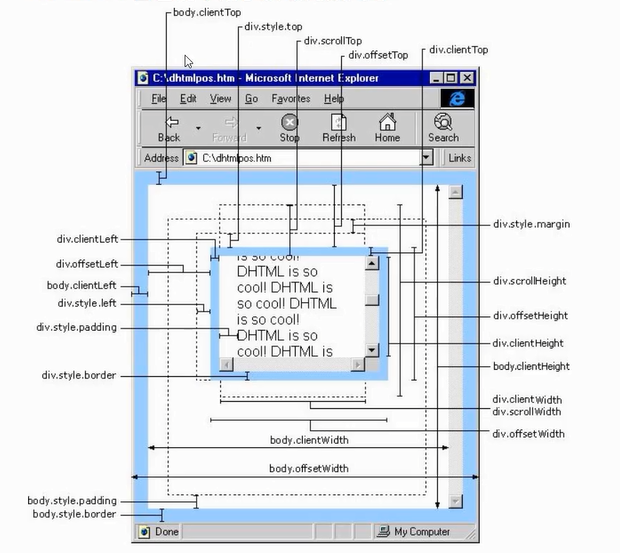
本次主要来看一下offset家族,包括offsetWidth、offsetHeight、offsetLeft和offsetTop。
offsetWidth和offsetHeight
offsetWidth和offsetHeight表示的是元素的可见宽度和高度,与元素有没有设置宽高没有直接关系,并且offsetHeight = 内容 + 内边距 + 边框(宽度同理)。
在说到offsetWidth和offsetHeight的时候,就不能忽略了style.width和style.height了,这两个表示的是通过行内元素设置的元素宽高。
例1:
<!DOCTYPE html>

<html lang="en">

<head>

    <meta charset="UTF-8">

    <title></title>

    <style>

        #box{

            background-color: red;

            padding: 10px;

            border: 5px solid #ddd;

            margin: 10px;

        }

    </style>

</head>

<body>

    <div id="box"></div>

<script>

    var box = document.getElementById("box");

    console.log( box.offsetWidth, box.offsetHeight);

    console.log( box.style.width, box.style.height);</script>

</body>

</html>
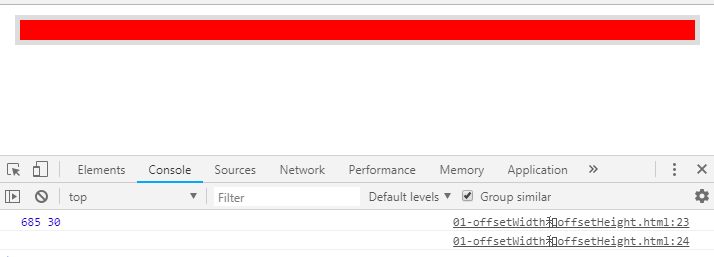
此时我们可以看到,因为虽然没有直接设置宽高,但元素有padding和border,所以有可见的宽高。但是因为没有设置行内宽高,所以元素的style.width和style.height为空。
例2:
<!DOCTYPE html>

<html lang="en">

<head>

    <meta charset="UTF-8">

    <title></title>

    <style>

        #box{

            width: 200px;

            height: 150px;

            background-color: red;

            padding: 10px;

            border: 5px solid #ddd;

            margin: 10px;

        }

    </style>

</head>

<body>

    <div id="box" style="width: 100px;height: 100px;"></div>

<script>

    var box = document.getElementById("box");

    console.log( box.offsetWidth, box.offsetHeight);

    console.log( box.style.width, box.style.height);

</script>

</body>

</html>
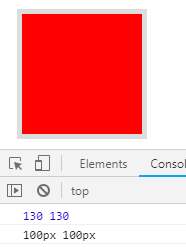
此时,我们将例1的代码少做修改,同时设置了两次宽高,最后发现行内的宽高覆盖了样式表里设置的宽高,offset的值是在style的值上面加上了padding和border的结果,另外。offsetWidth和offsetHeight得到的是不带单位的数值,而style.width和style.height得到的是带单位的结果。
例3:
我们继续修改上面的代码,将例2中的js部分改为下面部分:
<script>
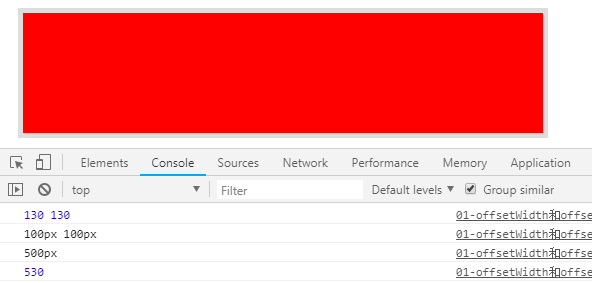
我们通过分别offsetWidth和style.width为元素赋予样式,只有style.width生效了,也就是说,offsetWidth和offsetHeight是只读的,style.width和style.height是可读写的。
offsetLeft和offsetTop
offsetLeft和offsetTop表示的是距离父元素的距离,具体值的是从符标签的padding开始计算,不包括border,即从子盒子边框到定位父盒子边框的距离。
例1:
<!DOCTYPE html>

<html lang="en">

<head>

    <meta charset="UTF-8">

    <title></title>

    <style>

        *{

            margin: 0;

            padding: 0;

            list-style: none;

        }

        #father{

            width: 400px;

            height: 400px;

            background-color: red;

            margin: 40px;

        }

        #box{

            width: 200px;

            height: 150px;

            background-color: blue;

            padding: 10px;

            border: 5px solid #000;

            margin-left: 20px;

        }

    </style>

</head>

<body>

    <div id="father">

        <div id="box"></div>

    </div>

<script>

    var box = document.getElementById("box");

    console.log(box.offsetLeft);

    console.log(box.offsetTop);

</script>

</body>

</html>
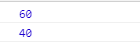
此时因为#box的父元素是没有定位的,所以获取到的知识一层层寻找有定位的上一层级,直到找到body,本次指的就是距离body的值。
现在,我们将上面的代码稍作调整,只需要修改#father的样式如下即可。
例2:
#father{

            width: 400px;

            height: 400px;

            background-color: red;

            margin: 40px;

            position: relative;

        }
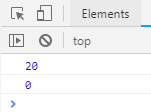
由例2我们可以看到,当元素的父级元素有了定位属性后,该元素的offsetLeft和offsetTop表示的就是到父元素的距离。
当然还有style.left和style.top,这里就不再详细介绍了,直接给出两者的不同之处:
- style.left只能获取行内的,而offsetLeft则可以获取到所有的;
- offsetLeft 可以返回没有定位盒子距离左侧的位置;而style.left不可以,其只能返回有定位盒子的left;
- offsetLeft 返回的是数字,而 style.left 返回的是字符串,除了数字外还带有单位:px;
- offsetLeft是只读的,而style.left是可读写;
- 如果没有给 当前 元素指定过 top 样式,则 style.top 返回的是空字符串。
offse家族属性的更多相关文章
- client家族属性
在前面总结了offset家族属性和scroll家族属性,今天来总结一下client家族属性,同前面一样,client家族也包宽高和左上,具体的通过代码来区别这三大家族属性的不同. <!DOCTY ...
- scroll家族属性
上一篇主要分析了一下offset家族属性,本篇文章则主要是来分析一下scroll家族属性. 首先,scroll家族包括4个属性: 网页正文宽度:document.body.scrollWidth; 网 ...
- jqu
1 /*2 * 说明:3 * 本源代码的中文注释乃Auscarlin呕心沥血所作.旨在促进jQuery的传播以及向广大jQuery爱好者提供一个进阶4 *的途径,以让各位更加深入地了解jQuery,学 ...
- JS-特效 ~ 04. client对象、网页可视区域的宽高、client / offset / scroll 三大家族的区别、冒泡事件、事件委托、获取内嵌式和外链式属性getStyle(ele,attr) ;、缓动动画封装
知识点: 模拟滚动条的解除事件问题 : event内置对象,包含 了大量事件: page兼容性: pageX || clientX + scool().top : if (true === a)tr ...
- 【6年开源路】FineUI家族今日全部更新(FineUI + FineUI3to4 + FineUI.Design + AppBox)!
刚才询问博客园团队: [6年开源路]三石今日送福利,AppBox4.0源码免费拿!FineUI家族今日全部更新(FineUI + FineUI3to4 + FineUI.Design + AppBox ...
- (转)css3-box-sizing属性详解
box-sizing是CSS3的box属性之一.一说到CSS的盒模型(Box model)我想很多人都会比较烦,特别是对于新手,然而这个Box model又是我们CSS运用中比较重要的一个属性.那么C ...
- JSON 获取属性值的方法
JSON(JavaScript Object Notation) 是一种轻量级的数据交换格式.易于人阅读和编写.同时也易于机器解析和生成.它基于JavaScript(Standard ECMA-262 ...
- H5、CSS3属性的支持性以及flex
一.项目中用到一个flex属性,但是应用了flex的父容器只设置了width,没有设置height,此时每一个应用了上面提到的属性的样式的div都重叠在了一起,在IE10,IE11出问题,IE9没有问 ...
- JS中的事件类型和事件属性的基础知识
周末无聊, 这几天又复习了下JS搞基程序设计3, 想着好记性不如浪笔头哇, 要么把这些东西写下来, 这样基础才能更加扎实么么哒, 知道的同学也可以直接过一下,当做复习, 小姨子再也不用担心我的学习啦 ...
随机推荐
- 踩坑tomcat8.5的cookie机制
https://www.pomelolee.com/1601.html tomcat升级到8.5版本 发现登录和退出报错,报错日志为下 [http-nio-8080-exec-20] 2016 Aug ...
- 【BZOJ2594】【WC2006】水管局长
日……又被傻B错坑了一整天…… 原题: SC省MY市有着庞大的地下水管网络,嘟嘟是MY市的水管局长(就是管水管的啦),嘟嘟作为水管局长的工作就是:每天供水公司可能要将一定量的水从x处送往y处,嘟嘟需要 ...
- <---------------线程修改名字、得到名字及开启------------------>
ThreadDemo: public class ThreadDemo extends Thread { public void run(){ System.out.println(getName() ...
- MySQL Transaction--MySQL与SQL Server在可重复读事务隔离级别上的差异
MySQL和SQL Server两种数据库在REPEATABLE-READ事务隔离级别实现方式不同,导致使用上也存在差异. 在MySQL中,默认使用REPEATABLE-READ事务隔离级别,MySQ ...
- How to implement long running flows, sagas, business processes or similar
转自:https://blog.bernd-ruecker.com/how-to-implement-long-running-flows-sagas-business-processes-or-si ...
- oracle参数文件与启动过程
oracle随系统启动而启动 cs65-64桌面版orcle-11.2.0.4 启动监听器,后台进程,OEM. 注意: 如果只做一和三,只能启动后台进程,监听器不启动,如果只做二和三,只能启动监听器, ...
- node start - hello world http server
Write a file t1.js 'use strict'; const express = require('express'); // Constants const PORT = 8080; ...
- vue-router 与 react-router 设计理念上的区别
vue-router 与 react-router 设计理念上的区别: 区别 vue-router react-router 改成history mode: 'history' 直接使用 react- ...
- MySQL 检索数据(SELECT)
检索单个列 mysql> SELECT 列名 FROM 表名; 如下,从表products中检索prod_name列 mysql> SELECT prod_name FROM ...
- mysql主从复制--重置操作reset master, reset slave
本文介绍reset master, reset slave的作用. reset master 在master上执行 mysql > RESET MASTER 作用包括: 删除binlog索引文件 ...