
React中的Context——从父组件传递数据
简介:在React中,数据可以以流的形式自上而下的传递,每当你使用一个组件的时候,你可以看到组件的props属性会自上而下的传递。但是,在某些情况下,我们不想通过父组件的props属性一级一级的往下传递,我们希望在某一级子组件中,直接得到上N级父组件中props中的值。
1.一般情况下通过props传值的情况
class Button extends React.Component {

  render() {

    return (

      <button style={{background: this.props.color}}>

        {this.props.children}

      </button>

    );

  }

}

class Message extends React.Component {

  render() {

    return (

      <div>

        {this.props.text} <Button color={this.props.color}>Delete</Button>

      </div>

    );

  }

}

class MessageList extends React.Component {

  render() {

    const color = "purple";

    const children = this.props.messages.map((message) =>

      <Message text={message.text} color={color} />

    );

    return <div>{children}</div>;

  }

}
我们来分析一下这段代码,大致的组件分为3级:
顶层MessageLists——>Message一级子类——>Button底层子类
我们来看从父组件到子组件的值的传递情况:
(1)text:
我们可以看到,在顶层组件MessageLists中的值,传递到一级子组件Message中,并在此组件中被使用。
(2)color:
再看props中的color的传递情况,在顶层组件MessageLists中的值,先传递到一级子组件Message中,
在传递到二级子组件Button中,最后在二级子组件中被使用。
综上:这就是一般在React中,所使用的通过props属性,在父组件与子组件中进行值传递。
2.如何利用React中的Context来进行值的越级传递。
class Button extends React.Component {

  render() {

    return (

      <button style={{background: this.context.color}}>

        {this.props.children}

      </button>

    );

  }

}

Button.contextTypes = {

  color: React.PropTypes.string

};

class Message extends React.Component {

  render() {

    return (

      <div>

        {this.props.text} <Button>Delete</Button>

      </div>

    );

  }

}

class MessageList extends React.Component {

  getChildContext() {

    return {color: "purple"};

  }

  render() {

    const children = this.props.messages.map((message) =>

      <Message text={message.text} />

    );

    return <div>{children}</div>;

  }

}

MessageList.childContextTypes = {

  color: React.PropTypes.string

};
上述代码,我们实现了通过React的Context实现了值——color的越级传递。我们来分析一下上述的方法。
(1)首先在顶层组件中:
MessageList.childContextTypes = {

  color: React.PropTypes.string

};
定义了顶层组件所拥有的子类context对象——该顶层组件所拥有的的子类context对象为color,且必须为字符串。
然后通过getChildText方法,来给子context对象的属性赋值:
getChildContext() {

    return {color: "purple"};

  }
这样就完成了顶层组件中,context对象的赋值。
(2)越级传递,因为color属性只在最底层使用
我们来看color属性的越级传递,因为color属性,在一级子组件Message中并没有直接用到,因此我们可以
直接传递到最底层(越级),在Button组件中使用。
首先Button组件中,再次声明了所接受到的context的子组件color的类型,声明必须为字符串:
Button.contextTypes = {

  color: React.PropTypes.string

};
然后可以通过this.context.color这种方式调用:
 <button style={{background: this.context.color}}>

        {this.props.children}

 </button>
综上:这样,我们发现通过Context,我们就能实现值得越级传递。
注意的是:子组件要用this.context.color进行调用
======================================================================================================
注意:
constructor(props, context) {

    super(props, context);

}
类似上面 一定要把context引进来
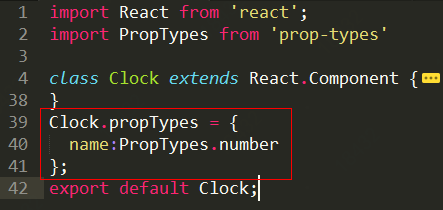
注意引入propTypes的方式
React中的Context——从父组件传递数据的更多相关文章
- vuejs子组件向父组件传递数据
子组件通过$emit方法向父组件发送数据,子组件在父组件的模板中,通过自定义事件接收到数据,并通过自定义函数操作数据 <!DOCTYPE html> <html lang=" ...
- vue 父向子组件传递数据,子组件向父组件传递数据方式
父组件向子组件传递数据通过props,子组件引入到父组件中,设置一个值等于父组件的数据,通过:bind将数据传到子组件中,子组件中通过props接收父组件的数据,这样就可以使用父组件的数据了,循环组件 ...
- Vue : props 使用细节(父组件传递数据给子组件)
props使用细节 在Vue.js中我们可以使用 props 实现父组件传递数据给子组件,下面我们总结一下props的使用细节 1.基础类型检查 2.必填数据 3.默认值 4.自定义验证函数 其中每一 ...
- vue子组件使用自定义事件向父组件传递数据
使用v-on绑定自定义事件可以让子组件向父组件传递数据,用到了this.$emit(‘自定义的事件名称’,传递给父组件的数据) <!DOCTYPE html> <html lang= ...
- vue单文件组件形成父子(子父)组件之间通信(vue父组件传递数据给子组件,子组件传递数据给父组件)
看了很多文章,官网文档也有看,对父子组件通信说的不是很明白:决定自己总结一下: vue一般都使用构建工具构建项目:这样每个组件都是单文件组件:而网上很多文章都是script标签方式映入vue,组件通信 ...
- Vue父组件向子组件传递方法(自定义方法)并且子组件向父组件传递数据
<!DOCTYPE html> <html lang="en"> <head> <meta charset="UTF-8&quo ...
- vue 父组件传递数据给子组件
父组件 <body> <div id="app"> <child v-bind:data = "test"></chi ...
- vue 实现,子组件向父组件 传递数据
首先理清组件之间的关系 组件与组件之间,还存在着不同的关系.父子关系与兄弟关系(不是父子的都暂称为兄弟吧). 父子组件 父子关系即是组件 A 在它的模板中使用了组件 B,那么组件 A 就是父组件,组件 ...
- vue组件-子组件向父组件传递数据-自定义事件
自定义事件 我们知道,父组件是使用 props 传递数据给子组件,但如果子组件要把数据传递回去,应该怎样做?那就是自定义事件!
随机推荐
- java⑩
1.for循环: for循环语法 for(表达式1;表达式2;表达式3){ 循环体4} 表达式1:初始化变量 只执行一次!表达式2:循环条件 满足条件进入循环体4表达式3:迭代变量 如果循环体 中只有 ...
- CF712E [Memort and Casinos]
题意 每次询问一段区间[l,r],求从最左边走到最右边(r+1)的概率(若走到l-1,则GG了),每个点上写有向右走的概率.支持单点修改. 思考 若只查询一次,那只要知道每个点在不走到l-1的情况下, ...
- [Leetcode 739]*还有几天会升温 Daily Temperatures
[题目] Given a list of daily temperatures T, return a list such that, for each day in the input, tells ...
- :工厂模式2:抽象工厂模式--Pizza
#ifndef __INGREDIENT_H__ #define __INGREDIENT_H__ #include <iostream> using namespace std; cla ...
- ftp上传操作
采用 :FtpWebRequest 进行操作ftp. 1.代码上传文件必须是被动模式 UsePassive=false 2.最好采用二进制传输 UseBinary=true 注意缓冲区大小,还有注意 ...
- NAND Flash vs NOR Flash
Avinash Aravindan reference:https://www.embedded.com/design/prototyping-and-development/4460910/2/Fl ...
- oracle截取字段中的部分字符串
使用Oracle中Instr()和substr()函数: 在Oracle中可以使用instr函数对某个字符串进行判断,判断其是否含有指定的字符. 其语法为: instr(sourceString,de ...
- url中特殊符号转换
特殊符号 url中显示 空格 %20 & %26
- PMS5003ST传感器
5003ST传感器已经收到,准备开始DIY PM2.5检测仪 一款可以同时监测空气中颗粒物浓度.甲醛浓度及温湿度的三 合一传感器.其中颗粒物浓度的监测基于激光散射原理,可连续采集并计算单位 ...
- 百杂讲堂之为什么32位系统只能操作4g内存
百杂讲堂之为什么32位系统只能操作4g内存 计算机内存中很多的单元,每一个单元就是一个字节,一个字节有8位.每一个单元有两种状态:0和1. 所以 两个单元就有4个组合: 3个单元就有8个组合: 依次类 ...