
nginx1.8.1反向代理、负载均衡功能的实现
nginx1.8.1 proxy 服务器192.168.8.40
web1 centos6.5 httpd2.2.15
web2 centos7.2 httpd2.4.6
1、代理功能的简单实现
nginx代理服务器:192.168.8.40
web服务器:192.168.8.101
8.40添加代理:
location /forum/ {
proxy_pass http://192.168.8.101/bbs/;
}

在被代理的web端
创建目录mkdir /web/htdocs/bbs
vim /web/htdocs/bbs/index.html
加入<h1>192.168.8.101 bbs</h1>
访问 http://192.168.8.40/forum/即可出现8.101的内容
改成正则表达式的方式:
location ~* ^/forum {
proxy_pass http://192.168.8.101;
}
此时http://192.168.8.40/forum/的方式不能访问,需要通过修改192.168.8.101的bbs目录改为forum即可访问
# mv bbs forum
2、代理上显示客户端真实IP(方便统计真实的IP访问情况)
8.101上更改显示日志的方式:
# vim /etc/httpd/conf/httpd.conf
LogFormat "%{X-Real-IP}i %l %u %t \"%r\" %>s %b \"%{Referer}i\" \"%{User-Agent}i\"" combined


nginx服务器端8.40配置:
location ~* ^/forum {
proxy_pass http://192.168.8.101;
proxy_set_header X-Real-IP $remote_addr;
}

3.实现简单的负载均衡:
nginx proxy server:192.168.8.40
apache web1:192.168.8.39
apache web2:192.168.8.101

nginx proxy server:192.168.8.40配置:
# 定义web服务器集群:
upstream webservers {
server 192.168.8.39 weight=1;
server 192.168.8.101 weight=1;
}
server {
#location / {
# root /web/htdocs;
# index index.php index.html index.htm;
#}
#定义访问集群
location / {
proxy_pass http://webservers/;
proxy_set_header X-Real-IP $remote_addr;
}
}

通过访问http://192.168.8.40可以看到负载的效果
4、对负载均衡的服务器宕机情况进行适配
#添加错误的定义
server {
listen 8080;
server_name localhost;
root /web/errorpages;
index index.html;
}
# 创建错误页面定义
# mkdir /web/errorpages/ -pv
# vim index.html
加入
sorry,website is being repaired please wait
# 添加超时定义及错误页面定义,如果连续访问错误两次则踢掉,检测时间间隔2秒
upstream webservers {
server 192.168.8.39 weight=1 max_fails=2 fail_timeout=2;
server 192.168.8.101 weight=1 max_fails=2 fail_timeout=2;
server 127.0.0.1:8080 weight=1 backup;
}
测试,关闭web1则,只能访问到web2,关闭web2后出现错误提示

5、为反向代理启用缓存功能
proxy_cache_path /nginx/cache/first levels=1:2 keys_zone=first:20m max_size=1g;
server {
listen 80;
server_name localhost;
index index.html index.php;
add_header X-Via $server_addr;
add_header X-Cache "$upstream_cache_status from $server_addr";
location / {
proxy_pass http://webservers/;
proxy_set_header X-Real-IP $remote_addr;
proxy_cache first;
proxy_cache_valid 200 10m;
}
# nginx -t
nginx: the configuration file /etc/nginx/nginx.conf syntax is ok
nginx: [emerg] mkdir() "/nginx/cache/first" failed (2: No such file or directory)
nginx: configuration file /etc/nginx/nginx.conf test failed
[root@centossz008 ~]# mkdir -pv /nginx/cache/first
mkdir: created directory `/nginx'
mkdir: created directory `/nginx/cache'
mkdir: created directory `/nginx/cache/first'

add_header X-Via $server_addr;
add_header X-Cache "$upstream_cache_status from $server_addr";
提示信息如下:

6、重定向规则
location / {
#root html;
root /web/htdocs;
index index.html index.htm;
rewrite ^/bbs/(.*)$ http://192.168.8.101/forum/$1;
}
访问:http://192.168.8.40/bbs/


7、上传文件的负载均衡
可能碰到这样的业务场景,几台web app设置了主从,一个服务器负责上传,其他只能通过同步来获取
nginx配置:
location / {
proxy_pass http://192.168.8.40/;
if ($request_method = "PUT"){
proxy_pass http://192.168.8.101;
}
}
客户端配置:
# vim /etc/httpd/conf/httpd.conf
在<Directory "/web/htdocs">下面添加Dav on
<Directory "/web/htdocs">
Dav on

# curl -T /etc/fstab http://192.168.8.40
<!DOCTYPE HTML PUBLIC "-//IETF//DTD HTML 2.0//EN">
<html><head>
<title>201 Created</title>
</head><body>
<h1>Created</h1>
<p>Resource /fstab has been created.</p>
</body></html>
在8.101上可以看到上传的文件
htdocs]# ls
forum fstab index.html
8、通过nginx统计某推广链接重写url
需求:
通过nginx统计某推广链接(如:http://www.baidu.com)的访问次数,即访问tuiguang.chinasoft.com自动跳转到www.baidu.com页面
如该服务器为1.1.1.1,带宽要足够大(要根据实际访问量来定)
步骤
①添加1.1.1.1的dns域名解析 tuiguang.chinasoft.com --> 1.1.1.1
②添加相关的配置
vim /etc/nginx/conf.d/tuiguang.conf
server {
server_name tuiguang.chinasoft.com;
rewrite_log on; # 打开重写的日志
error_log /data/logs/app_h5.log notice;
access_log /data/logs/app_error_h5.log;
location /h5/flow{
alias /data/h5;
index index.html;
proxy_set_header Host $host;
proxy_set_header X-Real-Ip $remote_addr;
proxy_set_header X-Forwarded-For $remote_addr;
rewrite ^(.*) http://www.baidu.com break;
}
}
9.修改http头Content-Type为application/octet-stream
upstream  lvs_server{

        server 10.27.13.215:;   #hd_lvs_voice01

        server 10.26.114.166:;  #hd_lvs_voice02

        server 10.27.62.9:;     #hd_lvs_voice03

        server 10.30.196.175:;  #hd_lvs_voice04

        server 10.30.196.157:;  #hd_lvs_voice05

    }

server {

    listen       ;

    location / {

     proxy_pass http://lvs_server;

    }

    location /index {

            proxy_set_header Host $http_host;

            proxy_set_header X-Real-Ip $remote_addr;

            proxy_set_header X-Forwarded-For $remote_addr;

            proxy_set_header Content-Type application/octet-stream;

            proxy_pass http://lvs_server;

    }#end index

}
日志中添加响应时间,请求时间的日志格式
log_format  main  '$remote_addr - $remote_user [$time_local] "$request" '

             '$status $body_bytes_sent "$http_referer" '

             '"$http_user_agent" "$http_x_forwarded_for" "$http_host" "$upstream_response_time" "$request_time"';
nginx获取不到客户端真实IP地址
upstream dxflowservers {

    ip_hash;

    server u04flow01.yaya.corp: weight= max_fails= fail_timeout=;

    server u04rec02.yaya.corp: weight= max_fails= fail_timeout=;

}

server {

    server_name 106.75.19.93;

    server_name dxacc.chinasoft.cn;

    location /{

        root /data/chinasoft/dx_traffic/liuliang_http/liuliangsdk/;

        index index.html;

        try_files $uri $uri/ /index.html;

    }

    location /dingxiangsdk/{

        proxy_set_header Host $host;

        proxy_set_header X-Real-Ip $remote_addr;

        # 经过ulb(lvs)以后无法获取客户端的真实IP地址,去掉下面这行即可

        #proxy_set_header X-Forwarded-For $remote_addr;

        proxy_pass http://dxflowservers/;

    }

    location /ngx_status {

            stub_status on;

            access_log off;

            allow 127.0.0.1;

            #deny all;

    }

}
简单测试反向代理upstream的健康检查功能
nginx --> apache(两台)
nginx : 192.168.3.200 (nginx 1.12.2)
apache01: 192.168.3.12
apache02:192.168.3.13
nginx的配置
upstream  lvs_server{

        server 192.168.3.12: weight= max_fails= fail_timeout=;

        server 192.168.3.13: weight= max_fails= fail_timeout=;

}

server {

    listen       ;

    server_name 192.168.3.200;

    access_log  /var/log/nginx/voice_lvs.access.log main;

    error_log  /var/log/nginx/voice_lvs.error.log;

    location / {

     proxy_pass http://lvs_server/;

    }

    location /index {

            proxy_set_header Host $http_host;

            proxy_set_header X-Real-Ip $remote_addr;

            proxy_set_header X-Forwarded-For $remote_addr;

            proxy_set_header Content-Type application/octet-stream;

            proxy_pass http://lvs_server;

    }

    location /ngx_status {

        stub_status on;

        access_log off;

        allow 127.0.0.1;

    }

}
[root@centossz008 ~]# cat /var/www/html/index.html
<h1>192.168.3.12</h1>
server01
[root@node5 ~]# cat /var/www/html/index.html
<h1>192.168.3.13</h1>
server02
经过测试,当不配置以下参数,如果关掉其中一台apache,请求会全部到另外一台中,所以upstream默认就会检查后端服务器,如果配置就按照你的配置
不配置就按照默认配置
weight=2 max_fails=5 fail_timeout=6;
[root@localhost /etc/nginx/conf.d]# for i in {1..20}; do curl http://192.168.3.200:8555/index.html;done
重定向示例
# cat /usr/local/nginx/conf/vhost.d/chinasoft.com.conf

map $http_origin $corsHost {

default "none" ;

"~https://chinasoft.com" https://chinasoft.com ;

"~https://chinasoft-com.cdn.ampproject.org" https://chinasoft-com.cdn.ampproject.org ;

"~https://chinasoft.com.amp.cloudflare.com" https://chinasoft.com.amp.cloudflare.com ;

"~https://cdn.ampproject.org" https://cdn.ampproject.org ;

"~https://images.chinasoft.com" https://images.chinasoft.com ;

"~https://my.chinasoft.com" https://my.chinasoft.com ;

"~https://store.chinasoft.com" https://store.chinasoft.com ;

"~https://my.chinasoft.jp" https://my.chinasoft.jp ;

}

server {

        listen ;

        server_name     chinasoft.com  www.chinasoft.com ori-www.chinasoft.com;

        access_log      /data/www/logs/nginx_log/access/chinasoft.com_access.log main ;

        error_log       /data/www/logs/nginx_log/error/chinasoft.com_error.log ;

        root            /data/www/vhosts/chinasoft.com/httpdocs ;

        index           index.html index.shtml index.php ;

    include        rewrite.d/chinasoft.com.conf ;

    error_page                /.html;

        rewrite ^/(.*)$ https://www.chinasoft.com/$1 permanent;    #跳转到Https

        location ~ \.php$ {

                fastcgi_pass unix:/tmp/php-cgi.sock;

                fastcgi_index index.php;

                #fastcgi_param SCRIPT_FILENAME ;

                fastcgi_param SCRIPT_FILENAME $document_root$fastcgi_script_name;

                include fastcgi_params;

                expires -;

        }

        location / {

            include proxy_params;

        if (!-d $request_filename){

            set $flag $flag;

        }

        if (!-f $request_filename){

            set $flag $flag;

        }

        if ($flag = ""){

                    rewrite ^(.*)$ /index.php last;

            expires -;

        }

        }

}

server {

        listen ;

        ssl on;

        ssl_certificate         cert2016/chinasoft_com.crt;

        ssl_certificate_key     cert2016/chinasoft_com.key;

        ssl_dhparam     cert2016/dh_2048.pem;

        ssl_session_timeout     5m;

        ssl_protocols   TLSv1 TLSv1. TLSv1.;

        ssl_ciphers     "ECDHE-RSA-AES128-GCM-SHA256:ECDHE-ECDSA-AES128-GCM-SHA256:ECDHE-RSA-AES256-GCM-SHA384:ECDHE-ECDSA-AES256-GCM-SHA384:DHE-RSA-AES128-GCM-SHA256:DHE-DSS-AES128-GCM-SHA256:kEDH+AESGCM:ECDHE-RSA-AES128-SHA256:ECDHE-E

CDSA-AES128-SHA256:ECDHE-RSA-AES128-SHA:ECDHE-ECDSA-AES128-SHA:ECDHE-RSA-AES256-SHA384:ECDHE-ECDSA-AES256-SHA384:ECDHE-RSA-AES256-SHA:ECDHE-ECDSA-AES256-SHA:DHE-RSA-AES128-SHA256:DHE-RSA-AES128-SHA:DHE-DSS-AES128-SHA256:DHE-RSA-AES256-S

HA256:DHE-DSS-AES256-SHA:DHE-RSA-AES256-SHA:!AES128-GCM-SHA256:!AES256-GCM-SHA384:!AES128-SHA256:!AES256-SHA256:!AES128-SHA:!AES256-SHA:AES:!CAMELLIA:DES-CBC3-SHA:!aNULL:!eNULL:!EXPORT:!DES:!RC4:!MD5:!PSK:!aECDH:!EDH-DSS-DES-CBC3-SHA:ED

H-RSA-DES-CBC3-SHA:!KRB5-DES-CBC3-SHA";

        ssl_prefer_server_ciphers       on;

#       add_header Strict-Transport-Security max-age=;

        #ssl_stapling        on;

        #ssl_stapling_verify        on;

        server_name     chinasoft.com www.chinasoft.com ori-www.chinasoft.com ;

        access_log      /data/www/logs/nginx_log/access/chinasoft.com_access.log main ;

        error_log       /data/www/logs/nginx_log/error/chinasoft.com_error.log ;

        root            /data/www/vhosts/chinasoft.com/httpdocs ;

        index           index.html index.shtml index.php ;

        include         rewrite.d/chinasoft.com.conf ;

    error_page                /.html;

        #add_header 'Access-Control-Allow-Origin' '*';

    add_header Access-Control-Allow-Origin $corsHost;

    add_header Access-Control-Allow-Methods 'GET, POST, OPTIONS';

    add_header Access-Control-Allow-Headers 'DNT,X-Mx-ReqToken,Keep-Alive,User-Agent,X-Requested-With,If-Modified-Since,Cache-Control,Content-Type,Authorization';

        location ~ \.php$ {

        try_files $uri =;

                fastcgi_pass unix:/tmp/php-cgi.sock;

                fastcgi_index index.php;

                #fastcgi_param SCRIPT_FILENAME ;

                fastcgi_param SCRIPT_FILENAME $document_root$fastcgi_script_name;

                include fastcgi_params;

                expires -;

        }

        location / {

                include proxy_params;

                if (!-d $request_filename){

                        set $flag $flag;

                }

                if (!-f $request_filename){

                        set $flag $flag;

                }

                if ($flag = ""){

                        rewrite ^(.*)$ /index.php last ;

                        expires -;

                }

        }

}

*****************

if ($request_uri ~ ^/snapchat/snapchat-password-cracker.html) { rewrite ^ https://www.centos.net/snapchat/snapchat-password-cracker.html permanent; }

if ($request_uri ~ ^/spy/index.html) { rewrite ^ https://www.chinasoft.com/topic/index.html permanent; }

if ($request_uri ~ ^/telegram/index.html) { rewrite ^ https://www.chinasoft.com/topic/index.html permanent; }

if ($request_uri ~ ^/track/hidden-phone-tracker-for-android-iphone.html) { rewrite ^ https://www.centos.net/track/hidden-phone-tracker-for-android-iphone.html permanent; }

if ($request_uri ~ ^/viber/index.html) { rewrite ^ https://www.chinasoft.com/topic/index.html permanent; }

[root@EOP_Aimersoft_web01:~]# head - /usr/local/nginx/conf/rewrite.d/chinasoft.com.conf

if ($host ~* ^chinasoft.com$){ rewrite ^(.*)$ http://www.chinasoft.com$1 permanent;}

if ($request_uri ~ ^/(.*)/(index|indice).(html)) { rewrite ^/(.*)/(index|indice).(html) /$   permanent;}

if ($request_uri ~ ^/(index|indice).html) { rewrite    ^       / permanent;}

#

if ($request_uri ~ ^/install-chinasoft-spy-app-on-android-phones.html) { rewrite ^ /how-to-spy-android-phones.html permanent; }
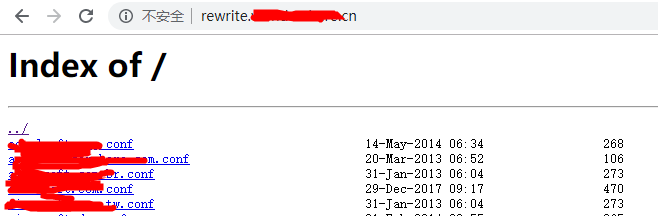
配置列出文件列表示例
[root@web:/usr/local/nginx/conf]# more admin_vhost.d/rewrite.chinasoft.cn.conf

server {

        listen ;

        server_name     rewrite.chinasoft.cn ;

        access_log      /data/www/logs/nginx_log/access/rewrite.chinasoft.cn_access.log main ;

        error_log       /data/www/logs/nginx_log/error/rewrite.chinasoft.cn_error.log ;

        root            /usr/local/nginx/conf/rewrite.d ;

        #index           index.html index.shtml index.php ;

        error_page                /.html;

        autoindex on;

        location ~ \.php$ {

                        proxy_pass http://php_pool;

                        include proxy_params;

                        access_log off;

        }

}

[root@web:/usr/local/nginx/conf]# more nginx.conf

#user  nobody;

worker_processes  ;

#error_log  logs/error.log;

#error_log  logs/error.log  notice;

#error_log  logs/error.log  info;

#pid        logs/nginx.pid;

pid        /data/www/logs/nginx.pid;

worker_rlimit_nofile  ;

events {

        use epoll;

        worker_connections  ;

        accept_mutex    off;

}

http {

    include       mime.types;

    default_type  application/octet-stream;

    #set_real_ip_from   0.0.0.0/;

    #real_ip_header     X-Forwarded-For;

    #proxy_set_header   Host    $host;

    #proxy_set_header   X-Real-IP       $remote_addr;

    #proxy_set_header   X-Forwarded-For $http_x_forwarded_for;

    #proxy_set_header   X-Forwarded-For $proxy_add_x_forwarded_for;

    proxy_headers_hash_max_size ;

    proxy_headers_hash_bucket_size      ;

    ssl_session_cache    shared:SSL:200m;

    ssl_session_timeout  15m;

    lua_package_path "/usr/local/nginx/conf/ngx_lua_waf/?.lua";

    lua_shared_dict limit 10m;

    init_by_lua_file  /usr/local/nginx/conf/ngx_lua_waf/init.lua;

    access_by_lua_file /usr/local/nginx/conf/ngx_lua_waf/waf.lua;

    #log_format  main  '$remote_addr - $remote_user [$time_local] "$request" '

    #                  '$status $body_bytes_sent "$http_referer" '

    #                  '"$http_user_agent" "$http_x_forwarded_for"';

    #    log_format main '[$time_local] $remote_addr $status $request_time $body_bytes_sent "$request" "$http_referer" $upstream_addr $http_x_real_ip $http_x_forwarded_for $http_user_agent  $request_filename';

    log_format main  '$remote_addr - - [$time_local] - - "$request" $status $body_bytes_sent "$http_referer" "$http_user_agent" "$http_cookie" "$request_body" "$http_user_agent" $request_time ';

    #   log_format test '[$fastcgi_script_name] [$time_local] $remote_addr $status $request_time $body_bytes_sent "$request" "$http_referer" $upstream_addr $http_x_real_ip $http_x_forwarded_for $http_user_agent ';

    log_format error  '$remote_addr - - [$time_local] - - "$request" $status $body_bytes_sent "$http_referer" "$http_user_agent" $request_time ';

    #access_log  logs/access.log  main;

    sendfile        on;

    tcp_nodelay    on;

    keepalive_timeout  ;

    #----for upload file

    client_max_body_size    8M;

    client_body_buffer_size 2M;

    #--- for resolve  error

    client_header_buffer_size 64k;

    large_client_header_buffers  64k;

    proxy_connect_timeout 90s;

    proxy_read_timeout 90s;

    #60s内后端服务器需要返回成功

    proxy_send_timeout 90s;

    proxy_buffer_size 16k;

    proxy_buffers  32k;

    proxy_busy_buffers_size 64k;

    proxy_temp_file_write_size 64k;

    proxy_ignore_client_abort on;

    proxy_intercept_errors on;

    gzip  on;

    gzip_vary off;

    gzip_min_length  1k;

    gzip_buffers      16k;

    gzip_http_version 1.0;

    gzip_comp_level  ;

    gzip_disable     "MSIE [1-6]\.";

    gzip_types text/plain text/css text/javascript application/javascript application/x-javascript text/xml application/xml application/wasm;

    ssi on;

    ssi_silent_errors on;

    #ssi_types text/shtml;

    expires 60d;

    server_names_hash_bucket_size ;

    #if_modified_since before;

    #limit_req_zone $binary_remote_addr zone=all_zone:10m rate=3r/s;

    #limit_req zone=all_zone burst= nodelay;

    upstream php_pool{

        ip_hash;

        #server 192.168.254.122: max_fails= fail_timeout=30s weight=;

        #server 192.168.254.123: max_fails= fail_timeout=30s weight=;

        #server 192.168.254.124: max_fails= fail_timeout=30s weight=;

        #server 192.168.254.125: max_fails= fail_timeout=30s weight=;

        server 192.168.254.11: max_fails= fail_timeout=30s weight=;

    check interval= rise= fall= timeout= type=tcp port=;

        check_keepalive_requests ;

       # check_http_send "HEAD / HTTP/1.1\r\nConnection: keep-alive\r\n\r\n";

        check_http_expect_alive http_2xx http_3xx;

    }

        include vhost.d/*.conf;

    include admin_vhost.d/*.conf;

        server {

        listen       80  default_server;

        server_name  localhost;

        #charset koi8-r;

        #access_log  logs/host.access.log  main;

        location / {

            root   /data/www/html;

            index  index.html index.htm;

        }

        #error_page  404              /404.html;

        # redirect server error pages to the static page /50x.html

        #

        error_page   500 502 503 504  /50x.html;

        location = /50x.html {

            root   html;

        }

        location /ws_status {

                stub_status on;

                access_log off;

        }

        location /status {

            check_status html;

            access_log   off;

        allow 127.0.0.1;

            deny all;

        }

    }

}
nginx1.8.1反向代理、负载均衡功能的实现的更多相关文章
- 十.nginx反向代理负载均衡服务实践部署
期中集群架构-第十章-nginx反向代理负载均衡章节章节====================================================================== 0 ...
- Nginx 反向代理 负载均衡 虚拟主机配置
Nginx 反向代理 负载均衡 虚拟主机配置 通过本章你将学会利用Nginx配置多台虚拟主机,清楚代理服务器的作用,区分正向代理和反向代理的区别,搭建使用Nginx反向搭理和负载均衡,了解Nginx常 ...
- Nginx 反向代理 负载均衡 虚拟主机
Nginx 反向代理 负载均衡 虚拟主机配置 通过本章你将学会利用Nginx配置多台虚拟主机,清楚代理服务器的作用,区分正向代理和反向代理的区别,搭建使用Nginx反向搭理和负载均衡,了解Nginx常 ...
- 【转】Nginx 反向代理 负载均衡 虚拟主机配置
原文:http://www.cnblogs.com/itdragon/p/8059000.html Nginx 反向代理 负载均衡 虚拟主机配置 通过本章你将学会利用Nginx配置多台虚拟主机,清楚代 ...
- 项目实战2.2—nginx 反向代理负载均衡、动静分离和缓存的实现
实验一:实现反向代理负载均衡且动静分离 1.环境准备: 机器名称 IP配置 服务角色 备注 nginx VIP:172.17.11.11 反向代理服务器 开启代理功能 设置监控,调度 rs01 RIP ...
- nginx 详解反向代理负载均衡
什么是反向代理负载均衡 使用代理服务器可以将请求转发给内部的Web服务器,使用这种加速模式显然可以提升静态网页的访问速度.因此也可以考虑使用这种技术,让代理服务器将请求 均匀转发给多台内部Web服务器 ...
- 项目实战2.1—nginx 反向代理负载均衡、动静分离和缓存的实现
总项目流程图,详见 http://www.cnblogs.com/along21/p/8000812.html 实验一:实现反向代理负载均衡且动静分离 1.环境准备: 机器名称 IP配置 服务角色 备 ...
- 项目实战02:nginx 反向代理负载均衡、动静分离和缓存的实现
目录 实验一:实现反向代理负载均衡且动静分离 1.环境准备: 2.下载编译安装tengine 3.设置代理服务器的配置文件 4.启动tengine服务 5.开启后端的web服务 6.测试 实验二:ng ...
- 反向代理负载均衡之APACHE
反向代理负载均衡之APACHE 一.反向代理1.1 介绍反响代理 反向代理(Reverse Proxy)方式是指以代理服务器来接受internet上的连接请求,然后将请求转发给内部网络上的服务器,并将 ...
- Nginx特性验证-反向代理/负载均衡/页面缓存/URL重定向
原文发表于cu:2016-08-25 参考文档: Nginx 反向代理.负载均衡.页面缓存.URL重写等:http://freeloda.blog.51cto.com/2033581/1288553 ...
随机推荐
- activity中访问内部fragment的函数
@Override public void onActivityResult(int requestCode, int resultCode, Intent data) { if (resultCod ...
- 洛谷P4364 IIIDX
题意:给定n个数和k,把n个数排成序列,满足ai >= ai/k,并使之字典序最大. 解:毒瘤线段树贪心... 以i/k为i的父亲构树. 当这n个数不同的时候,直接后序遍历贪心即可. 正解神奇的 ...
- react与umi
我们知道umi 是一个编译工具,但它同时也是一个前端框架.它对社区的 webpack,react-router 等进行的封装, 使得我们可以基于它快速搭建一个 React 项目. 第一步:安装umi ...
- git杂记:忽略ssl认证
当你通过HTTPS访问Git远程仓库,如果服务器的SSL证书未经过第三方机构签署,那么Git就会报错.这是十分合理的设计,毕竟未知的没有签署过的证书意味着很大安全风险.但是,如果你正好在架设G ...
- 什么是 Spring?
感想: 我在写这个东西的时候看了不同的视频,和不同的书,关于对于spring的讲解,感觉黑马的培训视频,是讲的更加的让人容易理解. 这段时间因为各种的事情,没有写过博客了,曾经做的笔记有的在有道云笔记 ...
- memcache、redis原理对比
一.问题: 数据库表数据量极大(千万条),要求让服务器更加快速地响应用户的需求. 二.解决方案: 1.通过高速服务器Cache缓存数据库数据 2.内存数据库 ( ...
- cdh-5.10.0搭建安装
1.修改主机名为master, slave1, slave2 vim /etc/sysconfig/network HOSTNAME = master HOSTNAME = slave1 HOSTNA ...
- Solr之java操作
参考教程: http://www.cnblogs.com/xia520pi/p/3625232.html http://www.cnblogs.com/hujunzheng/p/5647896.htm ...
- 电脑爱好——PE系统分区工具 分区时函数错误,报000000001错误 解决方法
1.启动硬盘分区软件diskgenius(一般都是这个分区软件,这个PE系统自带的居多) 2.将现有的分区全部删掉 3.选择菜单栏——“硬盘”——“转换分区表类型为MBR格式”——转换完成 4.快速分 ...
- kubernetes 集群
一.CentOS 7 基础环境准备 centos 默认服务目录 /usr/lib/systemd/system systemctl服务开机启动链接存贮目录: /etc/systemd/system/b ...