
ASP.NET MVC4中加入Log4Net日志记录功能
前言
在之前的.NET中,微软还没有提供过像样的日志框架,目前能用的一些框架比如Log4Net、NLog、CommonLogging等,虽然多多少少使用起来有点费劲,但这里还是简单分享一下Log4Net的初步使用方法。
在项目中的配置
第一步:首先在项目用引用Log4Net.dll.[管理NuGet程序包中直接搜索就可以啦]
第二步:Web.config文件中进行添加confIGsections的节点
<configuration>

  <configSections>

    <section name="log4net" type="log4net.Config.Log4NetConfigurationSectionHandler,log4net" />

  </configSections>

</configuration>
第三步:在configSections下添加Log4Net配置节点[这里将日志分类了,以便于理解与查看对应的日志信息]

<log4net>

    <!--错误日志-->

    <appender name="RollingLogFileAppender" type="log4net.Appender.RollingFileAppender">

      <file value="log\\LogError\\" />

      <appendToFile value="true" />

      <rollingStyle value="Date" />

      <datePattern value="yyyy\\yyyyMM\\yyyyMMdd'.txt'" />

      <staticLogFileName value="false" />

      <param name="MaxSizeRollBackups" value="100" />

      <layout type="log4net.Layout.PatternLayout">

        <!--每条日志末尾的文字说明-->

        <!--输出格式-->

        <!--样例:2008-03-26 13:42:32,111 [10] INFO  Log4NetDemo.MainClass [(null)] - info-->

        <conversionPattern value="%newline %n记录时间:%date %n线程ID:[%thread] %n日志级别:  %-5level %n错误描述:%message%newline %n" />

      </layout>

    </appender>

    <!--Info日志-->

    <appender name="InfoAppender" type="log4net.Appender.RollingFileAppender">

      <param name="File" value="Log\\LogInfo\\" />

      <param name="AppendToFile" value="true" />

      <param name="MaxFileSize" value="10240" />

      <param name="MaxSizeRollBackups" value="100" />

      <param name="StaticLogFileName" value="false" />

      <param name="DatePattern" value="yyyy\\yyyyMM\\yyyyMMdd'.txt'" />

      <param name="RollingStyle" value="Date" />

      <layout type="log4net.Layout.PatternLayout">

        <conversionPattern value="%newline %n记录时间:%date %n线程ID:[%thread] %n日志级别:  %-5level %n日志描述:%message%newline %n" />

      </layout>

    </appender>

    <!--监控日志-->

    <appender name="MonitorAppender" type="log4net.Appender.RollingFileAppender">

      <param name="File" value="Log\\LogMonitor\\" />

      <param name="AppendToFile" value="true" />

      <param name="MaxFileSize" value="10240" />

      <param name="MaxSizeRollBackups" value="100" />

      <param name="StaticLogFileName" value="false" />

      <param name="DatePattern" value="yyyy\\yyyyMM\\yyyyMMdd'.txt'" />

      <param name="RollingStyle" value="Date" />

      <layout type="log4net.Layout.PatternLayout">

        <conversionPattern value="%newline %n记录时间:%date %n线程ID:[%thread] %n日志级别:  %-5level %n跟踪描述:%message%newline %n" />

      </layout>

    </appender>

    <!--Error日志-->

    <logger name="LogError">

      <level value="ERROR" />

      <appender-ref ref="RollingLogFileAppender" />

    </logger>

    <!--Info日志-->

    <logger name="LogInfo">

      <level value="INFO" />

      <appender-ref ref="InfoAppender" />

    </logger>

    <!--监控日志-->

    <logger name="LogMonitor">

      <level value="Monitor" />

      <appender-ref ref="MonitorAppender" />

    </logger>

  </log4net>
在框架的体系里,所有的日志对象都是根日志(root logger)的后代。 因此如果一个日志对象没有在配置文件里显式定义,则框架使用根日志中定义的属性。在<root>标签里,可以定义level级别值和Appender的列表。如果没有定义LEVEL的值,则缺省为DEBUG。可以通过<appender-ref>标签定义日志对象使用的Appender对象。<appender-ref>声明了在其他地方定义的Appender对象的一个引用。在一个logger对象中的设置会覆盖根日志的设置。而对Appender属性来说,子日志对象则会继承父日志对象的Appender列表。这种缺省的行为方式也可以通过显式地设定<logger>标签的additivity属性为false而改变。
在项目中建立自定义Log日志
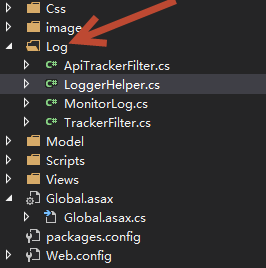
第四步:在文件里配置以下类:ApiTrackerFilter.cs[Api接口日志],TrackerFilter.cs[基本日志类],LoggerHelper.cs[日志信息处理类],MonitorLog.cs[监控日志类](对于监控日志,则根据个人需求是否建立),其中的BookException是自定义的错误,可以省略。
public class LoggerHelper

    {

        private static readonly log4net.ILog LogInfo = log4net.LogManager.GetLogger("LogInfo");

        private static readonly log4net.ILog LogError = log4net.LogManager.GetLogger("LogError");

        private static readonly log4net.ILog LogMonitor = log4net.LogManager.GetLogger("LogMonitor");

        /// <summary>

        /// 记录Error日志

        /// </summary>

        /// <param name="errorMsg"></param>

        /// <param name="ex"></param>

        public static void Error(string errorMsg, Exception ex = null)

        {

            if (ex != null)

            {

                LogError.Error(errorMsg, ex);

            }

            else

            {

                LogError.Error(errorMsg);

            }

        }

        /// <summary>

        /// 记录Info日志

        /// </summary>

        /// <param name="msg"></param>

        /// <param name="ex"></param>

        public static void Info(string msg, Exception ex = null)

        {

            if (ex != null)

            {

                LogInfo.Info(msg, ex);

            }

            else

            {

                LogInfo.Info(msg);

            }

        }

        /// <summary>

        /// 记录Monitor日志

        /// </summary>

        /// <param name="msg"></param>

        public static void Monitor(string msg)

        {

            LogMonitor.Info(msg);

        }

    }
LoggerHelper.cs
[AttributeUsage(AttributeTargets.Class | AttributeTargets.Method, AllowMultiple = false)]

    public class TrackerFilter : ActionFilterAttribute, IExceptionFilter

    {

        private readonly string key = "_thisOnActionMonitorLog_";

        #region Action时间监控

        public override void OnActionExecuting(ActionExecutingContext filterContext)

        {

            MonitorLog monLog = new MonitorLog();

            monLog.ExecuteStartTime = Convert.ToDateTime(DateTime.Now.ToString("yyyy/MM/dd HH:mm:ss.ffff", DateTimeFormatInfo.InvariantInfo));

            monLog.ControllerName = filterContext.RouteData.Values["controller"] as string;

            monLog.ActionName = filterContext.RouteData.Values["action"] as string;

            filterContext.Controller.ViewData[this.key] = monLog;

        }

        public override void OnActionExecuted(ActionExecutedContext filterContext)

        {

            MonitorLog monLog = filterContext.Controller.ViewData[this.key] as MonitorLog;

            monLog.ExecuteEndTime = DateTime.Now;

            monLog.FormCollections = filterContext.HttpContext.Request.Form;//form表单提交的数据

            monLog.QueryCollections = filterContext.HttpContext.Request.QueryString;//Url 参数

            LoggerHelper.Monitor(monLog.GetLogInfo());

        }

        #endregion

        #region View 视图生成时间监控

        public override void OnResultExecuting(ResultExecutingContext filterContext)

        {

            MonitorLog monLog = filterContext.Controller.ViewData[this.key] as MonitorLog;

            monLog.ExecuteStartTime = DateTime.Now;

        }

        public override void OnResultExecuted(ResultExecutedContext filterContext)

        {

            MonitorLog monLog = filterContext.Controller.ViewData[this.key] as MonitorLog;

            monLog.ExecuteEndTime = DateTime.Now;

            LoggerHelper.Monitor(monLog.GetLogInfo(MonitorLog.MonitorType.View));

            filterContext.Controller.ViewData.Remove(this.key);

        }

        #endregion

        #region 错误日志

        public void OnException(ExceptionContext filterContext)

        {

            if (!filterContext.ExceptionHandled)

            {

                string controllerName = string.Format("{0}Controller", filterContext.RouteData.Values["controller"] as string);

                string actionName = filterContext.RouteData.Values["action"] as string;

                string errorMsg = string.Format("在执行 controller[{0}] 的 action[{1}] 时产生异常", controllerName, actionName);

                LoggerHelper.Error(errorMsg, filterContext.Exception);

            }

        }

        #endregion

    }
TrackerFilter.cs
    /// <summary>

    /// 监控日志对象

    /// </summary>

    public class MonitorLog

    {

        public MonitorLog()

        {

            this.Watch = new Stopwatch();

            this.Watch.Start();

        }

        /// <summary>

        /// 监控类型

        /// </summary>

        public enum MonitorType

        {

            /// <summary>

            /// Action

            /// </summary>

            Action = 1,

            /// <summary>

            /// 视图

            /// </summary>

            View = 2

        }

        public string ControllerName { get; set; }

        public string ActionName { get; set; }

        public Stopwatch Watch { get; set; }

        public DateTime ExecuteStartTime { get; set; }

        public DateTime ExecuteEndTime { get; set; }

        /// <summary>

        /// Form 表单数据

        /// </summary>

        public NameValueCollection FormCollections { get; set; }

        /// <summary>

        /// URL 参数

        /// </summary>

        public NameValueCollection QueryCollections { get; set; }

        /// <summary>

        /// 文本流

        /// </summary>

        public string Raw { get; set; }

        /// <summary>

        /// 获取监控指标日志

        /// </summary>

        /// <param name="mtype"></param>

        /// <returns></returns>

        public string GetLogInfo(MonitorType mtype = MonitorType.Action)

        {

            this.Watch.Stop();

            string actionView = "Action执行时间监控:";

            string action = "Action";

            if (mtype == MonitorType.View)

            {

                actionView = "View视图生成时间监控:";

                action = "View";

            }

            string msgContent = string.Format(

                @"

      {0}

      ControllerName:{1}Controller

      {2}Name:{3}

      开始时间:{4}

      结束时间:{5}

      总 时 间:{6}秒",

                actionView,

                this.ControllerName,

                action,

                this.ActionName,

                this.ExecuteStartTime,

                this.ExecuteEndTime,

                this.Watch.ElapsedMilliseconds);

            if (!string.IsNullOrEmpty(this.Raw))

            {

                msgContent += @"

        Raw:" + this.Raw;

            }

            else if (this.FormCollections != null)

            {

                msgContent += @"

        Form:" + this.GetCollections(this.FormCollections);

            }

            else if (this.QueryCollections != null)

            {

                msgContent += @"

        Query:" + this.GetCollections(this.QueryCollections);

            }

            return msgContent;

        }

        /// <summary>

        /// 获取Post 或Get 参数

        /// </summary>

        /// <param name="collections"></param>

        /// <returns></returns>

        public string GetCollections(NameValueCollection collections)

        {

            string parameters = string.Empty;

            if (collections == null || collections.Count == 0)

            {

                return parameters;

            }

            parameters = collections.Keys.Cast<string>()

                .Aggregate(parameters, (current, key) => current + string.Format("{0}={1}&", key, collections[key]));

            if (!string.IsNullOrWhiteSpace(parameters) && parameters.EndsWith("&"))

            {

                parameters = parameters.Substring(0, parameters.Length - 1);

            }

            return parameters;

        }
MonitorLog.cs
[AttributeUsage(AttributeTargets.Class | AttributeTargets.Method, AllowMultiple = false)]

    public class ApiTrackerFilter : ActionFilterAttribute

    {

        private readonly string key = "_thisOnApiActionMonitorLog_";

        public override void OnActionExecuting(HttpActionContext actionContext)

        {

            var monLog = new MonitorLog();

            monLog.ExecuteStartTime = Convert.ToDateTime(DateTime.Now.ToString("yyyy/MM/dd HH:mm:ss.ffff", DateTimeFormatInfo.InvariantInfo));

            monLog.ControllerName = actionContext.ActionDescriptor.ControllerDescriptor.ControllerName;

            monLog.ActionName = actionContext.ActionDescriptor.ActionName;

            actionContext.Request.Properties[this.key] = monLog;

        }

        public override void OnActionExecuted(HttpActionExecutedContext actionExecutedContext)

        {

            if (actionExecutedContext.Exception != null)

            {

                string controllerName = string.Format(

                    "{0}Controller",

                    actionExecutedContext.ActionContext.ActionDescriptor.ControllerDescriptor.ControllerName);

                string actionName = actionExecutedContext.ActionContext.ActionDescriptor.ActionName;

                string errorMsg = string.Format("在执行 controller[{0}] 的 action[{1}] 时产生异常", controllerName, actionName);

                if (actionExecutedContext.Exception is BookException)

                {

                    LoggerHelper.Info(errorMsg, actionExecutedContext.Exception);

                }

                else

                {

                    LoggerHelper.Error(errorMsg, actionExecutedContext.Exception);

                }

            }

            if (!actionExecutedContext.Request.Properties.ContainsKey(this.key))

            {

                return;

            }

            var monLog = actionExecutedContext.Request.Properties[this.key] as MonitorLog;

            if (monLog != null)

            {

                monLog.ExecuteEndTime = DateTime.Now;

                monLog.Raw = actionExecutedContext.Request.Content.ReadAsStringAsync().Result;

                LoggerHelper.Monitor(monLog.GetLogInfo());

            }

        }

    }
ApiTrackerFilter.cs
在Global.asax文件中配置以及在MVC的FilterConfig过滤器中配置信息
经过这么多的准备工作,终于最后一步:
1.Global.axax中配置
protected void Application_Start(object sender, EventArgs e)

        {

            AreaRegistration.RegisterAllAreas();

            FilterConfig.RegisterGlobalFilters(GlobalFilters.Filters);

            RouteConfig.RegisterRoutes(RouteTable.Routes);

            log4net.Config.XmlConfigurator.Configure();

            GlobalConfiguration.Configuration.Filters.Add(new Log.ApiTrackerFilter());

            BundleConfig.RegisterBundles(BundleTable.Bundles);

        }
2.在FilterConfig过滤器中配置信息
public static void RegisterGlobalFilters(GlobalFilterCollection filters)

        {

            //监控日志

            filters.Add(new Log.TrackerFilter());

            filters.Add(new HandleErrorAttribute());

        }
至此,所有都成功了,最后运行的结果可以在项目根目录下查看相应日期的Log日志信息。
ASP.NET MVC4中加入Log4Net日志记录功能的更多相关文章
- 个人理解---在开发中何时加入日志记录功能[java]
是这样的:俩个月前做的一个小功能,今天经理突然问我这个'清除复投记录'功能是不是我做的,我说是,很久以前了.他说昨天一个客户找过来了,后台把人家的复投记录清除掉了,不知道何时清除的,我记得当时做的时候 ...
- C#面试题(转载) SQL Server 数据库基础笔记分享(下) SQL Server 数据库基础笔记分享(上) Asp.Net MVC4中的全局过滤器 C#语法——泛型的多种应用
C#面试题(转载) 原文地址:100道C#面试题(.net开发人员必备) https://blog.csdn.net/u013519551/article/details/51220841 1. . ...
- 如何在通用权限管理系统中集成log4net日志功能
开发人员都知道,在系统运行中要记录各种日志,自己写一个日志功能,无论是在效率还是功能扩展上来说都不是很好,目前大多用的是第三方的日志系统,其中一个非常有名,用的最多的就是log4net.下面是关于这个 ...
- ASP.NET MVC4中使用NHibernate
ASP.NET MVC4中使用NHibernate 1:下载安装NHibernate 打开 VS 2012新建一个 MVC4项目. 在项目名称上右击选择Manage NuGet Packages.你会 ...
- ASP.NET MVC4中的App_start中BundleConfig的介绍使用
在BundleConfig.cs中,指定CSS和JS,主要用来压缩JS和CSS 在ASP.NET MVC4中(在WebForm中应该也有),有一个叫做Bundle的东西,它用来将js和css进行压 ...
- ASP.NET MVC4中对JS和CSS的引用
https://www.cnblogs.com/madyina/p/3702314.html ASP.NET MVC4中对JS和CSS的引用又做了一次变化,在MVC3中我们这样引用资源文件: < ...
- ASP.NET MVC4中的bundles特性引发服务器拒绝访问(403错误)
在ASP.NET MVC4中微软引入了bundles特性,这个特性可以将服务器端的多个Javascript或多个css文件捆绑在一起作为一个单一的URL地址供客户端浏览器调用,从而减少了页面上Http ...
- WebSocket在ASP.NET MVC4中的简单实现
WebSocket在ASP.NET MVC4中的简单实现 2013-12-21 20:48 by 小白哥哥, 810 阅读, 3 评论, 收藏, 编辑 WebSocket 规范的目标是在浏览器中实现和 ...
- 在ASP.NET MVC4中实现同页面增删改查,无弹出框02,增删改查界面设计
在上一篇"在ASP.NET MVC4中实现同页面增删改查,无弹出框01,Repository的搭建"中,已经搭建好了Repository层,本篇就剩下增删改查的界面了......今 ...
随机推荐
- deepin中Tomcat添加执行权限
terwer@terwer-PC:~$ cd /opt/*tomcat*/bin terwer@terwer-PC:/opt/apache-tomcat-9.0.13/bin$ sudo chmod ...
- [knowledge] big data things
http://hadoop.apache.org/ https://spark.apache.org/ https://nifi.apache.org/ https://www.cloudera.co ...
- dispatch_barrier_async,加锁
dispatch_barrier_async用于文件读写,在写的时候,不允许进行读操作,在写操作完成才能进行读取操作,为了保证线程安全 加锁的方式: 1. barrier 2. NSLock 3. @ ...
- 20165225《Java程序设计》第四周学习总结
20165225<Java程序设计>第四周学习总结 1.视频与课本中的学习: 继承(extends) 重写 对象的上转型对象 super final instanceof运算符 abstr ...
- xpath定位方法详解
1.xpath较复杂的定位方法: 现在要引用id为“J_password”的input元素,可以像下面这样写: WebElement password = driver.findElement(By. ...
- ubuntu上u-boot的编译
1,下载u-boot 2,将Windows中的u-boot复制到ubuntu虚拟机中自定义目录并解压 3,进入该目录cd 4,安装dtc:sudo apt-get install device-tre ...
- 这套方法论,彻底终结MySQL同步延迟问题
作者介绍 张秀云,网名飞鸿无痕,现任职于腾讯,负责腾讯金融数据库的运维和优化工作.2007年开始从事运维方面的工作,经历过网络管理员.Linux运维工程师.DBA.分布式存储运维等多个IT职位.对Li ...
- vue中根据当前时间进行排序
computed: { newdataList: function() { return this.sortKey(this.dataList, "addtime"); } }, ...
- 为什么char *name="it",printf("%s",name) 能够输出字符串?
“it”里面是3个字符 “i”“t”“/0”,%s会打印指针指向的字符就是“i”,知道遇到“/0”停止,所以打印出来是“it”
- [django]python异步神器-celery
python异步神器celery https://segmentfault.com/a/1190000007780963