
IdentityServer4-用EF配置Client(一)
一、背景
IdentityServer4的介绍将不再叙述,百度下可以找到,且官网的快速入门例子也有翻译的版本。这里主要从Client应用场景方面介绍对IdentityServer4的应用。
首先简要介绍ID Token和Access Token:
Access Token是授权第三方客户端访问受保护资源的令牌。 ID Token是第三方客户端标识用户身份认证的问令牌,是JSON Web Token格式。
二、Client应用场景介绍
Client类是为OpenID Connect或OAuth 2.0 协议建模的。
我们先看官网快速入门中给的Client例子
 public static IEnumerable<Client> GetClients()

        {

            // client credentials client

            return new List<Client>

            {

                new Client

                {

                    ClientId = "Client",

                    AllowedGrantTypes = GrantTypes.ClientCredentials,

                    ClientSecrets =

                    {

                        new Secret("secret".Sha256())

                    },

                    AllowedScopes = { "api1" }

                },

                // resource owner password grant client

                new Client

                {

                    ClientId = "ro.client",

                    AllowedGrantTypes = GrantTypes.ResourceOwnerPassword,

                    ClientSecrets =

                    {

                        new Secret("secret".Sha256())

                    },

                    AllowedScopes = { "api1" }                },

                // OpenID Connect hybrid flow and client credentials client (MVC)

                new Client

                {

                    ClientId = "mvc",

                    ClientName = "MVC Client",

                    AllowedGrantTypes = GrantTypes.HybridAndClientCredentials,

                    ClientSecrets =

                    {

                        new Secret("secret".Sha256())

                    },

                    RedirectUris = { "http://localhost:5002/signin-oidc" },

                    PostLogoutRedirectUris = { "http://localhost:5002/signout-callback-oidc" },

                    AllowedScopes =

                    {

                        IdentityServerConstants.StandardScopes.OpenId,

                        IdentityServerConstants.StandardScopes.Profile,

                        "api1"

                    },

                    AllowOfflineAccess = true

                },

                // JavaScript Client

                new Client

                {

                    ClientId = "js",

                    ClientName = "JavaScript Client",

                    AllowedGrantTypes = GrantTypes.Implicit,

                    AllowAccessTokensViaBrowser = true,

                    RedirectUris = { "http://localhost:5003/callback.html" },

                    PostLogoutRedirectUris = { "http://localhost:5003/index.html" },

                    AllowedCorsOrigins = { "http://localhost:5003" },

                    AllowedScopes =

                    {

                        IdentityServerConstants.StandardScopes.OpenId,

                        IdentityServerConstants.StandardScopes.Profile,

                        "api1"

                    },

                }

            };

        }
里面主要介绍四种Client应用场景。
(1)客户端模式(AllowedGrantTypes = GrantTypes.ClientCredentials)
这是一种最简单的授权方式,应用于服务于服务之间的通信,token通常代表的是客户端的请求,而不是用户。
使用这种授权类型,会向token endpoint发送token请求,并获得代表客户机的access token。客户端通常必须使用token endpoint的Client ID和secret进行身份验证。
适用场景:用于和用户无关,服务与服务之间直接交互访问资源
(2)密码模式(ClientAllowedGrantTypes = GrantTypes.ResourceOwnerPassword)
该方式发送用户名和密码到token endpoint,向资源服务器请求令牌。这是一种“非交互式”授权方法。
官网上称,为了解决一些历史遗留的应用场景,所以保留了这种授权方式,但不建议使用。
适用场景:用于当前的APP是专门为服务端设计的情况。
(3)混合模式和客户端模式(ClientAllowedGrantTypes =GrantTypes.HybridAndClientCredentials)
ClientCredentials授权方式在第一种应用场景已经介绍了,这里主要介绍Hybrid授权方式。Hybrid是由Implicit和Authorization code结合起来的一种授权方式。其中Implicit用于身份认证,ID token被传输到浏览器并在浏览器进行验证;而Authorization code使用反向通道检索token和刷新token。
推荐使用Hybrid模式。
适用场景:用于MVC框架,服务器端 Web 应用程序和原生桌面/移动应用程序。
(4)简化模式(ClientAllowedGrantTypes =GrantTypes.Implicit)
Implicit要么仅用于服务端和JavaScript应用程序端进行身份认证,要么用于身份身份验证和access token的传输。
在Implicit中,所有token都通过浏览器传输的。
适用场景:JavaScript应用程序。
三、Server端搭建
为了介绍IdentityServer4的Client应用场景,我们需要先搭建IdentityServer服务端。
这里搭建的是使用EF Core来做数据操作,保存到SQL Server中。
(1)新建API项目
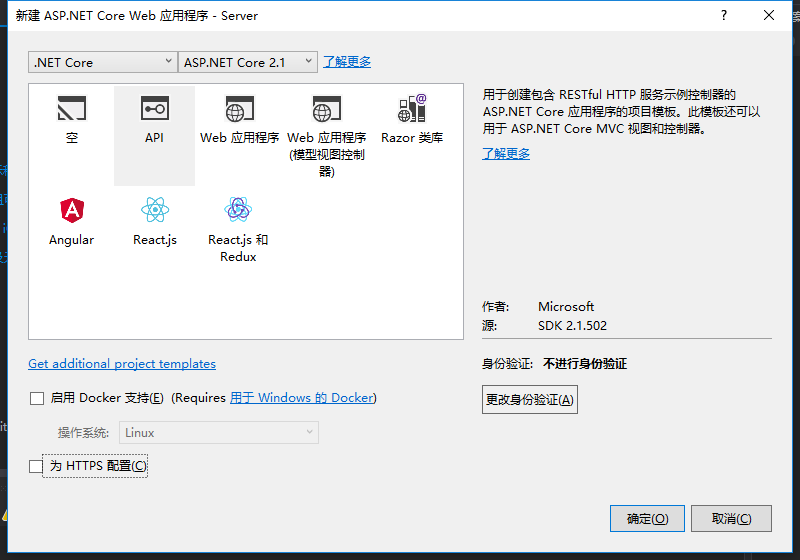
(2)安装IdentityServer4.EntityFramework包

(3)安装IdentityServer4包
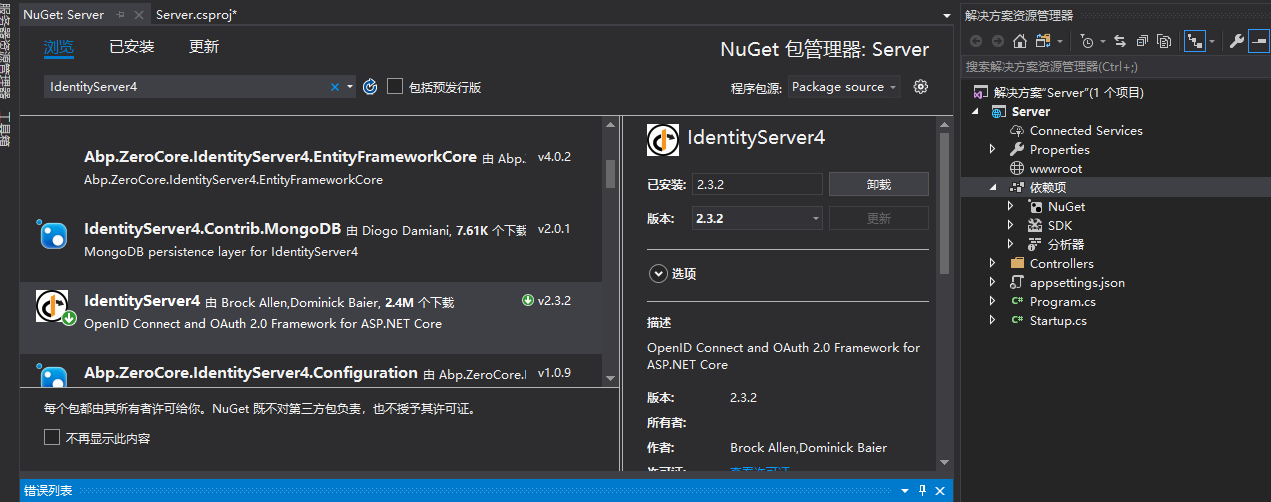
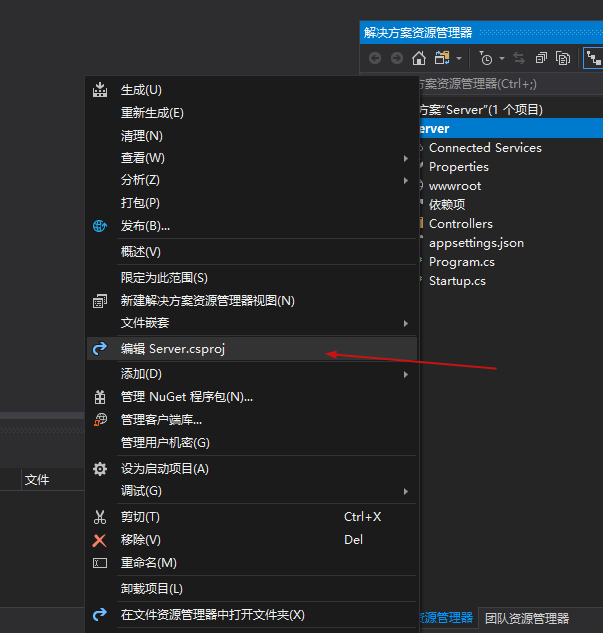
(4)右键项目的属性,编辑项目的.csproj文件
添加如下元素
<ItemGroup>

    <DotNetCliToolReference Include="Microsoft.EntityFrameworkCore.Tools.DotNet" Version="2.0.0" />

</ItemGroup>
如图:

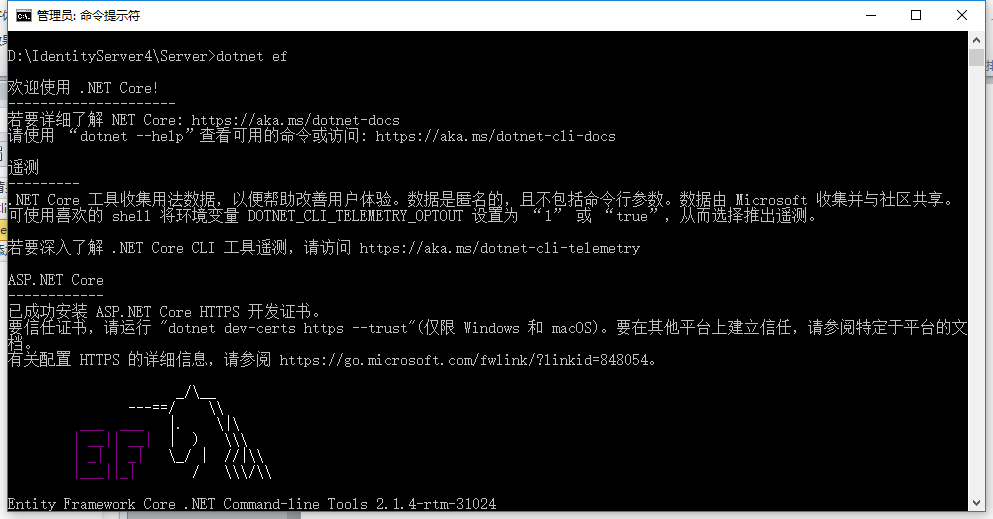
(5)cmd管理员身份进入项目目录路径(D:\IdentityServer4\Server),运行:dotnet ef
(6)项目内添加Config.cs类,代码如下
 public class Config

    {

        public static List<TestUser> GetUsers()

        {

            return new List<TestUser>

            {

                new TestUser

                {

                    SubjectId = "",

                    Username = "alice",

                    Password = "password",

                  Claims = new List<Claim>(){new Claim(JwtClaimTypes.Role,"superadmin") }

                },

                new TestUser

                {

                    SubjectId = "",

                    Username = "bob",

                    Password = "password",

                    Claims = new List<Claim>

                    {

                        new Claim("name", "Bob"),

                        new Claim("website", "https://bob.com")

                    },

                }

            };

        }

        public static IEnumerable<Client> GetClients()

        {

            // client credentials client

            return new List<Client>

            {

                new Client

                {

                    ClientId = "Client",

                    AllowedGrantTypes = GrantTypes.ClientCredentials,

                    ClientSecrets =

                    {

                        new Secret("secret".Sha256())

                    },

                    AllowedScopes = { "api1" }

                },

                // resource owner password grant client

                new Client

                {

                    ClientId = "ro.client",

                    AllowedGrantTypes = GrantTypes.ResourceOwnerPassword,

                    ClientSecrets =

                    {

                        new Secret("secret".Sha256())

                    },

                    AllowedScopes = { "api1" }

                },

                // OpenID Connect hybrid flow and client credentials client (MVC)

                new Client

                {

                    ClientId = "mvc",

                    ClientName = "MVC Client",

                    AllowedGrantTypes = GrantTypes.HybridAndClientCredentials,

                    ClientSecrets =

                    {

                        new Secret("secret".Sha256())

                    },

                    RedirectUris = { "http://localhost:5002/signin-oidc" },

                    PostLogoutRedirectUris = { "http://localhost:5002/signout-callback-oidc" },

                    AllowedScopes =

                    {

                        IdentityServerConstants.StandardScopes.OpenId,

                        IdentityServerConstants.StandardScopes.Profile,

                        "api1"

                    },

                    AllowOfflineAccess = true

                },

                // JavaScript Client

                new Client

                {

                    ClientId = "js",

                    ClientName = "JavaScript Client",

                    AllowedGrantTypes = GrantTypes.Implicit,

                    AllowAccessTokensViaBrowser = true,

                    RedirectUris = { "http://localhost:5003/callback.html" },

                    PostLogoutRedirectUris = { "http://localhost:5003/index.html" },

                    AllowedCorsOrigins = { "http://localhost:5003" },

                    AllowedScopes =

                    {

                        IdentityServerConstants.StandardScopes.OpenId,

                        IdentityServerConstants.StandardScopes.Profile,

                        "api1"

                    },

                }

            };

        }

        public static IEnumerable<IdentityResource> GetIdentityResources()

        {

            return new List<IdentityResource>

            {

                new IdentityResources.OpenId(),

                new IdentityResources.Profile(),

            };

        }

        public static IEnumerable<ApiResource> GetApiResources()

        {

            return new List<ApiResource>

            {

                new ApiResource("api1", "My API")

            };

        }
添加引用:
using IdentityModel;
using IdentityServer4;
using IdentityServer4.Models;
using IdentityServer4.Test;
using System.Collections.Generic;
using System.Security.Claims;
(7)编辑Startup.cs文件的ConfigureServices方法,改成如下代码。
public void ConfigureServices(IServiceCollection services)

        {

            const string connectionString = @"Server=localhost;database=IdentityServer4;User ID=sa;Password=Pwd;trusted_connection=yes";

            var migrationsAssembly = typeof(Startup).GetTypeInfo().Assembly.GetName().Name;

            // configure identity server with in-memory stores, keys, clients and scopes

            services.AddIdentityServer()

                .AddDeveloperSigningCredential()

                .AddTestUsers(Config.GetUsers())

                // this adds the config data from DB (clients, resources)

                .AddConfigurationStore(options =>

                {

                    options.ConfigureDbContext = builder =>

                        builder.UseSqlServer(connectionString,

                            sql => sql.MigrationsAssembly(migrationsAssembly));

                })

                // this adds the operational data from DB (codes, tokens, consents)

                .AddOperationalStore(options =>

                {

                    options.ConfigureDbContext = builder =>

                        builder.UseSqlServer(connectionString,

                            sql => sql.MigrationsAssembly(migrationsAssembly));

                    // this enables automatic token cleanup. this is optional.

                    options.EnableTokenCleanup = false;//是否从数据库清楚令牌数据,默认为false

                    options.TokenCleanupInterval = ;//令牌过期时间,默认为3600秒,一个小时

                });

            //.AddInMemoryClients(Config.GetClients());

            services.AddMvc().SetCompatibilityVersion(CompatibilityVersion.Version_2_1);

        }
添加引用:
using Microsoft.EntityFrameworkCore;
using System.Reflection;
(8)cmd管理员身份进入到项目目录路径(D:\IdentityServer4\Server\Server),注意,多了一层目录,分别运行以下两条指令:
dotnet ef migrations add InitialIdentityServerPersistedGrantDbMigration -c PersistedGrantDbContext -o Data/Migrations/IdentityServer/PersistedGrantDb

dotnet ef migrations add InitialIdentityServerConfigurationDbMigration -c ConfigurationDbContext -o Data/Migrations/IdentityServer/ConfigurationDb

运行完后,项目中会多了一个Data文件夹
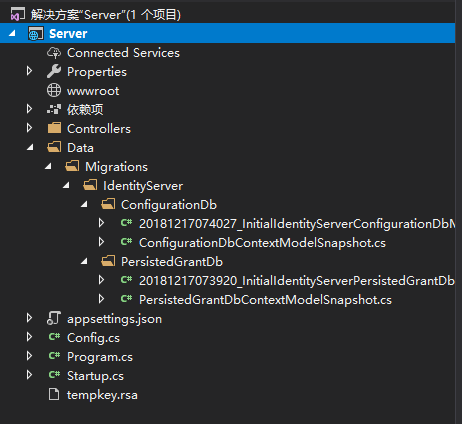
(9)在Startup.cs中添加初始化数据库方法。
private void InitializeDatabase(IApplicationBuilder app)

{

    using (var serviceScope = app.ApplicationServices.GetService<IServiceScopeFactory>().CreateScope())

    {

        serviceScope.ServiceProvider.GetRequiredService<PersistedGrantDbContext>().Database.Migrate();

        var context = serviceScope.ServiceProvider.GetRequiredService<ConfigurationDbContext>();

        context.Database.Migrate();

        if (!context.Clients.Any())

        {

            foreach (var client in Config.GetClients())

            {

                context.Clients.Add(client.ToEntity());

            }

            context.SaveChanges();

        }

        if (!context.IdentityResources.Any())

        {

            foreach (var resource in Config.GetIdentityResources())

            {

                context.IdentityResources.Add(resource.ToEntity());

            }

            context.SaveChanges();

        }

        if (!context.ApiResources.Any())

        {

            foreach (var resource in Config.GetApiResources())

            {

                context.ApiResources.Add(resource.ToEntity());

            }

            context.SaveChanges();

        }

    }

}
添加引用:
using IdentityServer4.EntityFramework.DbContexts;
using IdentityServer4.EntityFramework.Mappers;
(10)在Startup.cs中的Configure方法修改成以下代码。
  public void Configure(IApplicationBuilder app, IHostingEnvironment env)

        {

            //if (env.IsDevelopment())

            //{

            //    app.UseDeveloperExceptionPage();

            //}

            InitializeDatabase(app);

            //app.UseMvc();

        }
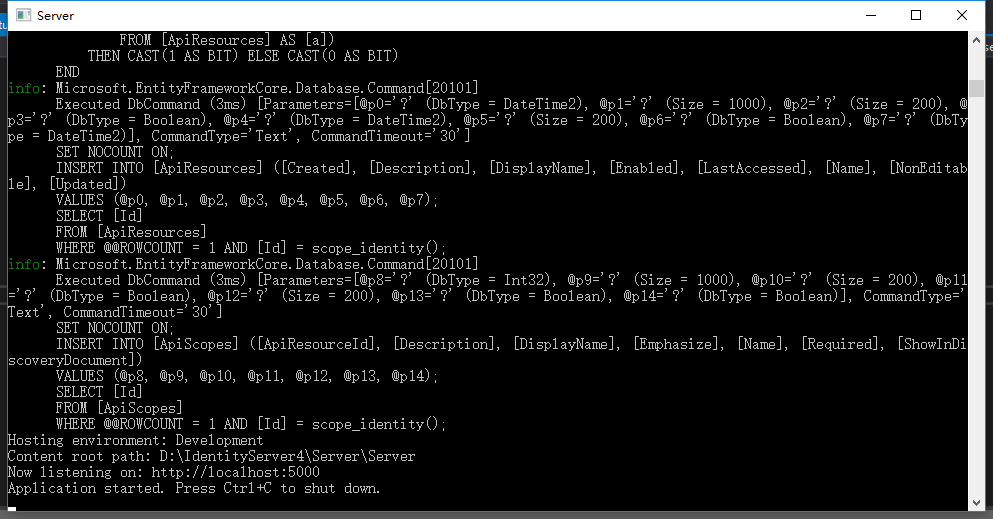
到这里,把项目以控制台形式运行
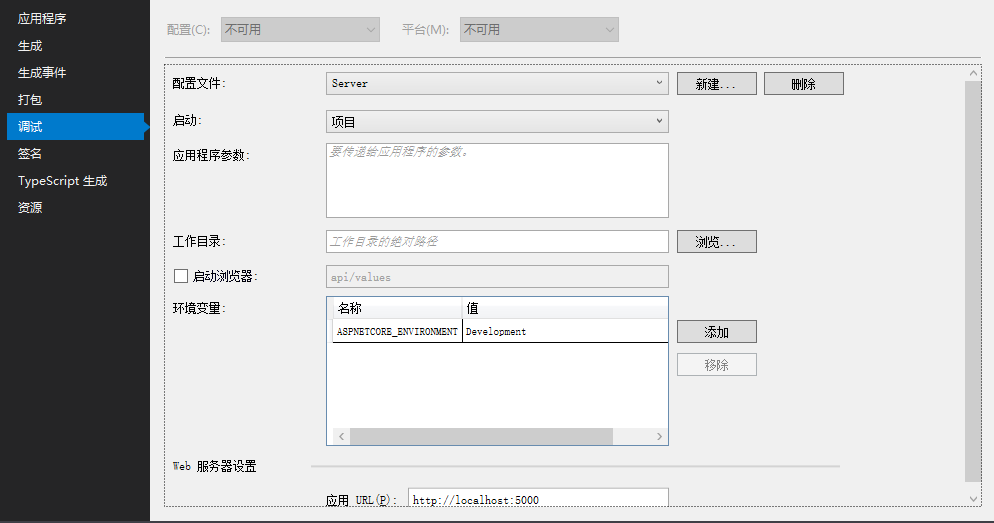

点击运行,可以跑起来,且生成数据库IdentityServer4DB。

关于Client的说明可以查阅官网资料:https://identityserver4.readthedocs.io/en/release/reference/client.html
源码地址:https://github.com/Bingjian-Zhu/Server.git
服务端准备好之后,下篇文章开始介绍Client客户端的应用。
IdentityServer4-用EF配置Client(一)的更多相关文章
- 27.集成EFCore配置Client和API
copy链接字符串,这是一个官方的字符串,直接复制过来,放在上面. 添加包的引用 引入IdentityServer4.EntityFramework的命名空间 主要是这个地方初始化我们的数据库 Ope ...
- IdentityServer4-EF动态配置Client和对Claims授权(二)
本节介绍Client的ClientCredentials客户端模式,先看下画的草图: 一.在Server上添加动态新增Client的API 接口. 为了方便测试,在Server服务端中先添加swagg ...
- EF配置模型
配置方法 EF里面的默认配置有两个方法,一个是用Data Annotations(在命名空间System.ComponentModel.DataAnnotations;),直接作用于类的属性上面,还有 ...
- 从头编写 asp.net core 2.0 web api 基础框架 (4) EF配置
第1部分:http://www.cnblogs.com/cgzl/p/7637250.html 第2部分:http://www.cnblogs.com/cgzl/p/7640077.html 第3部分 ...
- 【转载】从头编写 asp.net core 2.0 web api 基础框架 (4) EF配置
Github源码地址:https://github.com/solenovex/Building-asp.net-core-2-web-api-starter-template-from-scratc ...
- EF 配置MySQL
添加 mysql dll 引用 WebConfig 配置: 1.先添加connectionstrings,providerName 换成 mysql的 <connectionStrings> ...
- EF 配置实现建表与迁移
通过EF 作为操作数据库的工具有一段时间了,也做了几个相对不大的项目,慢慢的也对EF的使用摸索出来了一些规则,虽然说不是技术难点,但是,我说的是但是,能够提高我们开发效率的棉花糖有时我们还是必须要吃的 ...
- 【甘道夫】Hadoop2.2.0 NN HA具体配置+Client透明性试验【完整版】
引言: 前面转载过一篇团队兄弟[伊利丹]写的NN HA实验记录,我也基于他的环境实验了NN HA对于Client的透明性. 本篇文章记录的是亲自配置NN HA的具体全过程,以及全面測试HA对clien ...
- 基于IdentityServer4的单点登录——Client
以MvcClient项目为例 1.新建项目并添加引用 新建一个asp .net core 2.0的项目引用IdentityModel 2.配置 比之前的控制台客户端多这个步骤,需要配置这个客户端的Cl ...
随机推荐
- android彻底关闭应用程序方法
Android SDK > 7(Android2.1)之后,即Android2.2及以后版本彻底关闭应用的方法,目前试验只有一下方法有效: Intent startMain = new Inte ...
- Adroid反编译资料收集
Android反编译神器jadx的使用 https://blog.csdn.net/Fisher_3/article/details/78654450 Android 反编译利器,jadx 的高级技巧 ...
- 【Linux】Linux中Swap与Memory内存简单介绍
背景介绍 对于Linux来说,其在服务器市场的使用已经占据了绝对的霸主地位,不可动摇.Linux的各种设计思想和使用也被传承(当然不乏各种黑Linux,而且黑的漂亮).Linux的很多独特的设计,对性 ...
- Informatic学习总结_day01
1.forlder 必须open之后才出现 mapping的界面 2.Source Qualifer 3.小技巧 验证自己写的转换格式是否正确 提前过滤一些数据,informatica工具的本质也是 ...
- SpringBoot定制错误的Json数据
(1)自定义异常处理&返回定制Json数据 @ControllerAdvice public class MyExceptionHandler { @ResponseBody @Excepti ...
- .NET中制做对象的副本(二)继承对象之间的数据拷贝
定义学生 /// <summary> /// 学生信息 /// </summary> public class Student { /// <summary> // ...
- win10-Anaconda2-Theano-cuda7.5-VS2013
两天的辗转反侧,终于灵光一现找到了错误. 首先,我在win10下配置好了gpu和cudnn版本的caffe.但是因为win平台的限制,caffe用的不够舒服.因为之前用过一阵子theano,虽然很慢, ...
- Linux内核驱动--硬件访问I/O【原创】
寄存器与内存 寄存器与内存的区别在哪里呢? 寄存器和RAM的主要不同在于寄存器操作有副作用(side effect或边际效果): 读取某个地址时可能导致该地址内容发生变化,比如很多设备的中断状态寄存器 ...
- Ex 5_26 变量约束是否能同时满足(并查集)_第九次作业
利用并查集进行处理,定义一个维护数组components,components[i]表示变量序号为i的变量所处的集合,首先处理相等的变量,把它们放入同一个集合中,最后再处理不相等变量,若两个不相等的变 ...
- jmeter之使用代理录制脚本
从loadrunner到jmeter,录制压力测试脚本好像都只支持IE,近来才知道jmeter还有自带的录制脚本元件, 且支持IE.Chrome及Firefox等多种浏览器.这里就记录一下通过jmet ...