
React-Native子组件修改父组件的几种方式,兄弟组件状态修改(转载)
子组件修改父组件的状态,在开发中非常常见,下面列举了几种方式。
DeviceEventEmitter可以跨组件,跨页面进行数据传递,还有一些状态的修改。http://www.jianshu.com/p/c6991a241b4f
兄弟组件可以进行修改,所谓兄弟组件,就是说同一个页面,有两个组件,组件A,组件B,组件A的状态的变化,可以导致组件B的状态变化,有两种方式。第一种,使用DeviceEventEmitter跨组件通信。第二种,在页面内定义一个State,组件A,使用props属性引入,操作组件A,修改页面内的State,然后,组件B,也是引入页面内的State,所有,当组件A状态变化时,修改页面的State,重新Render,然后,更新组件B,组件B进行Render。
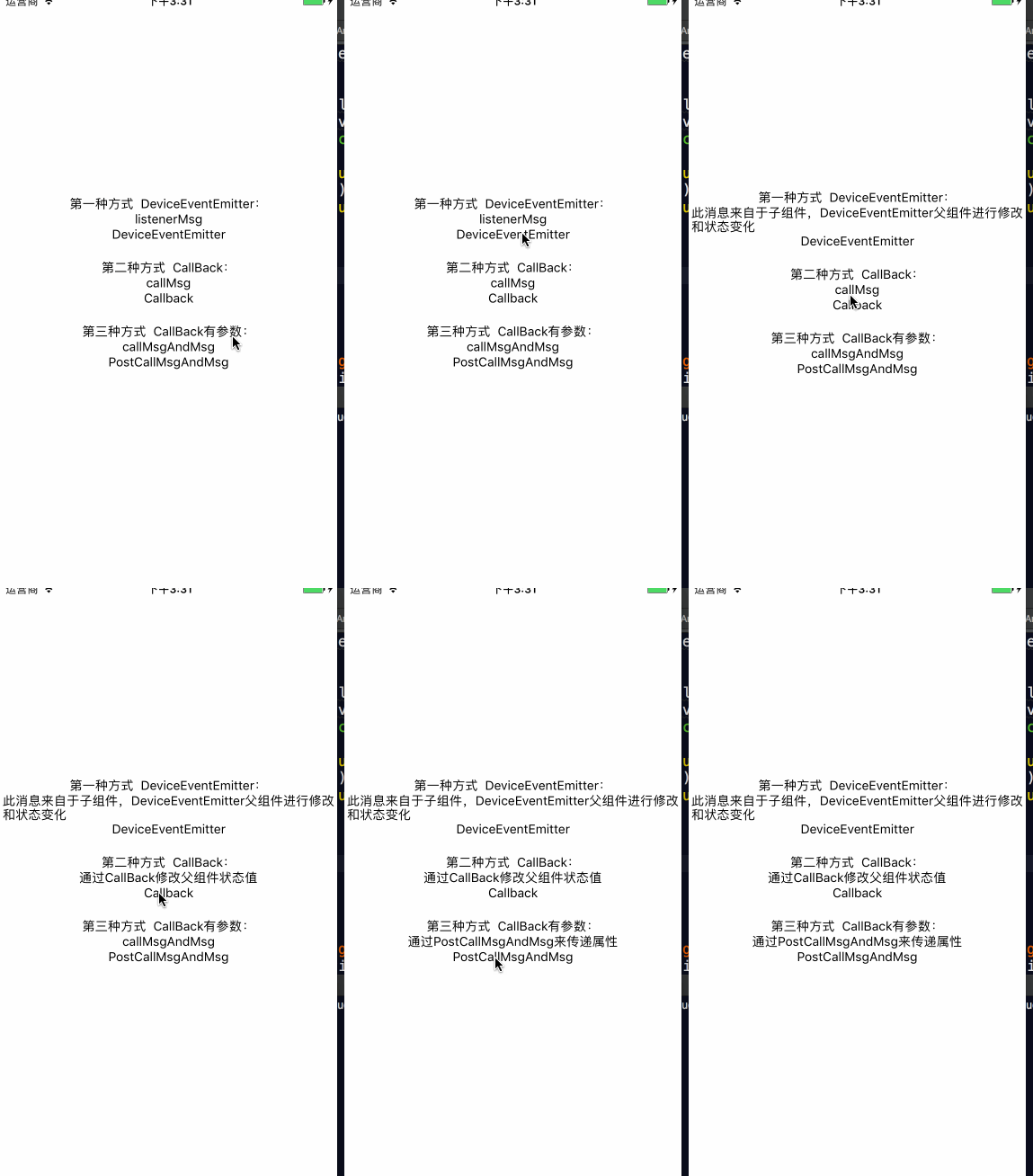
二: Coding
新建三个组件:分别为PostCallMsgAndMsg,PostCallMsg,PostMsg;
在Msg进行使用。
import React, { Component } from 'react';

import {

    AppRegistry,

    StyleSheet,

    Text,

    View,

    DeviceEventEmitter

} from 'react-native';

import PostMsg from './PostMsg'

import PostCallMsg from './PostCallMsg'

import PostCallMsgAndMsg from './PostCallMsgAndMsg'

export default class Msg extends Component {

    constructor(props){

        super(props);

        this.state={

            listenerMsg:'listenerMsg',

            callMsg:'callMsg',

            callMsgAndMsg:'callMsgAndMsg'

        }

    }

    componentDidMount() {

        //注意addListener的key和emit的key保持一致

        this.msgListener = DeviceEventEmitter.addListener('Msg',(listenerMsg) => {

            this.setState({

                listenerMsg:listenerMsg,

            })

        });

    }

    componentWillUnmount() {

        //此生命周期内,去掉监听

        this.msgListener&&this.msgListener.remove();

    }

    render() {

        return (

            <View style={styles.container}>

                    <Text>第一种方式  DeviceEventEmitter:</Text>

                    <Text>{this.state.listenerMsg}</Text>

                    <PostMsg  />

                    <Text>第二种方式  CallBack:</Text>

                    <Text>{this.state.callMsg}</Text>

                    <PostCallMsg  onChangeMsg={

                        this.onMsgByCall

                    }/>

                    <Text>第三种方式  CallBack有参数:</Text>

                    <Text>{this.state.callMsgAndMsg}</Text>

                    <PostCallMsgAndMsg  onChangeMsg={(msg)=>{

                        this.onMsgByCallAndMsg(msg)

                    } }/>

            </View>

        );

    }

    onMsgByCall=()=>{

        this.setState({

            callMsg:'通过CallBack修改父组件状态值'

        })

    }

    onMsgByCallAndMsg=(msg)=>{

        this.setState({

            callMsgAndMsg:msg

        })

    }

}

const styles = StyleSheet.create({

    container: {

        flex: ,

        justifyContent: 'center',

        alignItems:'center',

    },

});
import React, { Component } from 'react';

import {

    AppRegistry,

    StyleSheet,

    Text,

    View,

    TouchableOpacity,

} from 'react-native';

export default class PostCallMsgAndMsg extends Component {

    render() {

        return (

            <View style={styles.container}>

                <View style={styles.viewLine}/>

                <TouchableOpacity onPress={this._postMsgByCallBack}>

                    <Text>PostCallMsgAndMsg</Text>

                </TouchableOpacity>

            </View>

        );

    }

    _postMsgByCallBack=()=>{

        if(this.props.onChangeMsg){

            this.props.onChangeMsg('通过PostCallMsgAndMsg来传递属性');

        }

    }

}

const styles = StyleSheet.create({

    container: {

        justifyContent: 'center',

        alignItems: 'center',

        marginBottom:,

    },

});
import React, { Component } from 'react';

import {

    AppRegistry,

    StyleSheet,

    Text,

    View,

    TouchableOpacity,

} from 'react-native';

export default class PostCallMsg extends Component {

    render() {

        return (

            <View style={styles.container}>

                <View style={styles.viewLine}/>

                <TouchableOpacity onPress={this._postMsgByCallBack}>

                    <Text>Callback</Text>

                </TouchableOpacity>

            </View>

        );

    }

    _postMsgByCallBack=()=>{

        if(this.props.onChangeMsg){

            this.props.onChangeMsg();

        }

    }

}

const styles = StyleSheet.create({

    container: {

        justifyContent: 'center',

        alignItems: 'center',

        marginBottom:,

    },

});
import React, { Component } from 'react';

import {

    AppRegistry,

    StyleSheet,

    Text,

    View,

    TouchableOpacity,

    DeviceEventEmitter,

} from 'react-native';

export default class PostMsg extends Component {

    render() {

        return (

            <View style={styles.container}>

                <TouchableOpacity onPress={this._postMsgByListener}>

                    <Text>DeviceEventEmitter</Text>

                </TouchableOpacity>

            </View>

        );

    }

    _postMsgByListener=()=>{

        DeviceEventEmitter.emit('Msg','此消息来自于子组件,DeviceEventEmitter父组件进行修改和状态变化');

    }

}

const styles = StyleSheet.create({

    container: {

        justifyContent: 'center',

        alignItems: 'center',

        marginBottom:,

    },

});
React-Native子组件修改父组件的几种方式,兄弟组件状态修改(转载)的更多相关文章
- Vue父子组件通信(父级向子级传递数据、子级向父级传递数据、Vue父子组件存储到data数据的访问)
Vue父子组件通信(父级向子级传递数据.子级向父级传递数据.Vue父子组件存储到data数据的访问) 一.父级向子级传递数据[Prop]: ● Prop:子组件在自身标签上,使用自定义的属性来接收外界 ...
- 修改element内部样式的两种方式
第一种: 全局样式修改: 但这种方式有点不好的地方,这样会影响别的组件,比如修改elementUI的树结构的样式,这样改的话会影响到别的树组件: 第二种方式: 在要修改的组件内修改树结构样式 比如改这 ...
- Iframe刷新父窗口的几种方式
/*Iframe刷新父窗口的几种方式在iframe的子页面中,使用onload刷新父页面的时候,遇到了一些问题. 1.目前来说,测试成功,并且兼容IE6/7和FF的刷新方式. */ <scrip ...
- Vue中组件间传值常用的几种方式
版本说明: vue-cli:3.0 一.父子组件间传值 1.props/$emit -父组件==>>子组件: 子组件中通过定义props接收父组件中通过v-bind绑定的数据 父组件代码 ...
- Vue学习(二)-Vue中组件间传值常用的几种方式
版本说明:vue-cli:3.0 主要分为两类: 1.父子组件间的传值 2.非父子组件间的传值 1.父子组件间传值 父组件向子组件传值 第一种方式: props 父组件嵌套的子组件中,使用v-bind ...
- Java-Maven项目引入UEditor图片上传组件jar包类库的5种方式
最近,硬是和百度的UEditor组件杠上了.自己的个人官网项目,很容易就搞定了,公司的项目,尼玛,各种问题.项目多了,环境复杂了,解决问题的方法也得不断调整. 项目用Maven管理jar包,用到了UE ...
- React.js入门笔记 创建hello world 的6种方式
一.ReactJS简介 React 起源于 Facebook 的内部项目,因为该公司对市场上所有 JavaScript MVC 框架,都不满意,就决定自己写一套,用来架设 Instagram 的网站. ...
- 修改ElementUI样式的几种方式
ElementUI是一款非常强大的前端UI组件库,它默认定义了很多美观的样式,但是我们在实际开发过程中不可避免地遇到需要修改ElementUI默认样式.下面总结了几种修改默认样式的方法. 1. 新建全 ...
- JS刷新父窗口的几种方式<转>
常用的有: window.opener.location.reload(); 和 window.location.reload(); 浮层内嵌iframe及frame集合窗口,刷新父页面的 ...
- JS刷新父窗口的几种方式
浮层内嵌iframe及frame集合窗口,刷新父页面的多种方法 <script language=JavaScript> parent.location.reload(); ...
随机推荐
- SET构造函数
set<int,greater<int>> S; 可以在第二个参数位置设置比较模板,效果和sort类似,less表示升序,greater表示降序.这样做的好处是为了方便应对题目 ...
- jq回车触发绑定点击事件
//jq绑定回车事件触发点击事件<script> $(function(){ $(document).keyup(function(event){ if(event.keyCode ==1 ...
- laravel源码解析
本专栏系列文章已经收录到 GitBooklaravel源码解析 Laravel Passport——OAuth2 API 认证系统源码解析(下)laravel源码解析 Laravel Passport ...
- flask-系统介绍及环境搭建1
1.系统介绍 前台首页-电影筛选-电影列表- 播放详情-评论:收藏-搜索-注册-登录-会员中心(修改会员资料,查看评论记录,登录日志,收藏电影). 后台-标签-电影管理-预告-会员-评论-收藏-日志- ...
- HDFS - Shell命令
HDFS - Shell命令 最近学习比较忙,本来想做一个搭建集群笔记,今天先记录HDFS-shell命令,明天,最迟明天下午我一定会做一个搭建集群的笔记.. 介绍一个我的集群搭建:一主三从 3个虚拟 ...
- ActiveMQ broker 集群, 静态发现和动态发现
下载 activemq 压缩包解压后,conf 目录下有各种示例配置文件,红线标出的是静态发现和动态发现的配置. 1. 静态配置 启动3个 broker,端口分别为61616,61618,61620, ...
- Chargen UDP服务远程拒绝服务攻击漏洞修复教程
一.前置说明 chargen服务最初设计用于测试网络状态,监听19端口(包括TCP和UDP),其中UDP协议存在“Chargen UDP服务远程拒绝服务攻击漏洞”. chargen一般不会使用,所以直 ...
- sqlmap sql注入工具
下载地址: https://github.com/sqlmapproject/sqlmap 参数可以在sqlmap.conf里指定 url = http://localhost:55556/crm/u ...
- js之close()方法
.close()方法只适用于通过window.open()打开的弹出窗口.对于浏览器的主窗口,如果没有得到用户允许是不能关闭的.不过,弹出窗口可以调用top.close()在不经用户允许的情况下关闭自 ...
- POJ 2456 Agressive cows(二分)
POJ 2456 Agressive cows 农夫 John 建造了一座很长的畜栏,它包括N (2≤N≤100,000)个隔间,这 些小隔间的位置为x0,...,xN-1 (0≤xi≤1,000,0 ...